

Using Internet Service in a policy
This topic shows how to apply a predefined Internet Service entry into a policy.
There are three types of Internet Services you can apply to a firewall policy:
-
Predefined Internet Services
-
Custom Internet Services
-
Extension Internet Services
Sample IPv4 configuration
To apply a predefined Internet Service entry to a policy using the GUI:
-
Go to Policy & Objects > Firewall Policy and click Create New.
-
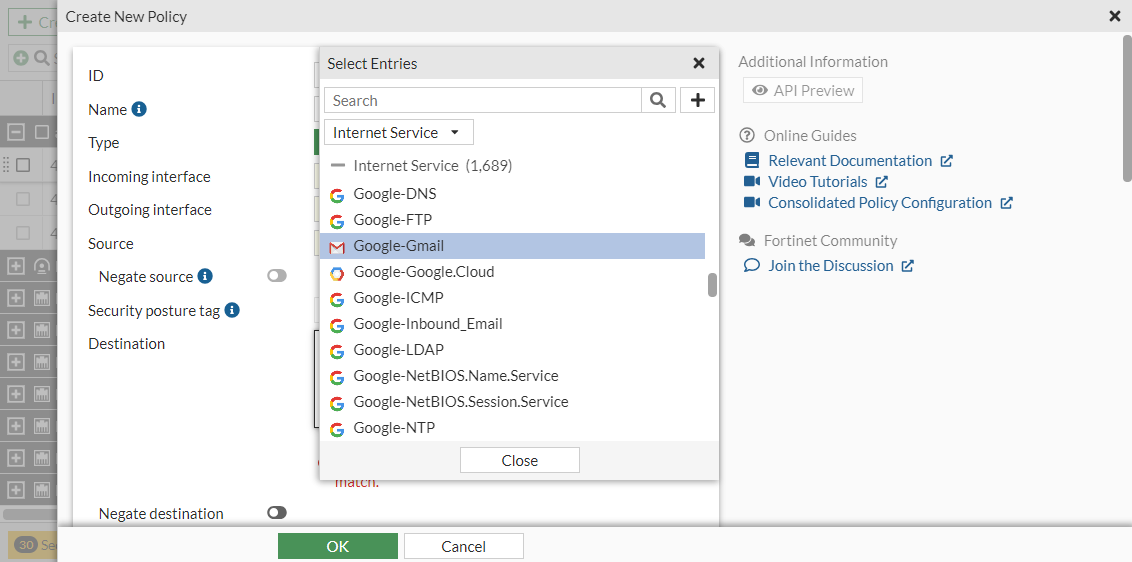
Click in the Destination field.
-
In the Select Entries pane, select Internet Service from the dropdown list and select Google-Gmail.
-
Configure the remaining fields as needed.
-
Click OK.
To apply a predefined Internet Service entry to a policy in the CLI:
In the CLI, enable the internet-service first and then use its ID to apply the policy.
This example uses Google Gmail and its ID is 65646. Each Internet Service has a unique ID.
config firewall policy
    edit 9
        set name "Internet Service in Policy"
        set srcintf "wan2"
        set dstintf "wan1"
        set srcaddr "all"
        set internet-service enable
        set internet-service-id 65646
        set action accept
        set schedule "always"
        set utm-status enable
        set av-profile "g-default"
        set ssl-ssh-profile "certificate-inspection"
        set nat enable
    next
end
To diagnose an Internet Service entry in the CLI:
# diagnose internet-service id-summary 65646
Version: 0000600096
Timestamp: 201902111802
Total number of IP ranges: 444727
Number of Groups: 7
Group(0), Singularity(20), Number of IP ranges(142740)
Group(1), Singularity(19), Number of IP ranges(1210)
Group(2), Singularity(16), Number of IP ranges(241)
Group(3), Singularity(15), Number of IP ranges(38723)
Group(4), Singularity(10), Number of IP ranges(142586)
Group(5), Singularity(8), Number of IP ranges(5336)
Group(6), Singularity(6), Number of IP ranges(113891)
Internet Service: 65646(Google.Gmail)
Number of IP range: 60
Number of IP numbers: 322845
Singularity: 15
Reputation: 5(Known and verified safe sites such as Gmail, Amazon, eBay, etc.)
Icon Id: 510
Second Level Domain: 53(gmail.com)
Direction: dst
Data source: isdb
Result
Because the IP and services related to Google Gmail on the Internet are included in this Internet Service (65646), all traffic to Google Gmail is forwarded by this policy.
Sample IPv6 configuration
In this example, the Google Gmail IPv6 ISDB address (ID 65646) is used as a destination in a firewall policy.
To apply a predefined IPv6 Internet Service entry to a policy using the GUI:
-
Go to Policy & Objects > Firewall Policy and click Create New.
-
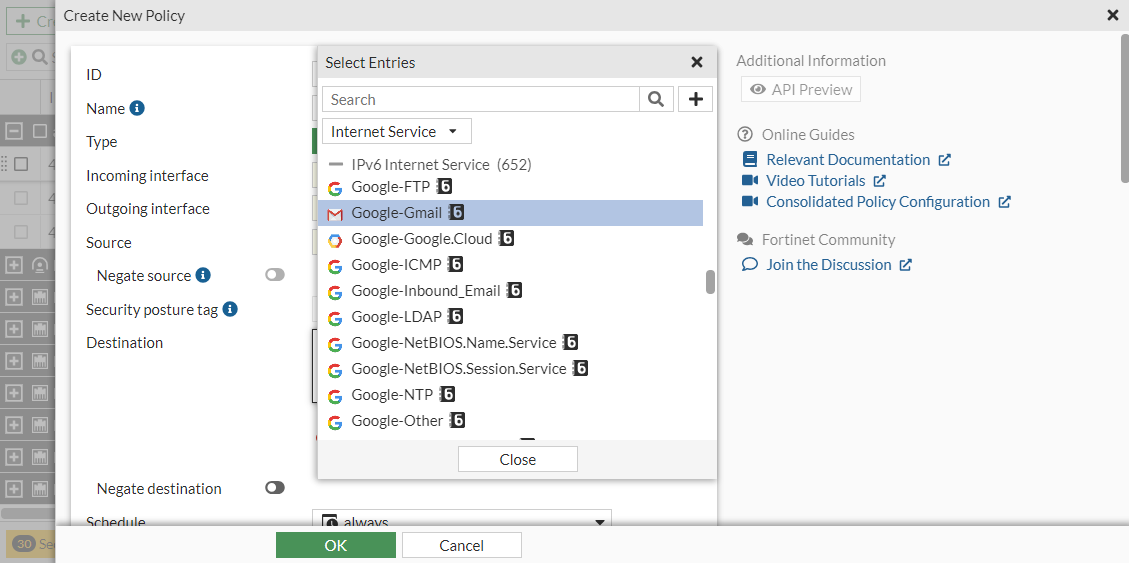
In the Destination field, select Internet Service from the dropdown list.
-
In the IPv6 Internet Service section, select Google-Gmail.
-
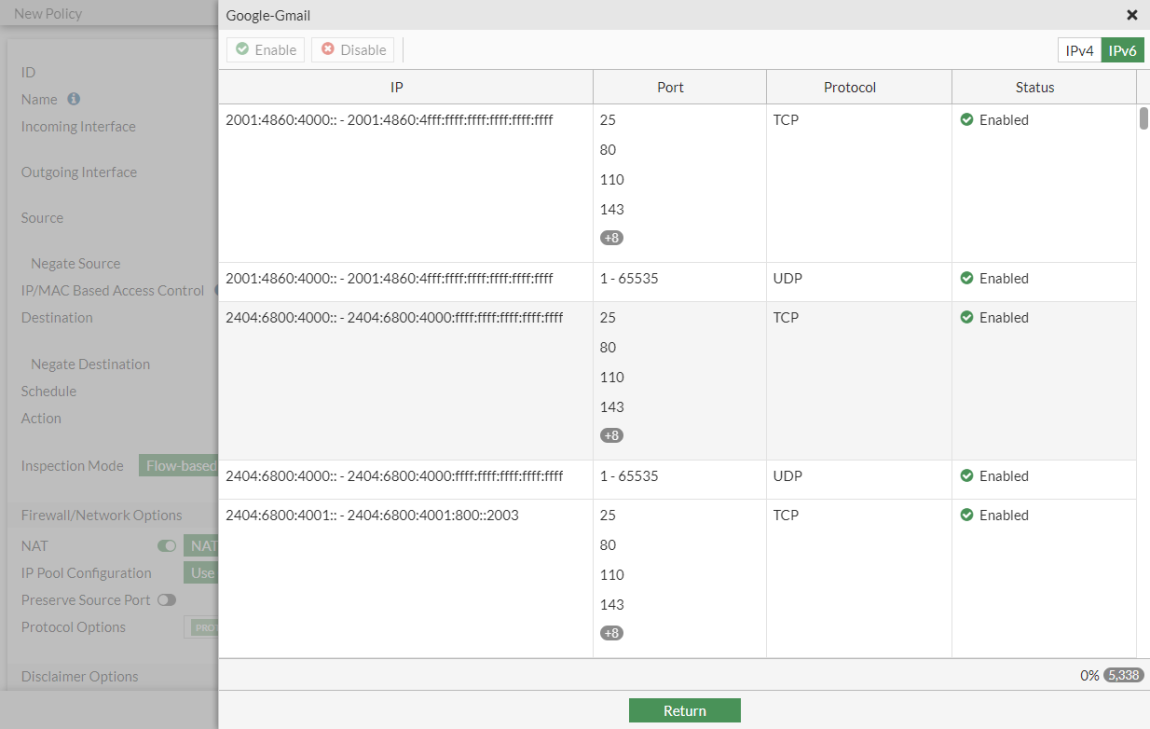
Optionally, hover over the Google Gmail and click View/Edit Entries. A pane appears that displays the IPv6 address ranges for this Internet Service.
-
Click Return to close the pane.
-
Configure the other settings as needed.
-
Click OK.
To apply a predefined IPv6 Internet Service entry to a policy using the CLI:
config firewall policy
    edit 4
        set name "Internet Service6 policy"
        set srcintf "vlan100"
        set dstintf "wan1"
        set action accept
        set srcaddr6 "all"
        set internet-service6 enable
        set internet-service6-name "Google-Gmail"
        set schedule "always"
        set nat enable
    next
end
To diagnose an IPv6 Internet Service entry in the CLI:
# diagnose internet-service6 id-summary 65646

Version: 00007.02907
Timestamp: 202212161345
Total number of IP ranges: 36878
Number of Groups: 12
Group(0), Singularity(20), Number of IP ranges(60)
Group(1), Singularity(18), Number of IP ranges(12)
Group(2), Singularity(17), Number of IP ranges(2728)
Group(3), Singularity(16), Number of IP ranges(2812)
Group(4), Singularity(15), Number of IP ranges(4011)
Group(5), Singularity(10), Number of IP ranges(2345)
Group(6), Singularity(9), Number of IP ranges(14)
Group(7), Singularity(8), Number of IP ranges(1555)
Group(8), Singularity(7), Number of IP ranges(2704)
Group(9), Singularity(6), Number of IP ranges(7300)
Group(10), Singularity(5), Number of IP ranges(3154)
Group(11), Singularity(4), Number of IP ranges(10183)
Internet Service: 65646(Google-Gmail)
Number of IP ranges: 482
Singularity: 15
Icon Id: 510
Direction: both
Data source: isdb
Country: 32 36 56 76 124 152 158 203 208 246 250 276 344 348 356 372 376 380 392 404 458 484
        528 616 634 643 682 702 710 724 752 756 784 826 840
Region: 65535
City: 65535
Result
Because the IP and services related to Google Gmail on the Internet are included in this Internet Service (65646), all traffic to Google Gmail is forwarded by this policy.