
Fortinet white logo
Fortinet white logo

New Features

Add prompt for upgrade when a critical vulnerability is detected upon login 7.4.1

Add prompt for upgrade when a critical vulnerability is detected upon login 7.4.1

Note

This information is also available in the FortiOS 7.4 Administration Guide:

When FortiOS detects a critical vulnerability, an upgrade prompt is shown after logging into the FortiGate. A warning message is displayed in the GUI about the critical vulnerability and allows the administrator to either upgrade or skip it. This ensures that the administrator is aware of any potential security risks and can take immediate action to address them.
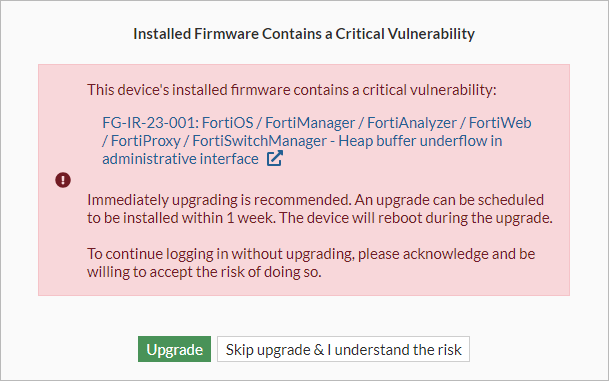
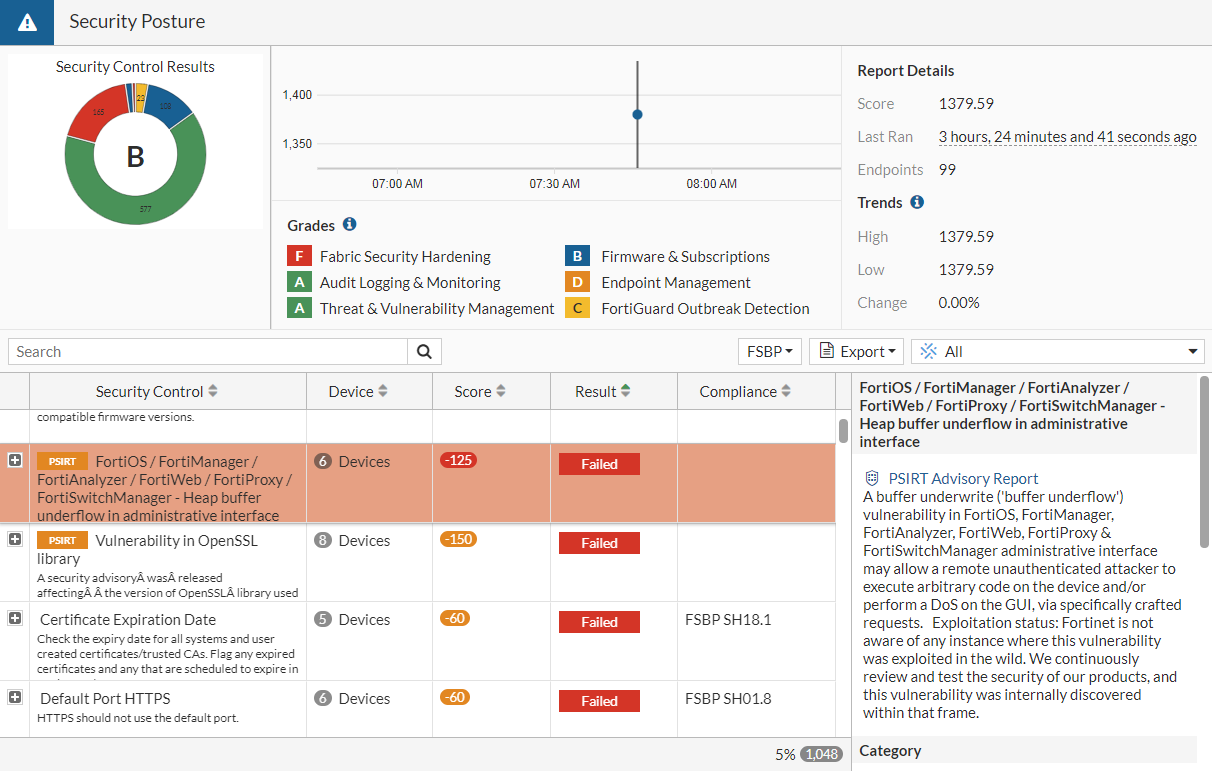
Clicking the hyperlinked vulnerability name opens the Security Fabric > Security Rating page, which displays more information about the vulnerability.
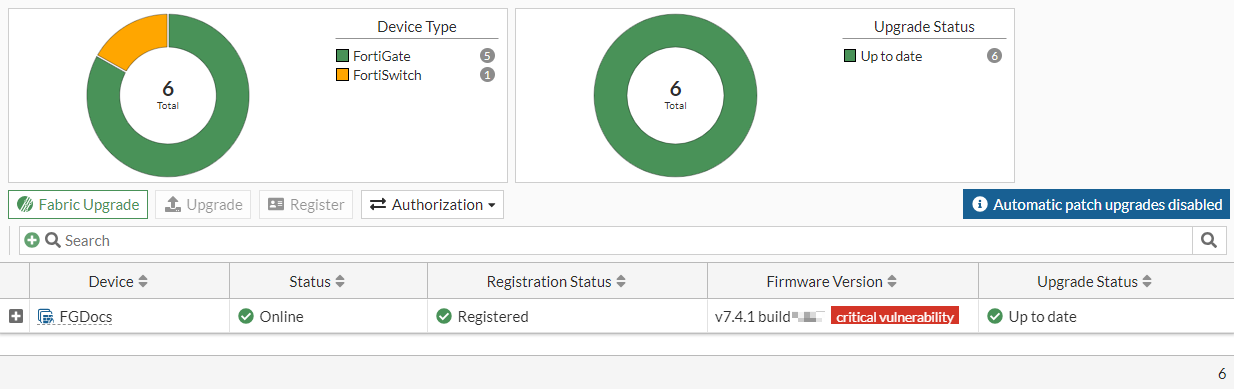
Clicking the Upgrade button opens the System > Firmware & Registration page where the administrator can upgrade the device.
Clicking the Skip upgrade & I understand the risk button continues the log in process as usual.

Diagnostics

To view vulnerability results after performing security rating scan:
# diagnose report-runner vuln-read
Index: 0
Name: FG-IR-23-001: FortiOS / FortiManager / FortiAnalyzer / FortiWeb / FortiProxy / FortiSwitchManager - Heap buffer underflow in administrative interface
FortiGate Serial: FGVM02TM23000000
To clear the vulnerability result:
# diagnose report-runner vuln-clean 
Deleted temporary critical vulnerability file

Add prompt for upgrade when a critical vulnerability is detected upon login 7.4.1

Add prompt for upgrade when a critical vulnerability is detected upon login 7.4.1

Note

This information is also available in the FortiOS 7.4 Administration Guide:

When FortiOS detects a critical vulnerability, an upgrade prompt is shown after logging into the FortiGate. A warning message is displayed in the GUI about the critical vulnerability and allows the administrator to either upgrade or skip it. This ensures that the administrator is aware of any potential security risks and can take immediate action to address them.

Clicking the hyperlinked vulnerability name opens the Security Fabric > Security Rating page, which displays more information about the vulnerability.

Clicking the Upgrade button opens the System > Firmware & Registration page where the administrator can upgrade the device.

Clicking the Skip upgrade & I understand the risk button continues the log in process as usual.

Diagnostics

To view vulnerability results after performing security rating scan:
# diagnose report-runner vuln-read
Index: 0
Name: FG-IR-23-001: FortiOS / FortiManager / FortiAnalyzer / FortiWeb / FortiProxy / FortiSwitchManager - Heap buffer underflow in administrative interface
FortiGate Serial: FGVM02TM23000000
To clear the vulnerability result:
# diagnose report-runner vuln-clean 
Deleted temporary critical vulnerability file