
Fortinet white logo
Fortinet white logo

Administration Guide

Global security profiles

Global security profiles

Global profiles can be configured globally across multiple VDOMs. Some or all profiles may be commonly-shared across VDOMs. Global profiles are available as read-only for VDOM-level administrators and can only be edited or deleted from within the global settings. The name for any global security profile must begin with g- for identification. Each security feature has at least one default global profile, available for all VDOMs to use.

Some security profile features, such as URL filters under web-filter, are not available for use in a global profile.

The following examples demonstrate configuring and editing Web Filter global security profiles. Similarly, you can view, edit, and configure other global security profiles for Antivirus, Application Control, Intrusion Prevention, and File Filter.

To configure a global security profile:
  1. Go to Security Profile > Web Filter.

  2. Click Create new.

  3. Enter any suitable name that begins with g- and configure the web-filter settings required.

  4. Click OK. This global web-filter is now available to be used in different VDOMs as required.

To view and edit a global security profile:
  1. In the Global VDOM, go to Security Profiles > Web Filter. The names of the global web-filter security profile begins with g- for identification.

  2. Select the default global web-filter profile named g-default and click Edit.

  3. Under FortiGuard Category Based Filter select Drug Abuse and set the Action to Block.
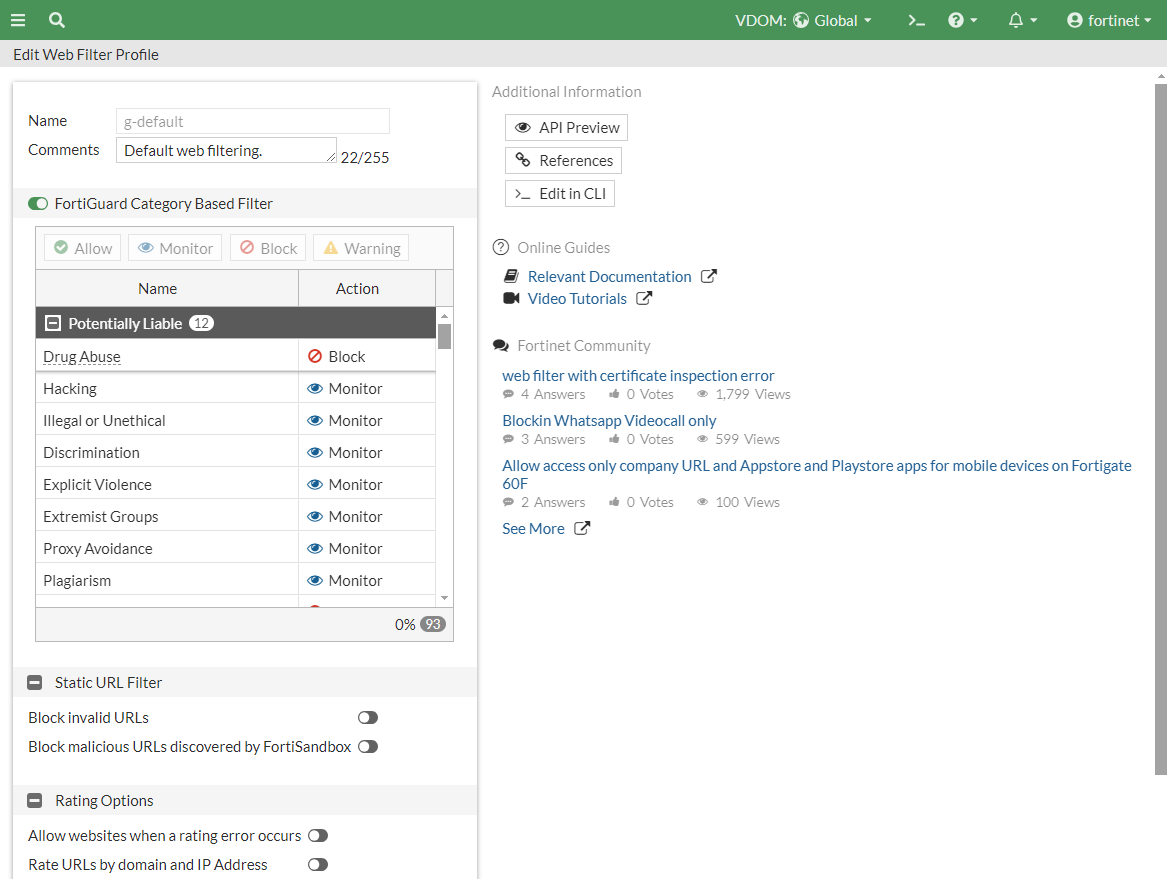
  4. Click OK.

Global security profiles

Global security profiles

Global profiles can be configured globally across multiple VDOMs. Some or all profiles may be commonly-shared across VDOMs. Global profiles are available as read-only for VDOM-level administrators and can only be edited or deleted from within the global settings. The name for any global security profile must begin with g- for identification. Each security feature has at least one default global profile, available for all VDOMs to use.

Some security profile features, such as URL filters under web-filter, are not available for use in a global profile.

The following examples demonstrate configuring and editing Web Filter global security profiles. Similarly, you can view, edit, and configure other global security profiles for Antivirus, Application Control, Intrusion Prevention, and File Filter.

To configure a global security profile:
  1. Go to Security Profile > Web Filter.

  2. Click Create new.

  3. Enter any suitable name that begins with g- and configure the web-filter settings required.

  4. Click OK. This global web-filter is now available to be used in different VDOMs as required.

To view and edit a global security profile:
  1. In the Global VDOM, go to Security Profiles > Web Filter. The names of the global web-filter security profile begins with g- for identification.

  2. Select the default global web-filter profile named g-default and click Edit.

  3. Under FortiGuard Category Based Filter select Drug Abuse and set the Action to Block.

  4. Click OK.