

Creating the initial topology
The following provides instructions for creating a topology to provision the SD-WAN overlay configuration to your FortiGates.
To create the initial topology:
- Go to SDWan Overlay > Settings.
- Set up the hub locations:
- Use the Primary Hub Locations and Secondary Hub Locations dropdown lists to select your locations.
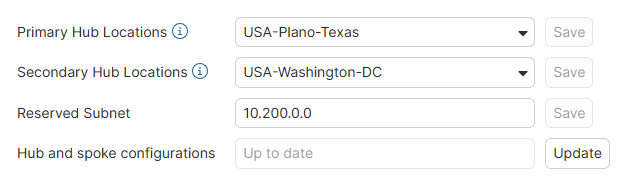

Select locations that are nearest to your site as this provides the best connectivity and backup.
- Use the Primary Hub Locations and Secondary Hub Locations dropdown lists to select your locations.
-
Add a site as Creating a site describes.
-
Configure the site to include ISP and subnet settings as Editing a site describes.
-
Repeat these steps to add another site configuration.
Not all FortiGate sites must be configured at once. You can add new sites, ISPs, and LAN subnets after you apply the initial configuration. See Creating a site, Editing a site and Provisioning the SD-WAN configuration to your sites and viewing tasks.