

Editing a site
You can edit a site to define the ISP and LAN subnet from the Site page.
You can add LAN subnets that will communicate within your SD-WAN region. You can define subnets as either direct or indirect:
-
direct: Directly select the subnet assigned to a FortiGate interface.
-
indirect: Use a Classless Inter-Domain Routing (CIDR) prefix to input a network summary address behind the interface. You can create multiple indirect subnets behind the same interface, if needed.
To edit a new site:
-
Go to SDWAN Overlay > Site.
-
Select the desired site, then click Edit.
-
Configure how the SD-WAN device connects to the region by selecting the ISP link for external access.
-
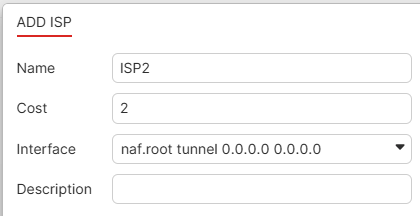
On the ISP tab, select Create. The Add ISP dialog opens.
-
Enter a Name for the ISP.
-
Enter the cost assigned to the ISP in the Cost field.
-
Select the interface from the Interface dropdown list.
-
(Optional) Enter a Description.
-
Click OK. The ISP is added between the hub and site.
-
Repeat the above steps to add another ISP configuration. SD-WAN overlay allows a maximum of three ISPs for each site.
-
-
Select the Subnet tab. Configure the following:
-
Select Create. The Add subnet dialog opens.
-
Enter a Name.
-
Select direct or indirect for the subnet definition.
-
Select the interface from the Interface dropdown list.
-
If you select indirect, configure the CIDR as needed.
-
Enable or disable Advertise to Overlay.
-
(Optional) Enter a Description.
-
Click OK. The subnet is added to the topology.
-
-
Click OK.