PostgreSQL L4 VirtualServer
This scenario demonstrates how to securely expose a PostgreSQL database service. By using a Layer 4 TCP VirtualServer, FortiADC acts as a high-performance proxy, providing a single entry point for database traffic while offloading SSL processing and managing real-server persistence.

Prerequisites
-
Cert-Manager: This deployment relies on cert-manager for automated TLS certificate issuance. If it is not already present in your cluster, refer to Preparing for the Validating and Conversion Webhook Servers.
-
SNAT Pool: Layer 4 VirtualServers on FortiADC use Full NAT by default. You must pre-configure a SNAT pool on the FortiADC hardware before deploying this CRD.
Note: If using ClusterIP, the SNAT IP range should reside within the VXLAN interface subnet to ensure symmetric return routing.
Implementation Steps:
Deploy the PostgreSQL database
You can download the PostresSQL service example and change part of the definition based on your environment. Especially the overlay tunnel specified in service annotation if you want to define the service with clusterIP type.
curl -k \
https://raw.githubusercontent.com/fortinet/fortiadc-kubernetes-controller/main/customResource/service_examples/postgresql_ssl_service.yaml \
-o postgresql_ssl_service.yaml
Then deploy the PostgresSQL with SSL enabled service with kubectl command
kubectl apply -f postgresql_ssl_service.yaml
Deploy the TCP VirtualServer
You can download the tcp-postgres-ssl-virtualserver example and modify the VirtualServer Annotation in virtualserver_postgres_ssl.yaml to accommodate to your environment, ex: fortiadc-ip, fortiadc-admin-port, etc. Also, modify the VirtualServer Spec, ex: address, contentRoutings.SourceAddress. Then, deploy the virtualserver with kubectl command.

|
When configuring a Layer 4 VirtualServer, the default packet forwarding method is Full NAT. Therefore, the natSourcePoolList field must be specified in the custom resource. Before deploying the VirtualServer custom resource, you must pre-configure a SNAT pool on the FortiADC. The SNAT IP address range should match the subnet of the VXLAN interface if service with clusterIP type is used, so that the return traffic is correctly routed. |
curl -k \
https://github.com/fortinet/fortiadc-kubernetes-controller/blob/main/customResource/virtualserver/virtualserver_postgres_ssl.yaml \
-o virtualserver_postgres_ssl.yaml

kubectl apply -f virtualserver_postgres_ssl.yaml
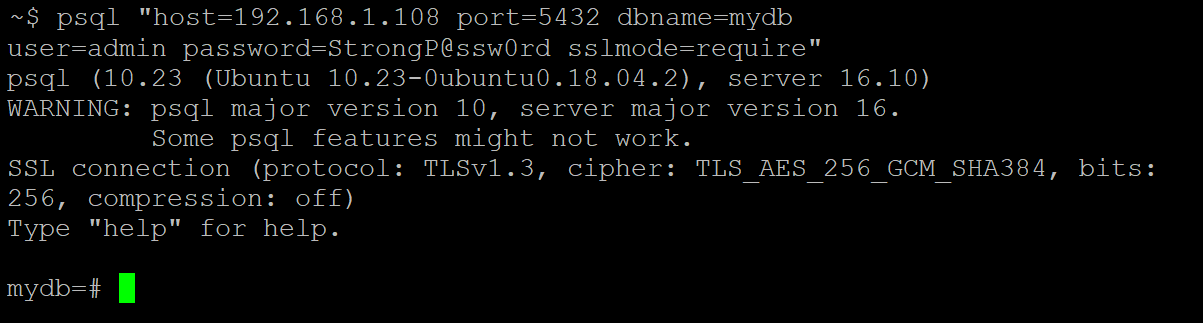
Test the connection to the TCP VirtualServer
Use psql to connect to the tcp virtualserver ip.