
Fortinet white logo
Fortinet white logo

Simple Fanout L7 VirtualServer

Simple Fanout L7 VirtualServer

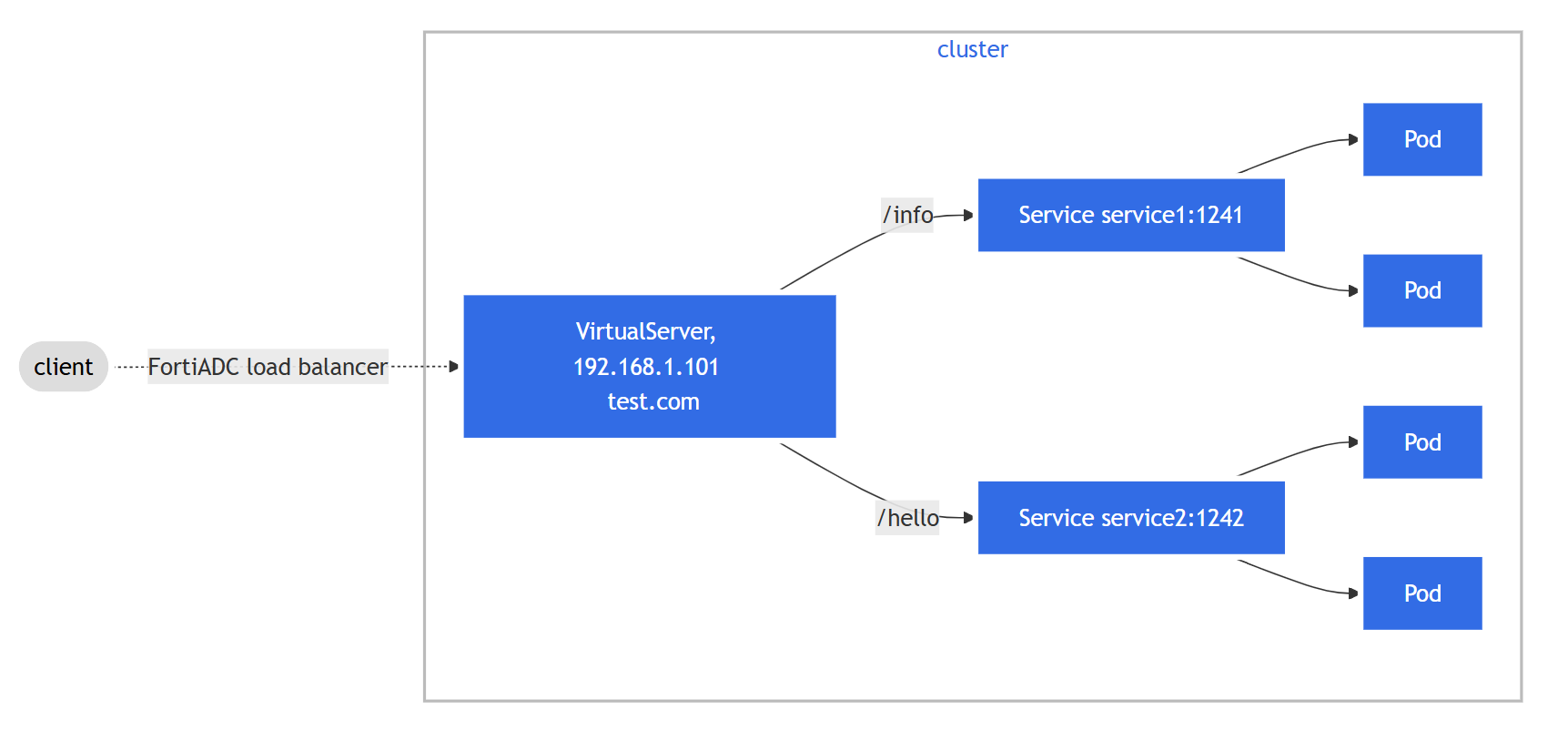
While standard Kubernetes Ingress is suitable for basic traffic steering, the FortiADC VirtualServer Custom Resource (CRD) allows you to leverage the full suite of FortiADC Application Delivery features. This scenario demonstrates a "simple-fanout" configuration where a single hostname uses multiple routing paths to reach different services, while simultaneously applying enterprise-grade security profiles.

Scenario Overview

In this deployment, the VirtualServer CRD is used to orchestrate a Layer 7 environment with the following advanced configurations:

  • Content Routing: Traffic is steered based on specific URL paths; requests for /info are sent to one service, while requests for /hello are directed to another.

  • Security Offloading: Integrated WAF (Web Application Firewall), Antivirus, and Captcha profiles are applied at the ADC level to protect the backend pods.

  • Global Availability: One-click GSLB integration is enabled via the fortigslb specification fields.
Implementation Steps

  1. Define the VirtualServer Resource

    The following manifest defines a VirtualServer that listens on port3 of the FortiADC. It maps test.com/info to service1 and test.com/hello to service2.

    apiVersion: fadk8sctrl.fortinet.com/v1alpha2
    kind: VirtualServer
    metadata:
      name: simple-fanout-virtualserver
      annotations: {
        "fortiadc-ip" : "172.23.133.110",
        "fortiadc-login" : "fad-login",
        "fortiadc-ctrl-log" : "enable",
        "fortiadc-admin-port": "443"
       }
      labels:
        fadcr: "true"
    spec:
      addressType: ipv4
      address: 192.168.1.101
      port: 443
      interface: port3
      loadBalanceProfile: LB_PROF_HTTPS
      loadBalanceMethod: LB_METHOD_ROUND_ROBIN
      wafProfile: High-Level-Security
      captchaProfile: LB_CAPTCHA_PROFILE_DEFAULT
      avProfile: Antivirus-Profile
      trafficGroup: default
      fortiview: enable
      trafficLog: enable
      wccp: disable
      fortigslbPublicIpType: ipv4
      fortigslbPublicAddress: 203.0.113.1
      fortigslbOneClick: enable
      fortigslbHostName: samplehost
      fortigslbDomainName: example.com.
      contentRoutings:
        - name: route1
          host: test.com
          path: /info
          pathType: Prefix
          realServerPool:
            service: service1
            servicePort: 1241
            serviceNamespace: default
        - name: route2
          host: test.com
          path: /hello
          pathType: Prefix
          realServerPool:
            service: service2
            servicePort: 1242
            serviceNamespace: default
      natSourcePoolList:
        - name: nat-pool-1
      vdom: root
  2. Deploy and Verify
    1. Apply the configuration:

      kubectl apply -f virtualserver_simple_fanout.yaml
      virtualserver.fadk8sctrl.fortinet.com/simple-fanout-virtualserver created
    2. Describe the resource to check the status and verify that the controller has parsed the parameters correctly. Get the information of the simple-fanout-virtualserver by using the kubectl describe command:

      # kubectl describe virtualserver simple-fanout-virtualserver
      Name:         simple-fanout-virtualserver
      Namespace:    default
      Labels:       fadcr=true
      Annotations:  fortiadc-admin-port: 443
                    fortiadc-ctrl-log: enable
                    fortiadc-ip: 172.23.133.110
                    fortiadc-login: fad-login
      API Version:  fadk8sctrl.fortinet.com/v1alpha2
      Kind:         VirtualServer
      Metadata:
        Creation Timestamp:  2025-09-11T19:06:24Z
        Generation:          1
        Resource Version:    30096049
        UID:                 687306af-c22e-4c9a-badf-06590f2927d5
      Spec:
        Address:          192.168.1.101
        Address Type:     ipv4
        Av Profile:       Antivirus-Profile
        Captcha Profile:  LB_CAPTCHA_PROFILE_DEFAULT
        Content Routings:
          Host:       test.com
          Name:       route1
          Path:       /info
          Path Type:  Prefix
          Real Server Pool:
            Service:            service1
            Service Namespace:  default
            Service Port:       1241
          Host:                 test.com
          Name:                 route2
          Path:                 /hello
          Path Type:            Prefix
          Real Server Pool:
            Service:               service2
            Service Namespace:     default
            Service Port:          1242
        Fortigslb Domain Name:     example.com.
        Fortigslb Host Name:       samplehost
        Fortigslb One Click:       enable
        Fortigslb Public Address:  203.0.113.1
        Fortigslb Public Ip Type:  ipv4
        Fortiview:                 enable
        Interface:                 port1
        Load Balance Method:       LB_METHOD_ROUND_ROBIN
        Load Balance Profile:      LB_PROF_HTTPS
        Port:                      443
        Traffic Group:             default
        Traffic Log:               enable
        Vdom:                      root
        Waf Profile:               High-Level-Securityaaa
        Wccp:                      disable
      Events:                      <none>
      
  3. Traffic Verification

    Once the controller has synchronized the resource with the FortiADC, verify the traffic flow:

    • Test Path 1: curl -k https://test.com/info

      • Expected Response: Host information from service1.

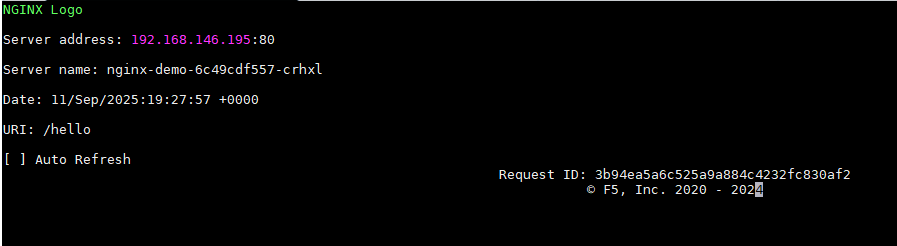
    • Test Path 2: curl -k https://test.com/hello

      • Expected Response: Greetings from service2.
    FortiView Monitoring

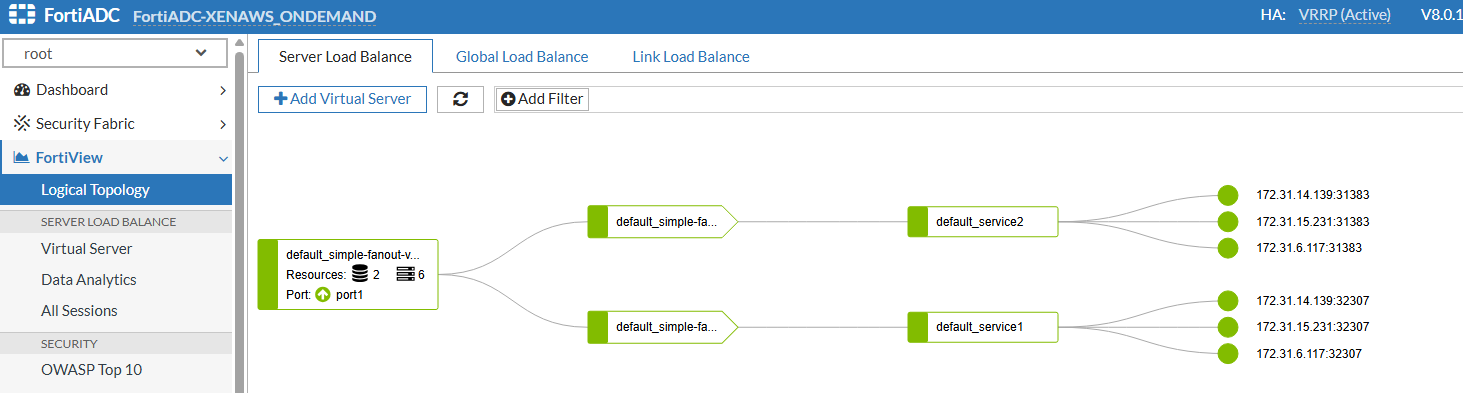
    You can monitor real-time performance, security events, and health status by logging into the FortiADC GUI and navigating to FortiView. This provides granular visibility into the traffic hitting your Kubernetes pods, including any blocked WAF or Antivirus violations.
  4. Lifecycle Management
    • Update: To modify security profiles or routing paths, you can edit the virtualserver_simple_fanout.yaml. and use kubectl apply or use the kubectl edit command.

      kubectl edit virtualserver simple-fanout-virtualserver 
    • Delete: To remove the configuration from both the cluster and the FortiADC hardware, run:

      kubectl delete virtualserver/simple-fanout-virtualserver 

Simple Fanout L7 VirtualServer

Simple Fanout L7 VirtualServer

While standard Kubernetes Ingress is suitable for basic traffic steering, the FortiADC VirtualServer Custom Resource (CRD) allows you to leverage the full suite of FortiADC Application Delivery features. This scenario demonstrates a "simple-fanout" configuration where a single hostname uses multiple routing paths to reach different services, while simultaneously applying enterprise-grade security profiles.

Scenario Overview

In this deployment, the VirtualServer CRD is used to orchestrate a Layer 7 environment with the following advanced configurations:

  • Content Routing: Traffic is steered based on specific URL paths; requests for /info are sent to one service, while requests for /hello are directed to another.

  • Security Offloading: Integrated WAF (Web Application Firewall), Antivirus, and Captcha profiles are applied at the ADC level to protect the backend pods.

  • Global Availability: One-click GSLB integration is enabled via the fortigslb specification fields.

Implementation Steps

  1. Define the VirtualServer Resource

    The following manifest defines a VirtualServer that listens on port3 of the FortiADC. It maps test.com/info to service1 and test.com/hello to service2.

    apiVersion: fadk8sctrl.fortinet.com/v1alpha2
    kind: VirtualServer
    metadata:
      name: simple-fanout-virtualserver
      annotations: {
        "fortiadc-ip" : "172.23.133.110",
        "fortiadc-login" : "fad-login",
        "fortiadc-ctrl-log" : "enable",
        "fortiadc-admin-port": "443"
       }
      labels:
        fadcr: "true"
    spec:
      addressType: ipv4
      address: 192.168.1.101
      port: 443
      interface: port3
      loadBalanceProfile: LB_PROF_HTTPS
      loadBalanceMethod: LB_METHOD_ROUND_ROBIN
      wafProfile: High-Level-Security
      captchaProfile: LB_CAPTCHA_PROFILE_DEFAULT
      avProfile: Antivirus-Profile
      trafficGroup: default
      fortiview: enable
      trafficLog: enable
      wccp: disable
      fortigslbPublicIpType: ipv4
      fortigslbPublicAddress: 203.0.113.1
      fortigslbOneClick: enable
      fortigslbHostName: samplehost
      fortigslbDomainName: example.com.
      contentRoutings:
        - name: route1
          host: test.com
          path: /info
          pathType: Prefix
          realServerPool:
            service: service1
            servicePort: 1241
            serviceNamespace: default
        - name: route2
          host: test.com
          path: /hello
          pathType: Prefix
          realServerPool:
            service: service2
            servicePort: 1242
            serviceNamespace: default
      natSourcePoolList:
        - name: nat-pool-1
      vdom: root
  2. Deploy and Verify
    1. Apply the configuration:

      kubectl apply -f virtualserver_simple_fanout.yaml
      virtualserver.fadk8sctrl.fortinet.com/simple-fanout-virtualserver created
    2. Describe the resource to check the status and verify that the controller has parsed the parameters correctly. Get the information of the simple-fanout-virtualserver by using the kubectl describe command:

      # kubectl describe virtualserver simple-fanout-virtualserver
      Name:         simple-fanout-virtualserver
      Namespace:    default
      Labels:       fadcr=true
      Annotations:  fortiadc-admin-port: 443
                    fortiadc-ctrl-log: enable
                    fortiadc-ip: 172.23.133.110
                    fortiadc-login: fad-login
      API Version:  fadk8sctrl.fortinet.com/v1alpha2
      Kind:         VirtualServer
      Metadata:
        Creation Timestamp:  2025-09-11T19:06:24Z
        Generation:          1
        Resource Version:    30096049
        UID:                 687306af-c22e-4c9a-badf-06590f2927d5
      Spec:
        Address:          192.168.1.101
        Address Type:     ipv4
        Av Profile:       Antivirus-Profile
        Captcha Profile:  LB_CAPTCHA_PROFILE_DEFAULT
        Content Routings:
          Host:       test.com
          Name:       route1
          Path:       /info
          Path Type:  Prefix
          Real Server Pool:
            Service:            service1
            Service Namespace:  default
            Service Port:       1241
          Host:                 test.com
          Name:                 route2
          Path:                 /hello
          Path Type:            Prefix
          Real Server Pool:
            Service:               service2
            Service Namespace:     default
            Service Port:          1242
        Fortigslb Domain Name:     example.com.
        Fortigslb Host Name:       samplehost
        Fortigslb One Click:       enable
        Fortigslb Public Address:  203.0.113.1
        Fortigslb Public Ip Type:  ipv4
        Fortiview:                 enable
        Interface:                 port1
        Load Balance Method:       LB_METHOD_ROUND_ROBIN
        Load Balance Profile:      LB_PROF_HTTPS
        Port:                      443
        Traffic Group:             default
        Traffic Log:               enable
        Vdom:                      root
        Waf Profile:               High-Level-Securityaaa
        Wccp:                      disable
      Events:                      <none>
      
  3. Traffic Verification

    Once the controller has synchronized the resource with the FortiADC, verify the traffic flow:

    • Test Path 1: curl -k https://test.com/info

      • Expected Response: Host information from service1.

    • Test Path 2: curl -k https://test.com/hello

      • Expected Response: Greetings from service2.

    FortiView Monitoring

    You can monitor real-time performance, security events, and health status by logging into the FortiADC GUI and navigating to FortiView. This provides granular visibility into the traffic hitting your Kubernetes pods, including any blocked WAF or Antivirus violations.

  4. Lifecycle Management
    • Update: To modify security profiles or routing paths, you can edit the virtualserver_simple_fanout.yaml. and use kubectl apply or use the kubectl edit command.

      kubectl edit virtualserver simple-fanout-virtualserver 
    • Delete: To remove the configuration from both the cluster and the FortiADC hardware, run:

      kubectl delete virtualserver/simple-fanout-virtualserver