
Fortinet white logo
Fortinet white logo

Ingress Deployment

Ingress Deployment

The FortiADC Kubernetes Controller allows you to use the native Kubernetes Ingress resource to manage Layer 7 traffic. When an Ingress resource is deployed, the controller automatically provisions a Virtual Server on the FortiADC, configures Content Routing for path-based steering, and synchronizes real server pools with cluster endpoints.

Simple-Fanout Scenario

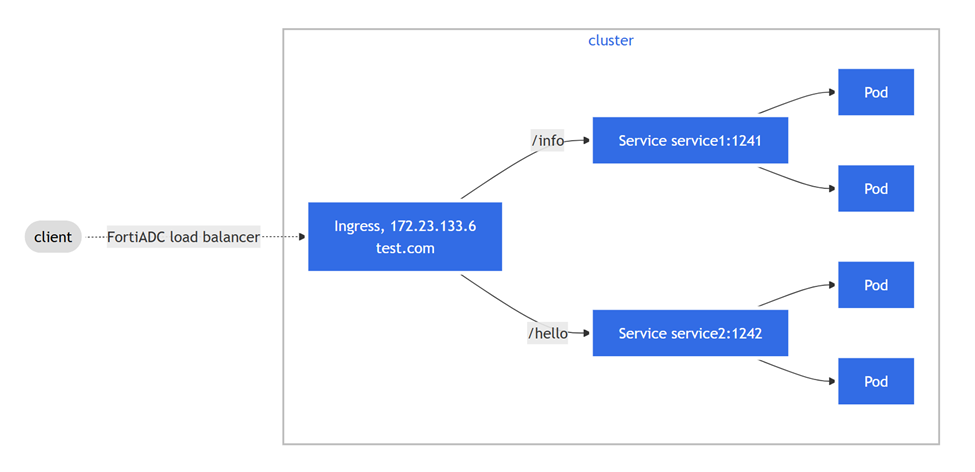
A "simple-fanout" deployment allows a single Load Balancer IP to route traffic to multiple backend services based on the URL path.

In this scenario, the client can access service1 with the URL https://test.com/info and access service2 with the URL https://test.com/hello.

Service1 defines a logical set of Pods with the label run=sise. Sise is a simple HTTP web server.

Service2 defines a logical set of Pods with the label run=nginx-demo. Nginx is also a simple HTTP web server. Services are deployed under the namespace default.

In this simple-fanout example, the Pods are exposed using the NodePort service type. You can also use the ClusterIP service type, or a combination of both, by defining Service2 as ClusterIP. For more information, see Service Deployment and Lifecycle.
Deploy the Pods and expose the Services

Service1:
kubectl apply -f https://raw.githubusercontent.com/fortinet/fortiadc-kubernetes-controller/main/service_examples/service1.yaml

Service2:
kubectl apply -f https://raw.githubusercontent.com/fortinet/fortiadc-kubernetes-controller/main/service_examples/service2.yaml

Check the service1 and service2 you have deployed.

kubectl get service

NAME                   TYPE        CLUSTER-IP       EXTERNAL-IP   PORT(S)          AGE
service1               NodePort    10.111.143.250   <none>        1241:31320/TCP   10m

service2               NodePort    10.109.117.79    <none>        1242:32075/TCP   2m59s

Deploy the Ingress

Define the Simple-fanout Ingress resource.

apiVersion: networking.k8s.io/v1
kind: Ingress
metadata:
  name: simple-fanout-example
  annotations: {
    "fortiadc-ip" : "10.0.100.133",
    "fortiadc-login" : "fad-login",
    "fortiadc-vdom" : "root",
    "fortiadc-ctrl-log" : "enable",
    "virtual-server-ip" : "172.23.133.6",
    "virtual-server-interface" : "port1",    
    "virtual-server-port" : "443",
    "load-balance-method" : "LB_METHOD_LEAST_CONNECTION",
    "load-balance-profile" : "LB_PROF_HTTPS"
  }
spec:
  ingressClassName: fadc-ingress-controller
  rules:
  - host: test.com
    http:
      paths:
      - path: /info
        pathType: Prefix
        backend:
          service:
            name: service1
            port:
              number: 1241
      - path: /hello
        pathType: Prefix
        backend:
          service:
            name: service2
            port:
              number: 1242

Deploy it with the kubectl command:

kubectl apply -f simple-fanout.yaml 
ingress.networking.k8s.io/simple-fanout-example created

Get the information of the simple-fanout-example Ingress by using the kubectl describe command:

user@control-plane-node ~> kubectl describe ingress simple-fanout-example

Name:             simple-fanout-example


Namespace:        default

Address:          172.23.133.6


Default backend:  default-http-backend:80


Rules:
  Host        Path  Backends

  ----        ----  --------
  test.com

              /info   service1:1241 (10.244.1.16:9876)
              /hello  service2:1242 (10.244.12.26:80)


Annotations:  fortiadc-admin: admin
              fortiadc-ctrl-log: enable
              fortiadc-ip: 10.0.100.133
              fortiadc-vdom: root
              load-balance-method: LB_METHOD_LEAST_CONNECTION
              load-balance-profile: LB_PROF_HTTPS
              virtual-server-interface: port1
              virtual-server-ip: 172.23.133.6
              virtual-server-port: 443
Events:       <none>


FortiView

Check the deployed Ingress with FortiView.
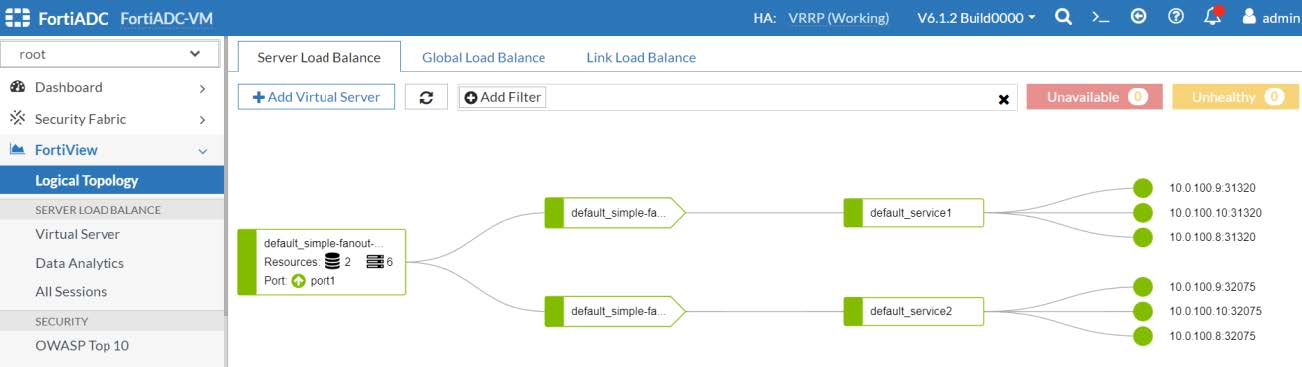
Try to access https://test.com/info.

Try to access https://test.com/hello.
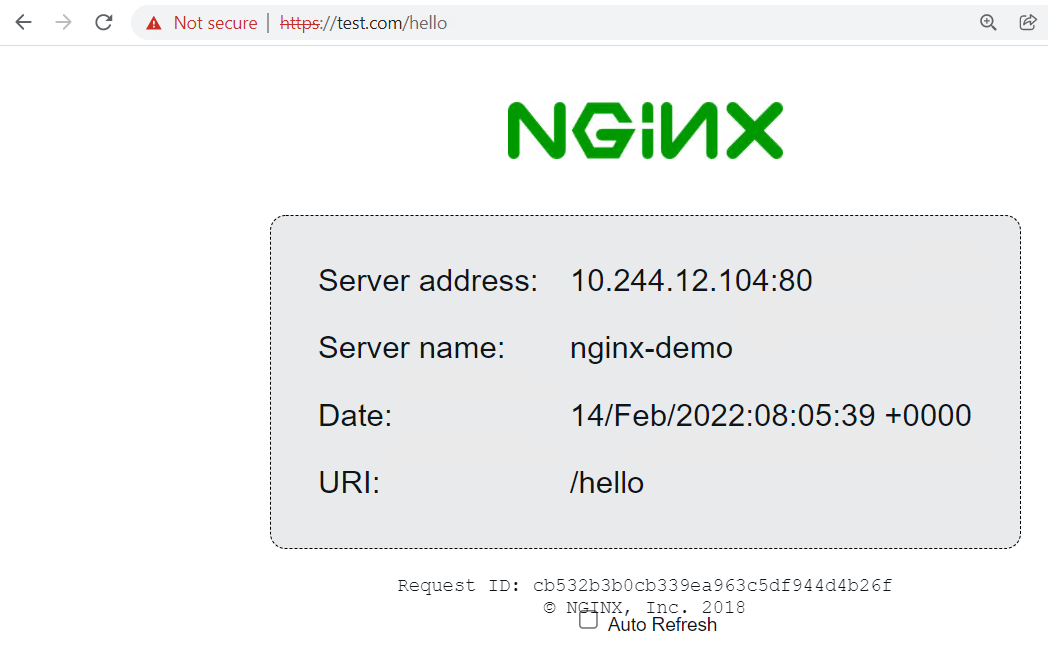
Update or delete the Ingress

To update an Ingress resource:

You can edit the ingress.yaml. and use kubectl apply or use the kubectl edit command.

kubectl edit ingress simple-fanout-example
To delete the Ingress resource:
kubectl delete ingress/simple-fanout-example

Ingress Deployment

Ingress Deployment

The FortiADC Kubernetes Controller allows you to use the native Kubernetes Ingress resource to manage Layer 7 traffic. When an Ingress resource is deployed, the controller automatically provisions a Virtual Server on the FortiADC, configures Content Routing for path-based steering, and synchronizes real server pools with cluster endpoints.

Simple-Fanout Scenario

A "simple-fanout" deployment allows a single Load Balancer IP to route traffic to multiple backend services based on the URL path.

In this scenario, the client can access service1 with the URL https://test.com/info and access service2 with the URL https://test.com/hello.

Service1 defines a logical set of Pods with the label run=sise. Sise is a simple HTTP web server.

Service2 defines a logical set of Pods with the label run=nginx-demo. Nginx is also a simple HTTP web server. Services are deployed under the namespace default.

In this simple-fanout example, the Pods are exposed using the NodePort service type. You can also use the ClusterIP service type, or a combination of both, by defining Service2 as ClusterIP. For more information, see Service Deployment and Lifecycle.

Deploy the Pods and expose the Services

Service1:
kubectl apply -f https://raw.githubusercontent.com/fortinet/fortiadc-kubernetes-controller/main/service_examples/service1.yaml

Service2:
kubectl apply -f https://raw.githubusercontent.com/fortinet/fortiadc-kubernetes-controller/main/service_examples/service2.yaml

Check the service1 and service2 you have deployed.

kubectl get service

NAME                   TYPE        CLUSTER-IP       EXTERNAL-IP   PORT(S)          AGE
service1               NodePort    10.111.143.250   <none>        1241:31320/TCP   10m

service2               NodePort    10.109.117.79    <none>        1242:32075/TCP   2m59s

Deploy the Ingress

Define the Simple-fanout Ingress resource.

apiVersion: networking.k8s.io/v1
kind: Ingress
metadata:
  name: simple-fanout-example
  annotations: {
    "fortiadc-ip" : "10.0.100.133",
    "fortiadc-login" : "fad-login",
    "fortiadc-vdom" : "root",
    "fortiadc-ctrl-log" : "enable",
    "virtual-server-ip" : "172.23.133.6",
    "virtual-server-interface" : "port1",    
    "virtual-server-port" : "443",
    "load-balance-method" : "LB_METHOD_LEAST_CONNECTION",
    "load-balance-profile" : "LB_PROF_HTTPS"
  }
spec:
  ingressClassName: fadc-ingress-controller
  rules:
  - host: test.com
    http:
      paths:
      - path: /info
        pathType: Prefix
        backend:
          service:
            name: service1
            port:
              number: 1241
      - path: /hello
        pathType: Prefix
        backend:
          service:
            name: service2
            port:
              number: 1242

Deploy it with the kubectl command:

kubectl apply -f simple-fanout.yaml 
ingress.networking.k8s.io/simple-fanout-example created

Get the information of the simple-fanout-example Ingress by using the kubectl describe command:

user@control-plane-node ~> kubectl describe ingress simple-fanout-example

Name:             simple-fanout-example


Namespace:        default

Address:          172.23.133.6


Default backend:  default-http-backend:80


Rules:
  Host        Path  Backends

  ----        ----  --------
  test.com

              /info   service1:1241 (10.244.1.16:9876)
              /hello  service2:1242 (10.244.12.26:80)


Annotations:  fortiadc-admin: admin
              fortiadc-ctrl-log: enable
              fortiadc-ip: 10.0.100.133
              fortiadc-vdom: root
              load-balance-method: LB_METHOD_LEAST_CONNECTION
              load-balance-profile: LB_PROF_HTTPS
              virtual-server-interface: port1
              virtual-server-ip: 172.23.133.6
              virtual-server-port: 443
Events:       <none>


FortiView

Check the deployed Ingress with FortiView.

Try to access https://test.com/info.

Try to access https://test.com/hello.

Update or delete the Ingress

To update an Ingress resource:

You can edit the ingress.yaml. and use kubectl apply or use the kubectl edit command.

kubectl edit ingress simple-fanout-example
To delete the Ingress resource:
kubectl delete ingress/simple-fanout-example