
Fortinet white logo
Fortinet white logo

Administration Guide

Add a script

Add a script

To add a script to an ADOM:
  1. Go to Device Manager > Scripts, or Policy & Objects > Scripts for the Global Database ADOM.
  2. Click Create New > Script, or right-click anywhere in the script list and select New from the menu. The Create Script dialog box.
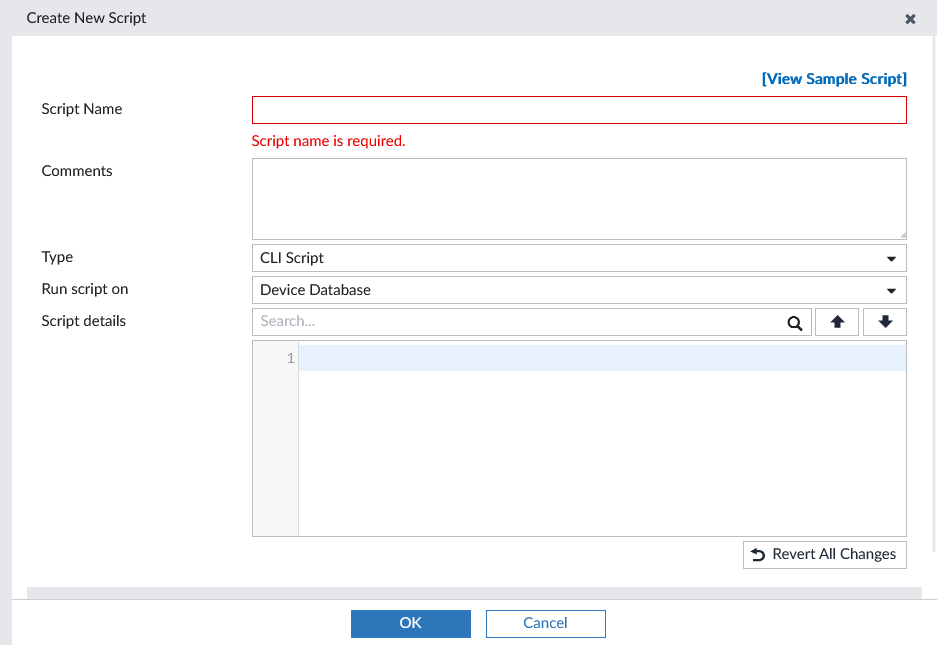
  3. Enter the required information, then select OK to create the new script.

    View Sample Script

    This option points to the FortiManager online help.

    Script Name

    Enter a unique name for the script.

    Comments

    Optionally, type a comment for the script.

    Type

    Specify the type of script as either a CLI Script, TCL Script, or Jinja Script.

    Only CLI Scripts are supported in the Global Database ADOM.

    Run Script on

    Select the script target. This settings will affect the options presented when you go to run a script.

    • CLI scripts can be run on one of the following:

      • Device Database
      • Policy Package or ADOM Database
      • Remote FortiGate Directly (via CLI)
    • TCL scripts can only be run on the Remote FortiGate Directly (via CLI).

    • Jinja scripts can only be run on the ADOM Database.

    • Global Database ADOM scripts can only be run on the Policy Package or ADOM Database.

    Validate on change

    When this feature is enabled, scripts are automatically validated when changes are made. This is only supported for CLI scripts.

    See Validate script syntax.

    Validate device platform

    Select the device platform to use when validating the script to ensure that the script syntax will run correctly on the selected platform.

    Script Detail

    Type the script itself, either manually using a keyboard, or by copying and pasting from another editor.

    Validate

    Validate the script syntax entered in the editor. This option is only available for CLI scripts.

    Format CLI script

    Formats the script in the editor.

    Revert All Changes

    Reverts all changes made to the script since to the last point that it was saved.

    Advanced Device Filters

    Select to adjust the advanced filters for the script. The options include:

    • Platform (select from the dropdown list)
    • Build
    • Device (select from the dropdown list)
    • Host name
    • SN

    These options are not available for Jinja scripts, Global Database ADOM scripts, or if Run script on is set to Policy Package or ADOM Database.

Add a script

Add a script

To add a script to an ADOM:
  1. Go to Device Manager > Scripts, or Policy & Objects > Scripts for the Global Database ADOM.
  2. Click Create New > Script, or right-click anywhere in the script list and select New from the menu. The Create Script dialog box.

  3. Enter the required information, then select OK to create the new script.

    View Sample Script

    This option points to the FortiManager online help.

    Script Name

    Enter a unique name for the script.

    Comments

    Optionally, type a comment for the script.

    Type

    Specify the type of script as either a CLI Script, TCL Script, or Jinja Script.

    Only CLI Scripts are supported in the Global Database ADOM.

    Run Script on

    Select the script target. This settings will affect the options presented when you go to run a script.

    • CLI scripts can be run on one of the following:

      • Device Database
      • Policy Package or ADOM Database
      • Remote FortiGate Directly (via CLI)
    • TCL scripts can only be run on the Remote FortiGate Directly (via CLI).

    • Jinja scripts can only be run on the ADOM Database.

    • Global Database ADOM scripts can only be run on the Policy Package or ADOM Database.

    Validate on change

    When this feature is enabled, scripts are automatically validated when changes are made. This is only supported for CLI scripts.

    See Validate script syntax.

    Validate device platform

    Select the device platform to use when validating the script to ensure that the script syntax will run correctly on the selected platform.

    Script Detail

    Type the script itself, either manually using a keyboard, or by copying and pasting from another editor.

    Validate

    Validate the script syntax entered in the editor. This option is only available for CLI scripts.

    Format CLI script

    Formats the script in the editor.

    Revert All Changes

    Reverts all changes made to the script since to the last point that it was saved.

    Advanced Device Filters

    Select to adjust the advanced filters for the script. The options include:

    • Platform (select from the dropdown list)
    • Build
    • Device (select from the dropdown list)
    • Host name
    • SN

    These options are not available for Jinja scripts, Global Database ADOM scripts, or if Run script on is set to Policy Package or ADOM Database.