Notification message examples
Notification messages are useful for the security or IT team to receive timely alerts and be aware of the actions they should take to address issues. Therefore, it's important to provide sufficient information in the message for them to understand the issue and the potential options for addressing it.
In this section we will provide examples of the notification messages for certain triggers or actions.
-
Example: Notification Message for the "Local Certificate Expired" trigger
-
Example: Notification Message for the "License Expired" trigger
-
Example: Notification Message for the "FDS DB updates" trigger
Before your read the examples, it's important to understand the parameters that will be used in the message.
Parameters
%%results%% Parameter
The notification action containing %%results%% should be used together with a CLI Script action. It shows the result of the CLI script that has been run.
For the config command, the result only shows "Fortiweb #" which is the next line you would normally see when a command is successfully run in CLI. In order to show more sufficient information, a workaround is to use the show command together with a config command in the CLI Script action, so that using %%results%% in the message can display the configuration updates of the config command. For an example of using show together with config in a CLI Script action, see Use case: Blocking repeated attacks from an IP address.
The size of the output of the script execution shouldn't exceed 2 MB by default. You can adjust this output size using the following command, with a valid range of 0-20 MB. If the output exceeds the specified limit, the action will be stopped, and only the allowed portion will be displayed by the %%results%% parameter. The rest part will be truncated.
config system-automation
edit <name>
set output_size 2097152
next
end
The default value is 2097152 byte (2 MB). The value range is 0-20971520 (0-20 MB).
Additionally, be aware of potential size limitations imposed by message receivers. For instance, even if the script can produce a 5 MB output, platforms like Teams or Jira may not accept messages of that size. Therefore, it's crucial to verify the size limits of the platform you intend to send the message to, as exceeding these limits may result in message delivery failure.
If more than one actions in a stitch contain %%results%%, only the first one will take effect.
Refer to Example: Notification Message for the "High CPU" trigger for a message that contains the %%results%% parameter.
%%log.srcip%% parameter
If the log that triggered the notification action contains source IP information, FortiWeb will extract the IP address and display it in the notification.
Refer to Example: Notification Message for the "IP ban" action for a message that contains the %%log.srcip%% parameter.
%%log%% parameter
The body of the log that has triggered the notification action. It can be the log in the "FortiWeb Log" trigger, or the logs of the System triggers, such as Low Memory, High CPU usage, etc.
All of the examples in the following part contain a %%log%% parameter. You can refer to any of it to better understand this parameter.
Message examples
Example: Notification Message for the "High CPU" trigger
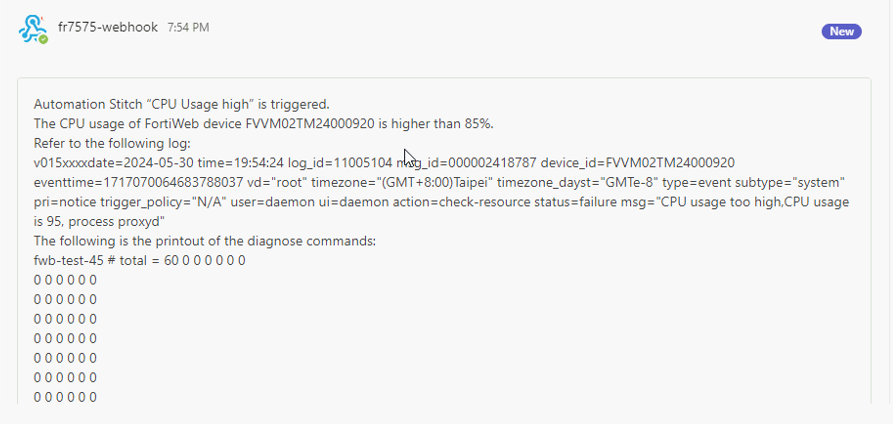
Assuming you have added a CLI Script action (run diagnose commands), then use a Notification action to refer the result of the diagnose commands. For example:
The CPU usage of FortiWeb device xxxxx is higher than 85%.
Refer to the following log:
--------------
%%log%%
---------------
The following is the printout of the diagnose commands:
--------------
%%results%%
---------------
When you receive the message, it will appear as follows. . Please note that it is just an example and may not correspond exactly to the messages configured above.
Example: Notification Message for the "Local Certificate Expired" trigger
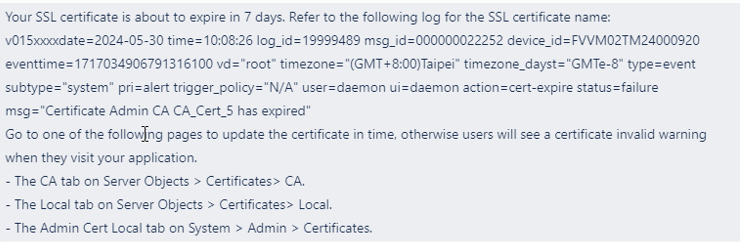
Your SSL certificate is about to expire in <integer (specify the number of days you have set in the config system global/set cert-expire-check-time command>days. Refer to the following log for more information:
--------------
%%log%%
---------------
Go to one of the following pages to update the certificate in time, otherwise your users will see a certificate invalid warning when they visit your application.
-
The CA tab on Server Objects > Certificates> CA.
-
The Local tab on Server Objects > Certificates> Local.
-
The Admin Cert Local tab on System > Admin > Certificates.
When you receive the message, it will appear as follows. Please note that it is just an example and may not correspond exactly to the messages configured above.
Example: Notification Message for the "License Expired" trigger
The FortiWeb license has expired.
--------------
%%log%%
---------------
-
Your application will still be protected by FortiWeb for 21 more days, and traffic will not be disrupted during then.
-
GUI and CLI access to FortiWeb is not available until a new license is applied.
Contact sales teams to buy a new license, then upload the license file in System > Status > License.
Example: Notification Message for the "FDS DB updates" trigger
FortiGuard Database has been updated. Please log in to FortiWeb and go to System > Config > FortiGuard to review the updated signatures and approve them.
--------------
%%log%%
---------------
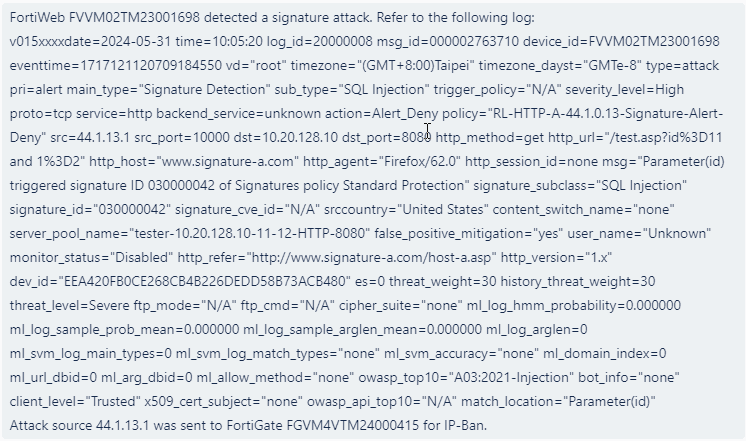
Example: Notification Message for the "IP ban" action
The following attack is detected:
--------------
%%log%%
---------------
Its source IP address "%%log.srcip%%" has been sent to FortiGate's IP Ban list. Further requests from this IP addresses will be blocked by FortiGate directly.
Please review the incident and ensure no legitimate traffic was blocked.
When you receive the message, it will appear as follows. Please note that it is just an example and may not correspond exactly to the messages configured above.