

Subresource Integrity (SRI) Check (8.0.0)
FortiWeb 8.0.0 introduces Subresource Integrity (SRI) Check as a new browser-side enforcement mechanism under the Client-Side Security module. This feature allows administrators to ensure the integrity of third-party JavaScript and CSS resources by specifying expected cryptographic hashes for each file.
Modern web applications often rely on externally hosted libraries—such as those delivered via content delivery networks (CDNs)—to improve performance and reduce server load. However, this practice introduces a critical supply chain risk: if a referenced resource is tampered with, outdated, or compromised, the browser will execute malicious code as if it were trusted.
Subresource Integrity Check mitigates this risk by injecting integrity and crossorigin attributes into <script>, <link>, and other supported tags in server responses. When the browser loads a tagged resource, it validates the file against the specified hash before executing it. If the hash does not match, the resource is blocked—preventing unauthorized or malicious content from affecting the application.
The SRI Check feature is managed through dedicated SRI Policies, which reference one or more SRI Rules. Every rule defines a specific URL, expected hash value, and cross-origin credential behavior. These policies are applied within Web Protection Profiles and enforced through Server Policies, offering granular control over third-party resource validation.
See the sections below for configuration details:
Role in the Layered Defense Strategy
As part of FortiWeb’s Client Side Security module, Subresource Integrity Check represents the second stage in the Layered Defense strategy for protecting against client-side threats: Detect Tampering at Runtime.
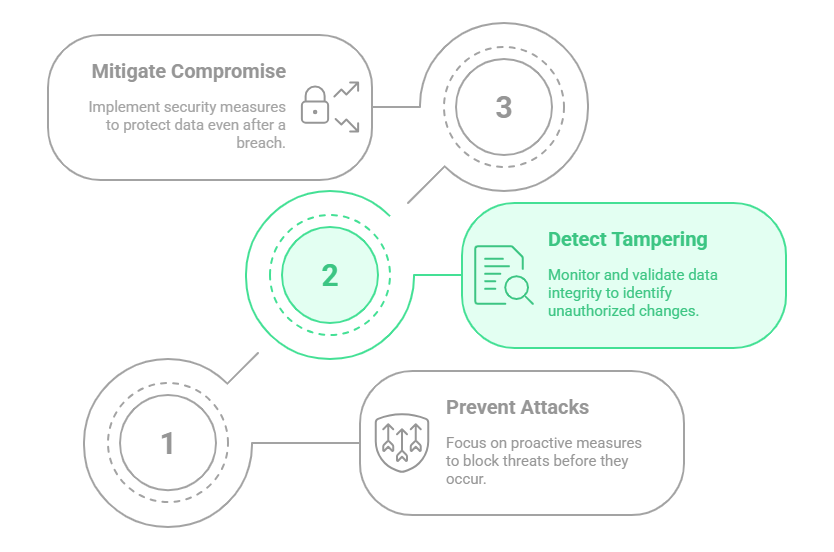
When enabled, FortiWeb injects the necessary integrity and crossorigin attributes into HTML responses. Browsers then validate each resource before execution, blocking tampered files and preserving application integrity.
This feature mitigates several OWASP client-side risks, including:
-
JavaScript drift
-
Use of vulnerable or outdated third-party components
-
Supply chain compromise
SRI Check works best in conjunction with other browser-layer defenses, such as Client-Side Protection and HTTP Header Security, to provide comprehensive protection across the client-side attack surface.
Configuring a Subresource Integrity Rule
An SRI Rule defines a single external resource that should be protected. FortiWeb uses the rule to inject validation attributes into matching response tags, ensuring that only unmodified content is executed by the browser.
To configure an SRI rule:
-
Go to Web Protection > Client Side Security > Subresource Integrity Check.
The configuration page displays the Subresource Integrity Policy tab. -
Click the Subresource Integrity Rule tab.
-
Click Create New to display the configuration editor.
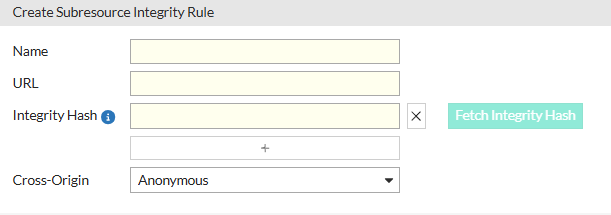
-
Configure the following settings:
Setting
Description
Name A unique identifier for the rule. This name is used internally when associating the rule with a Subresource Integrity Policy. URL The absolute URL of the external resource to be protected. This should match the exact resource reference used in the HTML content (e.g.,
https://cdn.example.com/lib/app.js). FortiWeb uses this URL to locate matching<script>,<link>, or other resource tags in server responses and apply the appropriate integrity attributes.Integrity Hash The expected cryptographic hash of the resource, formatted as
<algorithm>-<base64-encoded hash>, such assha384-abcd123...==. The hash must match the actual content of the resource byte-for-byte. If the resource is modified or replaced, the browser will block it from execution. The total length of the integrity hash string must not exceed 1024 characters, including hash algorithms and separating spaces.You can use Fetch Integrity Hash to automatically download the file and calculate the correct value. Resource size is limited to 100 MB.
Cross-Origin Determines how the browser handles credentialed requests when fetching the resource:
-
Anonymous – Instructs the browser to fetch the resource without sending cookies, client certificates, or HTTP authentication headers. Recommended for public assets (e.g., third-party CDNs) to prevent credential leakage and reduce CSRF exposure.
-
Use-Credentials – Instructs the browser to include credentials in the request. Required when the resource is hosted behind authentication (e.g., user-specific content or private APIs).
The default is Anonymous, which offers better isolation for shared resources.
-
-
Click OK to save the rule.
Configuring a Subresource Integrity Policy
An SRI Policy defines a set of SRI Rules that apply to specific client-side resources. When the policy is active, FortiWeb injects the appropriate attributes into matching response tags.
Before you begin:
-
Create one or more Subresource Integrity Rules. These rules define the target resource URLs and expected cryptographic hashes.
To configure an SRI policy:
-
Go to Web Protection > Client Side Security > Subresource Integrity Check.
The configuration page displays the Subresource Integrity Policy tab. -
Click Create New, enter a Name for the policy, and click OK.
The Rules section becomes configurable. -
Under the Rules section, Click Create New to display the rule selection dialog.
-
Configure the following:
Setting
Description
ID Automatically assigned numeric identifier for each rule entry. SRI Rule Select a previously configured Subresource Integrity Rule. Each rule can be reused in multiple policies if needed. Each Subresource Integrity Policy supports a maximum of 64 rules. -
Click OK to save the rule assignments.
-
Click OK again to save the policy.
After creating the Subresource Integrity Policy, it must be referenced in a Web Protection Profile, which is then applied through a Server Policy to take effect.
If no SRI policy is applied, FortiWeb will not inject integrity or crossorigin attributes, and related enforcement actions in the Client-Side Protection module will remain inactive.
For more information, see Subresource Integrity (SRI) Check.