

Standard Active-Active HA mode
A Standard Active-Active HA group can consist of up to eight FortiWeb appliances operating in Reverse Proxy and True Transparent Proxy modes. Within this HA setup, one appliance is designated as the primary appliance, while the others act as secondary appliances. The primary appliance serves as the central controller, managing traffic distribution across all HA members.
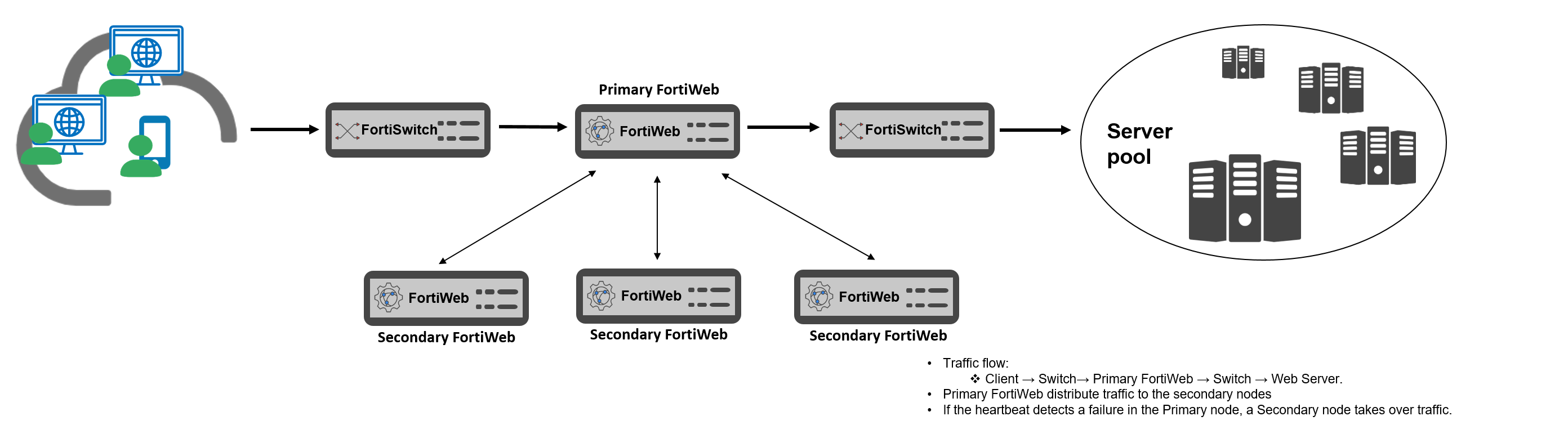
The traffic flow in this mode is as follows:
-
The primary appliance receives client requests and forwards them to back-end web servers.
-
It distributes traffic among all FortiWeb appliances (including itself) using a specified load-balancing algorithm.
-
Each FortiWeb processes the traffic independently, applying security policies for protection.
Key Benefits:
-
Load balancing ensures efficient use of resources.
-
Higher throughput by distributing security tasks across multiple appliances.
-
Scalability for increasing traffic demands.
The primary node uses the following load-balancing algorithms to distribute received traffic over the available HA members:
- By source IP: consistently distribute the traffic coming from a source to the same HA member (the default algorithm).
- By connections: dynamically distribute traffic to a member who has the fewest connections processing.
- Round-Robin: distribute traffic among the available members in a circular order.
All the HA members, including the primary appliance, are the candidates for the algorithms, unless failure is detected on any of them. Traffic distribution is based on TCP/UDP sessions, which means once the first packet of a TCP/UDP session is assigned to a member, the subsequent packets of the session will be consistently distributed to the same appliance during a time period. For more details, see Standard Active-Active HA mode.

|
Although algorithm By source IP distribute the subsequent traffic coming from the same source IP address to a fix HA member, it performs weighted round-robin to determine the member for the first packet coming from the IP address. You can configure the weights between the members through the CLI command |
If a secondary failure is detected, the secondary appliance will be ignored by the primary for its traffic distribution. If the primary fails, one of the secondary appliances will take it over as a primary immediately (see "How HA chooses the active appliance" on page 1).
Once the primary appliance fails and a secondary takes it over, subsequent traffic of all sessions that have been established for longer than 30 seconds will be transferred to the new primary for distribution (those sessions distributed to the original primary appliance by itself are not included, since the original primary lost them while it failed). To distribute the original sessions in the original way, the new primary has to know how they are mapped. To provide a seamless takeover for this, a primary appliance must maintain the mapping information (called session information as well) for all the sessions and synchronize it to all the other HA members all the time, so that when a secondary becomes the primary the subsequent traffic of the original sessions can be destined to where they were.

|
Although session synchronization in active-active HA guarantees a seamless takeover, it brings extra CPU and bandwidth consumption as well. The session synchronization is disabled by default, and you can enable it through the CLI command |