
Fortinet white logo
Fortinet white logo

Administration Guide

Client certificate verification in FTPS connections (7.6.1)

Client certificate verification in FTPS connections (7.6.1)

In an FTP policy, client certificate verification is now supported, allowing FortiWeb to require the client to present a certificate to prove its identity.

Typically, during an FTPS connection, FortiWeb must present its certificate to the client to establish its own identity. With this new feature, FortiWeb can also validate the client’s identity by requiring the client to present a certificate.

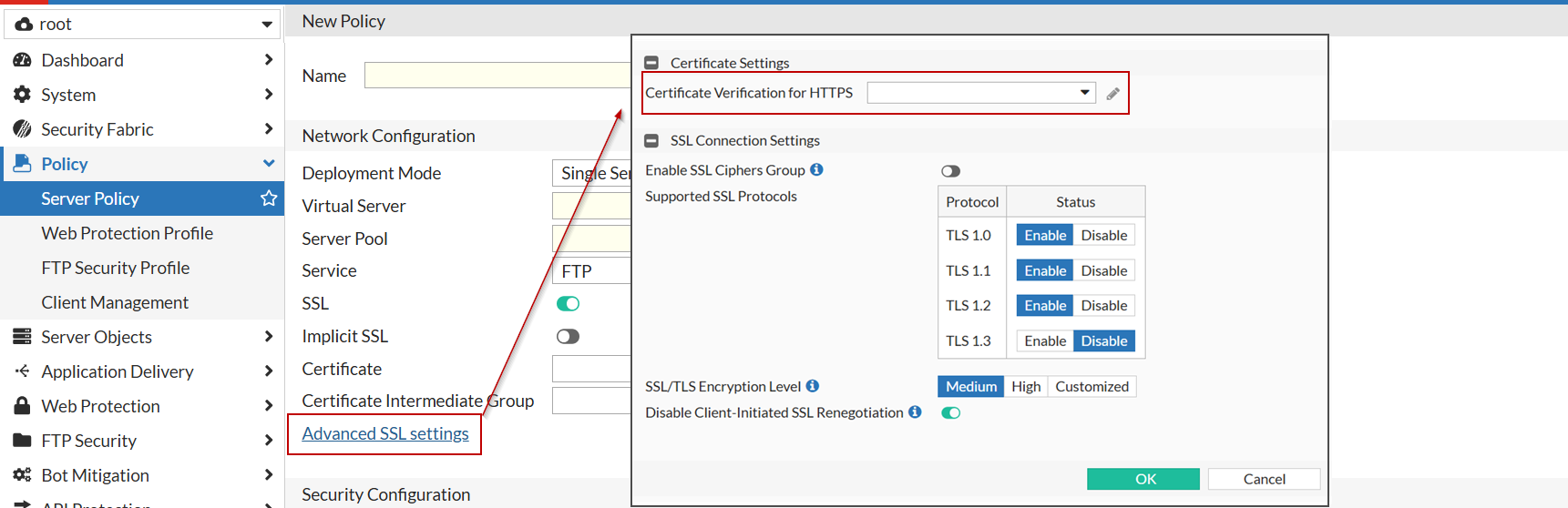
To configure this feature, navigate to an FTP policy, click Advanced SSL settings, then in the Certificate Verification for HTTPS option, select the certificate that FortiWeb will use to validate the client certificate. Typically, this should be the certificate that issued the client certificates.
For more information, see Configuring FTP security.

Client certificate verification in FTPS connections (7.6.1)

Client certificate verification in FTPS connections (7.6.1)

In an FTP policy, client certificate verification is now supported, allowing FortiWeb to require the client to present a certificate to prove its identity.

Typically, during an FTPS connection, FortiWeb must present its certificate to the client to establish its own identity. With this new feature, FortiWeb can also validate the client’s identity by requiring the client to present a certificate.

To configure this feature, navigate to an FTP policy, click Advanced SSL settings, then in the Certificate Verification for HTTPS option, select the certificate that FortiWeb will use to validate the client certificate. Typically, this should be the certificate that issued the client certificates.

For more information, see Configuring FTP security.