

Securosys Primus HSM support (7.6.3)
FortiWeb now integrates with Securosys Primus HSM, which provides a secure, tamper-resistant environment for cryptographic key management and processing. Securosys Primus HSM is available in two deployment models:
-
Primus HSM – A dedicated on-premises hardware appliance for secure key storage and cryptographic operations.
-
CloudHSM – A cloud-based HSM service that offers scalability, high availability, and reduced operational overhead by eliminating the need for on-premises infrastructure management.
Both solutions support secure key generation, storage, encryption, decryption, and digital signing, enabling FortiWeb to enhance security through hardware-backed cryptographic processing.
By leveraging Securosys Primus HSM, FortiWeb ensures that private keys remain protected and cryptographic operations are executed in a secure environment, helping organizations meet strict security and compliance requirements.
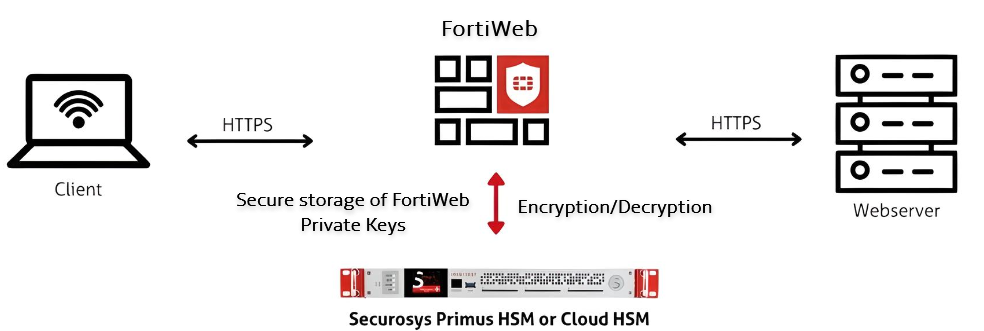
Key Operations and Cryptographic Offloading
FortiWeb leverages the HSM for the following cryptographic functions:
-
SSL/TLS Key Protection – Private keys are securely generated and stored within the HSM, ensuring strict key isolation and mitigating the risk of unauthorized access or key extraction. The HSM enforces access control policies to prevent unauthorized use.
-
Hardware-Accelerated Cryptographic Processing – Computationally intensive cryptographic operations, such as RSA and ECC key exchanges, symmetric encryption, and hashing, are offloaded to the HSM. This reduces CPU overhead on FortiWeb and enhances overall system performance.
-
Secure Digital Signatures and Certificate Management – Cryptographic signing operations, including certificate signing and message authentication, are performed within the HSM. This ensures data integrity, non-repudiation, and compliance with security policies.
-
PKCS#11-Based Key Operations – The HSM provides a standardized PKCS#11 API for cryptographic key generation, encryption, decryption, and secure key lifecycle management. This enables FortiWeb to leverage hardware-backed cryptographic processing while maintaining strict key protection mechanisms.
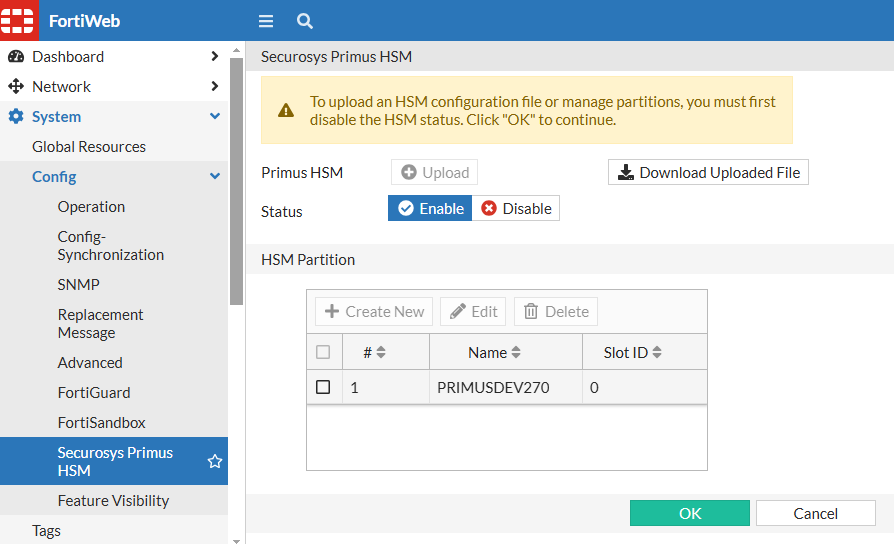
You can find the new Securosys Primus HSM configuration page under System > Config:

|
The Securosys Primus HSM module appears in the GUI only after enabling HSM support and setting the manufacturer to Securosys Primus HSM in the Server Policy via the CLI. |
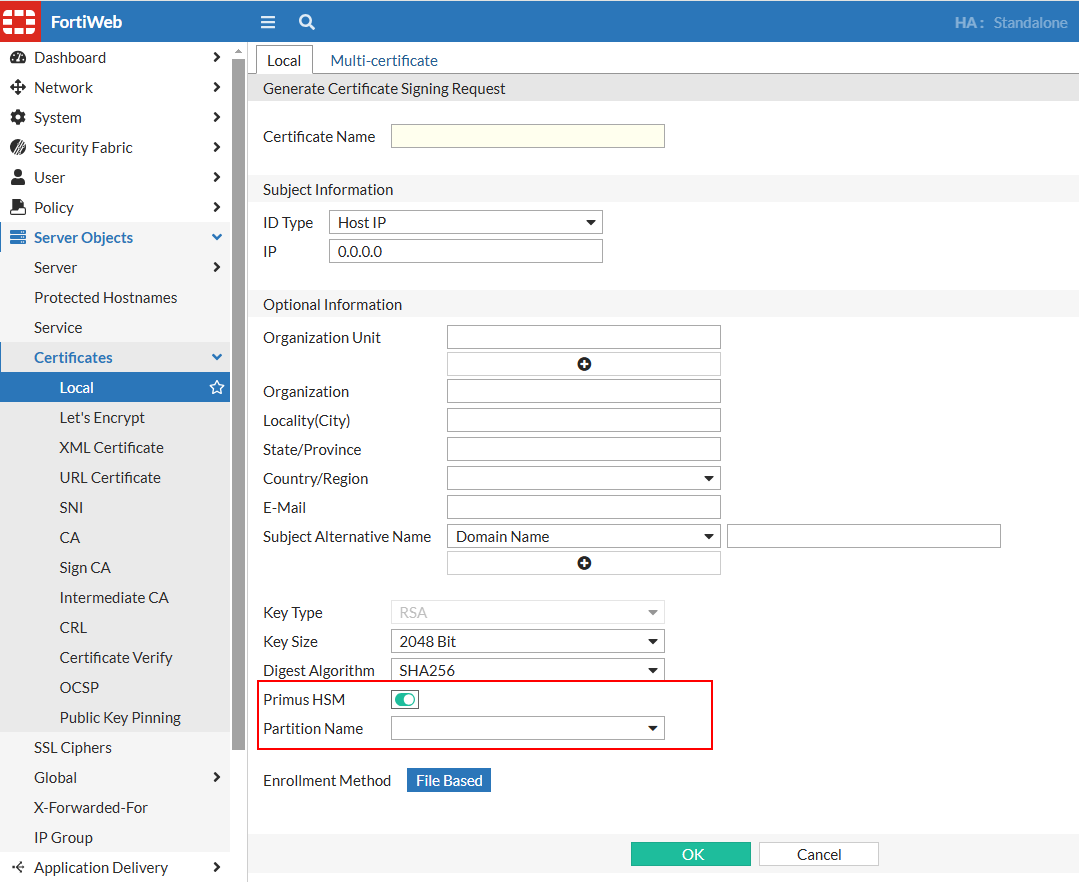
New options in the Local Certificate configuration now allow enabling Primus HSM and specifying the HSM Partition in the CSR.
Prerequisites
Before configuring Securosys Primus HSM on FortiWeb, ensure the following prerequisites are met. These credentials and files are required when setting up PKCS pin authentication on FortiWeb:
-
Active account with HSM username, setup password, and PKCS#11 password.
-
PKCS#11 API provider installed on the client machine.
-
Primus HSM configuration file obtained and configured.
-
Client registered to the HSM server and permanent secret retrieved.
Configuring Securosys Primus HSM on FortiWeb
The following steps outline the process of integrating Securosys Primus HSM with FortiWeb for secure cryptographic key management and SSL/TLS operations. This workflow ensures that private keys remain securely stored within the HSM while enabling FortiWeb to utilize hardware-based encryption.
Configuration Workflow:
-
Enable HSM in Server Policy via CLI – Configure FortiWeb to recognize and use an HSM for cryptographic operations by enabling HSM support and specifying the manufacturer in the CLI.
-
Configure the HSM in FortiWeb — Set up the HSM connection in FortiWeb by providing authentication credentials and specifying the HSM partition.
-
Generate a Local CSR on FortiWeb — Create a CSR on FortiWeb with the Primus HSM enabled, selecting the appropriate HSM partition.
-
Obtain a Signed Certificate — Download the CSR, submit it to a Certificate Authority (CA) for signing, and retrieve the signed certificate.
-
Import the Signed Certificate into FortiWeb — Upload the signed certificate to FortiWeb for use in SSL/TLS encryption.
-
Apply the Certificate in Server Policy — Assign the imported certificate to the relevant server policy to secure traffic with HSM-backed encryption.
For more details, see Using Securosys Primus HSM.