
Fortinet white logo
Fortinet white logo

Administration Guide

Backup or restore the system configuration

Backup or restore the system configuration

It is recommended that you create a system backup file as part of your maintenance plan. Always perform a backup before upgrading firmware or making major system configuration changes. Save these configuration backups to your local computer in the event that you need to restore the system after a network event.

Note
Limitations of backup/restore workflow:

You cannot use the GUI to back up and restore the following system settings:

  • Network Share
  • Network Share Quarantine
  • File size limit (execute file-size-threshold)
  • Email Alert Recipients

Please record these configuration settings before upgrading so the full configuration can be restored.

Network Share Configuration backup and restore is managed by its own CLI:

To backup the FortiNDR configuration to your local computer:
  1. Go to the Dashboard and click the account menu at the top-right of the page.
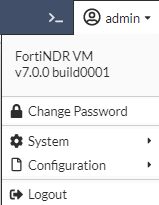
  2. Click Configuration > Backup. The configuration file is saved to your computer.
To restore the system configuration from your local computer:
  1. Go to the Dashboard and click the account menu at the top-right of the page.
  2. Click Configuration > Restore. The Restore System Configuration page opens.
  3. Click Upload and navigate to the location of the configuration file on your computer.
  4. Click OK. The system reboots.

Backup or restore the system configuration

Backup or restore the system configuration

It is recommended that you create a system backup file as part of your maintenance plan. Always perform a backup before upgrading firmware or making major system configuration changes. Save these configuration backups to your local computer in the event that you need to restore the system after a network event.

Note
Limitations of backup/restore workflow:

You cannot use the GUI to back up and restore the following system settings:

  • Network Share
  • Network Share Quarantine
  • File size limit (execute file-size-threshold)
  • Email Alert Recipients

Please record these configuration settings before upgrading so the full configuration can be restored.

Network Share Configuration backup and restore is managed by its own CLI:

To backup the FortiNDR configuration to your local computer:
  1. Go to the Dashboard and click the account menu at the top-right of the page.

  2. Click Configuration > Backup. The configuration file is saved to your computer.
To restore the system configuration from your local computer:
  1. Go to the Dashboard and click the account menu at the top-right of the page.
  2. Click Configuration > Restore. The Restore System Configuration page opens.
  3. Click Upload and navigate to the location of the configuration file on your computer.
  4. Click OK. The system reboots.