
Fortinet white logo
Fortinet white logo

Administration Guide

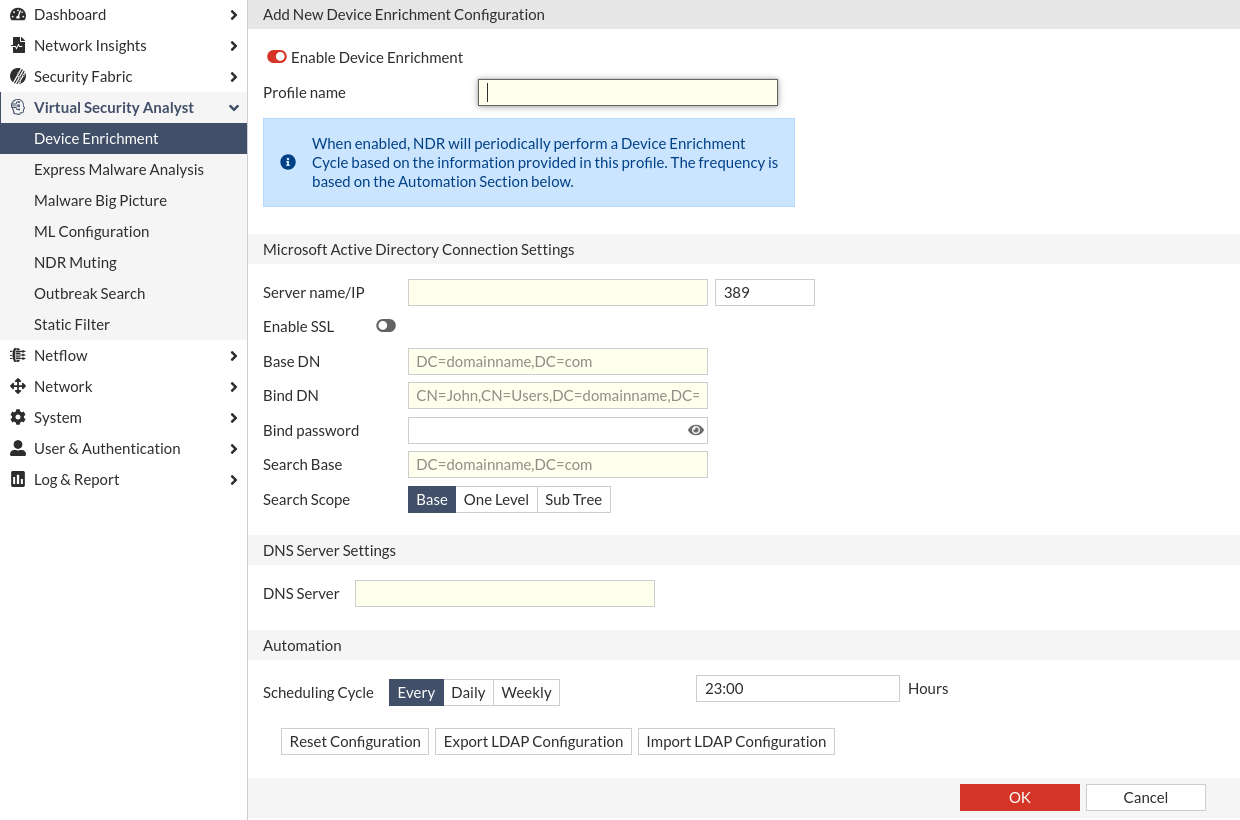
Creating a Device Enrichment Profile

Creating a Device Enrichment Profile

To create a Device Enrichment profile:
  1. Go to Virtual Security Analyst > Device Enrichment.
  2. In the toolbar, click Create New. The Add New Device Enrichment Configuration page opens.
  3. Configure the profile settings.

    Enable Device Configuration

    Disable or enable the profile

    Profile Name

    Provide a unique identifier for the Microsoft Active Directory Connection Profile

    Microsoft Active Directory Connection Settings

    Sever name/ IP

    Enter either the IP address of the windows AD server or domain name.

    Enable SSL

    Enable this option to select the SSL port and protocol to be used.

    Base DN

    The starting point of the LDAP Server for user authentication within the directory. For example, DC=example-domain, DC=com

    Bind DN

    The LDAP user and its LDAP directory tree location for binding. For example, CN=fndr_svc,CN=testUser, DC= example-domain,DC= com.

    Bind Password

    The password for the LDAP user account for binding. For example, DC= example-domain,DC= com.

    Search Base

    The starting point of the directory tree for retrieving information

    Search Scope

    The method of retrieving the information from the tree:

    • Base: Only retrieve information from the base level of the directory tree specified in search base

    • One Level: Only retrieve information from the search base and one level down.

    • Subtree: Retrieve everything underneath the specified search base.

    DNS Server Settings

    DNS Server

    DNS Server is required as part of the enrichment process involved querying DNS server with hostnames to retrieve current IP address.

    Automation

    Scheduling cycle

    • Every: the enrichment cycle will be preformed once right after the profile is saved. The next cycle will be run after the amount of hours user input
    • Daily: the enrichment cycle will start every day at the input time
    • Weekly: the enrichment cycle will start weekly at the input time.

    Reset Configuration

    Click to reset the configuration.

    Export Configuration

    Click to export the configuration as a config file. The password is not exported.

    Import Configuration

    Click to import a config file. Importing new profile will \replace all profile settings and clear the password.
  4. Click OK.

Active Directory Profile Actions

Use the Active Directory Profile Actions in the toolbar to test the connect or run the Device Enrichment Profile.

Active Directory Server Ping Test

Ping the Active Directory (AD) server and port in the Device Enrichment Profile.

Active Directory Server Connection Test

Verify the Microsoft Active Directory Connection Settings by attempting to connect the AD server.

Active Directory Server Manual Run

Execute the selected Device Enrichment Profile . The result will be shown as a notification on the bottom left.

Creating a Device Enrichment Profile

Creating a Device Enrichment Profile

To create a Device Enrichment profile:
  1. Go to Virtual Security Analyst > Device Enrichment.
  2. In the toolbar, click Create New. The Add New Device Enrichment Configuration page opens.
  3. Configure the profile settings.

    Enable Device Configuration

    Disable or enable the profile

    Profile Name

    Provide a unique identifier for the Microsoft Active Directory Connection Profile

    Microsoft Active Directory Connection Settings

    Sever name/ IP

    Enter either the IP address of the windows AD server or domain name.

    Enable SSL

    Enable this option to select the SSL port and protocol to be used.

    Base DN

    The starting point of the LDAP Server for user authentication within the directory. For example, DC=example-domain, DC=com

    Bind DN

    The LDAP user and its LDAP directory tree location for binding. For example, CN=fndr_svc,CN=testUser, DC= example-domain,DC= com.

    Bind Password

    The password for the LDAP user account for binding. For example, DC= example-domain,DC= com.

    Search Base

    The starting point of the directory tree for retrieving information

    Search Scope

    The method of retrieving the information from the tree:

    • Base: Only retrieve information from the base level of the directory tree specified in search base

    • One Level: Only retrieve information from the search base and one level down.

    • Subtree: Retrieve everything underneath the specified search base.

    DNS Server Settings

    DNS Server

    DNS Server is required as part of the enrichment process involved querying DNS server with hostnames to retrieve current IP address.

    Automation

    Scheduling cycle

    • Every: the enrichment cycle will be preformed once right after the profile is saved. The next cycle will be run after the amount of hours user input
    • Daily: the enrichment cycle will start every day at the input time
    • Weekly: the enrichment cycle will start weekly at the input time.

    Reset Configuration

    Click to reset the configuration.

    Export Configuration

    Click to export the configuration as a config file. The password is not exported.

    Import Configuration

    Click to import a config file. Importing new profile will \replace all profile settings and clear the password.

  4. Click OK.

Active Directory Profile Actions

Use the Active Directory Profile Actions in the toolbar to test the connect or run the Device Enrichment Profile.

Active Directory Server Ping Test

Ping the Active Directory (AD) server and port in the Device Enrichment Profile.

Active Directory Server Connection Test

Verify the Microsoft Active Directory Connection Settings by attempting to connect the AD server.

Active Directory Server Manual Run

Execute the selected Device Enrichment Profile . The result will be shown as a notification on the bottom left.