
Fortinet white logo
Fortinet white logo

New Features

Enhanced PIM support for IPv6 across all VRFs

Enhanced PIM support for IPv6 across all VRFs

This information is also available in the FortiOS 8.0 Administration Guide:

PIM now supports all VRFs (up to 511) and is aware of IPv6 multicast routing and forwarding over a single overlay, enhancing network scalability and flexibility compared to the previous VRF 0-only support. See Multicast routing and PIM support for more information.

A new config router multicast6-flow command is available:

config router multicast6-flow
    edit <name>
        config flows
            edit <ID> 
                set group-addr <IPv6 address>
            next
        end
    next
end

Option

Description

router multicast6-flow

Configure IPv6 multicast-flow.

flows

IPv6 multicast-flow entries.

edit <ID>

Flow ID.

group-addr <IPv6 address>

Multicast group IP address.

The config router multicast6 command has new options to configure PIM6 RP for PIM6 interface:

config router multicast6
    config interface 
        edit <name> 
            set rp-candidate {enable | disable}
            set static-group <string>
            set rp-candidate-group <string>
            set rp-candidate-priority <integer>
            set rp-candidate-interval <integer>
        next
    end
end

Option

Description

interface

Protocol Independent Multicast (PIM) interfaces.

Edit <name>

Interface name.

rp-candidate {enable | disable}

Enable/disable compete to become RP in elections.

static-group <string>

Statically set IPv6 multicast groups to forward out.

rp-candidate-group <string>

Multicast groups managed by this RP. Enter IPv6 access list name.

rp-candidate-priority <integer>

Router's priority as RP (0 to 255, default = 192).

rp-candidate-interval <integer>

RP candidate advertisement interval (1 to 16383 sec, default = 60).

The config router multicast6 command has new options:

config router multicast6
    config pim-sm-global
        set bsr-candidate {enable | disable}
        set bsr-interface <string>
        set bsr-priority <integer>
        set bsr-hash <integer>
        set bsr-allow-quick-refresh {enable | disable}
        set cisco-crp-prefix {enable | disable}
        set cisco-ignore-rp-set-priority {enable | disable}
        set spt-threshold {enable | disable}
        set spt-threshold-group
        config rp-address
            edit <id>
                set ip6-address <IPv6 addr>
                set group <string>
            next
        end
    end
end

Option

Description

pim-sm-global

PIM sparse-mode global settings.

bsr-candidate {enable | disable}

Enable/disable allowing this router to become a bootstrap router (BSR).

bsr-interface <string>

Interface to advertise as candidate BSR.

bsr-priority <integer>

BSR priority (0 - 255, default = 0).

bsr-hash <integer>

BSR hash length (0 - 32, default = 10).

bsr-allow-quick-refresh {enable | disable}

Enable/disable accept BSR quick refresh packets from neighbors.

cisco-crp-prefix {enable | disable}

Enable/disable making candidate RP compatible with old Cisco IOS.

  • enable: Do not allow sending group prefix of zero.

  • disable: Allow sending group prefix of zero.

cisco-ignore-rp-set-priority {enable | disable}

Use only hash for RP selection (compatibility with old Cisco IOS):

  • enable: Ignore RP-SET priority value.

  • disable: Do not ignore RP-SET priority value.

spt-threshold {enable | disable}

Enable/disable switching to source specific trees.

spt-threshould-group <string>

Groups allowed to switch to source tree. Enter the IPv6 access list name.

rp-address

Statically configure RP addresses.

Edit <id>

VRF ID.

ip6-address <IPv6 address>

RP router IPv6 address.

group <string>

Groups to use this RP. Enter the IPv6 access list name.

The config router multicast6 command has new options:

config router multicast6
    config pim-sm-global-vrf
        edit <id>
            set bsr-candidate {enable | disable}
            set bsr-interface <string>
            set bsr-priority <integer>
            set bsr-hash <integer>
            set bsr-allow-quick-refresh {enable | disable}
            set cisco-crp-prefix {enable | disable}
            config rp-address
                edit <id>
                    set ip6-address <IPv6 addr>
                    set group <string>
                next
            end
        next
    end
end

Option

Description

pim-sm-global-vrf

Per-VRF PIM sparse-mode global settings.

edit <VRF ID>

VRF ID.

bsr-candidate {enable | disable}

Enable/disable allowing this router to become a bootstrap router (BSR).

bsr-interface <string>

Interface to advertise as candidate BSR.

bsr-priority <integer>

BSR priority (0 - 255, default = 0).

bsr-hash <integer>

BSR hash length (0 - 128, default = 126).

bsr-allow-quick-refresh {enable | disable}

Enable/disable accept BSR quick refresh packets from neighbors.

cisco-crp-prefix {enable | disable}

Enable/disable making candidate RP compatible with old Cisco IOS.

rp-address

Statically configured RP addresses.

edit <id>

ID of the entry.

ip6-address <IPv6 addr>

ip6 xxxx:xxxx:xxxx:xxxx:xxxx:xxxx:xxxx:xxxx.

group <string>

IPv6 access list name.

The following commands are available:

execute mrouter6 clear mld interface
execute mrouter6 clear mld vrf

The following commands now support VRF:

execute mrouter6 clear mld group
execute mrouter6 clear sparse-routes
get router info6 multicast mld groups
get router info6 multicast mld groups-detail
get router info6 multicast pim sparse-mode bsr-router
get router info6 multicast pim sparse-mode rp mapping
get router info6 multicast pim sparse-mode rp-hash
get router info6 multicast pim sparse-mode nexthop
get router info6 multicast pim sparse-mode mroute

Example
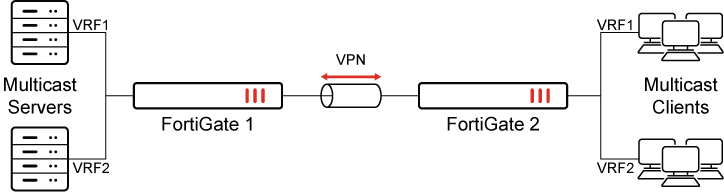
In this example, the multicast server:

  • Sends out multicast traffic ff0e::10 from 2000:172:16:205::11 in VRF1.

  • Sends out multicast traffic ff0e::20 from 2000:172:16:205::22 in VRF2.

To configure IPv6 multicast-flow:
config router multicast6-flow
    edit "flow6a"
        config flows
            edit 1
                set group-addr ff0e::10
            next
        end
    next
    edit "flow6b"
        config flows
            edit 1
                set group-addr ff0e::20
            next
        end
    next
end
To configure PIM-SM global settings for each VRF:
config router multicast6
    set multicast-routing enable
    config interface
        edit "vd3-1"
        next
        edit "vd3-vlan33"
        next
        edit "vd3-vlan331"
        next
    end
    config pim-sm-global-vrf
        edit 2
            config rp-address
                edit 1
                    set ip6-address 2011::12
                next
            end
        next
        edit 1
            config rp-address
                edit 1
                    set ip6-address 2011::11
                next
            end
        next
    end
end

For brevity, only the commands relevant to this enhancement are included.

To verify VRF in IPv6 multicast routing:
  1. Review the sniffer information:

    • The VRF1 client can receive ff0e::10 and cannot receive ff0e::20:

      0.800190 npu0_vlink0 out 2000:172:16:205::11.33372 -> ff0e::10.5001: udp 46 [flowlabel 0xa620f]
      0.800197 vd33-vlan33 in 2000:172:16:205::11.33372 -> ff0e::10.5001: udp 46 [flowlabel 0xa620f]
      
    • The VRF2 client can receive ff0e::20 and cannot receive ff0e::10:

      0.666623 vd3-vlan331 out 2000:172:16:205::22.33372 -> ff0e::20.5001: udp 46 [flowlabel 0xa620f
      0.666630 vd3-vlan331 out 2000:172:16:205::22.33372 -> ff0e::20.5001: udp 46 [flowlabel 0xa620f
      
  2. Review the group information:

    # get router info6 multicast mld groups
    MLD Connected Group Membership
    VRF Group Address                           Interface            Uptime   Expires  Last Reporter
    1   ff0e::10                                vd3-vlan33           00:21:05 now(static) ::
    2   ff0e::20                                vd3-vlan331          00:21:05 now(static) ::
    

Enhanced PIM support for IPv6 across all VRFs

Enhanced PIM support for IPv6 across all VRFs

This information is also available in the FortiOS 8.0 Administration Guide:

PIM now supports all VRFs (up to 511) and is aware of IPv6 multicast routing and forwarding over a single overlay, enhancing network scalability and flexibility compared to the previous VRF 0-only support. See Multicast routing and PIM support for more information.

A new config router multicast6-flow command is available:

config router multicast6-flow
    edit <name>
        config flows
            edit <ID> 
                set group-addr <IPv6 address>
            next
        end
    next
end

Option

Description

router multicast6-flow

Configure IPv6 multicast-flow.

flows

IPv6 multicast-flow entries.

edit <ID>

Flow ID.

group-addr <IPv6 address>

Multicast group IP address.

The config router multicast6 command has new options to configure PIM6 RP for PIM6 interface:

config router multicast6
    config interface 
        edit <name> 
            set rp-candidate {enable | disable}
            set static-group <string>
            set rp-candidate-group <string>
            set rp-candidate-priority <integer>
            set rp-candidate-interval <integer>
        next
    end
end

Option

Description

interface

Protocol Independent Multicast (PIM) interfaces.

Edit <name>

Interface name.

rp-candidate {enable | disable}

Enable/disable compete to become RP in elections.

static-group <string>

Statically set IPv6 multicast groups to forward out.

rp-candidate-group <string>

Multicast groups managed by this RP. Enter IPv6 access list name.

rp-candidate-priority <integer>

Router's priority as RP (0 to 255, default = 192).

rp-candidate-interval <integer>

RP candidate advertisement interval (1 to 16383 sec, default = 60).

The config router multicast6 command has new options:

config router multicast6
    config pim-sm-global
        set bsr-candidate {enable | disable}
        set bsr-interface <string>
        set bsr-priority <integer>
        set bsr-hash <integer>
        set bsr-allow-quick-refresh {enable | disable}
        set cisco-crp-prefix {enable | disable}
        set cisco-ignore-rp-set-priority {enable | disable}
        set spt-threshold {enable | disable}
        set spt-threshold-group
        config rp-address
            edit <id>
                set ip6-address <IPv6 addr>
                set group <string>
            next
        end
    end
end

Option

Description

pim-sm-global

PIM sparse-mode global settings.

bsr-candidate {enable | disable}

Enable/disable allowing this router to become a bootstrap router (BSR).

bsr-interface <string>

Interface to advertise as candidate BSR.

bsr-priority <integer>

BSR priority (0 - 255, default = 0).

bsr-hash <integer>

BSR hash length (0 - 32, default = 10).

bsr-allow-quick-refresh {enable | disable}

Enable/disable accept BSR quick refresh packets from neighbors.

cisco-crp-prefix {enable | disable}

Enable/disable making candidate RP compatible with old Cisco IOS.

  • enable: Do not allow sending group prefix of zero.

  • disable: Allow sending group prefix of zero.

cisco-ignore-rp-set-priority {enable | disable}

Use only hash for RP selection (compatibility with old Cisco IOS):

  • enable: Ignore RP-SET priority value.

  • disable: Do not ignore RP-SET priority value.

spt-threshold {enable | disable}

Enable/disable switching to source specific trees.

spt-threshould-group <string>

Groups allowed to switch to source tree. Enter the IPv6 access list name.

rp-address

Statically configure RP addresses.

Edit <id>

VRF ID.

ip6-address <IPv6 address>

RP router IPv6 address.

group <string>

Groups to use this RP. Enter the IPv6 access list name.

The config router multicast6 command has new options:

config router multicast6
    config pim-sm-global-vrf
        edit <id>
            set bsr-candidate {enable | disable}
            set bsr-interface <string>
            set bsr-priority <integer>
            set bsr-hash <integer>
            set bsr-allow-quick-refresh {enable | disable}
            set cisco-crp-prefix {enable | disable}
            config rp-address
                edit <id>
                    set ip6-address <IPv6 addr>
                    set group <string>
                next
            end
        next
    end
end

Option

Description

pim-sm-global-vrf

Per-VRF PIM sparse-mode global settings.

edit <VRF ID>

VRF ID.

bsr-candidate {enable | disable}

Enable/disable allowing this router to become a bootstrap router (BSR).

bsr-interface <string>

Interface to advertise as candidate BSR.

bsr-priority <integer>

BSR priority (0 - 255, default = 0).

bsr-hash <integer>

BSR hash length (0 - 128, default = 126).

bsr-allow-quick-refresh {enable | disable}

Enable/disable accept BSR quick refresh packets from neighbors.

cisco-crp-prefix {enable | disable}

Enable/disable making candidate RP compatible with old Cisco IOS.

rp-address

Statically configured RP addresses.

edit <id>

ID of the entry.

ip6-address <IPv6 addr>

ip6 xxxx:xxxx:xxxx:xxxx:xxxx:xxxx:xxxx:xxxx.

group <string>

IPv6 access list name.

The following commands are available:

execute mrouter6 clear mld interface
execute mrouter6 clear mld vrf

The following commands now support VRF:

execute mrouter6 clear mld group
execute mrouter6 clear sparse-routes
get router info6 multicast mld groups
get router info6 multicast mld groups-detail
get router info6 multicast pim sparse-mode bsr-router
get router info6 multicast pim sparse-mode rp mapping
get router info6 multicast pim sparse-mode rp-hash
get router info6 multicast pim sparse-mode nexthop
get router info6 multicast pim sparse-mode mroute

Example

In this example, the multicast server:

  • Sends out multicast traffic ff0e::10 from 2000:172:16:205::11 in VRF1.

  • Sends out multicast traffic ff0e::20 from 2000:172:16:205::22 in VRF2.

To configure IPv6 multicast-flow:
config router multicast6-flow
    edit "flow6a"
        config flows
            edit 1
                set group-addr ff0e::10
            next
        end
    next
    edit "flow6b"
        config flows
            edit 1
                set group-addr ff0e::20
            next
        end
    next
end
To configure PIM-SM global settings for each VRF:
config router multicast6
    set multicast-routing enable
    config interface
        edit "vd3-1"
        next
        edit "vd3-vlan33"
        next
        edit "vd3-vlan331"
        next
    end
    config pim-sm-global-vrf
        edit 2
            config rp-address
                edit 1
                    set ip6-address 2011::12
                next
            end
        next
        edit 1
            config rp-address
                edit 1
                    set ip6-address 2011::11
                next
            end
        next
    end
end

For brevity, only the commands relevant to this enhancement are included.

To verify VRF in IPv6 multicast routing:
  1. Review the sniffer information:

    • The VRF1 client can receive ff0e::10 and cannot receive ff0e::20:

      0.800190 npu0_vlink0 out 2000:172:16:205::11.33372 -> ff0e::10.5001: udp 46 [flowlabel 0xa620f]
      0.800197 vd33-vlan33 in 2000:172:16:205::11.33372 -> ff0e::10.5001: udp 46 [flowlabel 0xa620f]
      
    • The VRF2 client can receive ff0e::20 and cannot receive ff0e::10:

      0.666623 vd3-vlan331 out 2000:172:16:205::22.33372 -> ff0e::20.5001: udp 46 [flowlabel 0xa620f
      0.666630 vd3-vlan331 out 2000:172:16:205::22.33372 -> ff0e::20.5001: udp 46 [flowlabel 0xa620f
      
  2. Review the group information:

    # get router info6 multicast mld groups
    MLD Connected Group Membership
    VRF Group Address                           Interface            Uptime   Expires  Last Reporter
    1   ff0e::10                                vd3-vlan33           00:21:05 now(static) ::
    2   ff0e::20                                vd3-vlan331          00:21:05 now(static) ::