

Enhanced EVPN support for VXLAN Anycast gateway and type-5 routing
This information is also available in the FortiOS 8.0 Administration Guide:
This enhancement adds support for VXLAN Anycast gateway, EVPN IRB (Ethernet VPN Integrated Routing and Bridging), and type-5 EVPN routes, enabling seamless L2/L3 service integration and scalable IP prefix advertisement across the VXLAN fabric. It simplifies mobility and routing in modern data center deployments. For more background on EVPN, see VXLAN with MP-BGP EVPN.
The config router bgp command has new options:
config router bgp
    config redistribute {connected | static | isis | ospf | rip}
        set status-evpn {enable | disable}
        set route-map-evpn <string>
    end
    config {neighbor | neighbor-group}
        edit <string>
            set adv-evpn-route {type2 | type5 | local}
        next
    end
end
|
Option |
Description |
|---|---|
|
|
Types of routes to be redistributed. |
|
|
Enable/disable EVPN redistribution status. |
|
|
Route map name for EVPN redistribution. |
|
|
Types of EVPN routes that can be advertised to this neighbor as IPv4 routes:
|
The config system evpn command has new options:
config system evpn
    edit <id>
        set type {macvrf | ipvrf}
        set adv-default-gw {enable | disable}
        set virtual-mac-vrid <integer>
        set l3-instance <integer>
        set *interface <string>
        set distribute-local-route {enable | disable}
    next
end
|
Option |
Description |
|---|---|
|
|
EVPN instance type:
|
|
|
Enable/disable advertisement of default gateway. |
|
|
VRID used to generate virtual MAC address (1 to 255). |
|
|
L3VRF EVPN instance ID (0 to 4294967295). |
|
|
Outgoing interface for all VxLANs in this L3VRF EVPN instance. Available when |
|
|
Enable/disable distribution of local EVPN routes as IPv4 routes to BGP. |
A new get command is available for default-gateway:
get l2vpn evpn default-gateway
Example
This section includes the following examples:
Anycast gateway example
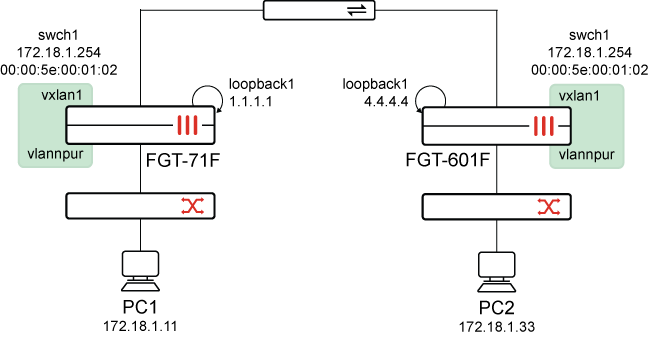
In a Security Fabric configured with EVPN, VXLAN, and an Anycast gateway (swch1), all leaf switches that connect endpoints in the same VLAN (or subnet) share the same virtual default gateway IP address. The leaf switches also share the same virtual MAC address for that gateway.
Endpoints (such as servers, VMs, containers) always see the same gateway regardless of which leaf they connect to. If a VM or host moves from Leaf1 to Leaf2, its default gateway stays the same and doesn't require any reconfiguration (for example re-ARP or a new IP address), which provides seamless mobility.
This example describes how to configure FortiGate-71F and FortiGate-601F in the topology. It also describes how to verify the configuration.
To configure FortiGate-71F:
-
Configure EVPN:
config system evpn edit 100 set rd "100:100" set import-rt "1:1" set export-rt "1:1" set ip-local-learning enable set adv-default-gw enable set virtual-mac-vrid 2 next end -
Configure VXLAN:
config system vxlan edit "vxlan1" set interface "loopback1" set vni 1000 set evpn-id 100 set learn-from-traffic enable next end -
Configure a system switch interface:
config system switch-interface edit "swch1" set vdom "root" set member "vxlan1" "vlannpur" next end -
Configure a system interface:
config system interface edit "swch1" set vdom "root" set ip 172.18.1.254 255.255.255.0 set allowaccess ping set type switch set snmp-index 26 next end -
Configure BGP:
config router bgp
    set as 65412
    set router-id 1.1.1.1
    set ibgp-multipath enable
    set network-import-check disable
    set recursive-next-hop enable
    set graceful-restart enable
    config neighbor
        edit "172.18.5.123"
            set ebgp-enforce-multihop enable
            set next-hop-self enable
            set next-hop-self-vpnv4 enable
            set soft-reconfiguration enable
            set soft-reconfiguration-evpn enable
            set remote-as 65412
            set graceful-shutdown-community "22:55"
        next
    end
    config network
        edit 1
            set prefix 1.1.1.1 255.255.255.255
        next
        edit 4
            set prefix 172.28.6.0 255.255.255.0
        next
    end
    config redistribute "connected"
    end
    config redistribute "rip"
    end
    config redistribute "ospf"
    end
    config redistribute "static"
    end
    config redistribute "isis"
    end
    config redistribute6 "connected"
    end
    config redistribute6 "rip"
    end
    config redistribute6 "ospf"
    end
    config redistribute6 "static"
    end
    config redistribute6 "isis"
    end
end
To configure FortiGate-601F:
-
Configure EVPN:
config system evpn edit 100 set rd "100:100" set import-rt "1:1" set export-rt "1:1" set ip-local-learning enable set adv-default-gw enable set virtual-mac-vrid 2 next end -
Configure VXLAN:
config system vxlan edit "vxlan1" set interface "loopback1" set vni 1000 set evpn-id 100 set learn-from-traffic enable next end -
Configure a system switch interface:
config system switch-interface edit "swch1" set vdom "root" set member "vxlan1" "vlannpur" next end -
Configure a system interface:
config system interface edit "swch1" set vdom "root" set ip 172.18.1.254 255.255.255.0 set allowaccess ping set type switch set snmp-index 50 next end -
Configure BGP:
config router bgp
    set as 65412
    set router-id 4.4.4.4
    set ibgp-multipath enable
    set recursive-next-hop enable
    config neighbor
        edit "172.18.5.121"
            set next-hop-self enable
            set next-hop-self-vpnv4 enable
            set soft-reconfiguration enable
            set soft-reconfiguration-evpn enable
            set remote-as 65412
        next
    end
    config network
        edit 1
            set prefix 4.4.4.4 255.255.255.255
        next
    end
    config redistribute "connected"
    end
    config redistribute "rip"
    end
    config redistribute "ospf"
    end
    config redistribute "static"
    end
    config redistribute "isis"
    end
    config redistribute6 "connected"
    end
    config redistribute6 "rip"
    end
    config redistribute6 "ospf"
    end
    config redistribute6 "static"
    end
end
To verify:
-
From FortiGate-601F, ping 172.18.1.11:
# execute ping 172.18.1.11
PING 172.18.1.11 (172.18.1.11): 56 data bytes
64 bytes from 172.18.1.11: icmp_seq=0 ttl=255 time=0.4 ms
64 bytes from 172.18.1.11: icmp_seq=1 ttl=255 time=0.3 ms
^C
--- 172.18.1.11 ping statistics ---
2 packets transmitted, 2 packets received, 0% packet loss
round-trip min/avg/max = 0.3/0.3/0.4 ms

FortiGate-601F (vdom1) (Interim)# diagnose ip arp list | grep 254
index=51 ifname=vlannpu1 172.18.1.254 00:00:5e:00:01:02 state=00000004 use=9094399 confirm=9100246 update=9094246 ref=0

FortiGate-601F (vdom1) (Interim)#
-
From FortiGate-71F, diagnose the IP ARP list:
# diagnose ip arp list
index=27 ifname=vlannpu1 172.18.1.33 86:39:8f:13:f7:01 state=00000002 use=2374 confirm=2374 update=1946 ref=3
index=27 ifname=vlannpu1 172.18.1.254 00:00:5e:00:01:02 state=00000002 use=435 confirm=435 update=435 ref=2
version count: 2
IRB example
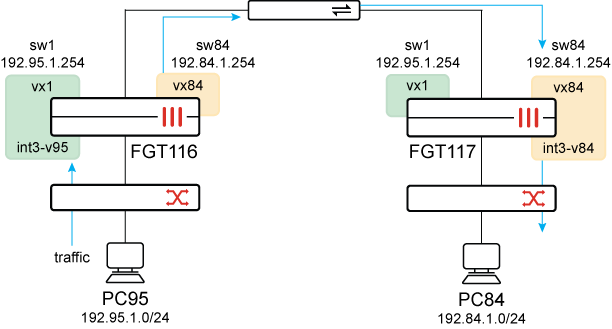
IRB (Integrated Routing and Bridging) in EVPN means that FortiGate can both bridge (L2) and route (L3) traffic inside the Security Fabric configured with VXLAN/EVPN. EVPN IRB allows L2 services for intra-subnet communication and L3 services for inter-subnet communications.
This example uses the following VLAN, subnets, and VNI names:
|
PC |
VLAN |
Subnet |
VNI |
|---|---|---|---|
|
PC95 |
vlan95 |
192.95.1.0/24 |
vni 141 |
|
PC94 |
vlan84 |
192.84.1.0/24 |
vni 84 |
This example describes how to configure FGT116 and FGT117 in the topology to allow inter-subnet routing between vlan95 and vlan84 over the VXLANs between the two FortiGate VTEPs. This allows PC95 to reach PC84 using EVPN over VXLAN.
To configure FGT116:
-
Configure EVPN:
config system evpn edit 1 set import-rt "1:1" set export-rt "1:1" set ip-local-learning enable next edit 84 set import-rt "84:84" set export-rt "84:84" set ip-local-learning enable next end -
Configure VXLAN interfaces:
config system vxlan edit "vx1" set interface "loopback1" set vni 141 set evpn-id 1 set learn-from-traffic enable next edit "vx84" set interface "loopback1" set vni 84 set evpn-id 84 set learn-from-traffic enable next end -
Configure a system interface:
config system interface edit "int3-v95" set vdom "root" set interface "internal3" set vlanid 95 next end -
Configure system switch interfaces and select the VXLAN interface:
config system switch-interface edit "sw1" set vdom "root" set member "int3-v95" "vx1" set intra-switch-policy explicit next edit "sw84" set vdom "root" set member "vx84" set intra-switch-policy explicit next end -
Configure system interfaces:
config system interface edit "sw1" set vdom "root" set ip 192.95.1.254 255.255.255.0 set allowaccess ping ssh telnet next edit "sw84" set vdom "root" set ip 192.84.1.254 255.255.255.0 set allowaccess ping ssh telnet next end -
Configure BGP:
config router bgp
    set as 65010
    set router-id 10.255.255.116
    config neighbor
        edit "10.1.2.117"
            set next-hop-self enable
            set soft-reconfiguration-evpn enable
            set remote-as 65010
            set connect-timer 1
        next
    end
    config network
        edit 1
            set prefix 10.255.255.116 255.255.255.255
        next
    end
end
To configure FGT117:
-
Configure EVPN:
config system evpn edit 1 set import-rt "1:1" set export-rt "1:1" set ip-local-learning enable next edit 84 set import-rt "84:84" set export-rt "84:84" set ip-local-learning enable next end -
Configure VXLAN interfaces:
config system vxlan edit "vx1" set interface "loopback1" set vni 141 set evpn-id 1 set learn-from-traffic enable next edit "vx84" set interface "loopback1" set vni 84 set evpn-id 84 set learn-from-traffic enable next end -
Configure a system switch interface and select the VXLAN interfaces:
config system switch-interface edit "sw1" set vdom "root" set member "vx1" set intra-switch-policy explicit next edit "sw84" set vdom "root" set member "int3-v84" "vx84" set intra-switch-policy explicit next end -
Configure system interfaces:
config system interface edit "sw1" set vdom "root" set ip 192.95.1.254 255.255.255.0 set allowaccess ping ssh telnet next edit "sw84" set vdom "root" set ip 192.84.1.254 255.255.255.0 set allowaccess ping ssh telnet next end -
Configure BGP:
config router bgp
    set as 65010
    set router-id 10.255.255.117
    config neighbor
        edit "10.1.2.116"
            set next-hop-self enable
            set soft-reconfiguration-evpn enable
            set remote-as 65010
            set connect-timer 1
        next
    end
    config network
        edit 1
            set prefix 10.255.255.117 255.255.255.255
        next
    end
end
To verify:
-
On FGT116, view the routing table. The FortiGate learned both the subnet of vlan95 and vlan84:
# get router info routing-table all Codes: K - kernel, C - connected, S - static, R - RIP, B - BGP O - OSPF, IA - OSPF inter area N1 - OSPF NSSA external type 1, N2 - OSPF NSSA external type 2 E1 - OSPF external type 1, E2 - OSPF external type 2 i - IS-IS, L1 - IS-IS level-1, L2 - IS-IS level-2, ia - IS-IS inter area V - BGP VPNv4, E - BGP EVPN * - candidate default Routing table for VRF=0 S* 0.0.0.0/0 [10/0] via 172.18.18.1, wan1, [1/0] C 10.1.2.0/24 is directly connected, wan2 C 10.255.255.116/32 is directly connected, loopback1 B 10.255.255.117/32 [200/0] via 10.1.2.117 (recursive is directly connected, wan2), 20:28:32, [1/0] C 172.18.18.0/24 is directly connected, wan1 C 192.84.1.0/24 is directly connected, sw84 C 192.95.1.0/24 is directly connected, sw1 C 192.96.0.0/16 is directly connected, int3-v96 -
Look at the L2 EVPN table for VNI 84, FGT116 has learned the MAC address for PC84.
The MAC address for PC84 is 00:0c:29:da:ca:07 84.
# get l2vpn evpn table 84

EVPN instance 84
 Broadcast domain VNI 84 TAGID 0

  EVPN MAC table:
  MAC               VNI      Remote Addr     Binded Address
  00:0c:29:da:ca:07 84       10.255.255.117  -
  00:11:92:d4:5e:8f 84       10.255.255.117  -
  04:d5:90:b1:9d:e8 84       10.255.255.117  -
  6a:a5:45:75:d5:65 84       10.255.255.117  -

  EVPN Local MAC table:
  "Inactive" means this MAC/IP pair will not be sent to peer.
  Flag code: S - Static, F - FDB, L - Switch local MAC, G - Default Gateway.
  Trailing * means HA
  MAC               Flag Status   Binded Address
  02:4c:63:08:3d:39 LG   Inactive 192.84.1.254
                    L    Active   -

  EVPN Local IP table:
  Address         MAC
  192.84.1.254    02:4c:63:08:3d:39

  EVPN PEER table:
  VNI      Remote Addr     Binded Address
  84       10.255.255.117  10.255.255.117
Type-5 route example
Instead of advertising MAC/IP bindings used in type-2 routes, type-5 EVPN routes advertise IP prefixes (subnets), allowing EVPN to carry L3 VPN routes across the Security Fabric configured with VXLAN to provide more than only L2 reachability.
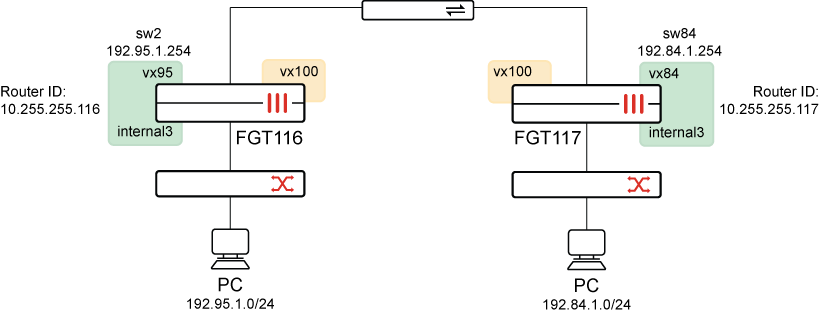
This example uses the following VLAN and VNI names and IDs:
|
PC and L3 instance |
VLAN |
VNI |
|---|---|---|
|
PC95 |
vlan95 |
vni 95 |
|
PC94 |
vlan84 |
vni 84 |
|
L3 instance |
- |
vni 100 |
This example describes how to configure FGT116 and FGT117 in the topology. It also describes how to verify the configuration.
To configure FGT116:
-
Configure EVPN:
config system evpn edit 95 set import-rt "95:95" set export-rt "95:95" set l3-instance 100 next edit 100 set type ipvrf set rd "100:100" set import-rt "100:100" set export-rt "100:100" set interface "loopback1" next end -
Configure VXLAN interfaces:
config system vxlan edit "vx95" set vni 95 set evpn-id 95 set learn-from-traffic enable next edit "vx100" set vni 100 set evpn-id 100 next end -
Configure the system switch interface:
config system switch-interface edit "sw2" set vdom "root" set member "vx95" "internal3" set intra-switch-policy explicit next end -
Configure the system interface:
config system interface edit "sw2" set vdom "root" set ip 192.95.1.254 255.255.0.0 set allowaccess ping set type switch next end -
Configure BGP:
config router bgp
    set as 65010
    set router-id 10.255.255.116
    config neighbor
        edit "10.1.2.117"
            set next-hop-self enable
            set soft-reconfiguration-evpn enable
            set remote-as 65010
            set connect-timer 1
        next
    end
    config network
        edit 1
            set prefix 10.255.255.116 255.255.255.255
        next
    end
    config redistribute "connected"
        set status evpn enable
    end
end
To configure FGT117:
-
Configure EVPN:
config system evpn edit 100 set type ipvrf set rd "100:100" set import-rt "100:100" set export-rt "100:100" set interface "loopback1" next edit 84 set import-rt "84:84" set export-rt "84:84" set l3-instance 100 next end -
Configure VXLAN interfaces:
config system vxlan edit "vx84" set vni 84 set evpn-id 84 set learn-from-traffic enable next edit "vx100" set vni 100 set evpn-id 100 set learn-from-traffic enable next end -
Configure the system switch interface:
config system switch-interface edit "sw84" set vdom "root" set member "vx84" "internal3" set intra-switch-policy explicit next end -
Configure the system interface:
config system interface
    edit "sw84"
        set vdom "root"
        set ip 192.84.1.254 255.255.0.0
        set allowaccess ping
        set type switch
    next
end
To verify:
-
On FGT117, get router info for the BGP EVPN network:
Type-5 routes are in bold.
FGT117# get router info bgp evpn network <string> L2VPN EVPN prefix FGT117# get router info bgp evpn network Network Next Hop Metric LocPrf Weight RouteTag Path Route Distinguisher: 100:100 (Default for VRF 0) *> [5][0][16][192.84.0.0]/72 10.255.255.117 0 100 32768 0 ? <-/1> *> [5][0][16][192.95.0.0]/72 10.255.255.116 0 100 0 0 ? <-/1> *> [5][0][16][192.96.0.0]/72 10.255.255.116 0 100 0 0 ? <-/1> * [5][0][16][192.96.0.0]/72 10.255.255.117 0 100 32768 0 ? <-/-> *> [5][0][24][10.1.2.0]/72 10.255.255.116 0 100 0 0 ? <-/1> * [5][0][24][10.1.2.0]/72 10.255.255.117 0 100 32768 0 ? <-/-> *> [5][0][24][172.18.18.0]/72 10.255.255.116 0 100 0 0 ? <-/1> * [5][0][24][172.18.18.0]/72 10.255.255.117 0 100 32768 0 ? <-/-> *> [5][0][32][10.255.255.116]/72 10.255.255.116 0 100 0 0 ? <-/1> *> [5][0][32][10.255.255.117]/72 10.255.255.117 0 100 32768 0 ? <-/1> Network Next Hop Metric LocPrf Weight RouteTag Path Route Distinguisher: 100:100 (received from VRF 0) *>i[5][0][16][192.95.0.0]/72 10.255.255.116 0 100 0 0 ? <-/1> *>i[5][0][16][192.96.0.0]/72 10.255.255.116 0 100 0 0 ? <-/1> *>i[5][0][24][10.1.2.0]/72 10.255.255.116 0 100 0 0 ? <-/1> *>i[5][0][24][172.18.18.0]/72 10.255.255.116 0 100 0 0 ? <-/1> *>i[5][0][32][10.255.255.116]/72 10.255.255.116 0 100 0 0 ? <-/1> Network Next Hop Metric LocPrf Weight RouteTag Path Route Distinguisher: 0.0.0.0:84 (Default for VRF 0) *> [2][0][48][00:0c:29:da:ca:07][0]/72 10.255.255.117 0 100 32768 0 i <-/1> *> [2][0][48][00:11:92:d4:5e:8f][0]/72 10.255.255.117 0 100 32768 0 i <-/1> *> [2][0][48][04:d5:90:b1:9d:e8][0]/72 10.255.255.117 0 100 32768 0 i <-/1> *> [2][0][48][0e:61:aa:b2:bb:c3][0]/72 10.255.255.117 0 100 32768 0 i <-/1> *> [3][0][32][10.255.255.117]/80 10.255.255.117 0 100 32768 0 i <-/1> -
Get router info for the BGP EVPN network:
FGT117# get router info bgp evpn network [5][0][16][192.95.0.0]/72
Route Distinguisher: 100:100 (Default for VRF 0)
BGP routing table entry for [5][0][16][192.95.0.0]/72
  Original VRF 0
  Local
    10.255.255.116 from 10.1.2.116 (10.255.255.116)
      Origin incomplete distance 200 metric 0, localpref 100, valid, internal, evpn, best
      Extended Community: RT:100:100  RMAC:d2:22:98:41:e5:ba
      RD [100:100]
      LABEL1 100
      Last update: Fri Apr 11 14:08:56 2025

Route Distinguisher: 100:100 (received from VRF 0)
BGP routing table entry for [5][0][16][192.95.0.0]/72
  Original VRF 0
  Local
    10.255.255.116 from 10.1.2.116 (10.255.255.116)
      Origin incomplete distance 200 metric 0, localpref 100, valid, internal, evpn, best
      Extended Community: RT:100:100  RMAC:d2:22:98:41:e5:ba
      RD [100:100]
      LABEL1 100
      Last update: Fri Apr 11 14:08:56 2025