

TPM support for FortiGate-VM
Using the TPM module, the FortiGate can generate, store, and authenticate cryptographic keys. When TPM is enabled on a FortiGate,a master-encryption-password is automatically generated to encrypt sensitive data on the FortiGate such as IPsec VPN preshared keys (PSK), and other passwords and keys as this document lists. In turn, a TPM-generated primary key, which is stored on the TPM, encrypts this master-encryption-passsword.
When the FortiGate backs up configurations to a configuration file, the master-encryption-password encrypts passwords and keys. The primary key also encrypts the master-encryption-password. Therefore, when restoring a config file, if the FortiGate unit does not have TPM enabled, or does not have the same master-encryption-key, you cannot upload the configuration file.
This enhancement adds TPM support to FGT-VM64 platforms. Hypervisors with software TPM emulator packages installed can support the TPM feature in FortiOS. This feature supports KVM/QEMU.
For information about TPM, see Trusted platform module support.
Passwords and keys that the masterencryptionkey can encrypt include:
- Alert email user password
- BGP and other routing-related configurations
- External resource
- FortiGuard proxy password
- FortiToken/FortiToken Mobile seed
- High availability password
- Link Monitor server-side password
- IPsec VPN PSK
- Local certificate private key
- SDN connector server-side password
- Local, LDAP, RADIUS, FSSO, and other user category-related passwords
- Modem/PPPoE
- NST password
- NTP Password
- SNMP
- Wireless security-related password
You cannot restore a private key-encrypted configuration via the FortiOS GUI if private-data-encryption is disabled. The following shows the GUI in this scenario:
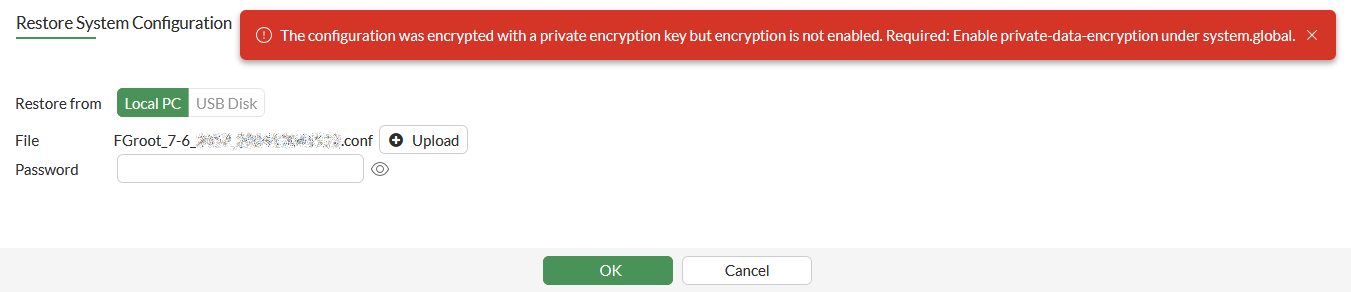
Also, if a configuration backup was taken while the private-data-encryption is enabled, then private-data-encryption is disabled and re-enabled again, the configuration backup will no longer be able to be restored.
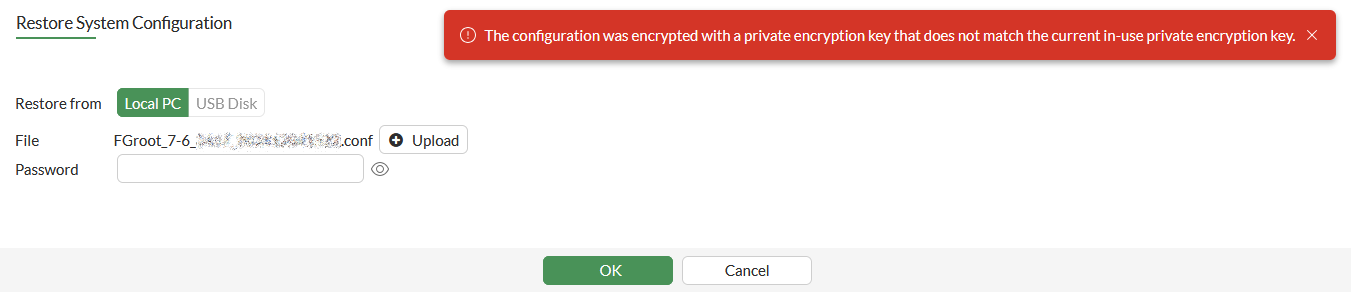
To check if your FortiGate has a TPM:
-
Verify that the required packages are installed on the Linux KVM host:
packet@kvm-s01:~$ lsb_release -a
No LSB modules are available.
Distributor ID:	Ubuntu
Description:	Ubuntu 22.04.1 LTS
Release:	22.04
Codename:	jammy
packet@kvm-s01:~$
packet@kvm-s01:~$ apt list swtpm swtpm-tools qemu libvirt0 virtinst
Listing... Done
libvirt0/jammy-updates,jammy-updates,now 8.0.0-1ubuntu7.1 amd64 [installed,automatic]
qemu/jammy-updates,jammy-updates,now 1:6.2+dfsg-2ubuntu6.3 amd64 [installed]
swtpm-tools/jammy,jammy,now 0.6.3-0ubuntu3 amd64 [installed]
swtpm/jammy,jammy,now 0.6.3-0ubuntu3 amd64 [installed]
virtinst/jammy,jammy,jammy,jammy,now 1:4.0.0-1 all [installed]
-
Import a FGT_VM64_KVM VM to the host. You may want to change the following script to fit your setup:
UUID="$(uuid)"
SKU="FGT_VM64_KVM"
VER=7
NUM=0418
CPU=2
RAM=2048
CONTROLLER="type=ide,index=0"
BUS="ide"
MODEL="virtio"
RND_MAC() { printf '90:6C:AC:%02X:%02X\n' $((RANDOM%256)) $((RANDOM%256)) ;}
MACADDR=$(RND_MAC)
DOMAIN=$SKU-v$VER-b$NUM

qemu-img create -f qcow2 $DOMAIN-log.qcow2 1024M
qemu-img create -f qcow2 $DOMAIN-wanopt.qcow2 1024M

virt-install --connect qemu:///system \
	--name $DOMAIN \
	--uuid $UUID \
	--virt-type kvm \
	--arch=x86_64 \
	--hvm \
	--osinfo linux \
	--os-variant=generic \
	--graphics vnc,listen=0.0.0.0 --noautoconsole \
	--cpu host-passthrough \
	--vcpus=$CPU \
	--ram $RAM \
	--sysinfo host \
	--controller $CONTROLLER \
	--boot hd,menu=on \
	--disk fortios.qcow2,device=disk,bus=$BUS,format=qcow2,cache=none,io=native \
	--disk $DOMAIN-log.qcow2,device=disk,bus=$BUS,format=qcow2,cache=none,io=native \
	--disk $DOMAIN-wanopt.qcow2,device=disk,bus=$BUS,format=qcow2,cache=none,io=native \
	--features kvm_hidden=on,smm=on \
	--tpm backend.type=emulator,backend.version=2.0,model=tpm-tis \
	--network bridge=br1,model=$MODEL,mac=$MACADDR:01 \
	--network bridge=br2,model=$MODEL,mac=$MACADDR:02 \
	--network bridge=br3,model=$MODEL,mac=$MACADDR:03 \
	--network bridge=br4,model=$MODEL,mac=$MACADDR:04 \
	--import
Key pairs are created on the host when the VM with TPM is imported:
packet@kvm-s01:~$ sudo ls -al /var/lib/swtpm-localca/
total 56
drwxr-x---  2 swtpm root  4096 Sep 21 08:09 .
drwxr-xr-x 49 root  root  4096 Sep 19 12:42 ..
-rwxr-xr-x  1 swtpm swtpm    0 Sep 21 08:09 .lock.swtpm-localca
-rw-r--r--  1 swtpm swtpm 5519 Sep 21 08:09 01.pem
-rw-r--r--  1 swtpm swtpm    1 Sep 21 08:19 certserial
-rw-r--r--  1 swtpm swtpm   48 Sep 21 08:09 index.txt
-rw-r--r--  1 swtpm swtpm   21 Sep 21 08:09 index.txt.attr
-rw-r--r--  1 swtpm swtpm    0 Sep 21 08:09 index.txt.old
-rw-r--r--  1 swtpm swtpm 5519 Sep 21 08:09 issuercert.pem
-rw-r--r--  1 swtpm swtpm    3 Sep 21 08:09 serial
-rw-r--r--  1 swtpm swtpm    3 Sep 21 08:09 serial.old
-rw-r-----  1 swtpm swtpm 2459 Sep 21 08:09 signkey.pem
-rw-r--r--  1 swtpm swtpm 1468 Sep 21 08:09 swtpm-localca-rootca-cert.pem
-rw-r-----  1 swtpm swtpm 2459 Sep 21 08:09 swtpm-localca-rootca-privkey.pem
packet@kvm-s01:~$
packet@kvm-s01:~$ sudo cat /var/log/swtpm/libvirt/qemu/FGT_VM64_KVM_v7.0.8_b0418-swtpm.log
Starting vTPM manufacturing as swtpm:swtpm @ Wed 21 Sep 2023 08:09:30 AM PDT
Successfully created RSA 2048 EK with handle 0x81010001.
  Invoking /usr/lib/x86_64-linux-gnu/swtpm/swtpm-localca --type ek --ek b0a85bad0cb79ef673f05f4d3fdb4f65da3171d86a392e60435c18a431a3062aafaadb22e2af06b2522cfcf959ca334ba38684859beb8064f2ba610735cb1dccee1388b9da840a4732d626358e383f0d089592d04dfc15b7e82285f1fa1b4a73bd1bfdbf0d75a02f94f069ae1546d2f28f984046f384f4b35ef1451a191628b2a1329f138dad4e4407d0d03b2f71defc568642fe74d98f0e383e8ac1a5c94b4c30c1a0aae0cfe96bc9316397582cbbb834557a2112aad32d3f1e825e8dfbd569bb9b2492728c425609515568f17d42aee8a5fdaf973a441aaf8bf20762101a9e2507ee0b4e876280e36474b4c10179df18fe066db708d0c11e741a8e722154c9 --dir /var/lib/libvirt/swtpm/eb3c65cc-d354-11ea-a7dc-08002799a4d5/tpm2 --logfile /var/log/swtpm/libvirt/qemu/FGT_VM64_KVM_v7.0.8_b0418-swtpm.log --vmid FGT_VM64_KVM_v7.0.8_b0418:eb3c65cc-d354-11ea-a7dc-08002799a4d5 --tpm-spec-family 2.0 --tpm-spec-level 0 --tpm-spec-revision 164 --tpm-manufacturer id:00001014 --tpm-model swtpm --tpm-version id:20191023 --tpm2 --configfile /etc/swtpm-localca.conf --optsfile /etc/swtpm-localca.options
Creating root CA and a local CA's signing key and issuer cert.
Successfully created EK certificate locally.
  Invoking /usr/lib/x86_64-linux-gnu/swtpm/swtpm-localca --type platform --ek b0a85bad0cb79ef673f05f4d3fdb4f65da3171d86a392e60435c18a431a3062aafaadb22e2af06b2522cfcf959ca334ba38684859beb8064f2ba610735cb1dccee1388b9da840a4732d626358e383f0d089592d04dfc15b7e82285f1fa1b4a73bd1bfdbf0d75a02f94f069ae1546d2f28f984046f384f4b35ef1451a191628b2a1329f138dad4e4407d0d03b2f71defc568642fe74d98f0e383e8ac1a5c94b4c30c1a0aae0cfe96bc9316397582cbbb834557a2112aad32d3f1e825e8dfbd569bb9b2492728c425609515568f17d42aee8a5fdaf973a441aaf8bf20762101a9e2507ee0b4e876280e36474b4c10179df18fe066db708d0c11e741a8e722154c9 --dir /var/lib/libvirt/swtpm/eb3c65cc-d354-11ea-a7dc-08002799a4d5/tpm2 --logfile /var/log/swtpm/libvirt/qemu/FGT_VM64_KVM_v7.0.8_b0418-swtpm.log --vmid FGT_VM64_KVM_v7.0.8_b0418:eb3c65cc-d354-11ea-a7dc-08002799a4d5 --tpm-spec-family 2.0 --tpm-spec-level 0 --tpm-spec-revision 164 --tpm-manufacturer id:00001014 --tpm-model swtpm --tpm-version id:20191023 --tpm2 --configfile /etc/swtpm-localca.conf --optsfile /etc/swtpm-localca.options
Successfully created platform certificate locally.
Successfully created NVRAM area 0x1c00002 for RSA 2048 EK certificate.
Successfully created NVRAM area 0x1c08000 for platform certificate.
Successfully created ECC EK with handle 0x81010016.
  Invoking /usr/lib/x86_64-linux-gnu/swtpm/swtpm-localca --type ek --ek x=d28e9411dbe9aa0ada17c179c0854bebcf2d7ef2f94f42ef92f4e2deb28b568c9ecabd847fd36a974efceb7b0d54893e,y=6b777ed060459c7907eb639665b3e64d9a93e692b7a4c0d20a18acafb6a2ae8e1284e948060266b96c1c23cc883e7634,id=secp384r1 --dir /var/lib/libvirt/swtpm/eb3c65cc-d354-11ea-a7dc-08002799a4d5/tpm2 --logfile /var/log/swtpm/libvirt/qemu/FGT_VM64_KVM_v7.0.8_b0418-swtpm.log --vmid FGT_VM64_KVM_v7.0.8_b0418:eb3c65cc-d354-11ea-a7dc-08002799a4d5 --tpm-spec-family 2.0 --tpm-spec-level 0 --tpm-spec-revision 164 --tpm-manufacturer id:00001014 --tpm-model swtpm --tpm-version id:20191023 --tpm2 --configfile /etc/swtpm-localca.conf --optsfile /etc/swtpm-localca.options
Successfully created EK certificate locally.
Successfully created NVRAM area 0x1c00016 for ECC EK certificate.
Successfully activated PCR banks sha1,sha256 among sha1,sha256,sha384,sha512.
Successfully authored TPM state.
Ending vTPM manufacturing @ Wed 21 Sep 2023 08:09:33 AM PDT
Starting vTPM manufacturing as swtpm:swtpm @ Wed 21 Sep 2023 08:19:44 AM PDT
Successfully created RSA 2048 EK with handle 0x81010001.
  Invoking /usr/lib/x86_64-linux-gnu/swtpm/swtpm-localca --type ek --ek b49eb6d250c2add268fe448098b458f57e3a47719c3fbcc49fb85ecddd937f2f662a238eee0b8814ea3c07a4beeebad5a4ef30fd224e9051fad2ae29256ba7b85b03aef004ec05d2fd1e8139edcb3396b0b2b0a2adfb6b29fd975a9daf385aa3ffc0739fbc2d6b5850b9f424c787074ac56571fc15564b3dfbd847f2c79d310dfea27f2a694bb2c49d3bbb2e2d2a61c29d4214140358dfe23b97562ea8c756da7942e8be3b260da9dfccb26383c4734c76d6e8e47e55055c1a697c1379faf3b41400034b201115fb0913151f0a1d4b963208e5f758ad9c59ee1da145d2bc740069768545085d18a00108915214014b8b99fb47611f8b9260c70a4e2cef3ce1c7 --dir /var/lib/libvirt/swtpm/eb3c65cc-d354-11ea-a7dc-08002799a4d5/tpm2 --logfile /var/log/swtpm/libvirt/qemu/FGT_VM64_KVM_v7.0.8_b0418-swtpm.log --vmid FGT_VM64_KVM_v7.0.8_b0418:eb3c65cc-d354-11ea-a7dc-08002799a4d5 --tpm-spec-family 2.0 --tpm-spec-level 0 --tpm-spec-revision 164 --tpm-manufacturer id:00001014 --tpm-model swtpm --tpm-version id:20191023 --tpm2 --configfile /etc/swtpm-localca.conf --optsfile /etc/swtpm-localca.options
Successfully created EK certificate locally.
  Invoking /usr/lib/x86_64-linux-gnu/swtpm/swtpm-localca --type platform --ek b49eb6d250c2add268fe448098b458f57e3a47719c3fbcc49fb85ecddd937f2f662a238eee0b8814ea3c07a4beeebad5a4ef30fd224e9051fad2ae29256ba7b85b03aef004ec05d2fd1e8139edcb3396b0b2b0a2adfb6b29fd975a9daf385aa3ffc0739fbc2d6b5850b9f424c787074ac56571fc15564b3dfbd847f2c79d310dfea27f2a694bb2c49d3bbb2e2d2a61c29d4214140358dfe23b97562ea8c756da7942e8be3b260da9dfccb26383c4734c76d6e8e47e55055c1a697c1379faf3b41400034b201115fb0913151f0a1d4b963208e5f758ad9c59ee1da145d2bc740069768545085d18a00108915214014b8b99fb47611f8b9260c70a4e2cef3ce1c7 --dir /var/lib/libvirt/swtpm/eb3c65cc-d354-11ea-a7dc-08002799a4d5/tpm2 --logfile /var/log/swtpm/libvirt/qemu/FGT_VM64_KVM_v7.0.8_b0418-swtpm.log --vmid FGT_VM64_KVM_v7.0.8_b0418:eb3c65cc-d354-11ea-a7dc-08002799a4d5 --tpm-spec-family 2.0 --tpm-spec-level 0 --tpm-spec-revision 164 --tpm-manufacturer id:00001014 --tpm-model swtpm --tpm-version id:20191023 --tpm2 --configfile /etc/swtpm-localca.conf --optsfile /etc/swtpm-localca.options
Successfully created platform certificate locally.
Successfully created NVRAM area 0x1c00002 for RSA 2048 EK certificate.
Successfully created NVRAM area 0x1c08000 for platform certificate.
Successfully created ECC EK with handle 0x81010016.
  Invoking /usr/lib/x86_64-linux-gnu/swtpm/swtpm-localca --type ek --ek x=56a69f0827e7f4fc237dffb8202573f910140516ced4d85f62b443b627d6eb3075993a5e757119ed56ab43daa76e5f23,y=c38364e2663bcb8cab92a658c2f4054826ca36d6cff99ea0a7a2ef9f600bf5902902482a67ad90101930ed7f17cc613d,id=secp384r1 --dir /var/lib/libvirt/swtpm/eb3c65cc-d354-11ea-a7dc-08002799a4d5/tpm2 --logfile /var/log/swtpm/libvirt/qemu/FGT_VM64_KVM_v7.0.8_b0418-swtpm.log --vmid FGT_VM64_KVM_v7.0.8_b0418:eb3c65cc-d354-11ea-a7dc-08002799a4d5 --tpm-spec-family 2.0 --tpm-spec-level 0 --tpm-spec-revision 164 --tpm-manufacturer id:00001014 --tpm-model swtpm --tpm-version id:20191023 --tpm2 --configfile /etc/swtpm-localca.conf --optsfile /etc/swtpm-localca.options
Successfully created EK certificate locally.
Successfully created NVRAM area 0x1c00016 for ECC EK certificate.
Successfully activated PCR banks sha1,sha256 among sha1,sha256,sha384,sha512.
Successfully authored TPM state.
Ending vTPM manufacturing @ Wed 21 Sep 2023 08:19:44 AM PDT
-
Log in to FGT_VM64_KVM and check TPM status:
FGT_VM64_KVM # diagnose hardware deviceinfo tpm

TPM capability information of fixed properties:
=========================================================
TPM_PT_FAMILY_INDICATOR:        2.0
TPM_PT_LEVEL:                   0
TPM_PT_REVISION:                164
TPM_PT_DAY_OF_YEAR:             75
TPM_PT_YEAR:                    2021
TPM_PT_MANUFACTURER:            IBM
TPM_PT_VENDOR_STRING:           SW   TPM
TPM_PT_VENDOR_STRING_1 in HEX:  0x53572020
TPM_PT_VENDOR_STRING_2 in HEX:  0x2054504d
TPM_PT_VENDOR_STRING_3 in HEX:  0x00000000
TPM_PT_VENDOR_STRING_4 in HEX:  0x00000000
TPM_PT_VENDOR_TPM_TYPE:         1
TPM_PT_FIRMWARE_VERSION:        8217.4131.22.13878
TPM_PT_FIRMWARE_VERSION in HEX: 0x2019102300163636

TPM_PT_MEMORY:
=========================================================
Shared RAM:                     0 CLEAR
Shared NV:                      1 SET
Object Copied To Ram:           1 SET

TPM_PT_PERMANENT:
=========================================================
Owner Auth Set:                 0 CLEAR
Sendorsement Auth Set:          0 CLEAR
Lockout Auth Set:               0 CLEAR
Disable Clear:                  0 CLEAR
In Lockout:                     0 CLEAR
TPM Generated EPS:              1 SET
FGT_VM64_KVM # diagnose tpm get-property

TPM capability information of fixed properties:
=========================================================
TPM_PT_FAMILY_INDICATOR:        2.0
TPM_PT_LEVEL:                   0
TPM_PT_REVISION:                164
TPM_PT_DAY_OF_YEAR:             75
TPM_PT_YEAR:                    2021
TPM_PT_MANUFACTURER:            IBM
TPM_PT_VENDOR_STRING:           SW   TPM
TPM_PT_VENDOR_STRING_1 in HEX:  0x53572020
TPM_PT_VENDOR_STRING_2 in HEX:  0x2054504d
TPM_PT_VENDOR_STRING_3 in HEX:  0x00000000
TPM_PT_VENDOR_STRING_4 in HEX:  0x00000000
TPM_PT_VENDOR_TPM_TYPE:         1
TPM_PT_FIRMWARE_VERSION:        8217.4131.22.13878
TPM_PT_FIRMWARE_VERSION in HEX: 0x2019102300163636

TPM_PT_MEMORY:
=========================================================
Shared RAM:                     0 CLEAR
Shared NV:                      1 SET
Object Copied To Ram:           1 SET

TPM_PT_PERMANENT:
=========================================================
Owner Auth Set:                 0 CLEAR
Sendorsement Auth Set:          0 CLEAR
Lockout Auth Set:               0 CLEAR
Disable Clear:                  0 CLEAR
In Lockout:                     0 CLEAR
TPM Generated EPS:              1 SET
FGT_VM64_KVM # diagnose tpm get-var-property

TPM capability information of variable properties:

TPM_PT_STARTUP_CLEAR:
=========================================================
Ph Enable:                      1 SET
Sh Enable:                      1 SET
Eh Enable:                      1 SET
Orderly:                        0 CLEAR
FGT_VM64_KVM # diagnose tpm read-clock

Clock info:
=========================================================
Time since the last TPM_Init:
2375158 ms  =  0 y, 0 d, 0 h, 39 min, 35 s, 158 ms

Time during which the TPM has been powered:
2375319 ms  =  0 y, 0 d, 0 h, 39 min, 35 s, 319 ms

TPM Reset since the last TPM2_Clear:            5
Number of times that TPM2_Shutdown:             0
Safe:                                           1 = Yes
FGT_VM64_KVM # diagnose tpm shutdown-prepare

Shutdown works as expected.
FGT_VM64_KVM # diagnose tpm selftest

Successfully tested. Works as expected.
FGT_VM64_KVM # diagnose tpm generate-random-number

Random value:

0x00000000:   0x73  0xF1  0x9F  0x31
FGT_VM64_KVM # diagnose tpm SHA-1 1234567890abcdef1234567890abcdef
1234567890abcdef1234567890abcdef

TPM2_Hash of '1234567890abcdef1234567890abcdef' with SHA-1:

0x00000000:   62  0A  31  15  69  9A  42  2B
0x00000008:   D8  74  DE  31  D3  E6  91  1C
0x00000010:   58  3A  76  75
FGT_VM64_KVM # diagnose tpm SHA-256 1234567890abcdef1234567890abcdef
1234567890abcdef1234567890abcdef

TPM2_Hash of '1234567890abcdef1234567890abcdef' with SHA-256:

0x00000000:   C5  12  D9  2E  35  45  B2  F1
0x00000008:   22  2E  4B  4C  6A  F6  D3  30
0x00000010:   EC  30  02  A0  4B  CA  A4  1D
0x00000018:   F9  CC  2C  49  62  84  96  D6
-
Enable TPM and input the master encryption password. This is an example. Using 0123456789abcdef0123456789abcdef as your private key is not recommended:
FGT_VM64_KVM # exec private-encryption-key sample
Private encryption is not enabled.
Command fail. Return code 7
FGT_VM64_KVM # config system global
FGT_VM64_KVM (global) # set private-data-encryption enable
FGT_VM64_KVM (global) # end
This operation will generate a random private data encryption key!
Previous config files encrypted with the system default key cannot be restored after this operation!
Do you want to continue? (y/n)y
Private data encryption key generation succeeded!
The following shows an example of a successful activation:
FGT_VM64_KVM # exec private-encryption-key sample
B64TEXT: u7oOx1iBjPFu4XLZVq5/RpoZrDJ9htRo6Jjhfts4BaI=
B64HMAC: FHmUhzSyT0IEfyoRnfdTFbY2l0o=
Note the B64TEXT and B64HMAC sample keys. Run the following to verify the feature:
FGT_VM64_KVM # exec private-encryption-key verify u7oOx1iBjPFu4XLZVq5/RpoZrDJ9htRo6Jjhfts4BaI= FHmUhzSyT0IEfyoRnfdTFbY2l0o=
Verification passed.
-
Back up the config:
FGT_VM64_KVM # execute backup config tftp FGVM02TM12345678.conf 172.18.70.161
Please wait...
Connect to tftp server 172.18.70.161 ...
#
Send config file to tftp server OK.
-
Verify that the backup config has private-encryption-key:
packet@1804:/mnt/incoming$ less FGVM02TM12345678.conf
  #config-version=FGVMK6-7.0.8-FW-build0418-220920:opmode=0:vdom=0:user=admin
  #conf_file_ver=2079893748141389
  #buildno=0418
  #global_vdom=1
  #private-encryption-key=oY5GhQK3w0Ddn0EX+8hp6UYpjB4=
  config system global
      set admin-server-cert "Fortinet_Factory"
      set alias "FortiGate-VM64-KVM"
      set hostname "FGT_VM64_KVM"
      set private-data-encryption enable
      set timezone 04
  end