

Configuring an AWS SDN connector using IAM roles
The following summarizes minimum sufficient IAM roles for this deployment to create dynamic address objects from AWS EC2 resources:
{
"Version": "2012-10-17",
"Statement": [
{
"Action": [
"ec2:Describe*"
],
"Resource": "*",
"Effect": "Allow"
}
]
}
For instances running in AWS (on demand or BYOL), you can set up the AWS SDN connector using AWS Identify and Access Management (IAM) credentials.
IAM authentication is available only for FGT-AWS and FGT-AWSONDEMAND platforms.
AWS SDN connectors support dynamic address groups based on AWS Kubernetes (EKS) filters. The following summarizes minimum permissions for this deployment:
{
"Version": "2012-10-17",
"Statement": [
{
"Sid": "VisualEditor0",
"Effect": "Allow",
"Action": [
"ec2:Describe*",
"eks:DescribeCluster",
"eks:ListClusters"
],
"Resource": "*"
}
]
}
Once you have the proper permissions for EKS, you must follow the steps at Managing Users or IAM Roles for your Cluster for EKS to properly pull data from the cluster. The following shows a successful pull of IP addresses from the EKS cluster:
awsd getting IPs from EKS cluster: dchao-cluster (us-west-2), endpoint: https://F57B834C1ADA8ED7FA3CAFB36073D384.gr7.us-west-2.eks.amazonaws.com
kube url: https://F57B834C1ADA8ED7FA3CAFB36073D384.gr7.us-west-2.eks.amazonaws.com/api/v1/services
kube host: F57B834C1ADA8ED7FA3CAFB36073D384.gr7.us-west-2.eks.amazonaws.com:443:100.21.79.123
kube url: https://F57B834C1ADA8ED7FA3CAFB36073D384.gr7.us-west-2.eks.amazonaws.com/api/v1/nodes
kube host: F57B834C1ADA8ED7FA3CAFB36073D384.gr7.us-west-2.eks.amazonaws.com:443:100.21.79.123
k8s node ip: 172.31.34.72, nodename: ip-172-31-34-72.us-west-2.compute.internal
cluster: dchao-cluster, region: us-west-2, zone: us-west-2b
k8s node ip: 18.237.109.243, nodename: ip-172-31-34-72.us-west-2.compute.internal
cluster: dchao-cluster, region: us-west-2, zone: us-west-2b
kube url: https://F57B834C1ADA8ED7FA3CAFB36073D384.gr7.us-west-2.eks.amazonaws.com/api/v1/pods
kube host: F57B834C1ADA8ED7FA3CAFB36073D384.gr7.us-west-2.eks.amazonaws.com:443:100.21.79.123
k8s pod ip: 172.31.34.72, podname: aws-node-7kbm5, namespace: kube-system
cluster: dchao-cluster, region: us-west-2, zone: us-west-2b
k8s pod ip: 172.31.45.127, podname: coredns-6f647f5754-85m88, namespace: kube-system
cluster: dchao-cluster, region: us-west-2, zone: us-west-2b
k8s pod ip: 172.31.38.147, podname: coredns-6f647f5754-87ch7, namespace: kube-system
cluster: dchao-cluster, region: us-west-2, zone: us-west-2b
k8s pod ip: 172.31.34.72, podname: kube-proxy-ks9pw, namespace: kube-system
cluster: dchao-cluster, region: us-west-2, zone: us-west-2b
After configuring the above, follow the instructions in the FortiOS Cookbook to complete configuration.
To configure AWS SDN connector using the GUI:
- Configure the AWS SDN connector:
- Go to Security Fabric > External Connectors.
- Click Create New, and select Amazon Web Services (AWS).
- Enable Use metadata IAM.
- Configure other fields as desired.
- Click OK.
- Create a dynamic firewall address for the configured AWS SDN connector:
- Go to Policy & Objects > Addresses.
- Click Create New, then select Address.
- Configure the address:
From the Type dropdown list, select Dynamic.
From the Sub Type dropdown list, select Fabric Connector Address.
From the SDN Connector dropdown list, select the connector that you created.
In the Filter field, configure the desired filter, such as
SecurityGroupId=sg-05f4749cf84267548orK8S_Region=us-west-2.Configure other fields as desired, then click OK.
- Ensure that the AWS SDN connector resolves dynamic firewall IP addresses:
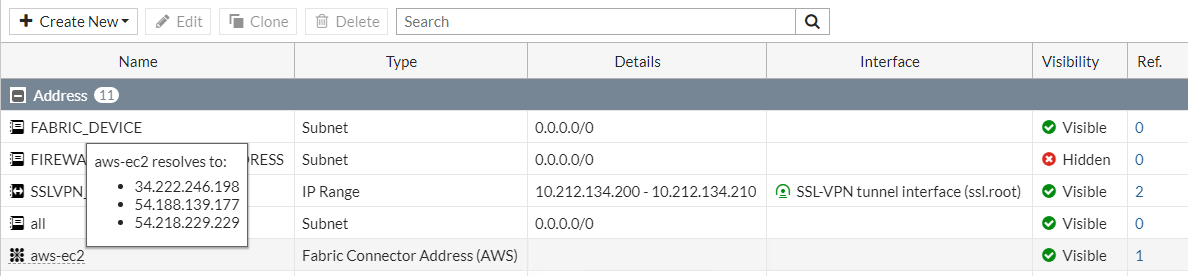
- Go to Policy & Objects > Addresses.
- Hover over the address created in step 2 to see a list of IP addresses for instances that belong to the security group configured in step 2.
To configure AWS SDN connector using CLI commands:
- Configure the AWS connector:
config system sdn-connector
edit "aws1"
set status enable
set type aws
set use-metadata-iam enable
set update-interval 60
next
end
- Create a dynamic firewall address for the configured AWS SDN connector with the supported filter:
Dynamic firewall address IPs are resolved by the SDN connector.
config firewall address
edit "aws-ec2"
set type dynamic
set sdn "aws1"
set filter "SecurityGroupId=sg-05f4749cf84267548"
set sdn-addr-type public
next
edit "aws-eks1"
set type dynamic
set sdn "aws1"
set filter "K8S_Region=us-west-2"
next
end
- Confirm that the AWS SDN connector resolves dynamic firewall IP addresses using the configured filter:
config firewall address
edit "aws-ec2"
set type dynamic
set sdn "aws1"
set filter "SecurityGroupId=sg-05f4749cf84267548"
set sdn-addr-type public
config list
edit "34.222.246.198"
next
edit "54.188.139.177"
next
edit "54.218.229.229"
next
end
next
edit "aws-eks1"
set type dynamic
set sdn "aws1"
set filter "K8S_Region=us-west-2"
config list
edit "192.168.114.197"
next
edit "192.168.167.20"
next
edit "192.168.180.72"
next
edit "192.168.181.186"
next
edit "192.168.210.107"
next
end
next
end