

Settings
In Settings, you can view the hub locations and the reserved subnet. You can modify settings as needed.
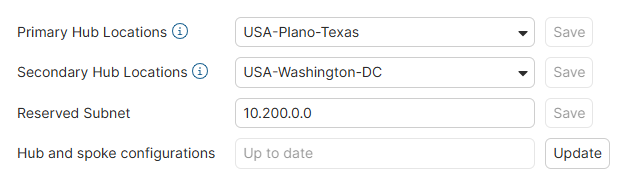
SD-WAN overlay uses a reserved subnet to provide IP addresses for the overlay network. Customers should not use this reserved subnet in their networks.
By default, SD-WAN overlay has reserved 10.200.0.0/16 for overlay IP addressing of all spokes, and you should not use this network in either the LAN subnets or WAN network. If you have a network conflict, you can modify the reserved subnet in the Settings within FortiGate Cloud.
To edit settings:
- Go to SDWAN Overlay > Settings.
- Modify the following settings as desired:
Setting
Description
Primary Hub Locations
Modify the primary location using the dropdown menus. Click Save.
Secondary Hub Locations
Modify the secondary location using the dropdown menus. Click Save.
Reserved Subnet
Assign a different subnet if you have a network conflict with the default reserved subnet. Click Save.
Hub and spoke configurations
Push changes to the configuration of the hub and spokes. Confirm in the warning dialog.