

Deployment in Static Route Mode
The following example shows how the FortiADC connects with the Pod via the pod network when the service type is ClusterIP.
OpenShift Project is the same as Kubernetes Namespace but with additional features.
Create the Secret
In OpenShift Container Platform 4, resources are isolated between projects. Each new project requires a new secret to log into FortiADC.
oc create secret generic fad-login --from-literal=username=<FortiADC-username> --from- literal=password=<FortiADC-password> -n <project-name>
Deploy the Pod and Service
Deploy the deployment fad_app/.
The YAML file can be downloaded from here: https://github.com/fortinet/fortiadc-kubernetes-controller/tree/main/route_examples/fad_app/
oc apply –f fad_app
Check the result:
[root@ocpsandy openshift]# oc status
In project fadgw on server https://api.ocp4.ocpsandy.com:6443

svc/fad-app - 172.30.248.97:1234
  deployment/fad-app deploys hsandy123/simpleserver:1.0.0-002
    deployment #1 running for 23 hours - 3 pods
Note that the service can only expose one port. FortiADC Kubernetes Controller in OpenShift does not support services with multiple ports exposed.
Deploy the Routes
Deploy an unsecured Route with path basic_route_with_path.yaml.
apiVersion: route.openshift.io/v1
kind: Route
metadata:
  labels:
      name: fad-app
  name: fad-demo-app
  namespace: fadgw
  annotations: {
        "ingress-controller" : "fadc-ingress-controller",
        "fortiadc-ip" : "172.23.133.171",
        "fortiadc-login" : "fad-login",
        "fortiadc-vdom" : "root",
        "fortiadc-ctrl-log" : "enable",
        "virtual-server-ip" : "10.0.0.104",
        "virtual-server-interface" : "port2",
        "virtual-server-port" : "443",
        "load-balance-method" : "LB_METHOD_LEAST_CONNECTION",
        "load-balance-profile" : "LB_PROF_HTTPS"
  }
spec:
    host: testfad.com
    path: "/info"
    port:
        targetPort: 1234-tcp
    to:
        kind: Service
        name: fad-app
Deploy the Routes with the following command.
oc apply –f fad_route.yaml
Describe Routes.
[root@ocpexp openshift]# oc describe route fad-demo-app
Name:           fad-demo-app
Namespace:      fadgw
Created:        54 seconds ago
Labels:         name=fad-app
Annotations:    fortiadc-ctrl-log=enable
                fortiadc-ip=172.23.133.171
                fortiadc-login=fad-login
                fortiadc-vdom=root
                ingress-controller=fadc-ingress-controller
                load-balance-method=LB_METHOD_LEAST_CONNECTION
                load-balance-profile=LB_PROF_HTTPS
                virtual-server-interface=port2
                virtual-server-ip=10.0.0.104
                virtual-server-port=443
Requested Host:         testfad.com
                           exposed on router default (host router-default.apps.ocp411.ocpexp.com) 54 seconds ago
Path:                   /info
TLS Termination:        <none>
Insecure Policy:        <none>
Endpoint Port:          1234-tcp

Service:        fad-app
Weight:         100 (100%)
Endpoints:      10.128.0.139:1234, 10.128.0.140:1234, 10.128.0.82:1234
Check the deployed Routes in FortiADC
After deploying the Routes, you can check the corresponding configuration and monitor in FortiADC to ensure the entries have been created successfully.
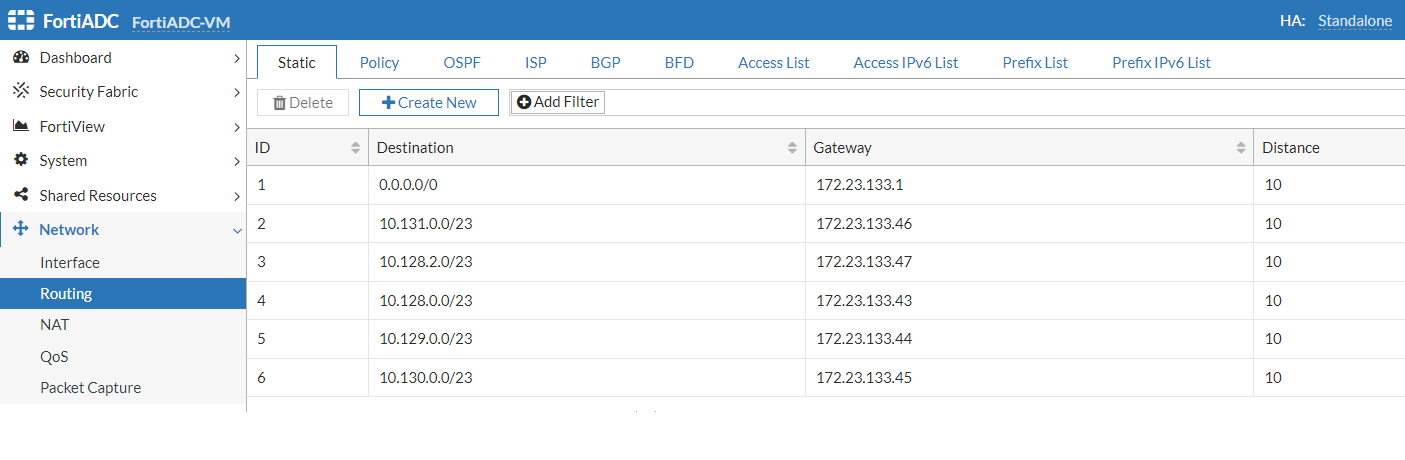
Static Routing
To check that the static Route entry for each node has been added successfully, go to Network > Routing > Static tab.
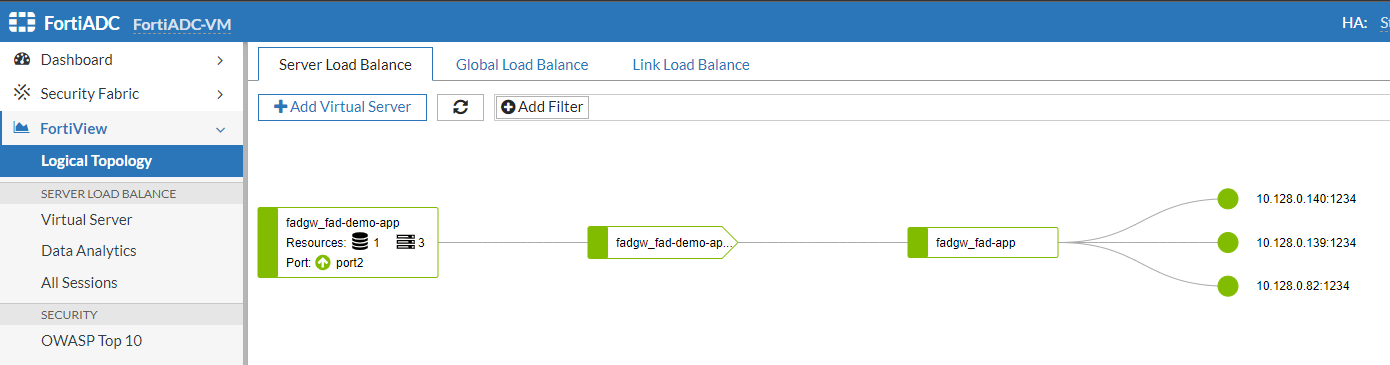
FortiView
Check the deployed Routes in the FortiView > Logical Topology > Server Load Balance tab.
Try to access testfad.com with the browser.

Update or delete the Routes
To update Routes, you can edit the YAML file and apply the file again. This is similar to the process for updating and deleting Kubernetes Ingress. Alternatively, you can just edit the Routes.
oc edit route fad-demo-app
Delete the Routes with the following command.
oc delete route fad-demo-app
Update Endpoints and EndpointSlices
Starting from version 3.0.0, the FortiADC Kubernetes Controller uses the EndpointSlice resource (discovery.k8s.io/v1) instead of the legacy Endpoint (v1) API, in alignment with Kubernetes’ updated service discovery framework.
In OpenShift, Endpoints and EndpointSlices are automatically generated to store the IP addresses and ports of Pods associated with a Service.
You can view the EndpointSlice resources with the following command.
[root@ocpexp openshift]# oc get endpointslices
NAME        ADDRESSTYPE  PORTS           ENDPOINTS                 AGE
fad-app-lrfcm   IPv4      1234 10.128.0.94,10.128.0.95,10.128.0.93 10m
Since FortiADC accesses the Pod via the pod network, FortiADC Kubernetes Controller monitors the Endpoints with the ClusterIP service instead of Nodes.
To refresh the Endpoint and EndpointSlice information, modify the number of replicas in the deployment.
You can update the deployment file and re-apply it, or edit the deployment directly.
oc edit deployment fad-app