
Fortinet white logo
Fortinet white logo

Installation in VxLAN Mode
Installation in VxLAN Mode

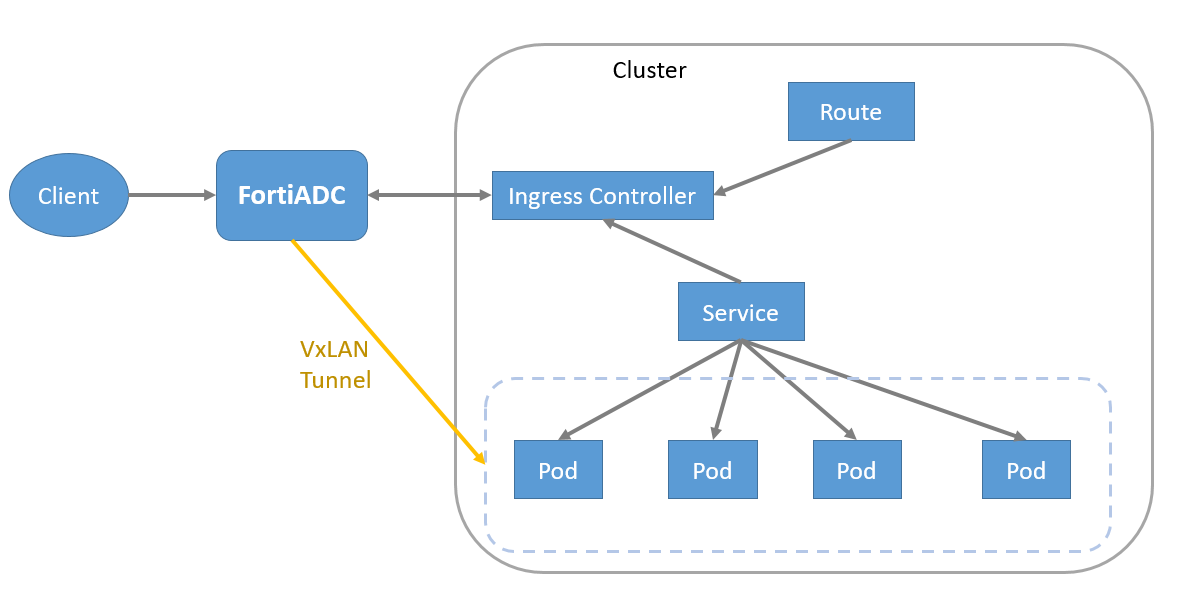
FortiADC Kubernetes Controller with OpenShift on VxLAN mode requires integration with an OpenShift Cluster utilizing the OVN-Kubernetes CNI, and it must have hybrid networking enabled.

Supported OpenShift version

The FortiADC OpenShift connector with VxLAN supports OpenShift Container Platform versions 4.7 to 4.12.x. FortiADC Kubernetes Controller needs to work with OpenShift OVN-Kubernetes CNI and hybrid networking enabled.

Installing FortiADC Kubernetes Controller in OpenShift with VxLAN

Install FortiADC Kubernetes Controller on OpenShift Container Platform 4 using Helm Charts.

Currently, only Helm 3 (version 3.6.3 or later) is supported.

Helm Charts ease the installation of FortiADC Kubernetes Controller in the OpenShift cluster. By using the Helm 3 installation tool, most of the OpenShift objects required for FortiADC Kubernetes Controller can be deployed in one simple command.

The OpenShift objects required for FortiADC Kubernetes Controller are listed below:

OpenShift object

Description

Deployment By configuring the replica and pod template in the OpenShift deployment, the deployment ensures FortiADC Kubernetes Controller provides a non-terminated service.
Service Account The service account is used in FortiADC Kubernetes Controller.
Cluster Role A cluster role defines the permission on the OpenShift cluster-scoped Routes-related objects.
Cluster Role Binding The cluster role is bound to the service account used for FortiADC Kubernetes Controller, allowing FortiADC Kubernetes Controller to access and operate the OpenShift cluster-scoped Routes-related objects.
Ingress Class The IngressClass "fadc-ingress-controller" is created for FortiADC Kubernetes Controller to identify the Ingress resource. If the Ingress is defined with the IngressClass "fadc-ingress-controller", FortiADC Kubernetes Controller will manage this Ingress resource as FortiADC Kubernetes Controller also supports Ingress in the OpenShift cluster.

The Helm Chart is composed of a collection of files that describe the related set of OpenShift files required by FortiADC Kubernetes Controller; one of which is the values.yaml file that provides the default configuration for deploying the OpenShift objects listed above.

Below lists parts of the values in the values.yaml file.

# Default values for fadc-k8s-ctrl.
# This is a YAML-formatted file.
# Declare variables to be passed into your templates.
# FortiADC Kubernetes Controller image from Dockerhub.com
image:
  repository: fortinet/fortiadc-ingress
  pullPolicy: IfNotPresent
  tag: "3.1.0"

serviceAccount:
  create: true
  annotations: {}
  name: "fortiadc-ingress"
tolerations:
  - effect: "NoExecute"
    key: "node.kubernetes.io/not-ready"
    operator: "Exists"
    tolerationSeconds: 30
  - effect: "NoExecute"
    key: "node.kubernetes.io/unreachable"
    operator: "Exists"
    tolerationSeconds: 30
# Define Ingress Class for FortiADC Kubernetes Controller
controller:
  ingressClassResource:
    name: "fadc-ingress-controller"
    enabled: true
    default: true
    controllerValue: "fortinet.com/fadc-ingress-controller"
# You can decide parameters defined in annotation of Ingress to be optional or mandatory.
# FortiADC Kubernetes Controller will check the parameter if it marks mandatory.
parameters:
  virtualServerNatSrcPool : "optional"
  virtualServerWafProfile : "optional"
  virtualServerAvProfile : "optional"
  virtualServerDosProfile : "optional"
  virtualServerCaptchaProfile : "optional"
  virtualServerPersistence : "optional"
  virtualServerFortiGSLB : "optional"
  openshiftRouteSupport: "no"
  enableStaticRouteSupport: "no"		
webhook: 
  useCertManager: true
  service:
    name: fad-webhook 
    port: 443  
    targetPort: 8443 
  tlsSecretName: webhook-tls 
  validatingWebhookName: validator.fadk8sctrl.fortinet.com 
  mutatingWebhookName: mutator.fadk8sctrl.fortinet.com  
  rules:  
  validating:  
    - name: validate-vs.fadk8sctrl.fortinet.com  
    group: fadk8sctrl.fortinet.com  
    version: v1alpha2  
    resources:  
      - virtualservers 
    scope: "Namespaced"  
    path: /validate-vs  
    - name: validate-ingress.fadk8sctrl.fortinet.com  
    group: networking.k8s.io  
    version: v1  
    resources:  
      - ingresses  
    scope: "Namespaced"
    path: /validate-ingress  
  mutating: 
    - name: mutate-vs.fadk8sctrl.fortinet.com  
    group: fadk8sctrl.fortinet.com  
    version: v1alpha2 
    resources:  
      - virtualservers    
    scope: "Namespaced" 
    path: /mutate-vs  

In some scenarios, you may want to override some of the values included in the values.yaml, such as for the toleration seconds or parameter properties. As the values.yaml file is packed in the Helm Chart package, you can override the values when installing or upgrading the Helm Chart (see Install the Helm Chart and Upgrade the Helm Chart). For more details on the parameters, see Configuration parameters.

Install the Helm Chart

curl -L https://mirror.openshift.com/pub/openshift-v4/clients/helm/latest/helm-linux-amd64 -o /usr/local/bin/helm
chmod +x /usr/local/bin/helm
helm version

For more details, see the OpenShift documentation on Helm Chart installation:
https://docs.openshift.com/container-platform/4.9/applications/working_with_helm_charts/installing-helm.html

Install cert-manager.io

Starting with FortiADC Kubernetes Controller version 3.1, a webhook server is introduced. A cert-manager installation is required to generate the self-signed certificate used for the TLS connection between the Kubernetes API server and the webhook server.

Before installing FortiADC Kubernetes Controller 3.1 or later, or upgrading to version 3.1 or later, install cert-manager by following the official installation guide at https://cert-manager.io/docs/installation/.

Compatibility has been verified with cert-manager v1.19.1.

helm repo add jetstack https://charts.jetstack.io  
helm repo update  
helm install --debug cert-manager jetstack/cert-manager \  
    --namespace cert-manager \  
    --create-namespace \  
    --version v1.19.1 \ 
    --set crds.enabled=true  

Get Repo Information

To get the repository information:

helm repo add fortiadc-kubernets-controller https://fortinet.github.io/fortiadc-kubernets-controller/
helm repo update

Installation parameters

To support Routes in OpenShift Container Platform, the openshiftRouteSupport parameter is added for installation. The default value of openshiftRouteSupport is no.

Starting from version 3.0.0, the security level of the FortiADC Kubernetes Controller has been increased. When deploying in OpenShift environments, you must set openshiftRouteSupport to yes to ensure a secure installation and prevent installation failure.

Install and Update the Helm Chart

You can specify a particular OpenShift Project in which FortiADC Kubernetes Controller will be deployed. Note that OpenShift Project is equal to Kubernetes Namespace.

By default, if no OpenShift Project is specified, the default project would be "default". The RELEASE_NAME is the name you give to this chart installation.

Try with the following command to enable OpenShift Routes support in FortiADC Kubernetes Controller.

helm install --set parameters.openshiftRouteSupport="yes" --namespace [OpenShift Project] [RELEASE_NAME] fortiadc-kubernetes-controller/fadc-k8s-ctrl

In the example below, the Helm chart is installed with the release name “first-release” in the OpenShift project “fortiadc-ingress”.

helm install --set parameters.openshiftRouteSupport="yes" \
--namespace fortiadc-ingress first-release fortiadc-kubernetes-controller/fadc-k8s-ctrl

If you want to override values in the Helm Chart, you can add --set flags in the command. In the example below, you can set the virtualServerWafProfile parameter as mandatory.

helm install --set parameters.openshiftRouteSupport="yes" \
--set parameters.virtualServerWafProfile="mandatory" \
--namespace fortiadc-ingress first-release fortiadc-kubernetes-controller/fadc-k8s-ctrl

Moreover, you can create a new project and deploy FortiADC Kubernetes Controller within the project at the same time.

helm install --set parameters.openshiftRouteSupport="yes" --namespace fortiadc-ingress --create-namespace first-release fortiadc-kubernetes-controller/fadc-k8s-ctrl

Upgrade the Helm Chart

Starting with version 3.0.0, the Helm chart repository was renamed to fortiadc-kubernetes-controller.

When upgrading from version 2.x to 3.0.0 or later, remove the old Helm repository and add the new repository before continuing with the upgrade.

helm repo remove fortiadc-ingress
helm repo add fortiadc-kubernetes-controller \
https://fortinet.github.io/fortiadc–kubernetes–controller/
helm repo update

To upgrade the Helm chart, add the required parameter.

helm upgrade --set parameters.openshiftRouteSupport="yes" [RELEASE_NAME] fortiadc-kubernetes-controller/fadc-k8s-ctrl

In the example below, you can upgrade the helm chart with the release name “first-release”.

helm upgrade --set parameters.openshiftRouteSupport="yes" \
first-release fortiadc-kubernetes-controller/fadc-k8s-ctrl

Using the --debug option, you can check the Helm debug information “USER-SUPPLIED VALUES” to check if you have all the value set as you need.

Release "first-release" has been upgraded. Happy Helming!
NAME: first-release
LAST DEPLOYED: Fri Aug  4 13:32:10 2023
NAMESPACE: fortiadc-ingress
STATUS: deployed
REVISION: 2
TEST SUITE: None
USER-SUPPLIED VALUES:
parameters:
  virtualServerWafProfile: mandatory
  openshiftRouteSupport: yes

Check the Installation

The helm history command shows the installation information.

[root@bastion ~]# helm history first-release
REVISION        UPDATED                               STATUS          CHART                       APP VERSION     DESCRIPTION
1                      Fri Aug  4 13:31:20 2023        superseded      fadc-k8s-ctrl-2.0.0     2.0.0           Install complete

Check if FortiADC Kubernetes Controller is installed correctly.

[root@ocpexp openshift]# oc get deployment
NAME                                 READY   UP-TO-DATE   AVAILABLE   AGE
first-release-fadc-k8s-ctrl   1/1        1                      1                   4d17h

Check the FortiADC Kubernetes Controller log.

[root@ocpexp openshift]# oc logs first-release-fadc-k8s-ctrl-7cdcfdbdf6-fds6h 
Stopping fortiadc Kubernetes controller
Starting fortiadc Kubernetes controller
time="2024-06-05T05:42:38Z" level=info msg="Starting FortiADC Kubernetes controller"
time="2024-06-05T05:42:39Z" level=info msg="Routes Monitor Enabled"

Installation in VxLAN Mode

Installation in VxLAN Mode

FortiADC Kubernetes Controller with OpenShift on VxLAN mode requires integration with an OpenShift Cluster utilizing the OVN-Kubernetes CNI, and it must have hybrid networking enabled.

Supported OpenShift version

The FortiADC OpenShift connector with VxLAN supports OpenShift Container Platform versions 4.7 to 4.12.x. FortiADC Kubernetes Controller needs to work with OpenShift OVN-Kubernetes CNI and hybrid networking enabled.

Installing FortiADC Kubernetes Controller in OpenShift with VxLAN

Install FortiADC Kubernetes Controller on OpenShift Container Platform 4 using Helm Charts.

Currently, only Helm 3 (version 3.6.3 or later) is supported.

Helm Charts ease the installation of FortiADC Kubernetes Controller in the OpenShift cluster. By using the Helm 3 installation tool, most of the OpenShift objects required for FortiADC Kubernetes Controller can be deployed in one simple command.

The OpenShift objects required for FortiADC Kubernetes Controller are listed below:

OpenShift object

Description

Deployment By configuring the replica and pod template in the OpenShift deployment, the deployment ensures FortiADC Kubernetes Controller provides a non-terminated service.
Service Account The service account is used in FortiADC Kubernetes Controller.
Cluster Role A cluster role defines the permission on the OpenShift cluster-scoped Routes-related objects.
Cluster Role Binding The cluster role is bound to the service account used for FortiADC Kubernetes Controller, allowing FortiADC Kubernetes Controller to access and operate the OpenShift cluster-scoped Routes-related objects.
Ingress Class The IngressClass "fadc-ingress-controller" is created for FortiADC Kubernetes Controller to identify the Ingress resource. If the Ingress is defined with the IngressClass "fadc-ingress-controller", FortiADC Kubernetes Controller will manage this Ingress resource as FortiADC Kubernetes Controller also supports Ingress in the OpenShift cluster.

The Helm Chart is composed of a collection of files that describe the related set of OpenShift files required by FortiADC Kubernetes Controller; one of which is the values.yaml file that provides the default configuration for deploying the OpenShift objects listed above.

Below lists parts of the values in the values.yaml file.

# Default values for fadc-k8s-ctrl.
# This is a YAML-formatted file.
# Declare variables to be passed into your templates.
# FortiADC Kubernetes Controller image from Dockerhub.com
image:
  repository: fortinet/fortiadc-ingress
  pullPolicy: IfNotPresent
  tag: "3.1.0"

serviceAccount:
  create: true
  annotations: {}
  name: "fortiadc-ingress"
tolerations:
  - effect: "NoExecute"
    key: "node.kubernetes.io/not-ready"
    operator: "Exists"
    tolerationSeconds: 30
  - effect: "NoExecute"
    key: "node.kubernetes.io/unreachable"
    operator: "Exists"
    tolerationSeconds: 30
# Define Ingress Class for FortiADC Kubernetes Controller
controller:
  ingressClassResource:
    name: "fadc-ingress-controller"
    enabled: true
    default: true
    controllerValue: "fortinet.com/fadc-ingress-controller"
# You can decide parameters defined in annotation of Ingress to be optional or mandatory.
# FortiADC Kubernetes Controller will check the parameter if it marks mandatory.
parameters:
  virtualServerNatSrcPool : "optional"
  virtualServerWafProfile : "optional"
  virtualServerAvProfile : "optional"
  virtualServerDosProfile : "optional"
  virtualServerCaptchaProfile : "optional"
  virtualServerPersistence : "optional"
  virtualServerFortiGSLB : "optional"
  openshiftRouteSupport: "no"
  enableStaticRouteSupport: "no"		
webhook: 
  useCertManager: true
  service:
    name: fad-webhook 
    port: 443  
    targetPort: 8443 
  tlsSecretName: webhook-tls 
  validatingWebhookName: validator.fadk8sctrl.fortinet.com 
  mutatingWebhookName: mutator.fadk8sctrl.fortinet.com  
  rules:  
  validating:  
    - name: validate-vs.fadk8sctrl.fortinet.com  
    group: fadk8sctrl.fortinet.com  
    version: v1alpha2  
    resources:  
      - virtualservers 
    scope: "Namespaced"  
    path: /validate-vs  
    - name: validate-ingress.fadk8sctrl.fortinet.com  
    group: networking.k8s.io  
    version: v1  
    resources:  
      - ingresses  
    scope: "Namespaced"
    path: /validate-ingress  
  mutating: 
    - name: mutate-vs.fadk8sctrl.fortinet.com  
    group: fadk8sctrl.fortinet.com  
    version: v1alpha2 
    resources:  
      - virtualservers    
    scope: "Namespaced" 
    path: /mutate-vs  

In some scenarios, you may want to override some of the values included in the values.yaml, such as for the toleration seconds or parameter properties. As the values.yaml file is packed in the Helm Chart package, you can override the values when installing or upgrading the Helm Chart (see Install the Helm Chart and Upgrade the Helm Chart). For more details on the parameters, see Configuration parameters.

Install the Helm Chart

curl -L https://mirror.openshift.com/pub/openshift-v4/clients/helm/latest/helm-linux-amd64 -o /usr/local/bin/helm
chmod +x /usr/local/bin/helm
helm version

For more details, see the OpenShift documentation on Helm Chart installation:
https://docs.openshift.com/container-platform/4.9/applications/working_with_helm_charts/installing-helm.html

Install cert-manager.io

Starting with FortiADC Kubernetes Controller version 3.1, a webhook server is introduced. A cert-manager installation is required to generate the self-signed certificate used for the TLS connection between the Kubernetes API server and the webhook server.

Before installing FortiADC Kubernetes Controller 3.1 or later, or upgrading to version 3.1 or later, install cert-manager by following the official installation guide at https://cert-manager.io/docs/installation/.

Compatibility has been verified with cert-manager v1.19.1.

helm repo add jetstack https://charts.jetstack.io  
helm repo update  
helm install --debug cert-manager jetstack/cert-manager \  
    --namespace cert-manager \  
    --create-namespace \  
    --version v1.19.1 \ 
    --set crds.enabled=true  

Get Repo Information

To get the repository information:

helm repo add fortiadc-kubernets-controller https://fortinet.github.io/fortiadc-kubernets-controller/
helm repo update

Installation parameters

To support Routes in OpenShift Container Platform, the openshiftRouteSupport parameter is added for installation. The default value of openshiftRouteSupport is no.

Starting from version 3.0.0, the security level of the FortiADC Kubernetes Controller has been increased. When deploying in OpenShift environments, you must set openshiftRouteSupport to yes to ensure a secure installation and prevent installation failure.

Install and Update the Helm Chart

You can specify a particular OpenShift Project in which FortiADC Kubernetes Controller will be deployed. Note that OpenShift Project is equal to Kubernetes Namespace.

By default, if no OpenShift Project is specified, the default project would be "default". The RELEASE_NAME is the name you give to this chart installation.

Try with the following command to enable OpenShift Routes support in FortiADC Kubernetes Controller.

helm install --set parameters.openshiftRouteSupport="yes" --namespace [OpenShift Project] [RELEASE_NAME] fortiadc-kubernetes-controller/fadc-k8s-ctrl

In the example below, the Helm chart is installed with the release name “first-release” in the OpenShift project “fortiadc-ingress”.

helm install --set parameters.openshiftRouteSupport="yes" \
--namespace fortiadc-ingress first-release fortiadc-kubernetes-controller/fadc-k8s-ctrl

If you want to override values in the Helm Chart, you can add --set flags in the command. In the example below, you can set the virtualServerWafProfile parameter as mandatory.

helm install --set parameters.openshiftRouteSupport="yes" \
--set parameters.virtualServerWafProfile="mandatory" \
--namespace fortiadc-ingress first-release fortiadc-kubernetes-controller/fadc-k8s-ctrl

Moreover, you can create a new project and deploy FortiADC Kubernetes Controller within the project at the same time.

helm install --set parameters.openshiftRouteSupport="yes" --namespace fortiadc-ingress --create-namespace first-release fortiadc-kubernetes-controller/fadc-k8s-ctrl

Upgrade the Helm Chart

Starting with version 3.0.0, the Helm chart repository was renamed to fortiadc-kubernetes-controller.

When upgrading from version 2.x to 3.0.0 or later, remove the old Helm repository and add the new repository before continuing with the upgrade.

helm repo remove fortiadc-ingress
helm repo add fortiadc-kubernetes-controller \
https://fortinet.github.io/fortiadc–kubernetes–controller/
helm repo update

To upgrade the Helm chart, add the required parameter.

helm upgrade --set parameters.openshiftRouteSupport="yes" [RELEASE_NAME] fortiadc-kubernetes-controller/fadc-k8s-ctrl

In the example below, you can upgrade the helm chart with the release name “first-release”.

helm upgrade --set parameters.openshiftRouteSupport="yes" \
first-release fortiadc-kubernetes-controller/fadc-k8s-ctrl

Using the --debug option, you can check the Helm debug information “USER-SUPPLIED VALUES” to check if you have all the value set as you need.

Release "first-release" has been upgraded. Happy Helming!
NAME: first-release
LAST DEPLOYED: Fri Aug  4 13:32:10 2023
NAMESPACE: fortiadc-ingress
STATUS: deployed
REVISION: 2
TEST SUITE: None
USER-SUPPLIED VALUES:
parameters:
  virtualServerWafProfile: mandatory
  openshiftRouteSupport: yes

Check the Installation

The helm history command shows the installation information.

[root@bastion ~]# helm history first-release
REVISION        UPDATED                               STATUS          CHART                       APP VERSION     DESCRIPTION
1                      Fri Aug  4 13:31:20 2023        superseded      fadc-k8s-ctrl-2.0.0     2.0.0           Install complete

Check if FortiADC Kubernetes Controller is installed correctly.

[root@ocpexp openshift]# oc get deployment
NAME                                 READY   UP-TO-DATE   AVAILABLE   AGE
first-release-fadc-k8s-ctrl   1/1        1                      1                   4d17h

Check the FortiADC Kubernetes Controller log.

[root@ocpexp openshift]# oc logs first-release-fadc-k8s-ctrl-7cdcfdbdf6-fds6h 
Stopping fortiadc Kubernetes controller
Starting fortiadc Kubernetes controller
time="2024-06-05T05:42:38Z" level=info msg="Starting FortiADC Kubernetes controller"
time="2024-06-05T05:42:39Z" level=info msg="Routes Monitor Enabled"