

Detecting and mitigating SSL stripping
SSL Stripping is a form of Man-in-the-Middle (MitM) attack that exploits the way encryption protocols establish connections. By downgrading HTTPS connections to HTTP, attackers can intercept and manipulate sensitive data transmitted in plaintext. This technique, also known as an SSL Downgrade Attack, exposes users to data theft and content modification.
To mitigate this threat, FortiWeb introduces a new Middle Proxy option in the Man-in-the-Browser (MitB) Protection module. This enhancement enables FortiWeb to analyze traffic and detect SSL stripping attempts by comparing security attributes from both the client and the server. If a mismatch is detected, FortiWeb logs the attack. To enhance security, enabling HTTP Strict Transport Security (HSTS) is recommended.
When the Middle Proxy option is enabled in a Man-in-the-Browser Protection Rule, FortiWeb compares security attributes reported by the client—including protocol, host, User-Agent (UA), and security headers—against stored data. The client then reports its observed security attributes, allowing FortiWeb to detect discrepancies, such as missing or modified security headers, that may indicate an SSL stripping attack.
For example, if the server response includes an HSTS header but the client reports its absence, FortiWeb identifies this discrepancy as a potential SSL stripping attempt.
To apply Middle Proxy in the Man in the Browser Protection Rule:
-
Navigate to Web Protection > Advanced Protection > Man in the Browser Protection.
-
Click the Man in the Browser Protection Rule tab.
-
Click Create New to define a new protection rule or select an existing rule to modify.
-
Enable Middle Proxy to allow FortiWeb to analyze encrypted traffic and compare protocol integrity.
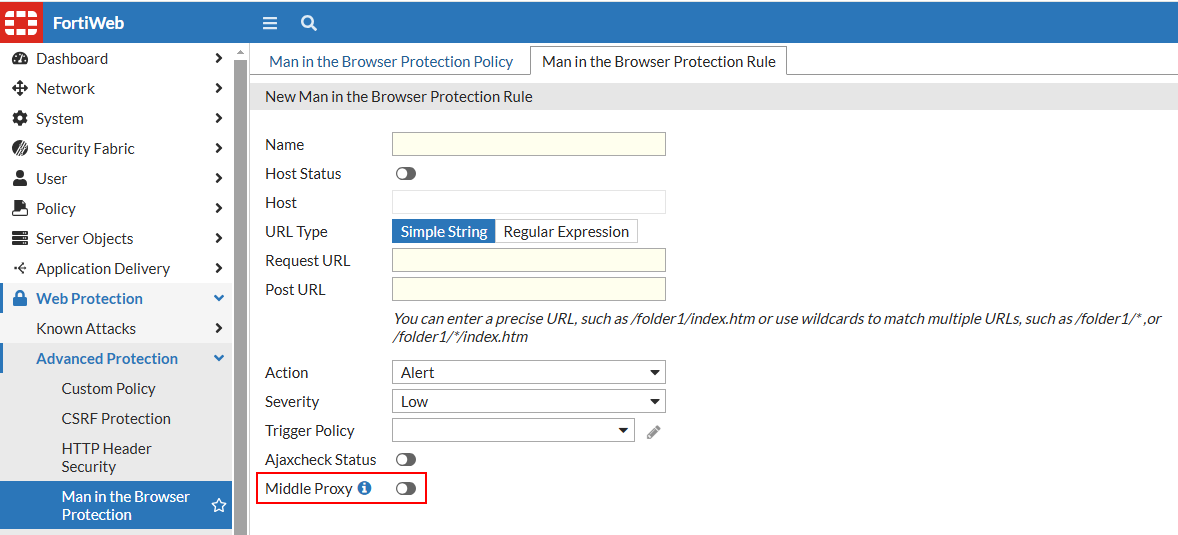
-
Configure additional parameters as required and click OK to save the rule configuration.
Apply the protection rule to the appropriate Web Protection Profile under Policy > Web Protection Profile. Then, monitor Log & Report > Attack Log for detected SSL stripping attempts and fine-tune configurations as needed.
Detecting SSL Stripping
SSL stripping attacks downgrade secure connections, exposing sensitive data to interception. FortiWeb detects these attacks by identifying mismatches between expected security attributes and those reported by the client. The following examples illustrate common SSL stripping detection scenarios.
Protocol Downgrade:
-
The server responds with
https://secure.example.com, but the client reportshttp://secure.example.com. -
FortiWeb detects that the connection was downgraded from HTTPS to HTTP.
Missing Security Headers:
-
The server includes Strict-Transport-Security (HSTS) and Content Security Policy (CSP) headers in its response.
-
The client reports missing or altered headers, indicating a possible SSL stripping attack.
User-Agent (UA) Manipulation:
-
The server logs the original User-Agent string, but the client reports a different or generic UA.
-
FortiWeb detects potential tampering with client attributes.
Unsecured Form Submission:
-
The server provides a login form over HTTPS, but the client submits credentials via HTTP.
-
FortiWeb identifies the downgrade and flags it as a security risk.
Unexpected Redirects:
-
The server issues a 301/302 redirect to an HTTPS page, but the client reports being redirected to an HTTP version.
-
FortiWeb detects an inconsistency that may indicate SSL stripping in progress.