OCSP-Based client certificate verification (7.6.1)
Prior to version 7.6.1, FortiWeb only supported CRL file-based client certificate verification. With the release of 7.6.1, FortiWeb now supports real-time OCSP checks to verify the status of client certificates, improving security by ensuring the most up-to-date revocation information is used.
What is a client certificate?
In SSL/TLS connections between the clients (like browsers or apps) and FortiWeb, clients by default check the server certificate presented by FortiWeb, verifying it against a trusted CA store, and ensure it is not revoked or expired.
For high-security scenarios such as online banking platforms, it's essential to validate identity of the clients as well. This is achieved through Mutual Authentication, where the clients verify the identify of FortiWeb, and FortiWeb also requires the client to present a certificate to authenticate its identity before sensitive data is exchanged. A common use case for client certificates is in online banking systems, where a bank may issue customers a hardware device, like a smart card or USB token, storing a digital certificate. To access the banking system, the customer connects the device to their computer and configures their browser to use the stored certificate for identity verification.
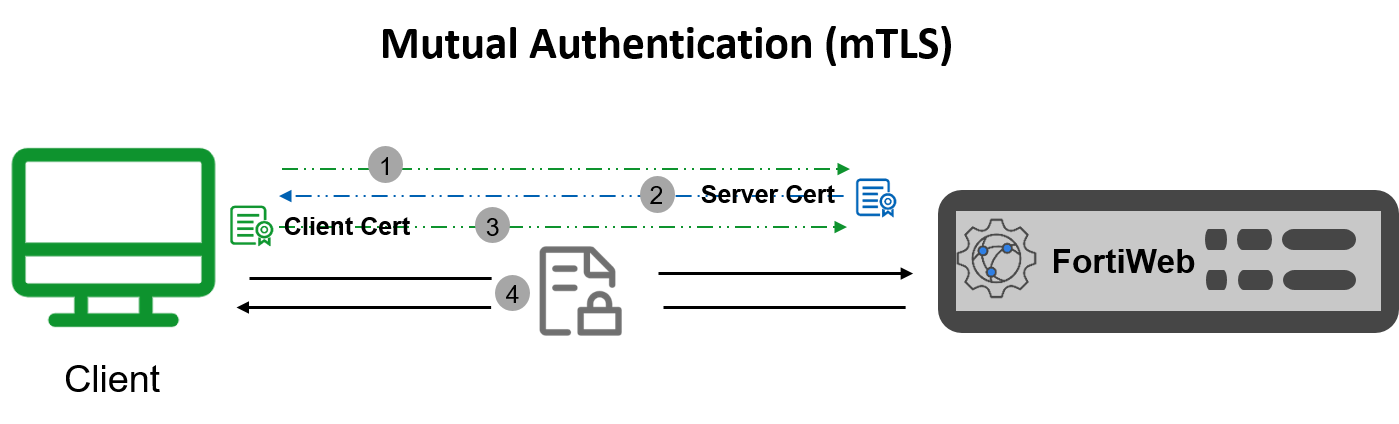
The process of mutual authentication is shown as above:
- Client connects to the FortiWeb to initiate an SSL connection.
- FortiWeb presents its server certificate to the client. The client authenticates the server certificate from its truststore and can verify the hostname (Optional).
- Client presents its client certificate to FortiWeb. FortiWeb authenticates the client certificate.
- Symmetric session keys are created, and an SSL connection gets established. The client and FortiWeb exchange information in a secure connection.
Client Certificate Revocation Check
Client certificates can be revoked before expiration for reasons such as:
-
The certificate’s private key has been compromised.
-
The certificate was issued to a user or entity no longer authorized to use it.
-
The certificate’s details are no longer valid.
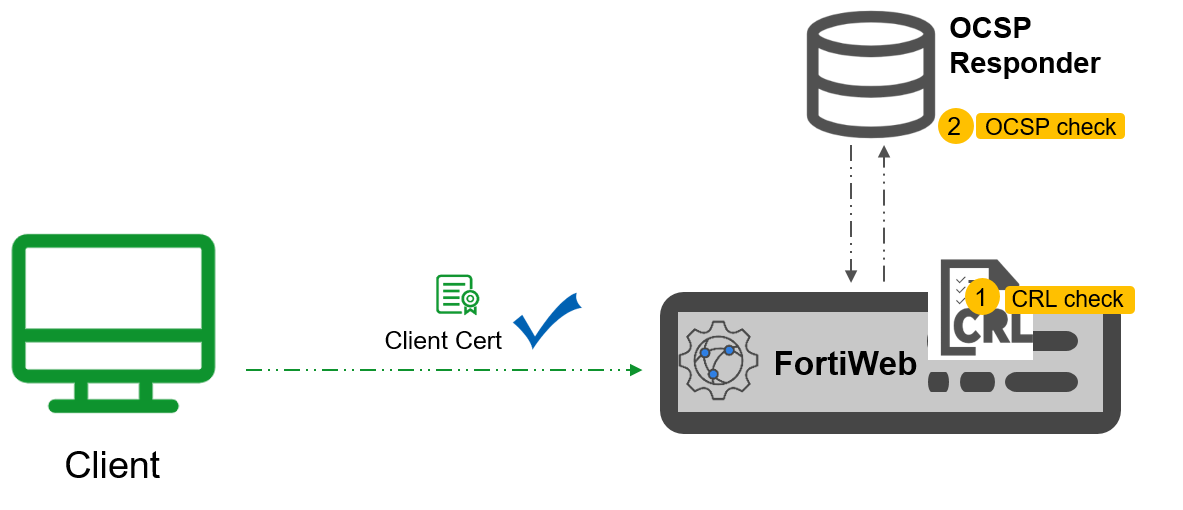
If a client certificate has been revoked (due to compromise, expiration, or policy violation), it should no longer be trusted. To ensure security, FortiWeb must identify and block access attempts from clients presenting revoked certificates. FortiWeb offers two methods for checking client certificate revocation.
-
CRL file-based check: A Certificate Revocation List (CRL) that is stored locally on FortiWeb. It is a file containing a list of revoked certificates. This is a traditional approach that FortiWeb has supported for some time. For details on configuring CRL-based revocation, refer to Revoking certificates.
-
OCSP check: Introduced in version 7.6.1, OCSP (Online Certificate Status Protocol) allows FortiWeb to perform real-time checks with an OCSP responder to obtain the current revocation status of client certificates. For configuration details, see "Configuring OCSP Responder (for client certificate)" in OCSP-Based certificate revocation check.