
Fortinet white logo
Fortinet white logo

Connecting to FortiVoice Cloud

Connecting to FortiVoice Cloud

After deploying FortiVoice Cloud, you can configure and use FortiVoice Cloud in two administration portals:

  • FortiVoice Cloud portal (also called Service Portal) for basic configuration, as explained in this guide.
  • FortiVoice Cloud admin portal for fully configuring and administering your FortiVoice Cloud instance.

You also need to explain to your users how to access the user portal and its features.

For more information, see the following guides:

To log in to the FortiVoice Cloud portal

  1. Go to FortiVoice Cloud and click Login Now.
  2. Enter your FortiCloud account credentials.
  3. Review the disclaimer. To continue, click Agree.
  4. Select the account you want to access.
  5. Click Continue.
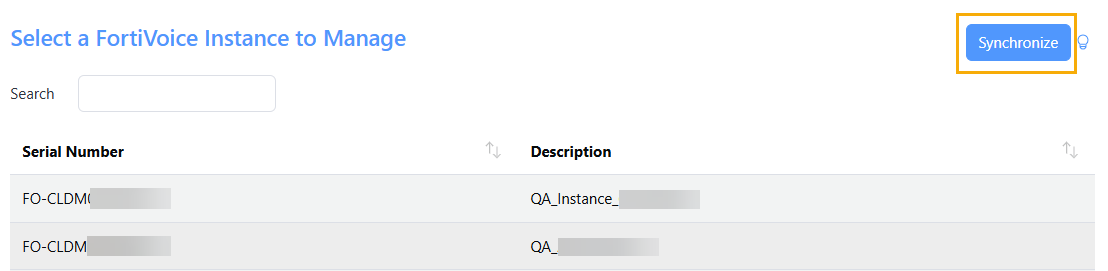
  6. Select the FortiVoice Cloud instance you want to manage.

    If your FortiVoice Cloud instance is not in the list, click Synchronize. The list is updated with the latest license information from FortiCare.
  7. Click Continue.
  8. Review the selected account and FortiVoice Cloud instance.
  9. To log in, click Continue.

    FortiVoice Cloud shows the Dashboard.

Connecting to FortiVoice Cloud

Connecting to FortiVoice Cloud

After deploying FortiVoice Cloud, you can configure and use FortiVoice Cloud in two administration portals:

  • FortiVoice Cloud portal (also called Service Portal) for basic configuration, as explained in this guide.
  • FortiVoice Cloud admin portal for fully configuring and administering your FortiVoice Cloud instance.

You also need to explain to your users how to access the user portal and its features.

For more information, see the following guides:

To log in to the FortiVoice Cloud portal

  1. Go to FortiVoice Cloud and click Login Now.
  2. Enter your FortiCloud account credentials.
  3. Review the disclaimer. To continue, click Agree.
  4. Select the account you want to access.
  5. Click Continue.
  6. Select the FortiVoice Cloud instance you want to manage.

    If your FortiVoice Cloud instance is not in the list, click Synchronize. The list is updated with the latest license information from FortiCare.

  7. Click Continue.
  8. Review the selected account and FortiVoice Cloud instance.
  9. To log in, click Continue.

    FortiVoice Cloud shows the Dashboard.