
Fortinet white logo
Fortinet white logo

FortiAI Insight

FortiAI Insight

Going to Cases & Alerts > FortiAI Insight triggers FortiAI to fetch cases and alerts and perform deep correlation analysis. This highlights the threats for SOC analysts and guides next steps.
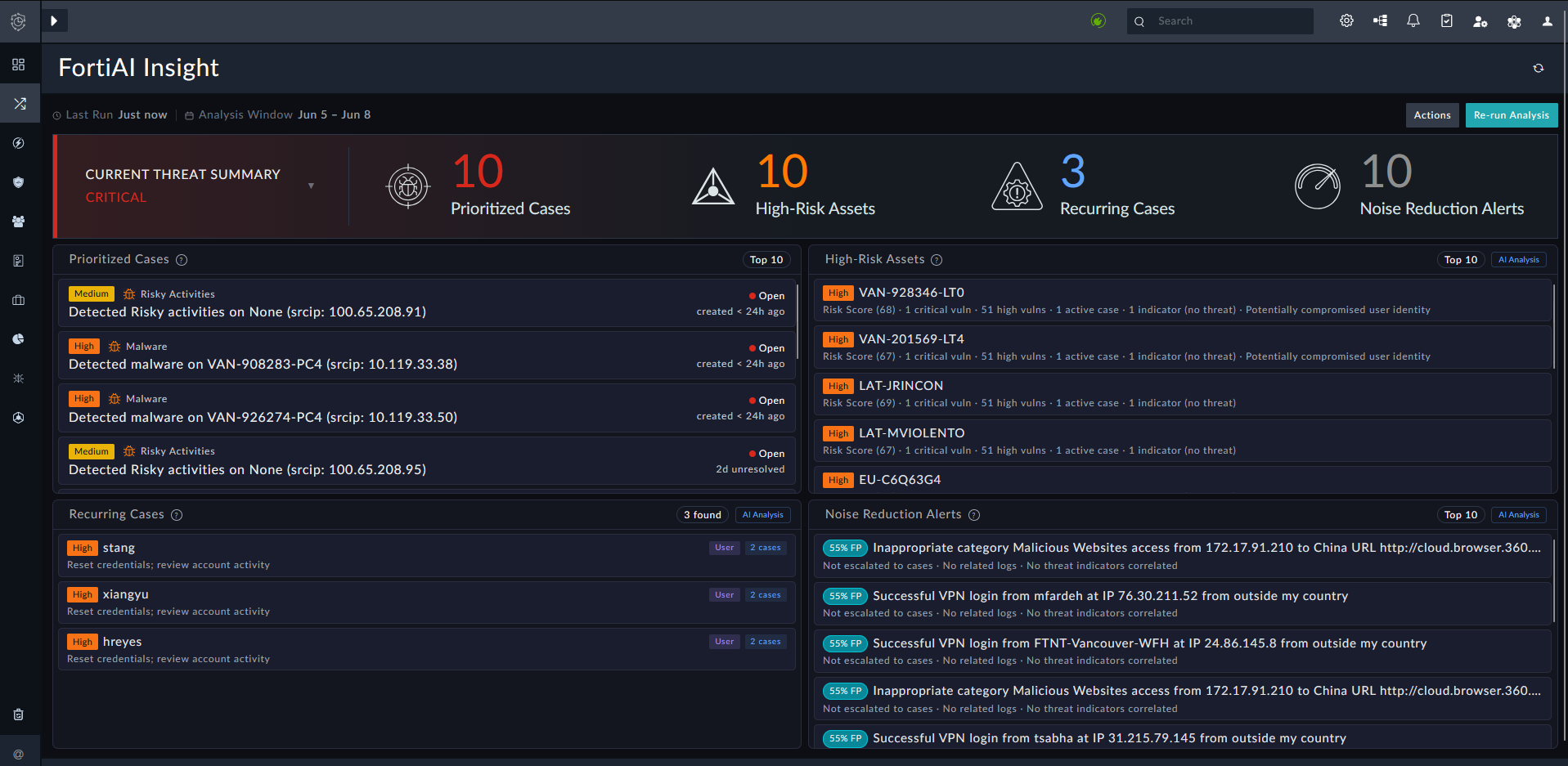
Once FortiAI completes the analysis, the FortiAI Insight pane displays the following information:

Widget

Description

Current Threat Summary

Lists the number of prioritized cases, high-risk assets, recurring cases, a reduce noise alerts. See below for further descriptions.

Prioritized Cases

Lists prioritized cases ranked by risk factors, including:

  • Severity: Critical/High severity cases

  • SLA State: Missed SLA deadlines

  • Phase: Active investigation phase

  • Threat IOCs: Correlated malicious and suspicious indicators

  • Alert Volume: Multiple correlated alerts

Click a case to display the Case details.

High-Risk Assets

Lists high-risk assets flagged for risk factors, including:

  • Vulnerabilities: Critical/High vulnerability counts

  • Active Cases: Asset involved in open cases

  • Threat IOCs: Associated with malicious and suspicious indicators

  • Compromised Identities: User account shows high-risk behavior

Click an asset to display the Asset details.

Click AI Analysis to view the analysis from FortiAI. This includes the Risk and Score for the asset as well as the supporting evidence (Risk Score, number of critical and high vulnerabilities, number of active cases, number of indicators, etc.).

Recurring Cases

Detects patterns across cases:

  • IOC Reuse: Same malicious/suspicious indicators (IPs, domain, hashes) appear in multiple cases

  • Asset Compromise: Same asset/hostname targeted across multiple cases

  • User Targeting: Same user/email targeted across multiple cases

Click a record in the list to view the details. From these details, you can click the related cases to open their Case details.

Click AI Analysis to view the analysis from FortiAI. This includes the breakdown of the IOC Reuse, Asset Compromise, or User Targeting identified by FortiAI.

Patterns require two or more cases to be flagged.

Noise Reduction Alerts

Alerts flagged as potential false positives, which could be generating noise:

  • Low Signal: Minimal threat indicators present

  • Benign Patterns: Matches known safe activity

  • Rule Drift: Detection rules may need recalibration

Review these alerts and, if appropriate, suppress them to reduce noise and analyst fatigue.

Click AI Analysis to view the analysis from FortiAI, including confidence and brief reasoning for flagging the false positive.

The analysis will remain if the SOC analyst navigates away and returns to the FortiAI Insight pane. Click Re-run Analysis to trigger a fresh analysis from FortiAI.

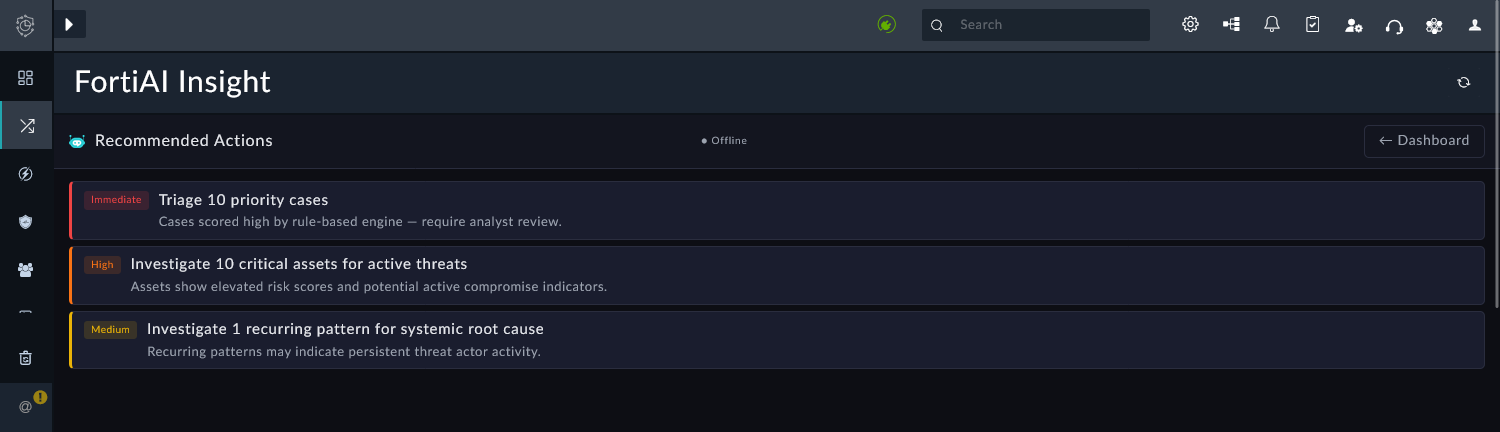
Click Actions to view the Recommended Actions from FortiAI.
FortiAI Insight

FortiAI Insight

Going to Cases & Alerts > FortiAI Insight triggers FortiAI to fetch cases and alerts and perform deep correlation analysis. This highlights the threats for SOC analysts and guides next steps.

Once FortiAI completes the analysis, the FortiAI Insight pane displays the following information:

Widget

Description

Current Threat Summary

Lists the number of prioritized cases, high-risk assets, recurring cases, a reduce noise alerts. See below for further descriptions.

Prioritized Cases

Lists prioritized cases ranked by risk factors, including:

  • Severity: Critical/High severity cases

  • SLA State: Missed SLA deadlines

  • Phase: Active investigation phase

  • Threat IOCs: Correlated malicious and suspicious indicators

  • Alert Volume: Multiple correlated alerts

Click a case to display the Case details.

High-Risk Assets

Lists high-risk assets flagged for risk factors, including:

  • Vulnerabilities: Critical/High vulnerability counts

  • Active Cases: Asset involved in open cases

  • Threat IOCs: Associated with malicious and suspicious indicators

  • Compromised Identities: User account shows high-risk behavior

Click an asset to display the Asset details.

Click AI Analysis to view the analysis from FortiAI. This includes the Risk and Score for the asset as well as the supporting evidence (Risk Score, number of critical and high vulnerabilities, number of active cases, number of indicators, etc.).

Recurring Cases

Detects patterns across cases:

  • IOC Reuse: Same malicious/suspicious indicators (IPs, domain, hashes) appear in multiple cases

  • Asset Compromise: Same asset/hostname targeted across multiple cases

  • User Targeting: Same user/email targeted across multiple cases

Click a record in the list to view the details. From these details, you can click the related cases to open their Case details.

Click AI Analysis to view the analysis from FortiAI. This includes the breakdown of the IOC Reuse, Asset Compromise, or User Targeting identified by FortiAI.

Patterns require two or more cases to be flagged.

Noise Reduction Alerts

Alerts flagged as potential false positives, which could be generating noise:

  • Low Signal: Minimal threat indicators present

  • Benign Patterns: Matches known safe activity

  • Rule Drift: Detection rules may need recalibration

Review these alerts and, if appropriate, suppress them to reduce noise and analyst fatigue.

Click AI Analysis to view the analysis from FortiAI, including confidence and brief reasoning for flagging the false positive.

The analysis will remain if the SOC analyst navigates away and returns to the FortiAI Insight pane. Click Re-run Analysis to trigger a fresh analysis from FortiAI.

Click Actions to view the Recommended Actions from FortiAI.