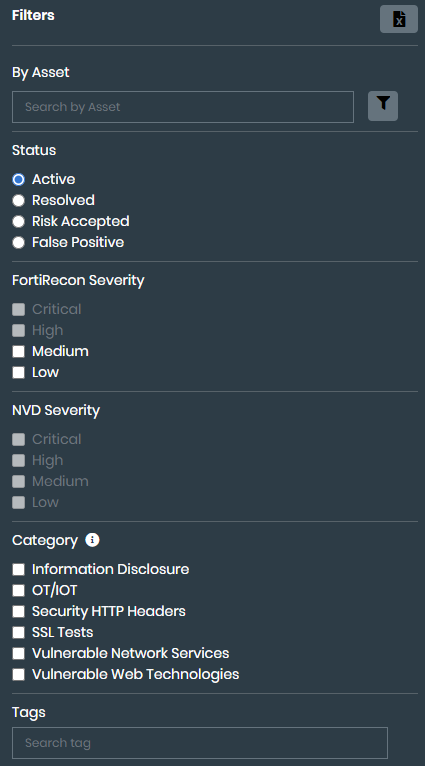
Filtering security issues
By default, the Attack Surface Management > Asset Discovery page displays all potential security issues, starting with critical security issues. You can use filters to display specific types of issues.
To filter security issues:
- Go to Attack Surface Management > Security Issues. Choose IASM using toggle, the respective security issues are displayed.
- Filter by Asset. You can search for specific security issues using the By Asset field. Enter IP address information, such as 192.168.10.10 or 192.168.12.0/24.
- Add advanced search features:
- Click the filter icon. The advanced search fields are displayed.
- Select the Search Type.
- Click Search.
- Select one or more filters:
Filter
Options
Status
Select one of the following statuses:
- Active
- Resolved
- Risk accepted
- False positive
Severity
Select one or more of the following severity statuses:
- Critical
- High
- Medium
- Low
Category
Select one or more of the categories. The list of categories changes based on the displayed security issues.
OT/IoT
CORS Misconfiguration
Security HTTP Headers
Information Disclosure
Suspicious Domains
Web Filter Rating Lookup
SSL Tests
Weak Cipher
Vulnerable Web Technologies
Vulnerable Network Services
CMS Security
Country
Select one or more countries. The list of filtered security issues is displayed.
- (Optional) In the Filters list, toggle on False Positive. The list displays only issues marked with a status of False Positive.
- In the Filters list, click Clear to remove all filters.