

Avoiding the web browser warning on the FortiPAM GUI
Besides avoiding the Not secure web browser warning when you log in to the FortiPAM GUI, the newly created GUI certificate is a requirement if the EMS uses Enforce Valid Server Certificate in Endpoint Profile > ZTNA destinations > Advanced.
To avoid the web browser warning on the FortiPAM GUI:
- Create a FortiPAM GUI certificate signed by the FortiPAM CA certificate.
- In the FortiPAM GUI, go to System > Certificates, click Create/Import, and select Certificate from the dropdown.
- In Generate Certificate using Local CA, select Generate Certificate.
The Certificate Details tab opens.
- In Certificate name, enter the certificate name.
- In Common name, enter the common name for the certificate, i.e., an FQDN.
- In Subject alternative name, enter the IP address.
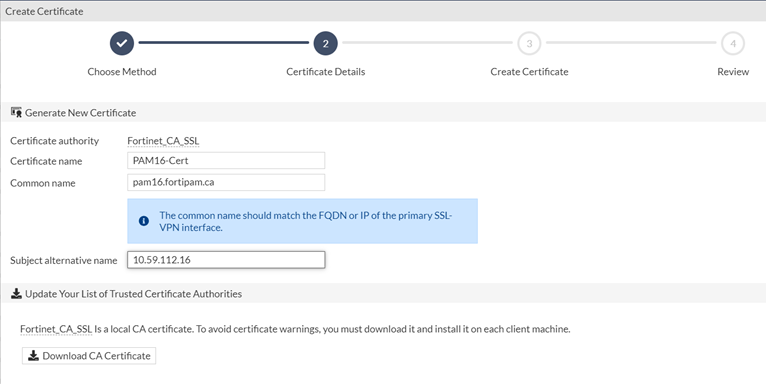
- Click Create.
The new certificate is created and listed under Local Certificate.
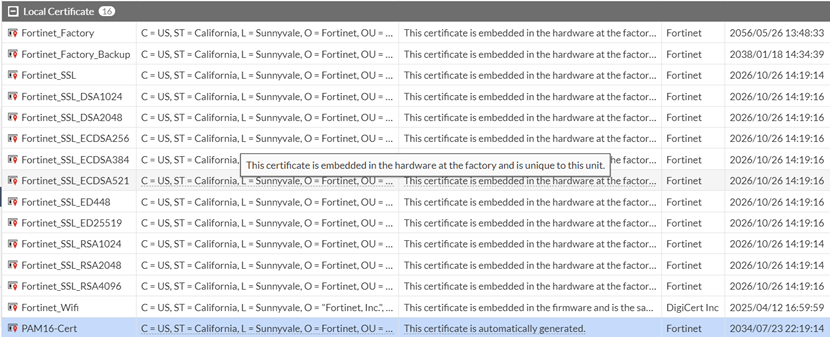
- Enable the newly created certificate on the FortiPAM GUI.
- Go to Network > Interfaces.
- Double-click to edit the network interface.
- In the Service Access Setting pane, from the SSL Certificate dropdown, select the certificate created in step 1.
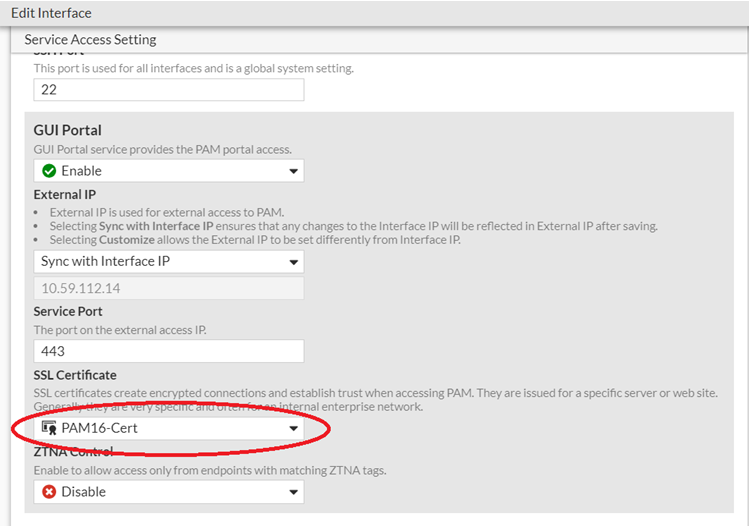
- Click Save.