Downloading FortiPAM CA from the FortiPAM GUI
Downloading FortiPAM CA from the FortiPAM GUI
To download the FortiPAM CA from the FortiPAM GUI and manually install it:
- Download FortiPAM default CA on the FortiPAM GUI.
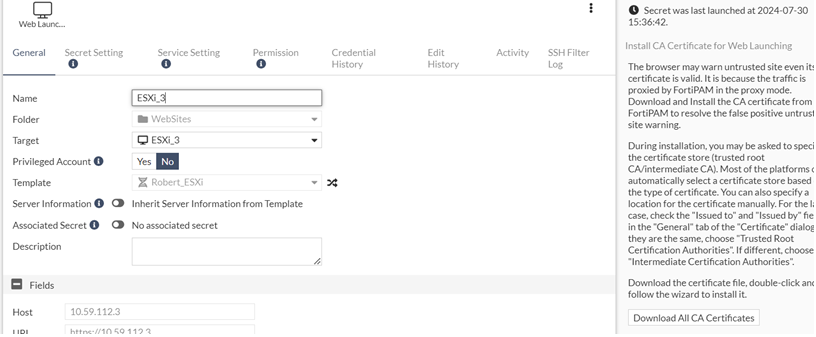
- Go to Secrets > Secrets, select a Web Account secret, and select Edit to edit the secret.
- Click Download All CA Certificates.
- Double-click the downloaded file to unzip it.
- Double-click the CA certificate.
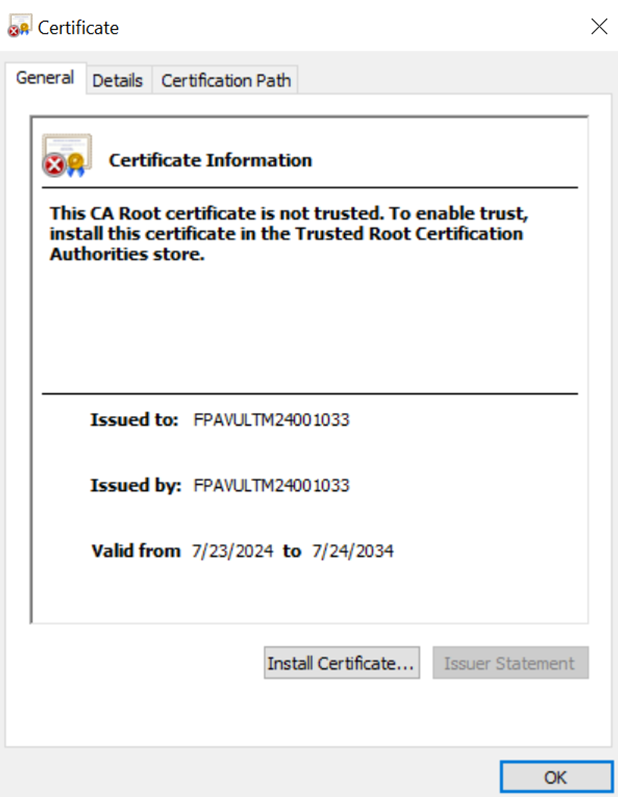
- Click Install Certificate and follow the installation prompts to install the certificate to the trust root.
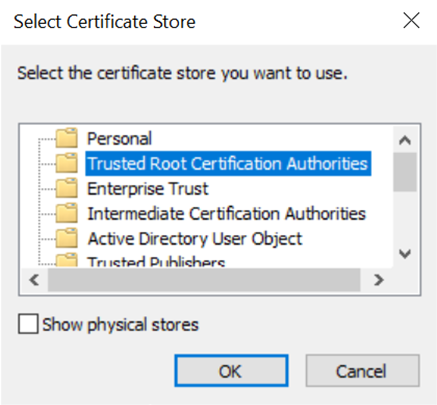
- Click OK.
Downloading FortiPAM CA from the FortiPAM GUI
Downloading FortiPAM CA from the FortiPAM GUI
To download the FortiPAM CA from the FortiPAM GUI and manually install it:
- Download FortiPAM default CA on the FortiPAM GUI.
- Go to Secrets > Secrets, select a Web Account secret, and select Edit to edit the secret.
- Click Download All CA Certificates.
- Double-click the downloaded file to unzip it.
- Double-click the CA certificate.
- Click Install Certificate and follow the installation prompts to install the certificate to the trust root.
- Click OK.

