

Configuring a VIP on FortiGate for FortiPAM access
Prerequisites
- An IP address as the VIP for the FortiPAM GUI, e.g.,
10.59.112.167.The actual FortiGate GUI IP address is
10.59.112.58. - The actual FortiPAM IP address is
10.1.100.157.Note: This IP address is within the corporate network and is not exposed publicly.
VIP mode topology
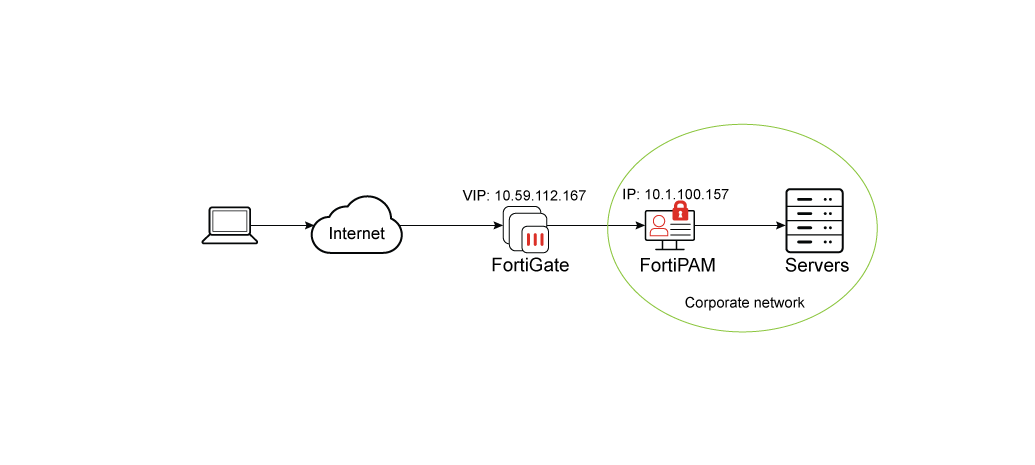
Configuring a VIP for FortiPAM access
To configure a VIP for FortiPAM access:
-
In the FortiGate CLI console, enter the following commands:
 config firewall vip
  edit "VIP_PAM_167"
   set uuid bb4bf8ac-789d-51f0-4976-2cc09088e220
   set extip 10.59.112.167
   set mappedip "10.1.100.157"
   set extintf "any"
   set portforward enable
   set extport 443-2000 #Port 443: PAM GUI;  Port 1444: PAM web-proxy
   set mappedport 443-2000
  next
 end

For a port supporting the web proxy feature, FortiPAM port can use any port, e.g., 1444in this example.config firewall policy edit 7 set name "VIP167_Policy" set uuid ee86b2a2-789d-51f0-f736-4483abb85ec9 set srcintf "port1" set dstintf "port2" #port2 connects to the 10.1.100.x subnet set action accept set srcaddr "all" set dstaddr "VIP_PAM_167" set schedule "always" set service "ALL" set nat enable next end
- In the FortiPAM CLI console, enter the following commands to enable web proxy:
 config system interface
  edit "port2"
   set ip 10.1.100.157 255.255.255.0
   set allowaccess ping ssh
   set type physical
   set explicit-web-proxy enable #enable web proxy
   set snmp-index 2
  next
 end
 config web-proxy explicit-proxy
   edit "web-proxy"
    set stattus enable
    set interface "any"
    set http-incoming-port 1444
   next
  end
  config web-proxy global
   set proxy-fqdn "10.59.112.167"
  end
You can now access FortiPAM using the VIP
10.59.112.167set up on the FortiGate.