
Fortinet white logo
Fortinet white logo

New features and enhancements

New features and enhancements

This document provides information about FortiNDR version 7.6.4 build 0673.

The following is a summary of new features and enhancements in version 7.6.4.

For details, see the FortiNDR7.6.4 Administration Guide in the Document Library.

System & Data Handling Updates

  • Database performance has been enhanced.
    Before upgrade, please see Upgrade information
  • The anti-virus database (AVDB) now supports patch updates.
  • Enhanced PCAP handling to improve both performance and overall usability.

  • Management port now supports LACP.

File tagging (e.g., marking malicious files) is not supported in Center Investigations.

Detection enhancements

  • Machine learning and NetFlow baselining are no longer started by default. You can now choose when to begin baselining, reducing unnecessary noise and alarms.

  • FortiNDR can now submit files to FortiSandbox for additional analysis. This extends the current integration, where FortiSandbox is able to use FortiNDR as a pre‑scan stage.

Muting enhancements

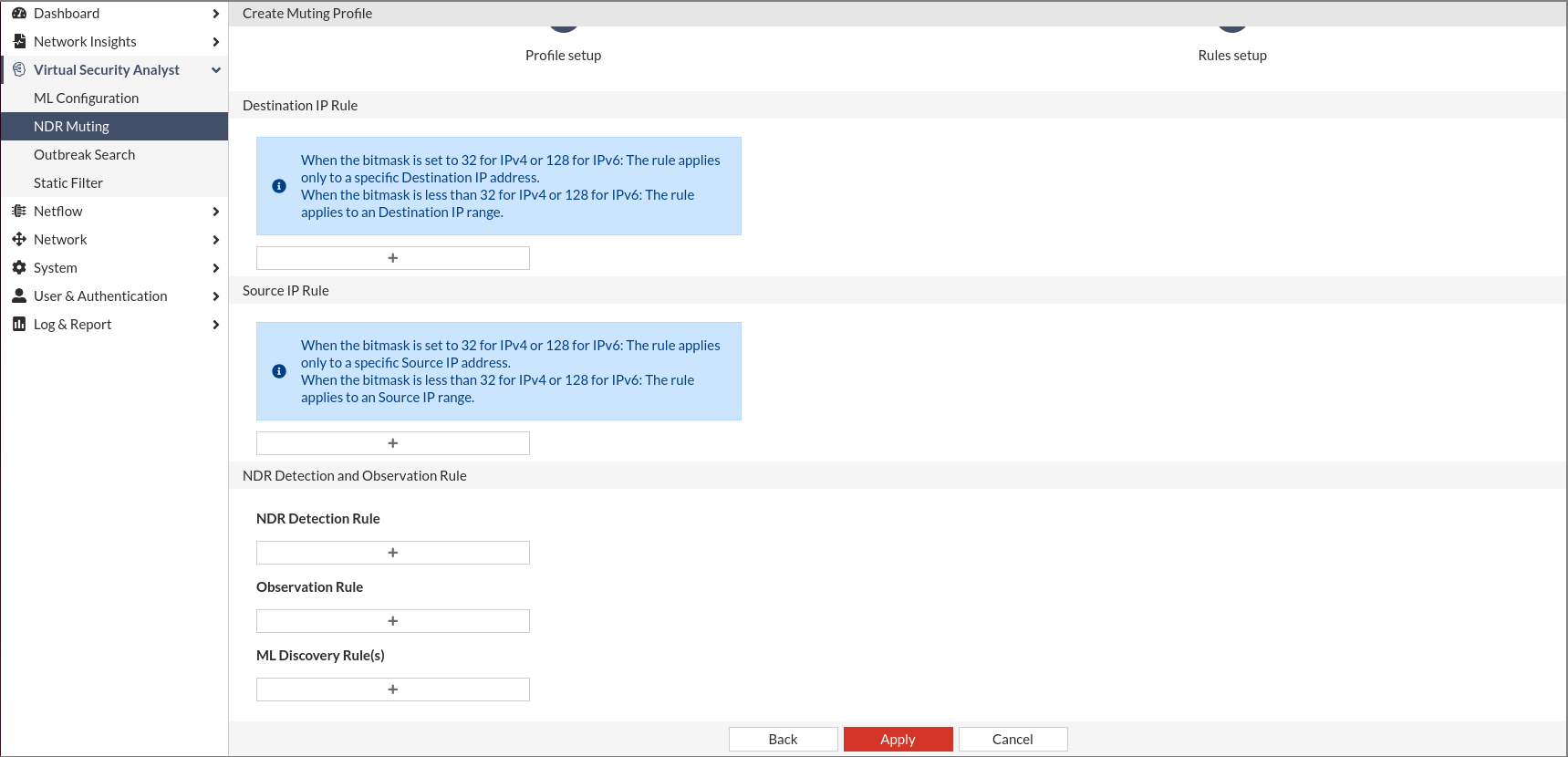
  • You can now combine ML‑based discovery, traditional detections, and observation types within a single rule.

  • Multiple ML features can now be added as a single combined rule.

  • FortiNDR muting now applies to both historical traffic and new detections entering the network.
GUI and navigation improvements

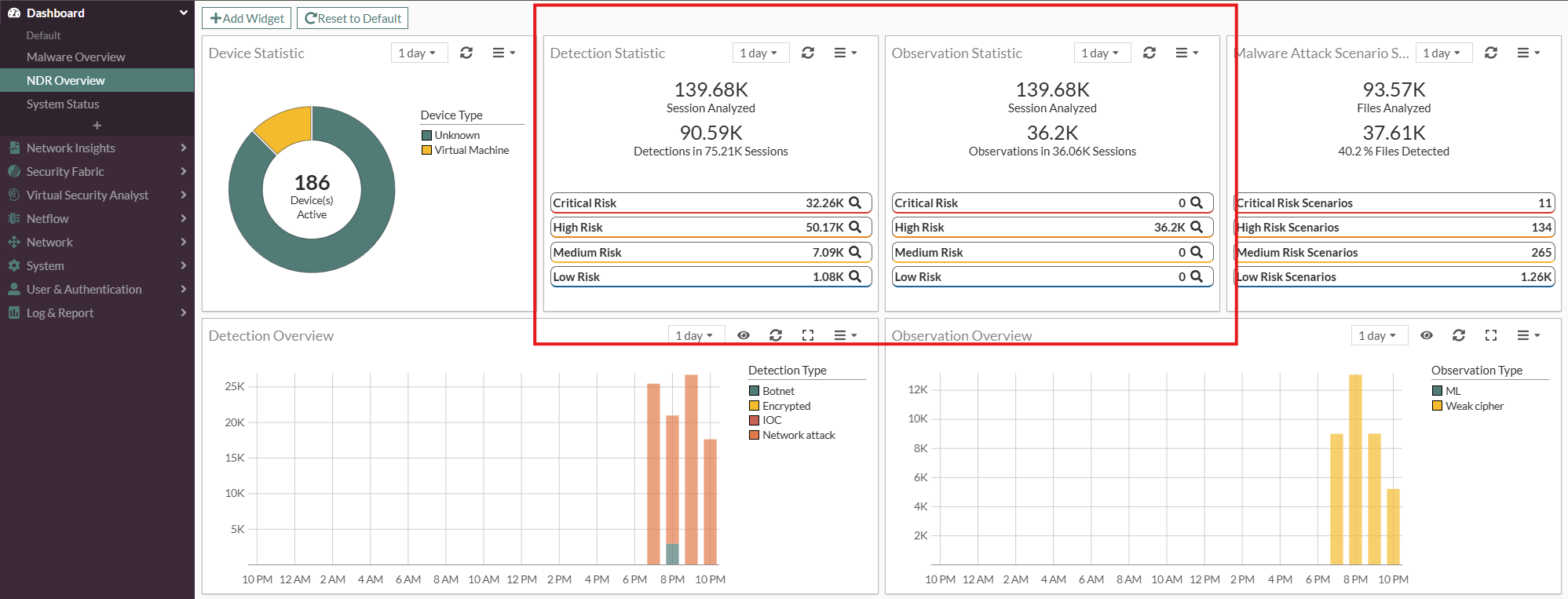
  • Replaced the term Anomaly with Detection and Observation, in Network Insights, Log & Report and throughout FortiNDR.
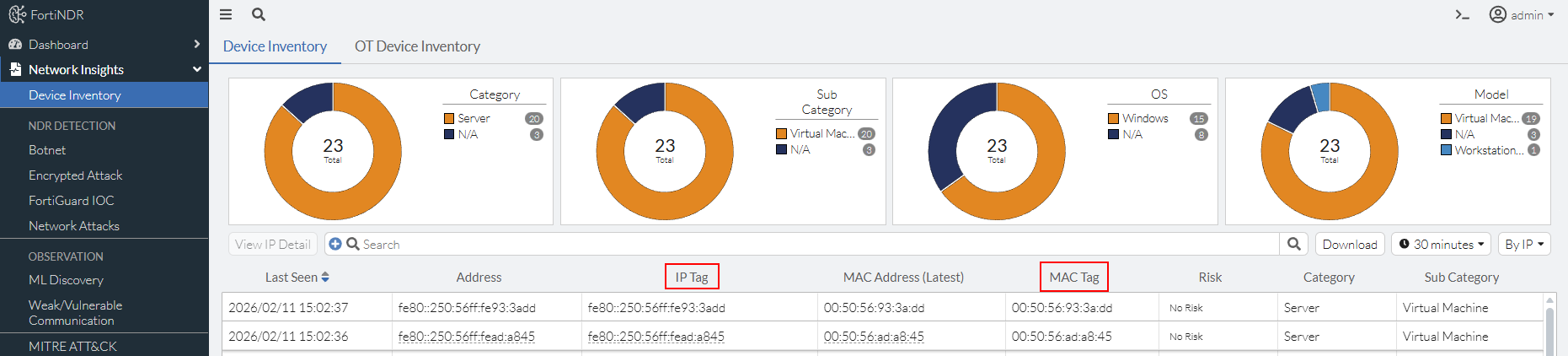
  • Device Name has been replaced with IP Tag and MAC Tag. These tags are configurable and can be used in scenarios where a firewall with many IP addresses sits behind a single MAC address.
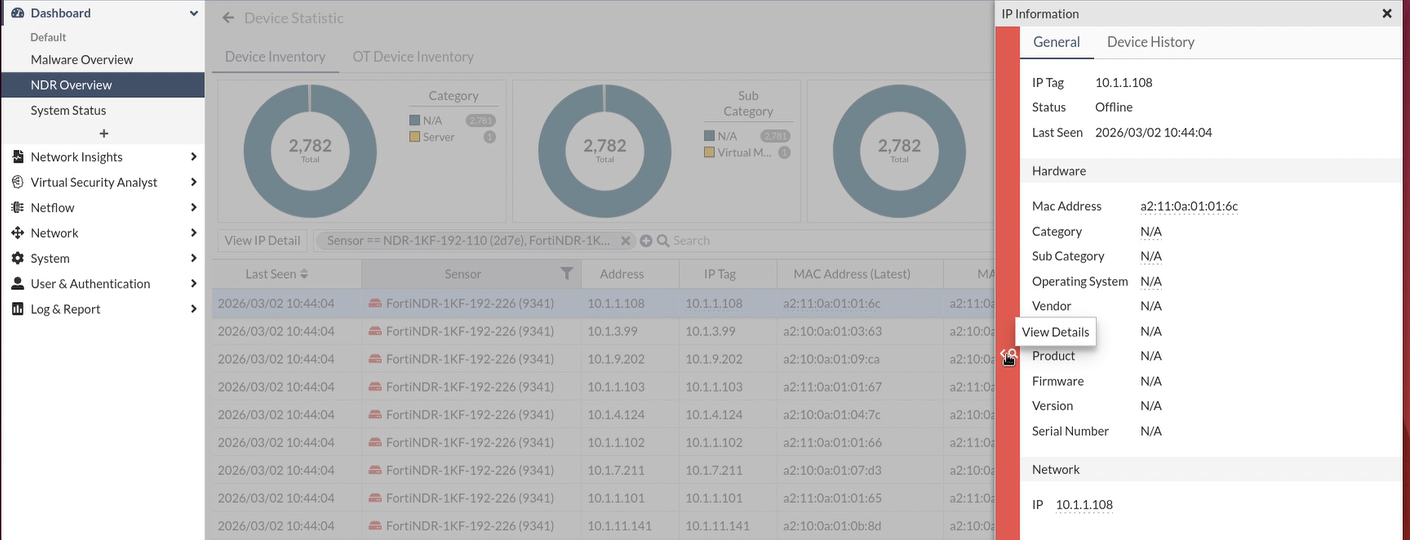
  • Introduced a new sliding‑pane navigation method for accessing Profile Pages, making it easier for users to reach a device’s profile page.
  • A demo indicator has been added to the top‑right banner to show when demo mode is active.

  • Users are required to enter their current password when changing to a new one.

CLI

For detailed information about CLI commands, please refer to the FortiNDR CLI Reference.

New CLI:
  • config system fortisandbox: Use this command to configure FortiSandbox settings. FortiNDR can send suspicious malware files to FortiSandbox and receive verdicts to validate whether they are false positives. For more informaiton, see FortiSandbox in the FortiNDR Administration Guide.

  • execute db sample_process_summary: Use this command to get the processing status of FortiNDR within a specific time period.

  • execute factoryreset-shutdown: Use this command to reset FortiNDR to its factory default settings for the current installed firmware version and shut down.

  • execute factoryreset-shutdown config: Use this command to reset FortiNDR to its factory default configurations for the current installed firmware version.

  • execute expandspooldisk: Use this command to expand /var/spool and `/var/log` disks on VM without losing pre-existing data.

  • execute cleanup pcap: Use this command to clean up PCAP related information in database and files in disk.

  • execute db migrate: Use this command to migrate or cleanup legacy table data (max of 7 days data at a time) when you upgrade FortiNDR to 7.6.4GA.

Updated CLI:
  • config system interface: Added set type {aggregate} and set redundant-member <member-interface_name>.
  • config system global: Added set remoteauthtimeout <seconds> to set the global timeout (in seconds) for remote authentication transactions.

  • execute tac report: Updated pre-defined CLI commands

New features and enhancements

New features and enhancements

This document provides information about FortiNDR version 7.6.4 build 0673.

The following is a summary of new features and enhancements in version 7.6.4.

For details, see the FortiNDR7.6.4 Administration Guide in the Document Library.

System & Data Handling Updates

  • Database performance has been enhanced.
    Before upgrade, please see Upgrade information
  • The anti-virus database (AVDB) now supports patch updates.
  • Enhanced PCAP handling to improve both performance and overall usability.

  • Management port now supports LACP.

File tagging (e.g., marking malicious files) is not supported in Center Investigations.

Detection enhancements

  • Machine learning and NetFlow baselining are no longer started by default. You can now choose when to begin baselining, reducing unnecessary noise and alarms.

  • FortiNDR can now submit files to FortiSandbox for additional analysis. This extends the current integration, where FortiSandbox is able to use FortiNDR as a pre‑scan stage.

Muting enhancements

  • You can now combine ML‑based discovery, traditional detections, and observation types within a single rule.

  • Multiple ML features can now be added as a single combined rule.

  • FortiNDR muting now applies to both historical traffic and new detections entering the network.

GUI and navigation improvements

  • Replaced the term Anomaly with Detection and Observation, in Network Insights, Log & Report and throughout FortiNDR.

  • Device Name has been replaced with IP Tag and MAC Tag. These tags are configurable and can be used in scenarios where a firewall with many IP addresses sits behind a single MAC address.

  • Introduced a new sliding‑pane navigation method for accessing Profile Pages, making it easier for users to reach a device’s profile page.

  • A demo indicator has been added to the top‑right banner to show when demo mode is active.

  • Users are required to enter their current password when changing to a new one.

CLI

For detailed information about CLI commands, please refer to the FortiNDR CLI Reference.

New CLI:
  • config system fortisandbox: Use this command to configure FortiSandbox settings. FortiNDR can send suspicious malware files to FortiSandbox and receive verdicts to validate whether they are false positives. For more informaiton, see FortiSandbox in the FortiNDR Administration Guide.

  • execute db sample_process_summary: Use this command to get the processing status of FortiNDR within a specific time period.

  • execute factoryreset-shutdown: Use this command to reset FortiNDR to its factory default settings for the current installed firmware version and shut down.

  • execute factoryreset-shutdown config: Use this command to reset FortiNDR to its factory default configurations for the current installed firmware version.

  • execute expandspooldisk: Use this command to expand /var/spool and `/var/log` disks on VM without losing pre-existing data.

  • execute cleanup pcap: Use this command to clean up PCAP related information in database and files in disk.

  • execute db migrate: Use this command to migrate or cleanup legacy table data (max of 7 days data at a time) when you upgrade FortiNDR to 7.6.4GA.

Updated CLI:
  • config system interface: Added set type {aggregate} and set redundant-member <member-interface_name>.
  • config system global: Added set remoteauthtimeout <seconds> to set the global timeout (in seconds) for remote authentication transactions.

  • execute tac report: Updated pre-defined CLI commands