Fortinet white logo
Fortinet white logo

Admin Guide

26.2.0

Demo: Configuring FIC as the SCIM server

Demo: Configuring FIC as the SCIM server

  1. Go to http://fic.fortinet.com and log in.

  2. Click Applications>SCIM >Add SCIM Application, and configure the following:
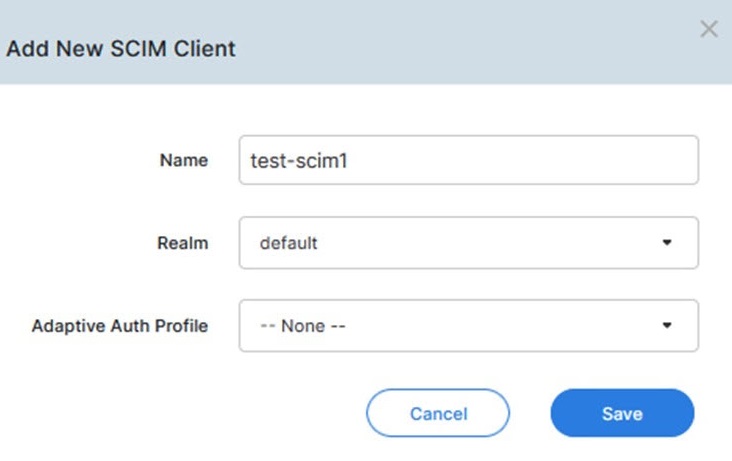
    • Name: test-scim1, for example

    • Realm : <default>

    • Adaptive Auth Profile: --None--

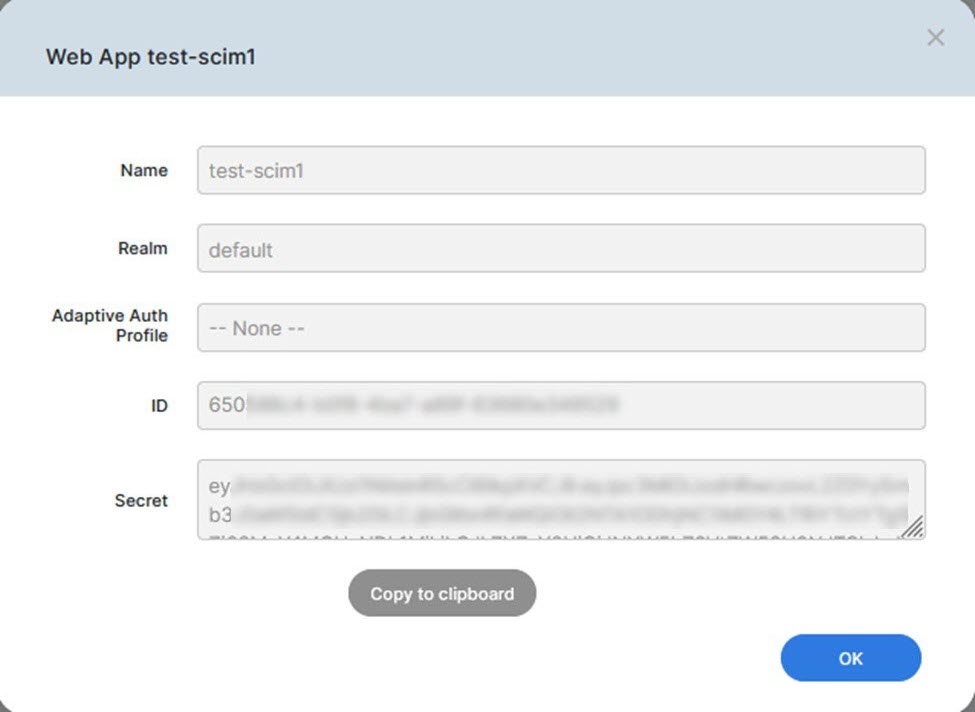
  3. Click Save. The following page opens.

  4. Copy the secret. Be sure to apply the secret to the SCIM clients (i.e., Okta, Azure, or FortiAuthenticator) that you are going to configure.

Demo: Configuring FIC as the SCIM server

Demo: Configuring FIC as the SCIM server

  1. Go to http://fic.fortinet.com and log in.

  2. Click Applications>SCIM >Add SCIM Application, and configure the following:

    • Name: test-scim1, for example

    • Realm : <default>

    • Adaptive Auth Profile: --None--

  3. Click Save. The following page opens.

  4. Copy the secret. Be sure to apply the secret to the SCIM clients (i.e., Okta, Azure, or FortiAuthenticator) that you are going to configure.