Fortinet white logo
Fortinet white logo

New Features

Custom GUI themes and admin‑level personalization

Custom GUI themes and admin‑level personalization

This information is also available in the FortiOS 8.0 Administration Guide:

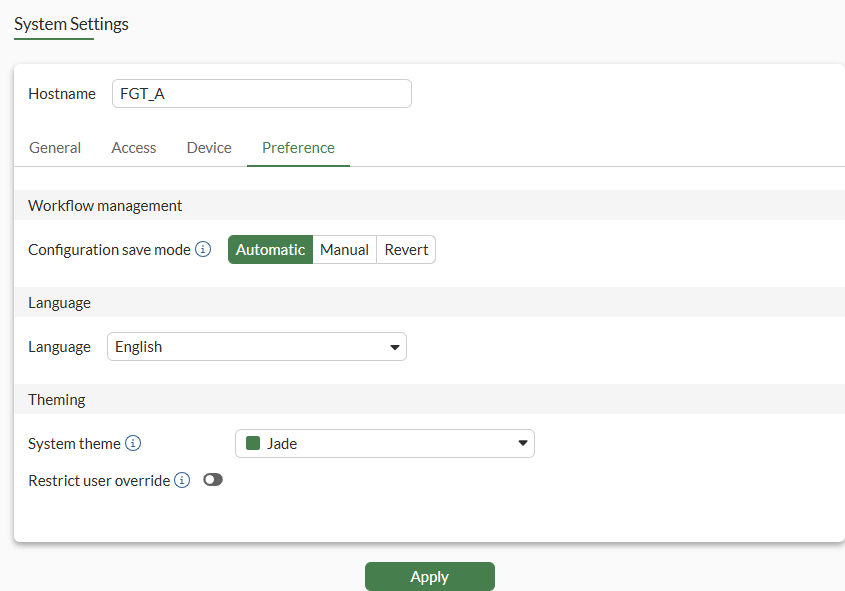
The System > Settings options are now organized across General, Access, Device, and Preference tabs. The Preference tab includes a System theme option to select a predefined theme or create a custom theme. Predefined and custom themes can then be associated with the FortiOS system, admin profiles, or individual administrators, enabling clearer environment distinction, improved usability, and stronger security awareness in multi-classification deployments.

Banner messages associated with a severity can be created for custom themes using the CLI.

GUI

You can create one or more custom GUI themes for administrators. Then you can assign different predefined or custom themes to the system, admin profiles, and administrators.

Administrators can also choose a theme.

To create a system theme in the GUI:
  1. Go to System > Settings > Preference.

  2. Beside System theme, click the list, and select Create (+). The Configure system theme pane is displayed.
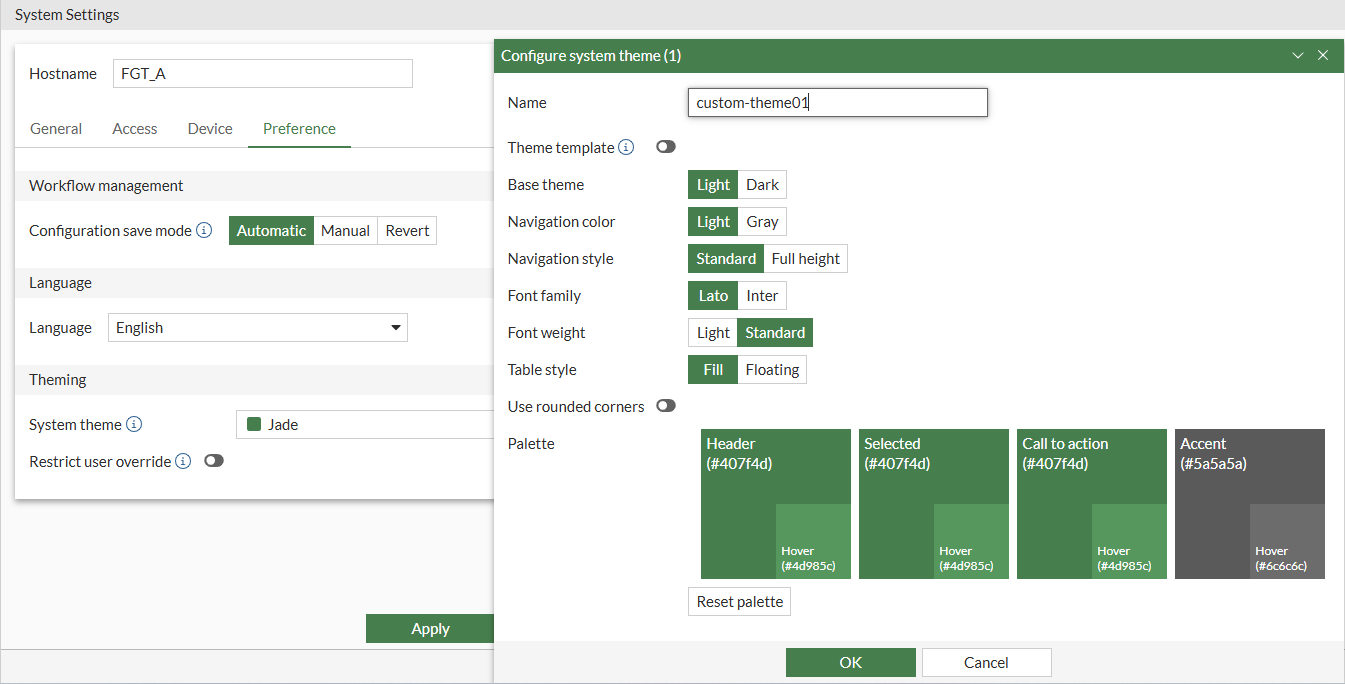
  3. (Optional) Enable Theme template and select an existing template to customize.

  4. Set the options, and click OK. The custom theme is selected.

  5. (Optional) Enable Restrict user override to restrict theme customization to administrators assigned the super_admin profile.

  6. Click Apply to apply the changes to the GUI.

To assign a theme to an administrator profile in the GUI:
  1. Go to System > Admin Profiles.

  2. Open an existing administrator profile for editing, or click Create new to create a new profile.

  3. Set Override Theme to Customize and select a theme, or click Create (+) to create a custom theme.
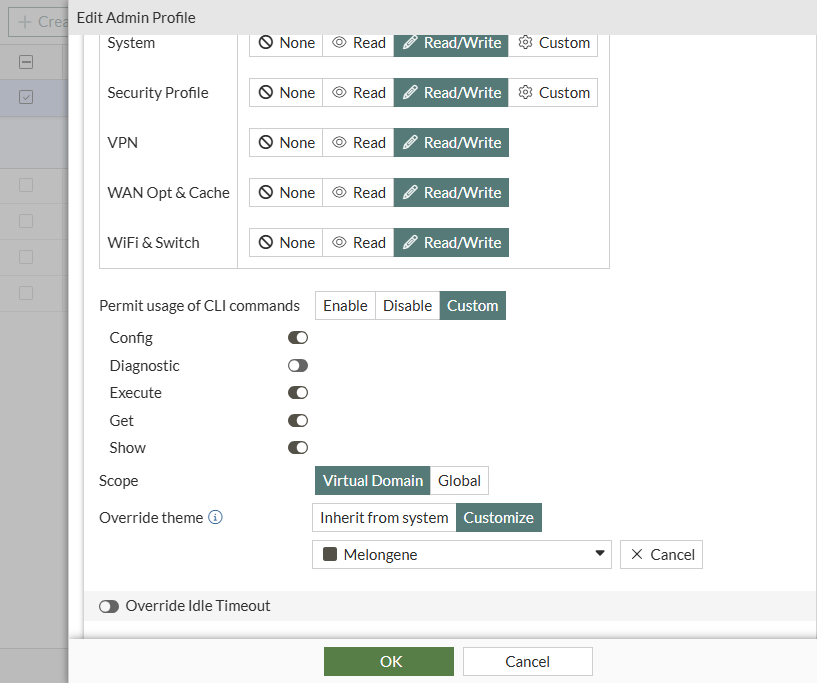
  4. Click OK to save the settings.

    The selected theme is used for administrators assigned this profile.

To assign a theme to individual administrators in the GUI:
  1. Go to System > Administrators and double-click an administrator to open it for editing.

  2. Set Override Theme to Customize and select a theme, or click Create (+) to create a custom theme.

  3. Click OK to save the settings.

    The selected theme is used for the administrator.

To personalize the GUI:
  1. From the top-right corner, click your administrator name and select Personalize. The Personalize dialog box is displayed.

  2. Set Theme to Customize and select a theme, or click Create (+) to create a custom theme.

  3. Click OK to save the settings.

    The selected theme is used when you log in to FortiOS.

CLI

You can use the CLI to create one or more custom GUI themes. Then you can assign different predefined or custom themes to the FortiOS system, admin profiles, and administrators.

In the CLI, you can also create a banner message associated with a severity to display in a custom GUI theme.

To create a custom GUI theme in the CLI:
config system theme    
    edit "custom theme 1"
        set nav-color gray
        set nav-style full-height
        set font inter
        set font-weight light
        set table-style float
        set border-radius enable
        set header-color "#e64747"
        set selected-color "#2cbaa2"
        set call-to-action-color "#ba2cb5"
        set accent-color "#df1616"
        set banner-msg ''
    next 
end
To assign a custom theme to an administrator profile in the CLI:
config system accprofile
    edit "prof_admin"       
        set gui-theme custom
        set gui-custom-theme custom theme 1
    next
end
To assign a custom theme to individual administrators in the CLI:
config system admin
    edit "admin"        
        set gui-theme custom
        set gui-custom-theme custom theme 1        
    next
end
To configure a banner for a custom theme in the CLI:
  1. Configure the banner message and severity:

    config system theme
        edit theme01        
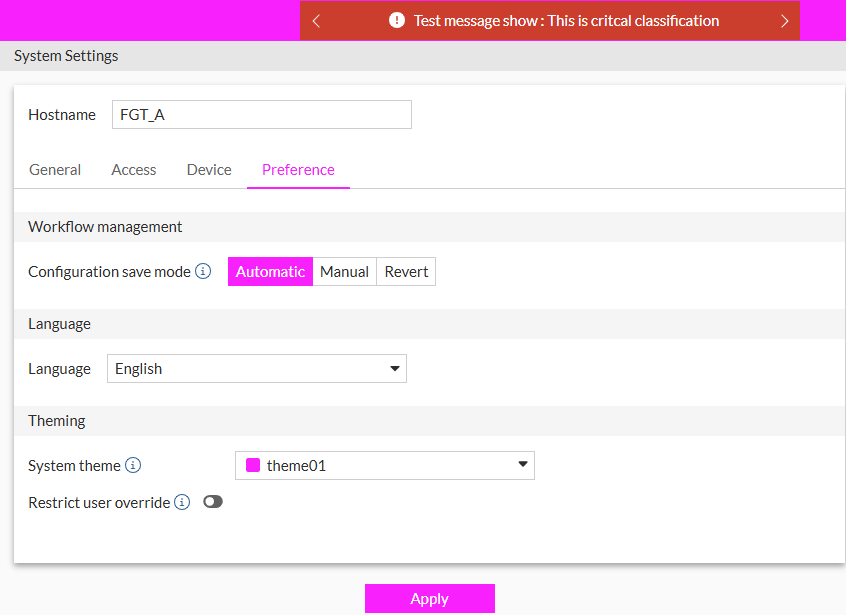
            set banner-msg "Test message show: This is critical classification"
            set banner-msg-severity critical
        next
    end

    The message displays in the banner for the custom theme:
CLI syntax

A new command is available to configure custom GUI themes:

config system theme
    edit <name>
        set theme-template {jade | neutrino | mariner | graphite | melongene | jet-stream | security-fabric | retro | dark-matter | onyx | eclipse | none}
        set base-theme {light | dark}
        set nav-color {light | gray}
        set nav-style {standard | full-height}
        set font {lato | inter}
        set font-weight {light | standard}
        set table-style {fill | float}
        set border-radius {enable | disable}
        set header-color <string>
        set selected-color <string>
        set call-to-action-color <string>
        set accent-color <string>
        set banner-msg <string> 
        set banner-msg-severity {info | warning | critical}
    next
end

Option

Description

config system theme

Configure custom GUI themes.

<name>

Name of the theme.

theme-template {jade | neutrino | mariner | graphite | melongene | jet-stream | security-fabric | retro | dark-matter | onyx | eclipse | none}

Set the theme template to use in place of the base theme:

  • jade: Jade theme.

  • neutrino: Neutrino theme.

  • mariner: Mariner theme.

  • graphite: Graphite theme.

  • melongene: Melongene theme.

  • jet-stream: Jet stream theme.

  • security-fabric: Security Fabric theme.

  • retro: FortiOS v3 retro theme.

  • dark-matter: Dark matter theme.

  • onyx: Onyx theme.

  • eclipse: Eclipse theme.

  • none: No theme template.

base-theme {light | dark}

Set the base theme to use as a template:

  • light: Light theme.

  • dark: Dark theme.

nav-color {light | gray}

Set the color of the navigation bar:

  • light: Light colored navigation bar.

  • gray: Gray colored navigation bar.

nav-style {standard | full-height}

Set the navigation bar style:

  • standard: Use the standard navigation bar style.

  • full-height: Use the full-height navigation bar style.

font {lato | inter}

Set the font family:

  • lato: Use the Lato font.

  • inter: Use the Inter font.

font-weight {light | standard}

Set the font weight:

  • light: Use a thin font-weight.

  • standard: Use a standard font-weight.

table-style {fill | float}

Set the table style:

  • fill: Tables will fill the available space.

  • float: Tables will be separated by a margin.

border-radius {enable | disable}

Enable/disable border radius:

  • enable: Enable having curved borders for buttons and input fields.

  • disable: Disable having curved borders for buttons and input fields.

header-color <string>

Hexadecimal color code for the header color.

selected-color <string>

Hexadecimal color code for the selected color.

call-to-action-color <string>

Hexadecimal color code for the call to action color.

accent-color <string>

Hexadecimal color code for the accent color.

banner-msg <string>

Optional message to appear on the FortiGate header.

banner-msg-severity {info | warning | critical}

Severity color of the banner message:

  • info:Banner message on a blue background. Default severity.

  • warning: Banner message on a yellow background.

  • critical: Banner message on a red background.

A new parameter is available to assign a custom GUI theme to the system:

config system global
    set gui-custom-theme <string>
    set gui-restrict-theme-change {enable | disable}
end

Option

Description

gui-custom-theme <string>

Custom theme that overrides the default FortiGate themes.

gui-restrict-theme-change {enable | disable}

Enable/disable restricting editing and assigning override themes to super admins.

New parameters are available to assign a GUI theme to an admin profile:

config system accprofile
    edit <name>
        set gui-theme-type {predefined | custom}
        set gui-custom-theme <string>
        set gui-theme <string>
    next
end

Option

Description

gui-theme-type {predefined | custom}

Use predefined themes or custom themes:

  • predefined: Use predefined theme.

  • custom: Use custom theme

gui-custom-theme <string>

Name of the custom GUI theme. Available when gui-theme-type is set to custom.

gui-theme <string>

Set the predefined theme that overrides the default FortiGate theme.

Available when gui-theme-type is set to predefined.

New parameters are available to assign a GUI theme to an administrator:

config system admin
    edit <name>
        set accprofile <name>
        set gui-theme-type {predefined | custom}
        set gui-custom-theme <string>
        set gui-theme <string>
    next
end

Option

Description

gui-theme-type {predefined | custom}

Use predefined themes or custom themes:

  • predefined: Use predefined theme.

  • custom: Use custom theme

gui-custom-theme <string>

Name of the custom GUI theme. Available when gui-theme-type is set to custom.

gui-theme <string>

Set the predefined theme that overrides the default FortiGate theme.

Available when gui-theme-type is set to predefined.

Custom GUI themes and admin‑level personalization

Custom GUI themes and admin‑level personalization

This information is also available in the FortiOS 8.0 Administration Guide:

The System > Settings options are now organized across General, Access, Device, and Preference tabs. The Preference tab includes a System theme option to select a predefined theme or create a custom theme. Predefined and custom themes can then be associated with the FortiOS system, admin profiles, or individual administrators, enabling clearer environment distinction, improved usability, and stronger security awareness in multi-classification deployments.

Banner messages associated with a severity can be created for custom themes using the CLI.

GUI

You can create one or more custom GUI themes for administrators. Then you can assign different predefined or custom themes to the system, admin profiles, and administrators.

Administrators can also choose a theme.

To create a system theme in the GUI:
  1. Go to System > Settings > Preference.

  2. Beside System theme, click the list, and select Create (+). The Configure system theme pane is displayed.

  3. (Optional) Enable Theme template and select an existing template to customize.

  4. Set the options, and click OK. The custom theme is selected.

  5. (Optional) Enable Restrict user override to restrict theme customization to administrators assigned the super_admin profile.

  6. Click Apply to apply the changes to the GUI.

To assign a theme to an administrator profile in the GUI:
  1. Go to System > Admin Profiles.

  2. Open an existing administrator profile for editing, or click Create new to create a new profile.

  3. Set Override Theme to Customize and select a theme, or click Create (+) to create a custom theme.

  4. Click OK to save the settings.

    The selected theme is used for administrators assigned this profile.

To assign a theme to individual administrators in the GUI:
  1. Go to System > Administrators and double-click an administrator to open it for editing.

  2. Set Override Theme to Customize and select a theme, or click Create (+) to create a custom theme.

  3. Click OK to save the settings.

    The selected theme is used for the administrator.

To personalize the GUI:
  1. From the top-right corner, click your administrator name and select Personalize. The Personalize dialog box is displayed.

  2. Set Theme to Customize and select a theme, or click Create (+) to create a custom theme.

  3. Click OK to save the settings.

    The selected theme is used when you log in to FortiOS.

CLI

You can use the CLI to create one or more custom GUI themes. Then you can assign different predefined or custom themes to the FortiOS system, admin profiles, and administrators.

In the CLI, you can also create a banner message associated with a severity to display in a custom GUI theme.

To create a custom GUI theme in the CLI:
config system theme    
    edit "custom theme 1"
        set nav-color gray
        set nav-style full-height
        set font inter
        set font-weight light
        set table-style float
        set border-radius enable
        set header-color "#e64747"
        set selected-color "#2cbaa2"
        set call-to-action-color "#ba2cb5"
        set accent-color "#df1616"
        set banner-msg ''
    next 
end
To assign a custom theme to an administrator profile in the CLI:
config system accprofile
    edit "prof_admin"       
        set gui-theme custom
        set gui-custom-theme custom theme 1
    next
end
To assign a custom theme to individual administrators in the CLI:
config system admin
    edit "admin"        
        set gui-theme custom
        set gui-custom-theme custom theme 1        
    next
end
To configure a banner for a custom theme in the CLI:
  1. Configure the banner message and severity:

    config system theme
        edit theme01        
            set banner-msg "Test message show: This is critical classification"
            set banner-msg-severity critical
        next
    end

    The message displays in the banner for the custom theme:

CLI syntax

A new command is available to configure custom GUI themes:

config system theme
    edit <name>
        set theme-template {jade | neutrino | mariner | graphite | melongene | jet-stream | security-fabric | retro | dark-matter | onyx | eclipse | none}
        set base-theme {light | dark}
        set nav-color {light | gray}
        set nav-style {standard | full-height}
        set font {lato | inter}
        set font-weight {light | standard}
        set table-style {fill | float}
        set border-radius {enable | disable}
        set header-color <string>
        set selected-color <string>
        set call-to-action-color <string>
        set accent-color <string>
        set banner-msg <string> 
        set banner-msg-severity {info | warning | critical}
    next
end

Option

Description

config system theme

Configure custom GUI themes.

<name>

Name of the theme.

theme-template {jade | neutrino | mariner | graphite | melongene | jet-stream | security-fabric | retro | dark-matter | onyx | eclipse | none}

Set the theme template to use in place of the base theme:

  • jade: Jade theme.

  • neutrino: Neutrino theme.

  • mariner: Mariner theme.

  • graphite: Graphite theme.

  • melongene: Melongene theme.

  • jet-stream: Jet stream theme.

  • security-fabric: Security Fabric theme.

  • retro: FortiOS v3 retro theme.

  • dark-matter: Dark matter theme.

  • onyx: Onyx theme.

  • eclipse: Eclipse theme.

  • none: No theme template.

base-theme {light | dark}

Set the base theme to use as a template:

  • light: Light theme.

  • dark: Dark theme.

nav-color {light | gray}

Set the color of the navigation bar:

  • light: Light colored navigation bar.

  • gray: Gray colored navigation bar.

nav-style {standard | full-height}

Set the navigation bar style:

  • standard: Use the standard navigation bar style.

  • full-height: Use the full-height navigation bar style.

font {lato | inter}

Set the font family:

  • lato: Use the Lato font.

  • inter: Use the Inter font.

font-weight {light | standard}

Set the font weight:

  • light: Use a thin font-weight.

  • standard: Use a standard font-weight.

table-style {fill | float}

Set the table style:

  • fill: Tables will fill the available space.

  • float: Tables will be separated by a margin.

border-radius {enable | disable}

Enable/disable border radius:

  • enable: Enable having curved borders for buttons and input fields.

  • disable: Disable having curved borders for buttons and input fields.

header-color <string>

Hexadecimal color code for the header color.

selected-color <string>

Hexadecimal color code for the selected color.

call-to-action-color <string>

Hexadecimal color code for the call to action color.

accent-color <string>

Hexadecimal color code for the accent color.

banner-msg <string>

Optional message to appear on the FortiGate header.

banner-msg-severity {info | warning | critical}

Severity color of the banner message:

  • info:Banner message on a blue background. Default severity.

  • warning: Banner message on a yellow background.

  • critical: Banner message on a red background.

A new parameter is available to assign a custom GUI theme to the system:

config system global
    set gui-custom-theme <string>
    set gui-restrict-theme-change {enable | disable}
end

Option

Description

gui-custom-theme <string>

Custom theme that overrides the default FortiGate themes.

gui-restrict-theme-change {enable | disable}

Enable/disable restricting editing and assigning override themes to super admins.

New parameters are available to assign a GUI theme to an admin profile:

config system accprofile
    edit <name>
        set gui-theme-type {predefined | custom}
        set gui-custom-theme <string>
        set gui-theme <string>
    next
end

Option

Description

gui-theme-type {predefined | custom}

Use predefined themes or custom themes:

  • predefined: Use predefined theme.

  • custom: Use custom theme

gui-custom-theme <string>

Name of the custom GUI theme. Available when gui-theme-type is set to custom.

gui-theme <string>

Set the predefined theme that overrides the default FortiGate theme.

Available when gui-theme-type is set to predefined.

New parameters are available to assign a GUI theme to an administrator:

config system admin
    edit <name>
        set accprofile <name>
        set gui-theme-type {predefined | custom}
        set gui-custom-theme <string>
        set gui-theme <string>
    next
end

Option

Description

gui-theme-type {predefined | custom}

Use predefined themes or custom themes:

  • predefined: Use predefined theme.

  • custom: Use custom theme

gui-custom-theme <string>

Name of the custom GUI theme. Available when gui-theme-type is set to custom.

gui-theme <string>

Set the predefined theme that overrides the default FortiGate theme.

Available when gui-theme-type is set to predefined.