
Fortinet white logo
Fortinet white logo

Administration Guide

Tunneling protocol and encapsulation

Tunneling protocol and encapsulation

Fortinet’s IPsec VPN offers the following options for tunneling and encapsulation:

  • Native ESP

  • UDP encapsulation

  • TCP encapsulation with Fortinet proprietary extension

  • TCP encapsulation using RFC 8229

  • TCP encapsulation using RFC 8229 with TLS 1.3

When ESP is used without encapsulation, it connects directly over IP Protocol 50. When ESP is encapsulated within UDP, it uses UDP/500 and UDP/4500 for NAT traversal, which are the options for dialup IPsec VPN. Furthermore the port can be modified on a per-VDOM basis.

FortiGate can also operate in an Auto-transport mode where UDP will be attempted first before failing over to TCP or TCP with TLS. By default, TCP encapsulation and Auto-transport is disabled per VDOM. However, once enabled, tunnels can be changed to use Auto-transport mode.

This allows IPsec to encapsulate ESP packets within TCP and operate on TCP port 443 (default), enabling ESP packets to traverse carrier networks where direct IPsec traffic is blocked or impeded by carrier-grade NAT.

This feature requires using IKE version 2. For remote access over dialup tunnels, it also requires FortiClient 7.4.1 or later.

Tunnel and encapsulation settings

In the GUI, go to VPN > VPN Tunnels and select the Settings tab:
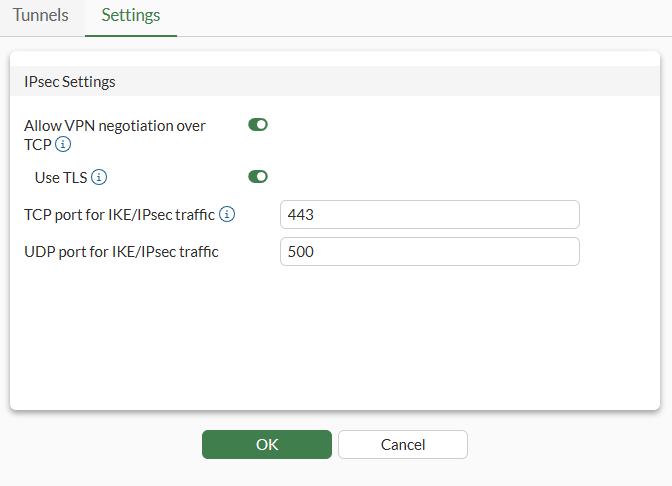
In the CLI:

config system settings
    set ike-tcp-service {enable | disable}
    set ike-tls-service {enable | disable}
end

Both settings are per-vdom settings to control whether IKE over TCP and TLS is used in VPN tunnels. These settings are disabled by default.

When ike-tcp-service is enabled, dialup VPNs configured in the VDOM will behave as the Auto transport option - transport over UDP will be preferred, but when the IKE connection cannot be made over UDP, communication will be attempted in TCP or TLS. For site-to-site VPNs, you must set the transport option to Auto to use TCP or TLS.

When disabled (default), dialup VPNs will not attempt to connect over TCP.

Upgrading from 7.6 and lower:

  1. If a dynamic-type dialup VPN with auto or TCP transport mode exists, the ike-tcp-service setting is enabled for the VDOM.

  2. If a static VPN with TCP transport mode exists, the ike-tcp-service setting is enabled for the VDOM.

  3. If a static VPN with auto transport mode exists, that VPN will be changed to use transport UDP.

For more information:

Tunneling protocol and encapsulation

Tunneling protocol and encapsulation

Fortinet’s IPsec VPN offers the following options for tunneling and encapsulation:

  • Native ESP

  • UDP encapsulation

  • TCP encapsulation with Fortinet proprietary extension

  • TCP encapsulation using RFC 8229

  • TCP encapsulation using RFC 8229 with TLS 1.3

When ESP is used without encapsulation, it connects directly over IP Protocol 50. When ESP is encapsulated within UDP, it uses UDP/500 and UDP/4500 for NAT traversal, which are the options for dialup IPsec VPN. Furthermore the port can be modified on a per-VDOM basis.

FortiGate can also operate in an Auto-transport mode where UDP will be attempted first before failing over to TCP or TCP with TLS. By default, TCP encapsulation and Auto-transport is disabled per VDOM. However, once enabled, tunnels can be changed to use Auto-transport mode.

This allows IPsec to encapsulate ESP packets within TCP and operate on TCP port 443 (default), enabling ESP packets to traverse carrier networks where direct IPsec traffic is blocked or impeded by carrier-grade NAT.

This feature requires using IKE version 2. For remote access over dialup tunnels, it also requires FortiClient 7.4.1 or later.

Tunnel and encapsulation settings

In the GUI, go to VPN > VPN Tunnels and select the Settings tab:

In the CLI:

config system settings
    set ike-tcp-service {enable | disable}
    set ike-tls-service {enable | disable}
end

Both settings are per-vdom settings to control whether IKE over TCP and TLS is used in VPN tunnels. These settings are disabled by default.

When ike-tcp-service is enabled, dialup VPNs configured in the VDOM will behave as the Auto transport option - transport over UDP will be preferred, but when the IKE connection cannot be made over UDP, communication will be attempted in TCP or TLS. For site-to-site VPNs, you must set the transport option to Auto to use TCP or TLS.

When disabled (default), dialup VPNs will not attempt to connect over TCP.

Upgrading from 7.6 and lower:

  1. If a dynamic-type dialup VPN with auto or TCP transport mode exists, the ike-tcp-service setting is enabled for the VDOM.

  2. If a static VPN with TCP transport mode exists, the ike-tcp-service setting is enabled for the VDOM.

  3. If a static VPN with auto transport mode exists, that VPN will be changed to use transport UDP.

For more information: