
Fortinet white logo
Fortinet white logo

Administration Guide

Configurable UDP port for IKE

Configurable UDP port for IKE

Some ISPs block UDP port 500 or UDP port 4500, preventing an IPsec VPN from being negotiated and established. To accommodate this, the IKE port can be changed.

To set the IKE port in the GUI:
  1. Go to VPN > VPN Tunnels and select the Settings tab.

  2. Edit the UDP port for IKE/IPsec traffic field.
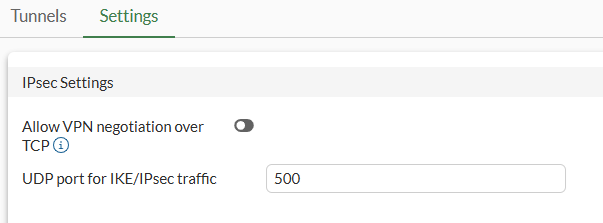
  3. Click OK.

To set the IKE port in the CLI:
config system settings
    set ike-port <integer>
end

Command

Description

ike-port <integer>

UDP port for IKE/IPsec traffic (1024 - 65535, default = 500, special = 500 and 443).

Example 1: site-to-site VPN without NAT

In this example, the IKE port is set to 6000 on the two site-to-site VPN gateways. There is no NAT between the VPN gateways, but the ISP has blocked UDP port 500. A site-to-site VPN is established using the defined IKE port.

To set the IKE port:
config system settings
    set ike-port 6000
end
To configure and check the site-to-site VPN:
  1. Configure the phase1 and phase2 interfaces:

    config vpn ipsec phase1-interface
        edit "s2s"
            set interface "port27"
            set ike-version 2
            set peertype any
            set net-device disable
            set proposal aes128-sha256 aes256-sha256 aes128gcm-prfsha256 aes256gcm-prfsha384 chacha20poly1305-prfsha256
            set wizard-type static-fortigate
            set remote-gw 11.101.1.1
            set psksecret **********
        next
    end
    config vpn ipsec phase2-interface
        edit "s2s"
            set phase1name "s2s"
            set proposal aes128-sha1 aes256-sha1 aes128-sha256 aes256-sha256 aes128gcm aes256gcm chacha20poly1305
            set src-addr-type name
            set dst-addr-type name
            set src-name "s2s_local"
            set dst-name "s2s_remote"
        next
    end
  2. Check the IKE gateway list and confirm that the specified port is used:

    # diagnose vpn ike gateway list
    
    vd: root/0
    name: s2s
    version: 2
    interface: port27 17
    addr: 173.1.1.1:6000 -> 11.101.1.1:6000
    tun_id: 11.101.1.1
    remote_location: 0.0.0.0
    created: 194s ago
    PPK: no
    IKE SA: created 1/2  established 1/2  time 0/4500/9000 ms
    IPsec SA: created 1/2  established 1/2  time 0/4500/9000 ms
    ...
  3. Check the VPN tunnel list:

    # diagnose vpn tunnel list
    list all ipsec tunnel in vd 0
    ------------------------------------------------------
    name=s2s ver=2 serial=1 173.1.1.1:6000->11.101.1.1:6000 tun_id=11.101.1.1 dst_mtu=1500 dpd-link=on remote_location=0.0.0.0 weight=1
    bound_if=17 lgwy=static/1 tun=tunnel/15 mode=auto/1 encap=none/520 options[0208]=npu frag-rfc  run_state=0 accept_traffic=1 overlay_id=0
    ...

Example 2: dialup VPN with NAT

In this example, the IKE port is set to 5000 on the VPN gateway and the dialup peer. The dialup peer is behind NAT, so NAT traversal (NAT-T) is used. The ISP blocks both UDP port 500 and UDP port 4500. The VPN connection is initiated on UDP port 5000 from the dialup VPN client and remains on port 5000 since NAT-T floating to 4500 is only required when the IKE port is 500.

To set the IKE port:
config system settings
    set ike-port 5000
end
To configure and check the dialup VPN with NAT:
  1. Configure the phase1 and phase2 interfaces:

    config vpn ipsec phase1-interface
        edit "server"
            set type dynamic
            set interface "port27"
            set ike-version 2
            set peertype any
            set net-device disable
            set proposal aes128-sha256 aes256-sha256 aes128gcm-prfsha256 aes256gcm-prfsha384 chacha20poly1305-prfsha256
            set dpd on-idle
            set wizard-type static-fortigate
            set psksecret **********
            set dpd-retryinterval 60
        next
    end
    config vpn ipsec phase2-interface
        edit "server"
            set phase1name "server"
            set proposal aes128-sha1 aes256-sha1 aes128-sha256 aes256-sha256 aes128gcm aes256gcm chacha20poly1305
            set src-addr-type name
            set dst-addr-type name
            set src-name "server_local"
            set dst-name "server_remote"
        next
    end
  2. Check the IKE gateway list and confirm that the specified port is used:

    # diagnose vpn ike gateway list
    
    vd: root/0
    name: server_0
    version: 2
    interface: port27 17
    addr: 173.1.1.1:5000 -> 173.1.1.2:65416
    tun_id: 173.1.1.2
    remote_location: 0.0.0.0
    created: 90s ago
    nat: peer
    PPK: no
    IKE SA: created 1/1  established 1/1  time 0/0/0 ms
    IPsec SA: created 1/1  established 1/1  time 0/0/0 ms
    ...
  3. Check the VPN tunnel list:

    # diagnose vpn tunnel list
    list all ipsec tunnel in vd 0
    ------------------------------------------------------
    name=server_0 ver=2 serial=a 173.1.1.1:5000->173.1.1.2:65416 tun_id=173.1.1.2 dst_mtu=1500 dpd-link=on remote_location=0.0.0.0 weight=1
    bound_if=17 lgwy=static/1 tun=tunnel/15 mode=dial_inst/3 encap=none/904 options[0388]=npu rgwy-chg rport-chg frag-rfc  run_state=0 accept_traffic=1 overlay_id=0
    ...

Example 3: UDP port 443 for dialup IPsec VPN

This example demonstrates a simple VPN configuration utilizing IKEv2 over UDP/443 between a Dialup VPN Gateway (FGTD) and a VPN Client (FGTA) where both ends utilize UDP/443 for IKEv2 negotiations.

To configure the hub FortiGate, FGTD:
  1. Configure the IKE port:

    config system settings
        set ike-port 443
    end
  2. Configure an IPSec VPN tunnel:

    config vpn ipsec phase1-interface
        edit "tofgta"
            set type dynamic
            set interface "port13"
            set ike-version 2
            set peertype any
            set net-device disable
            set proposal aes128-sha256 aes256-sha256 aes128gcm-prfsha256 aes256gcm-prfsha384 chacha20poly1305-prfsha256
            set dhgrp 20 21
            set transport auto
            set psksecret <password>
        next
    end
    config vpn ipsec phase2-interface
        edit "tofgta"
            set phase1name "tofgta"
            set proposal aes128-sha1 aes256-sha1 aes128-sha256 aes256-sha256 aes128gcm aes256gcm chacha20poly1305
            set dhgrp 20 21
        next
    end
  3. Configure a firewall policy:

    config firewall policy
        edit 1
            set srcintf "any"
            set dstintf "any"
            set action accept
            set srcaddr "all"
            set dstaddr "all"
            set srcaddr6 "all"
            set dstaddr6 "all"
            set schedule "always"
            set service "ALL"
        next
    end
To configure the spoke FortiGate, FGTA:
  1. Configure the IKE port:

    config system settings
        set ike-port 443
    end
  2. Configure an IPSec VPN tunnel:

    config vpn ipsec phase1-interface
        edit "tofgtd"
            set interface "port9"
            set ike-version 2
            set peertype any
            set net-device disable
            set proposal aes128-sha256 aes256-sha256 aes128gcm-prfsha256 aes256gcm-prfsha384 chacha20poly1305-prfsha256
            set dhgrp 20 21
            set transport auto
            set remote-gw 173.1.1.1
            set psksecret <password>
        next
    end
    config vpn ipsec phase2-interface
        edit "tofgtd"
            set phase1name "tofgtd"
            set proposal aes128-sha1 aes256-sha1 aes128-sha256 aes256-sha256 aes128gcm aes256gcm chacha20poly1305
            set dhgrp 20 21
        next
    end
  3. Configure a firewall policy:

    config firewall policy
        edit 1
            set srcintf "any"
            set dstintf "any"
            set action accept
            set srcaddr "all"
            set dstaddr "all"
            set srcaddr6 "all"
            set dstaddr6 "all"
            set schedule "always"
            set service "ALL"
        next
    end
To verify the IPsec VPN tunnel status:

Note that addr shows the UDP custom port value and transport shows UDP.

# diagnose vpn ike gateway list
vd: root/0
name: tofgtd
version: 2
interface: port9 15
addr: 11.101.1.1:443-> 173.1.1.1:443
tun_id: 173.1.1.1/::173.1.1.1
remote_location: 0.0.0.0
network-id: 0
transport: UDP
created: 642s ago
peer-id: 173.1.1.1
peer-id-auth: no
nat: me
pending-queue: 0
PPK: no
IKE SA: created 1/1  established 1/1  time 10/10/10 ms
IPsec SA: created 1/1  established 1/1  time 10/10/10 ms
 
  id/spi: 5 ea6ed73ac96d8151/df3decebc465a65f
  direction: initiator
  status: established 642-642s ago = 10ms
  proposal: aes128-sha256
  child: no
  SK_ei: d09da40c2a7b9989-cf5538d9462a81e4
  SK_er: 6a9d32b1b60a201b-aec078baabffa9c7
  SK_ai: 248682bcff1866ea-444582d14090b9ac-de08d11d6a5f58a7-5e3fdb29f53d25c2
  SK_ar: caa2d26a92aac4ad-bcd92aa0018aa398-e3088448964778cb-499e8b05acffb64b
  PPK: no
  message-id sent/recv: 2/0
  QKD: no
  PQC-KEM (IKE): no
  PQC-KEM (all IPsec): no
  lifetime/rekey: 86400/85457
  DPD sent/recv: 00000000/00000000
  peer-id: 173.1.1.1

Configurable UDP port for IKE

Configurable UDP port for IKE

Some ISPs block UDP port 500 or UDP port 4500, preventing an IPsec VPN from being negotiated and established. To accommodate this, the IKE port can be changed.

To set the IKE port in the GUI:
  1. Go to VPN > VPN Tunnels and select the Settings tab.

  2. Edit the UDP port for IKE/IPsec traffic field.

  3. Click OK.

To set the IKE port in the CLI:
config system settings
    set ike-port <integer>
end

Command

Description

ike-port <integer>

UDP port for IKE/IPsec traffic (1024 - 65535, default = 500, special = 500 and 443).

Example 1: site-to-site VPN without NAT

In this example, the IKE port is set to 6000 on the two site-to-site VPN gateways. There is no NAT between the VPN gateways, but the ISP has blocked UDP port 500. A site-to-site VPN is established using the defined IKE port.

To set the IKE port:
config system settings
    set ike-port 6000
end
To configure and check the site-to-site VPN:
  1. Configure the phase1 and phase2 interfaces:

    config vpn ipsec phase1-interface
        edit "s2s"
            set interface "port27"
            set ike-version 2
            set peertype any
            set net-device disable
            set proposal aes128-sha256 aes256-sha256 aes128gcm-prfsha256 aes256gcm-prfsha384 chacha20poly1305-prfsha256
            set wizard-type static-fortigate
            set remote-gw 11.101.1.1
            set psksecret **********
        next
    end
    config vpn ipsec phase2-interface
        edit "s2s"
            set phase1name "s2s"
            set proposal aes128-sha1 aes256-sha1 aes128-sha256 aes256-sha256 aes128gcm aes256gcm chacha20poly1305
            set src-addr-type name
            set dst-addr-type name
            set src-name "s2s_local"
            set dst-name "s2s_remote"
        next
    end
  2. Check the IKE gateway list and confirm that the specified port is used:

    # diagnose vpn ike gateway list
    
    vd: root/0
    name: s2s
    version: 2
    interface: port27 17
    addr: 173.1.1.1:6000 -> 11.101.1.1:6000
    tun_id: 11.101.1.1
    remote_location: 0.0.0.0
    created: 194s ago
    PPK: no
    IKE SA: created 1/2  established 1/2  time 0/4500/9000 ms
    IPsec SA: created 1/2  established 1/2  time 0/4500/9000 ms
    ...
  3. Check the VPN tunnel list:

    # diagnose vpn tunnel list
    list all ipsec tunnel in vd 0
    ------------------------------------------------------
    name=s2s ver=2 serial=1 173.1.1.1:6000->11.101.1.1:6000 tun_id=11.101.1.1 dst_mtu=1500 dpd-link=on remote_location=0.0.0.0 weight=1
    bound_if=17 lgwy=static/1 tun=tunnel/15 mode=auto/1 encap=none/520 options[0208]=npu frag-rfc  run_state=0 accept_traffic=1 overlay_id=0
    ...

Example 2: dialup VPN with NAT

In this example, the IKE port is set to 5000 on the VPN gateway and the dialup peer. The dialup peer is behind NAT, so NAT traversal (NAT-T) is used. The ISP blocks both UDP port 500 and UDP port 4500. The VPN connection is initiated on UDP port 5000 from the dialup VPN client and remains on port 5000 since NAT-T floating to 4500 is only required when the IKE port is 500.

To set the IKE port:
config system settings
    set ike-port 5000
end
To configure and check the dialup VPN with NAT:
  1. Configure the phase1 and phase2 interfaces:

    config vpn ipsec phase1-interface
        edit "server"
            set type dynamic
            set interface "port27"
            set ike-version 2
            set peertype any
            set net-device disable
            set proposal aes128-sha256 aes256-sha256 aes128gcm-prfsha256 aes256gcm-prfsha384 chacha20poly1305-prfsha256
            set dpd on-idle
            set wizard-type static-fortigate
            set psksecret **********
            set dpd-retryinterval 60
        next
    end
    config vpn ipsec phase2-interface
        edit "server"
            set phase1name "server"
            set proposal aes128-sha1 aes256-sha1 aes128-sha256 aes256-sha256 aes128gcm aes256gcm chacha20poly1305
            set src-addr-type name
            set dst-addr-type name
            set src-name "server_local"
            set dst-name "server_remote"
        next
    end
  2. Check the IKE gateway list and confirm that the specified port is used:

    # diagnose vpn ike gateway list
    
    vd: root/0
    name: server_0
    version: 2
    interface: port27 17
    addr: 173.1.1.1:5000 -> 173.1.1.2:65416
    tun_id: 173.1.1.2
    remote_location: 0.0.0.0
    created: 90s ago
    nat: peer
    PPK: no
    IKE SA: created 1/1  established 1/1  time 0/0/0 ms
    IPsec SA: created 1/1  established 1/1  time 0/0/0 ms
    ...
  3. Check the VPN tunnel list:

    # diagnose vpn tunnel list
    list all ipsec tunnel in vd 0
    ------------------------------------------------------
    name=server_0 ver=2 serial=a 173.1.1.1:5000->173.1.1.2:65416 tun_id=173.1.1.2 dst_mtu=1500 dpd-link=on remote_location=0.0.0.0 weight=1
    bound_if=17 lgwy=static/1 tun=tunnel/15 mode=dial_inst/3 encap=none/904 options[0388]=npu rgwy-chg rport-chg frag-rfc  run_state=0 accept_traffic=1 overlay_id=0
    ...

Example 3: UDP port 443 for dialup IPsec VPN

This example demonstrates a simple VPN configuration utilizing IKEv2 over UDP/443 between a Dialup VPN Gateway (FGTD) and a VPN Client (FGTA) where both ends utilize UDP/443 for IKEv2 negotiations.

To configure the hub FortiGate, FGTD:
  1. Configure the IKE port:

    config system settings
        set ike-port 443
    end
  2. Configure an IPSec VPN tunnel:

    config vpn ipsec phase1-interface
        edit "tofgta"
            set type dynamic
            set interface "port13"
            set ike-version 2
            set peertype any
            set net-device disable
            set proposal aes128-sha256 aes256-sha256 aes128gcm-prfsha256 aes256gcm-prfsha384 chacha20poly1305-prfsha256
            set dhgrp 20 21
            set transport auto
            set psksecret <password>
        next
    end
    config vpn ipsec phase2-interface
        edit "tofgta"
            set phase1name "tofgta"
            set proposal aes128-sha1 aes256-sha1 aes128-sha256 aes256-sha256 aes128gcm aes256gcm chacha20poly1305
            set dhgrp 20 21
        next
    end
  3. Configure a firewall policy:

    config firewall policy
        edit 1
            set srcintf "any"
            set dstintf "any"
            set action accept
            set srcaddr "all"
            set dstaddr "all"
            set srcaddr6 "all"
            set dstaddr6 "all"
            set schedule "always"
            set service "ALL"
        next
    end
To configure the spoke FortiGate, FGTA:
  1. Configure the IKE port:

    config system settings
        set ike-port 443
    end
  2. Configure an IPSec VPN tunnel:

    config vpn ipsec phase1-interface
        edit "tofgtd"
            set interface "port9"
            set ike-version 2
            set peertype any
            set net-device disable
            set proposal aes128-sha256 aes256-sha256 aes128gcm-prfsha256 aes256gcm-prfsha384 chacha20poly1305-prfsha256
            set dhgrp 20 21
            set transport auto
            set remote-gw 173.1.1.1
            set psksecret <password>
        next
    end
    config vpn ipsec phase2-interface
        edit "tofgtd"
            set phase1name "tofgtd"
            set proposal aes128-sha1 aes256-sha1 aes128-sha256 aes256-sha256 aes128gcm aes256gcm chacha20poly1305
            set dhgrp 20 21
        next
    end
  3. Configure a firewall policy:

    config firewall policy
        edit 1
            set srcintf "any"
            set dstintf "any"
            set action accept
            set srcaddr "all"
            set dstaddr "all"
            set srcaddr6 "all"
            set dstaddr6 "all"
            set schedule "always"
            set service "ALL"
        next
    end
To verify the IPsec VPN tunnel status:

Note that addr shows the UDP custom port value and transport shows UDP.

# diagnose vpn ike gateway list
vd: root/0
name: tofgtd
version: 2
interface: port9 15
addr: 11.101.1.1:443-> 173.1.1.1:443
tun_id: 173.1.1.1/::173.1.1.1
remote_location: 0.0.0.0
network-id: 0
transport: UDP
created: 642s ago
peer-id: 173.1.1.1
peer-id-auth: no
nat: me
pending-queue: 0
PPK: no
IKE SA: created 1/1  established 1/1  time 10/10/10 ms
IPsec SA: created 1/1  established 1/1  time 10/10/10 ms
 
  id/spi: 5 ea6ed73ac96d8151/df3decebc465a65f
  direction: initiator
  status: established 642-642s ago = 10ms
  proposal: aes128-sha256
  child: no
  SK_ei: d09da40c2a7b9989-cf5538d9462a81e4
  SK_er: 6a9d32b1b60a201b-aec078baabffa9c7
  SK_ai: 248682bcff1866ea-444582d14090b9ac-de08d11d6a5f58a7-5e3fdb29f53d25c2
  SK_ar: caa2d26a92aac4ad-bcd92aa0018aa398-e3088448964778cb-499e8b05acffb64b
  PPK: no
  message-id sent/recv: 2/0
  QKD: no
  PQC-KEM (IKE): no
  PQC-KEM (all IPsec): no
  lifetime/rekey: 86400/85457
  DPD sent/recv: 00000000/00000000
  peer-id: 173.1.1.1