

Remote access VPNs with IPAM addressing New
The VPN wizard for creating remote access and SIA tunnels defaults to using IPAM for addressing, instead of manually entering the client IP range. When IPAM is not enabled, an option is displayed in the wizard to enable it and to assign basic IPAM parameters. Once enabled, administrators only need to select a network size in order to automatically assign a block of addresses from the IPAM address pool to the VPN clients.
Example
In this example, we enable IPAM and assign a default block of addresses for use by IPAM. Using the Remote Access VPN Wizard, we create the VPN settings and reserve a 256 address block for VPN client address assignments. IPAM automatically assigns the address range with 256 addresses from the default address block. This simplifies the role of the admin in reserving and defining an address range manually for client endpoints.

To enable IPAM and IPAM Subnet in the GUI:
-
Go to Network > IPAM > IPAM Settings.
-
Set Status to Enabled.
-
Click OK.
-
Go to the IPAM Subnets tab.
-
Define a subnet to allow IPAM to assign addresses from, for example 172.31.0.0 255.255.0.0.
-
Click OK.
To configure an IPsec tunnel from template in the GUI:
-
Go to VPN > VPN Wizard.
-
Enter a Tunnel name and select Remote Access, then click Begin.
-
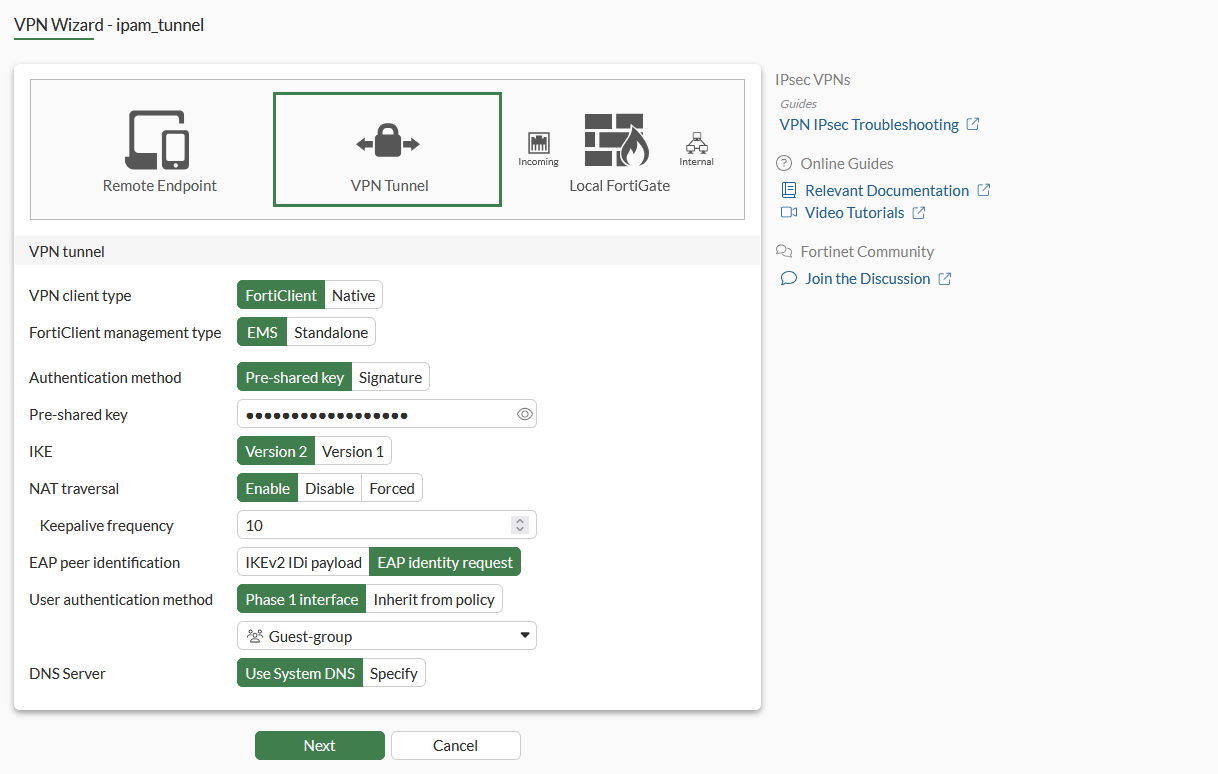
Set VPN client type to FortiClient and FortiClient management type to EMS.
-
Set Authentication method to Pre-shared key and enter the Pre-shared key.
-
Set User authentication method to Phase 1 interface and select a user group.
-
Click Next.
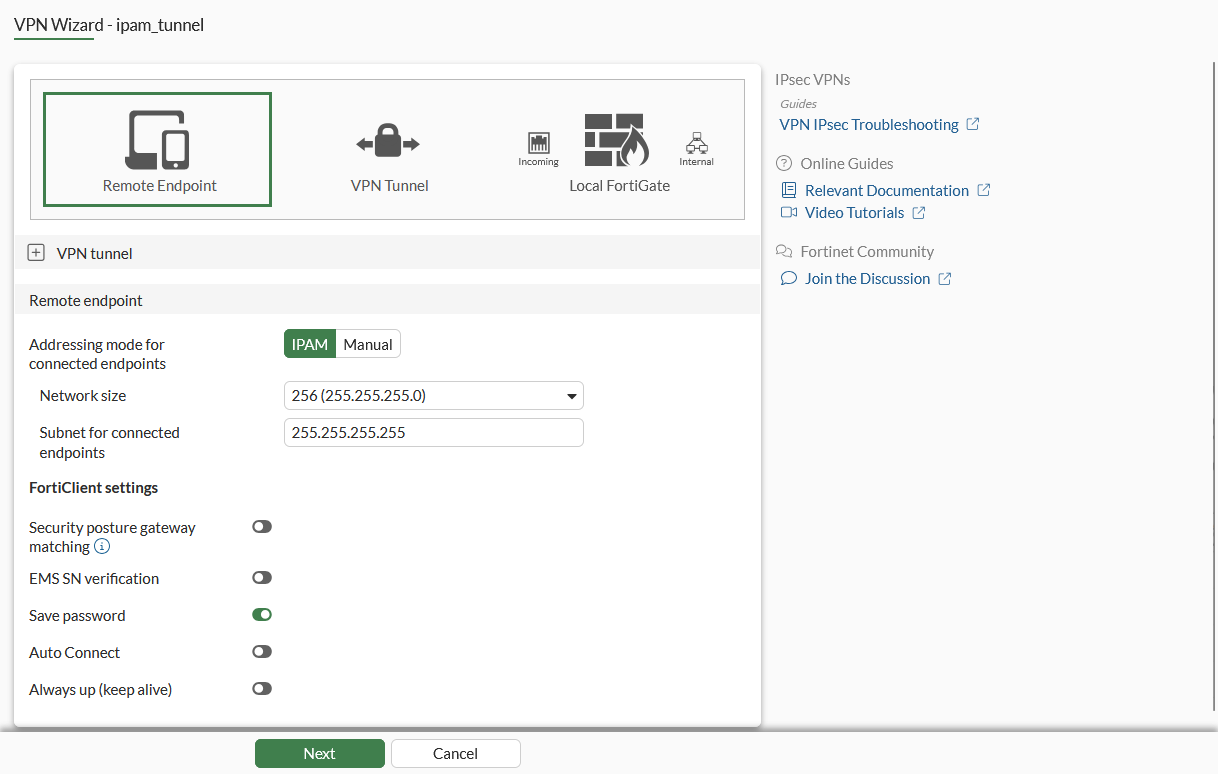
Addressing mode for connected endpoints is set to IPAM by default. If IPAM was not previously enabled, an option Edit IPAM Settings is shown.
-
Set the Network size. This will reserve a range of addresses in the IPAM address range for VPN clients.
-
Leave Subnet for connected endpoints as is, and click Next.
-
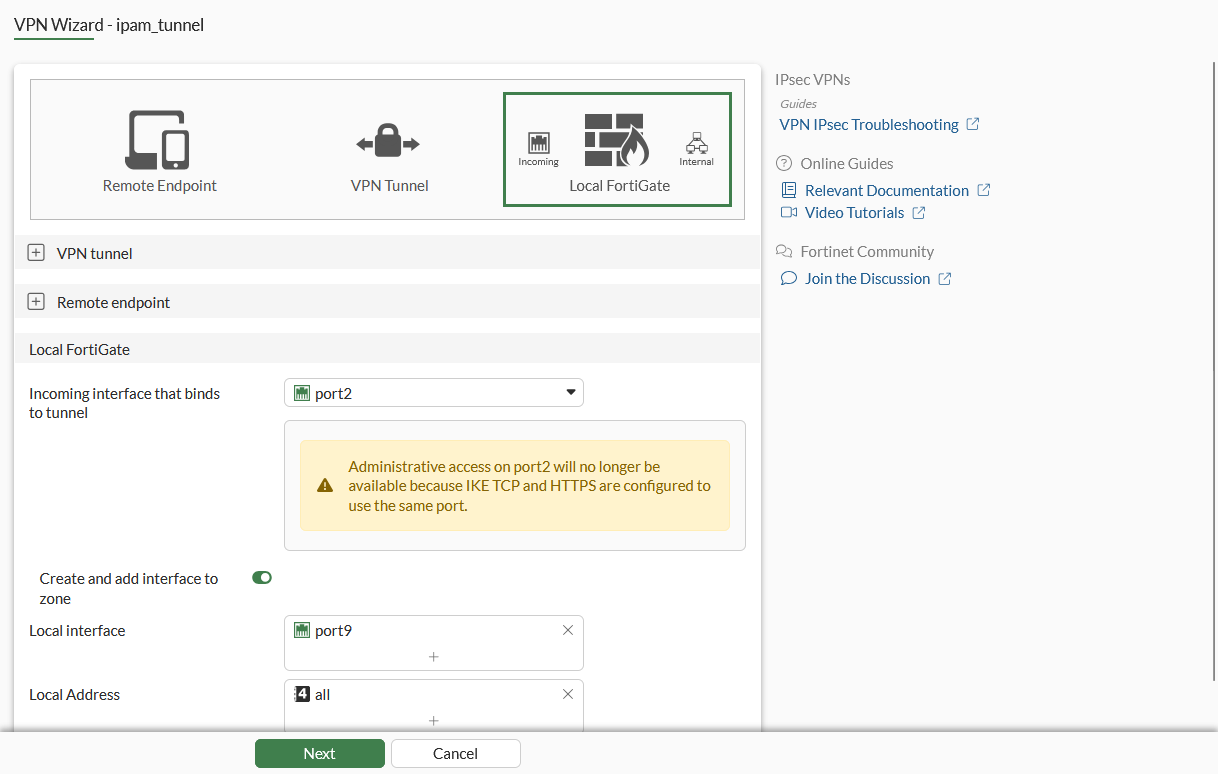
Set the Incoming interface that binds to tunnel, Local interface, and Local Address.
-
Click Next.
-
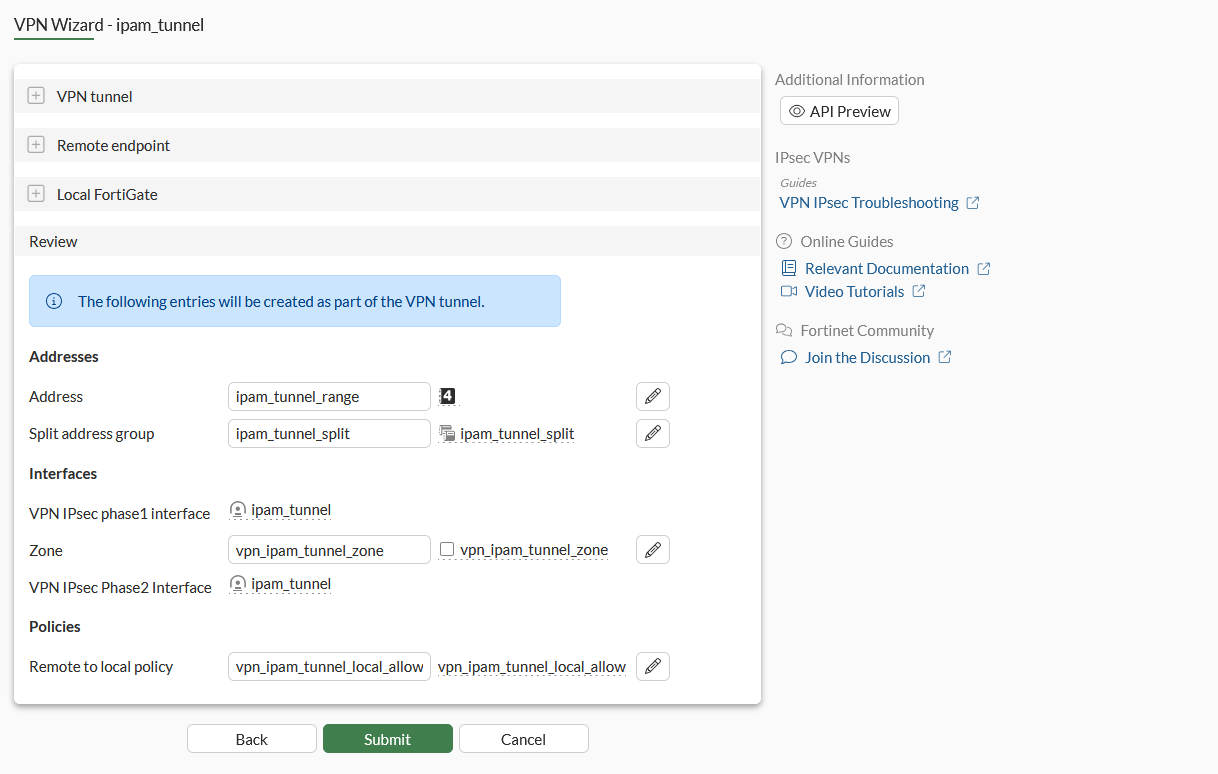
Review the settings, then click Submit.
To enable IPAM and IPAM Subnet in the CLI:
config system ipam
    set status enable
    config pools
        edit "default-pool"
            set subnet 172.31.0.0 255.255.0.0
        next
    end
end
To configure an IPsec tunnel in the CLI:
config vpn ipsec phase1-interface
    edit "ipam_tunnel"
        set type dynamic
        set interface "port1"
        set ike-version 2
        set peertype any
        set net-device disable
        set mode-cfg enable
        set proposal aes128-sha256 aes256-sha256 aes128gcm-prfsha256 aes256gcm-prfsha384 chacha20poly1305-prfsha256
        set comments "VPN: ipam_tunnel -- Created by VPN wizard"
        set dhgrp 20 21
        set eap enable
        set eap-identity send-request
        set wizard-type dialup-forticlient
        set authusrgrp "local-group"
        set assign-ip-from name
        set dns-mode auto
        set ipv4-split-include "ipam_tunnel_split"
        set ipv4-name "ipam_tunnel_range"
        set save-password enable
        set psksecret PLAIN "0x313233343536"
    next
end
config vpn ipsec phase2-interface
    edit "ipam_tunnel"
        set phase1name "ipam_tunnel"
        set proposal aes128-sha256 aes256-sha256 aes128gcm aes256gcm chacha20poly1305
        set dhgrp 20 21
        set comments "VPN: ipam_tunnel -- Created by VPN wizard"
    next
end
config firewall address
    edit "ipam_tunnel_range"
        set type ipam
        set comment "VPN: ipam_tunnel -- Created by VPN wizard"
        set subnet 172.31.0.0 255.255.255.0
    next
end

config firewall policy
    edit 1
        set srcintf "any"
        set dstintf "any"
        set action accept
        set srcaddr "all"
        set dstaddr "all"
        set schedule "always"
        set service "ALL"
        set nat enable
    next
    edit 2
        set name "vpn_ipam_tunnel_local_allow"
        set srcintf "ipam_tunnel"
        set dstintf "port9"
        set action accept
        set srcaddr "ipam_tunnel_range"
        set dstaddr "all"
        set schedule "always"
        set service "ALL"
        set nat enable
        set comments "VPN: ipam_tunnel -- Created by VPN wizard"
    next
end
The firewall address type is set to ipam, see IPAM firewall address New.