

Configuring PCP port mapping with SNAT and DNAT
FortiOS supports the Port Control Protocol (PCP) by allowing the FortiGate to act as a PCP server, and dynamically manage network addresses and port translations for PCP clients.
IPv6 PCP for DNAT46 is also supported, enabling inbound PCP MAP requests in NAT64 deployments and allowing FortiOS to dynamically manage IPv6-to-IPv4 mappings through PCP, improving compatibility with CLAT-based CPEs.
The PCP server must be enabled with a pool (config system pcp-server). In the firewall policy, enable either pcp-outbound or pcp-inbound mode and assign the pool.
config system pcp-server
    set status {enable | disable}
    config pools
        edit <name>
            set client-subnet <ip_address/subnet>
            set client6-prefix <IPv6 client prefixes>
            set ext-intf <string>
            set extip ip>[-<ip>]
            set extport <port>[-<port>]
            set minimal-lifetime <integer>
            set maximal-lifetime <integer>
            set client-mapping-limit <integer>
            set mapping-filter-limit <integer>
            set allow-opcode {map peer announce}
            set third-party {allow | disallow}
            set multicast-announcement {enable | disable}
            set announcement-count <integer>
            set intl-intf <string>
            set recycle-delay <integer>
            set nat46 {enable | disable}
        next
    end
end
|
Command |
Description |
|---|---|
|
client-subnet <ip_address/subnet> |
Enter the IP address with subnet from which PCP requests are accepted. |
|
client6-prefix <IPv6 client prefixes> |
Prefixes from which PCP requests are accepted. |
|
ext-intf <string> |
Enter the external interface name. |
|
extip <ip>[-<ip>] |
Enter the IP address or address range on the external interface to map to an address on the internal network. |
|
extport <port>[-<port>] |
Enter the incoming port number or port range to map to a port number on the internal network. |
|
minimal-lifetime <integer> |
Set the minimal lifetime of a PCP mapping, in seconds (60 - 300, default = 120). |
|
maximal-lifetime <integer> |
Set the maximal lifetime of a PCP mapping, in seconds (3600 - 604800, default = 86400). |
|
client-mapping-limit <integer> |
Mapping limit per client (0 - 65535, default = 0, 0 = unlimited). |
|
mapping-filter-limit <integer> |
Filter limit per mapping (0 - 5, default = 1). |
|
allow-opcode {map peer announce} |
Set the allowed PCP OpCode:
|
|
third-party {allow | disallow} |
Allow/disallow the third-party option. |
|
multicast-announcement {enable | disable} |
Enable/disable multicast announcements. |
|
announcement-count <integer> |
Set the number of multicast announcements (3 - 10, default = 3). |
|
intl-intf <string> |
Enter the internal interface name. |
|
recycle-delay <integer> |
Set the minimum delay the PCP server will wait before recycling mappings that have expired, in seconds (0 - 3600, default = 0). |
|
nat46 {enable | disable} |
Enable/disable NAT46. |
The following topology is used in examples one and two to demonstrate PCP mapping with SNAT and DNAT.
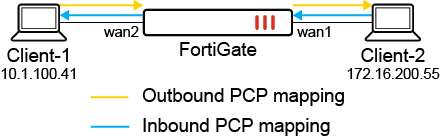
Example 1: PCP mapping with SNAT
This example demonstrates how PCP mapping works with SNAT. In the FortiGate PCP server settings, the pcp-pool1 pool is applied in the firewall policy with pcp-outbound mode. A PCP request is sent from Client-1 to the FortiGate to create PCP outbound mapping. When traffic is sent from Client-1 to Client-2, SNAT is performed by the PCP outbound mapping.
To configure the FortiGate as a PCP server:
-
Configure the PCP server settings:
config system pcp-server set status enable config pools edit "pcp-pool1" set client-subnet "10.1.100.41/32" set ext-intf "wan1" set extip 172.16.200.231 set extport 50000-51000 set intl-intf "wan2" next end end -
Configure the firewall policy:
config firewall policy
    edit 999
        set name "Outbound-pcp-policy999"
        set srcintf "wan2"
        set dstintf "wan1"
        set action accept
        set srcaddr "all"
        set dstaddr "all"
        set srcaddr6 "all"
        set dstaddr6 "all"
        set schedule "always"
        set service "ALL"
        set logtraffic all
        set auto-asic-offload disable
        set nat enable
        set pcp-outbound enable
        set pcp-poolname "pcp-pool1"
    next
end
To verify the configuration:
-
Generate a PCP peer request from Client-1 (10.1.100.41) to the FortiGate.
-
Verify the client's PCP request to the PCP server. In this example, an PCP client was installed on Ubuntu:
root@pc41:~# pcp -i 10.1.100.41:41111 -p 172.16.200.55:80 -s 10.1.100.8
-
On the FortiGate, verify the PCP outbound mappings list:
# diagnose firewall pcp-mapping list outbound
PCP outbound mappings (vdom=root):
pool:1 nonce:04307eb4037e0448317dc8b7 protocol:6 duration:8 lifetime:900 expiry:893 intl:10.1.100.41:41111 ext:172.16.200.231:50000 remote:172.16.200.55:80
-
Send HTTP traffic that passes through the FortiGate and access Client-2 (172.16.200.55:80) from Client-1.
-
On the FortiGate, verify the session list. The source IP address of Client-1 is translated to 172.16.200.231:50000, which follows the PCP outbound mapping:
# diagnose sys session list
session info: proto=6 proto_state=01 duration=8 expire=3599 timeout=3600 flags=00000000 socktype=0 sockport=0 av_idx=0 use=3
origin-shaper=
reply-shaper=
per_ip_shaper=
class_id=0 ha_id=0 policy_dir=0 tunnel=/ vlan_cos=0/255
state=log may_dirty f00 pcp_outbound
statistic(bytes/packets/allow_err): org=1812/33/1 reply=124168/92/1 tuples=2
tx speed(Bps/kbps): 204/1 rx speed(Bps/kbps): 13998/111
orgin->sink: org pre->post, reply pre->post dev=8->7/7->8 gwy=172.16.200.55/10.1.100.41
hook=post dir=org act=snat 10.1.100.41:41111->172.16.200.55:80(172.16.200.231:50000)
hook=pre dir=reply act=dnat 172.16.200.55:80->172.16.200.231:50000(10.1.100.41:41111)
pos/(before,after) 0/(0,0), 0/(0,0)
misc=0 policy_id=999 pol_uuid_idx=677 auth_info=0 chk_client_info=0 vd=0
serial=0000b4f8 tos=ff/ff app_list=0 app=0 url_cat=0
rpdb_link_id=00000000 ngfwid=n/a
npu_state=0x4000001 no_offload
no_ofld_reason:  disabled-by-policy
total session 1
-
Send HTTP traffic that passes through the FortiGate and access another server from Client-1.
-
On the FortiGate, verify the session list. This time, the source IP address of Client-1 is not translated to 172.16.200.231:50000, since the traffic does not match the existing PCP outbound mapping:
# diagnose sys session list
session info: proto=6 proto_state=01 duration=6 expire=3596 timeout=3600 flags=00000000 socktype=0 sockport=0 av_idx=0 use=3
origin-shaper=
reply-shaper=
per_ip_shaper=
class_id=0 ha_id=0 policy_dir=0 tunnel=/ vlan_cos=0/255
state=log may_dirty f00
statistic(bytes/packets/allow_err): org=1449/26/1 reply=98808/72/1 tuples=2
tx speed(Bps/kbps): 215/1 rx speed(Bps/kbps): 14703/117
orgin->sink: org pre->post, reply pre->post dev=8->7/7->8 gwy=172.16.200.155/10.1.100.41
hook=post dir=org act=snat 10.1.100.41:41111->172.16.200.155:80(172.16.200.8:41111)
hook=pre dir=reply act=dnat 172.16.200.155:80->172.16.200.8:41111(10.1.100.41:41111)
pos/(before,after) 0/(0,0), 0/(0,0)
misc=0 policy_id=999 pol_uuid_idx=677 auth_info=0 chk_client_info=0 vd=0
serial=0000b596 tos=ff/ff app_list=0 app=0 url_cat=0
rpdb_link_id=00000000 ngfwid=n/a
npu_state=0x4000001 no_offload
no_ofld_reason:  disabled-by-policy
total session 1
Example 2: PCP mapping with DNAT
This example demonstrates how PCP mapping works with DNAT. In the FortiGate PCP server settings, the pcp-pool1 pool is applied in the firewall policy with pcp-inbound mode. A PCP request is sent from Client-1 to the FortiGate to create PCP inbound mapping. When traffic is sent from Client-2 to access the external IP of Client-1 (172.16.200.231:50000), traffic passes by due to the PCP inbound mapping.
To configure the FortiGate as a PCP server:
-
Configure the PCP server settings:
config system pcp-server set status enable config pools edit "pcp-pool1" set client-subnet "10.1.100.41/32" set ext-intf "wan1" set extip 172.16.200.231 set extport 50000-51000 set intl-intf "wan2" next end end -
Configure the firewall policy:
config firewall policy
    edit 998
        set name "Inbound-pcp-policy998"
        set srcintf "wan1"
        set dstintf "wan2"
        set action accept
        set srcaddr "all"
        set dstaddr "all"
        set srcaddr6 "all"
        set dstaddr6 "all"
        set schedule "always"
        set service "ALL"
        set logtraffic all
        set auto-asic-offload disable
        set nat enable
        set pcp-inbound enable
        set pcp-poolname "pcp-pool1"
    next
end
To verify the configuration:
-
Generate a PCP peer request from Client-1 (10.1.100.41) to the FortiGate.
-
Verify the client's PCP request to the PCP server. In this example, an PCP client was installed on Ubuntu:
root@pc41:~# pcp -i 10.1.100.41:80 -s 10.1.100.8
-
On the FortiGate, verify the PCP inbound mappings list:
# diagnose firewall pcp-mapping list inbound
PCP inbound mappings (vdom=root):
pool:1 nonce:35e2ff035b959f7a4e669791 protocol:6 duration:3 lifetime:900 expiry:900 intl:10.1.100.41:80 ext:172.16.200.231:50000
-
From Client-2 (172.16.200.55:80), send traffic that passes through the FortiGate and access the external IP of Client-1 (172.16.200.231:50000).
-
On the FortiGate, run a sniffer trace. The traffic is allowed through policy 998, and the destination IP:port is translated from 172.16.200.231:50000 to 10.1.100.41:80, which follows the PCP inbound mapping:
# diagnose sniffer packet any 'tcp and port 50000 or port 80' 4
interfaces=[any]
filters=[tcp and port 50000 or port 80]
2.959915 wan1 in 172.16.200.55.43284 -> 172.16.200.231.50000: syn 3480016601
2.960051 wan2 out 10.1.100.8.43284 -> 10.1.100.41.80: syn 3480016601
2.960390 wan2 in 10.1.100.41.80 -> 10.1.100.8.43284: syn 2813145613 ack 3480016602
2.960447 wan1 out 172.16.200.231.50000 -> 172.16.200.55.43284: syn 2813145613 ack 3480016602
2.960644 wan1 in 172.16.200.55.43284 -> 172.16.200.231.50000: ack 2813145614
2.960664 wan2 out 10.1.100.8.43284 -> 10.1.100.41.80: ack 2813145614
2.961194 wan1 in 172.16.200.55.43284 -> 172.16.200.231.50000: psh 3480016602 ack 2813145614
2.961209 wan2 out 10.1.100.8.43284 -> 10.1.100.41.80: psh 3480016602 ack 2813145614
2.961516 wan2 in 10.1.100.41.80 -> 10.1.100.8.43284: ack 3480016686
2.961533 wan1 out 172.16.200.231.50000 -> 172.16.200.55.43284: ack 3480016686
2.993623 wan2 in 10.1.100.41.80 -> 10.1.100.8.43284: psh 2813145614 ack 3480016686
2.993637 wan1 out 172.16.200.231.50000 -> 172.16.200.55.43284: psh 2813145614 ack 3480016686
2.993947 wan1 in 172.16.200.55.43284 -> 172.16.200.231.50000: ack 2813145875
2.993962 wan2 out 10.1.100.8.43284 -> 10.1.100.41.80: ack 2813145875
2.995677 wan1 in 172.16.200.55.43284 -> 172.16.200.231.50000: fin 3480016686 ack 2813145875
2.995691 wan2 out 10.1.100.8.43284 -> 10.1.100.41.80: fin 3480016686 ack 2813145875
2.996059 wan2 in 10.1.100.41.80 -> 10.1.100.8.43284: fin 2813145875 ack 3480016687
2.996075 wan1 out 172.16.200.231.50000 -> 172.16.200.55.43284: fin 2813145875 ack 3480016687
2.996230 wan1 in 172.16.200.55.43284 -> 172.16.200.231.50000: ack 2813145876
2.996245 wan2 out 10.1.100.8.43284 -> 10.1.100.41.80: ack 2813145876
Only traffic matching the PCP inbound mapping will be forwarded by policy 998. Any other traffic is dropped.
Example 3: PCP IPv6-to-IPv4 mapping with NAT64/DNAT46 New
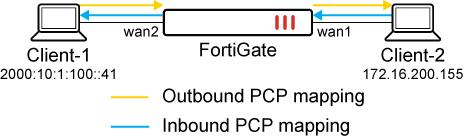
This example demonstrates how PCP IPv6-to-IPv4 mappings work with NAT64/DNAT46.
Client-1 has an IPv6 IP address, and Client-2 has an IPv4 address. On the FortiGate, a PCP server is configured with a PCP pool that has NAT46 enabled. The PCP pool is applied to a NAT46 firewall policy with pcp-inbound enabled and the pool specified. Client-1 sends an IPv6 PCP request to FortiGate to request a PCP inbound mapping. FortiGate uses the inbound PCP mapping to DNAT translate the IPv4 IP address from Client-2 to the IPv6 IP address for Client-1.
To configure the FortiGate as a PCP server:
-
Configure the PCP server settings:
The pool is named
35366_pool46_inbound. NAT46 is enabled and an IPv6 prefix is defined. One IP/host subnet is used for both client and external IP.config system pcp-server set status enable config pool edit "35366_pool46_inbound" set client-subnet "10.1.100.41/32" set client6-prefix "2000:10:1:100::41/128" set ext-intf "port1" set extip 172.16.200.121 set extport 50000-51000 set intl-intf "port9" set nat46 enable next end end -
Configure the firewall policy:
In the firewall policy,
nat46is enabled,pcp-inboundis enabled, and the PCP pool name (35366_pool46_inbound) is specified.The external interface (
ext-intf) is port1, and the internal interface (intl-intf) is port9.config firewall policy edit 46 set name "pcp-46-inbound" set uuid de6c3632-95a6-51f0-0124-aa2705db9569 set srcintf "port1" set dstintf "port9" set action accept set nat46 enable set custom-tags "test_tag_pcp_test" set srcaddr "all" set dstaddr "all" set srcaddr6 "all" set dstaddr6 "all" set schedule "always" set service "ALL" set logtraffic all set auto-asic-offload disable set pcp-inbound enable set pcp-poolname "35366_pool46_inbound" set ippool enable set poolname6 "pcp_ippool6_1" next end
To verify the configuration:
-
Generate a PCP map request from Client-1 (IPv6 2000:10:1:100::41) to the FortiGate:
root@pc41:~# pcp -i [2000:10:1:100::41]:80 -s [2000:10:1:100::5]
-
On the FortiGate, verify the PCP inbound mappings list:
# diagnose firewall pcp-mapping list inbound
PCP inbound mappings (vdom=root):
pool:2 nonce:19c410963f68158746b735ba protocol:6 duration:809 lifetime:900 expiry:90 intl:2000:10:1:100::41:80 ext:172.16.200.121:50000
-
From Client-2 (IPv4 172.16.200.155), send traffic to pass through FortiGate and access the external interface (
extip) of Client-1 (IPv4 172.16.200.121:50000).The traffic passes by the policy (policy id
46), and the destination IP:port is DNAT translated from172.16.200.231:50000to2000:10:1:100::41:80, which follows the inbound pcp-mapping.Policy 46 only forwards traffic that matches the inbound PCP mapping (
pcp-mapping). Other traffic is dropped.# diagnose sniffer packet any 'tcp and port 80 or port 50000' 4 interfaces=[any] filters=[tcp and port 80 or port 50000] 4.645467 port1 in 172.16.200.155.56926 -> 172.16.200.121.50000: syn 3388939279 4.645517 naf.root out 172.16.200.155.56926 -> 172.16.200.121.50000: syn 3388939279 4.645521 naf.root in 2000:10:1:100::121.56926 -> 2000:10:1:100::41.80: syn 3388939279 4.645557 port9 out 2000:10:1:100::121.56926 -> 2000:10:1:100::41.80: syn 3388939279 4.645866 port9 in 2000:10:1:100::41.80 -> 2000:10:1:100::121.56926: syn 3670124269 ack 3388939280 [flowlabel 0x60fc6] 4.645882 naf.root out 2000:10:1:100::41.80 -> 2000:10:1:100::121.56926: syn 3670124269 ack 3388939280 [flowlabel 0x60fc6] 4.645884 naf.root in 172.16.200.121.50000 -> 172.16.200.155.56926: syn 3670124269 ack 3388939280 4.645906 port1 out 172.16.200.121.50000 -> 172.16.200.155.56926: syn 3670124269 ack 3388939280 4.646006 port1 in 172.16.200.155.56926 -> 172.16.200.121.50000: ack 3670124270 4.646013 naf.root out 172.16.200.155.56926 -> 172.16.200.121.50000: ack 3670124270 4.646014 naf.root in 2000:10:1:100::121.56926 -> 2000:10:1:100::41.80: ack 3670124270 4.646020 port9 out 2000:10:1:100::121.56926 -> 2000:10:1:100::41.80: ack 3670124270 4.646138 port1 in 172.16.200.155.56926 -> 172.16.200.121.50000: psh 3388939280 ack 3670124270 4.646141 naf.root out 172.16.200.155.56926 -> 172.16.200.121.50000: psh 3388939280 ack 3670124270 4.646142 naf.root in 2000:10:1:100::121.56926 -> 2000:10:1:100::41.80: psh 3388939280 ack 3670124270 4.646144 port9 out 2000:10:1:100::121.56926 -> 2000:10:1:100::41.80: psh 3388939280 ack 3670124270 4.646227 port9 in 2000:10:1:100::41.80 -> 2000:10:1:100::121.56926: ack 3388939364 [flowlabel 0x60fc6] 4.646232 naf.root out 2000:10:1:100::41.80 -> 2000:10:1:100::121.56926: ack 3388939364 [flowlabel 0x60fc6] 4.646233 naf.root in 172.16.200.121.50000 -> 172.16.200.155.56926: ack 3388939364 4.646236 port1 out 172.16.200.121.50000 -> 172.16.200.155.56926: ack 3388939364 4.646587 port9 in 2000:10:1:100::41.80 -> 2000:10:1:100::121.56926: psh 3670124270 ack 3388939364 [flowlabel 0x60fc6] 4.646590 naf.root out 2000:10:1:100::41.80 -> 2000:10:1:100::121.56926: psh 3670124270 ack 3388939364 [flowlabel 0x60fc6] 4.646591 naf.root in 172.16.200.121.50000 -> 172.16.200.155.56926: psh 3670124270 ack 3388939364 4.646593 port1 out 172.16.200.121.50000 -> 172.16.200.155.56926: psh 3670124270 ack 3388939364 4.646668 port1 in 172.16.200.155.56926 -> 172.16.200.121.50000: ack 3670124531 4.646671 naf.root out 172.16.200.155.56926 -> 172.16.200.121.50000: ack 3670124531 4.646672 naf.root in 2000:10:1:100::121.56926 -> 2000:10:1:100::41.80: ack 3670124531 4.646675 port9 out 2000:10:1:100::121.56926 -> 2000:10:1:100::41.80: ack 3670124531 4.648833 port1 in 172.16.200.155.56926 -> 172.16.200.121.50000: fin 3388939364 ack 3670124531 4.648836 naf.root out 172.16.200.155.56926 -> 172.16.200.121.50000: fin 3388939364 ack 3670124531 4.648837 naf.root in 2000:10:1:100::121.56926 -> 2000:10:1:100::41.80: fin 3388939364 ack 3670124531 4.648839 port9 out 2000:10:1:100::121.56926 -> 2000:10:1:100::41.80: fin 3388939364 ack 3670124531 4.649053 port9 in 2000:10:1:100::41.80 -> 2000:10:1:100::121.56926: fin 3670124531 ack 3388939365 [flowlabel 0x60fc6] 4.649057 naf.root out 2000:10:1:100::41.80 -> 2000:10:1:100::121.56926: fin 3670124531 ack 3388939365 [flowlabel 0x60fc6] 4.649058 naf.root in 172.16.200.121.50000 -> 172.16.200.155.56926: fin 3670124531 ack 3388939365 4.649061 port1 out 172.16.200.121.50000 -> 172.16.200.155.56926: fin 3670124531 ack 3388939365 4.649138 port1 in 172.16.200.155.56926 -> 172.16.200.121.50000: ack 3670124532 4.649142 naf.root out 172.16.200.155.56926 -> 172.16.200.121.50000: ack 3670124532 4.649143 naf.root in 2000:10:1:100::121.56926 -> 2000:10:1:100::41.80: ack 3670124532 4.649146 port9 out 2000:10:1:100::121.56926 -> 2000:10:1:100::41.80: ack 3670124532 ^C 40 packets received by filter 0 packets dropped by kernel