Fortinet white logo
Fortinet white logo

Administration Guide

Configuring a file filter profile

Configuring a file filter profile

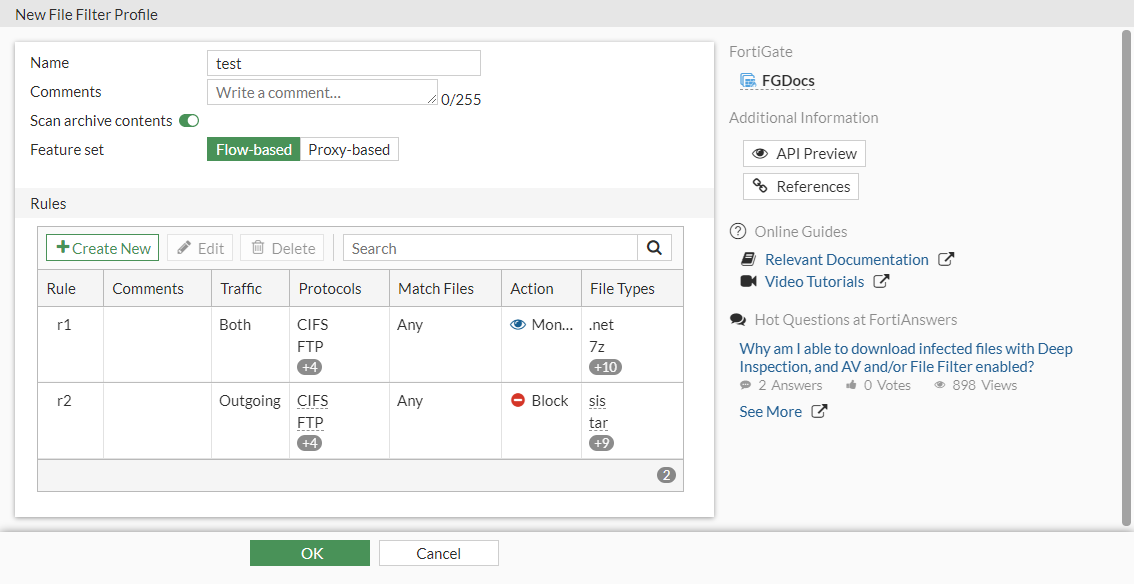
In this example, a flow-based file filter profile is created that has two rules.

  • Rule 1: applied to HTTP, FTP, SMTP, IMAP, POP3, and CIFS to monitor any matched .NET, 7-Zip, ActiveMime, ARJ, ASPack, AVI, Base64, Windows batch, BinHex, BMP, Bzip, and Bzip2 files transmitted in the session's originating and reply directions.
  • Rule 2: applied to HTTP, FTP, SMTP, IMAP, POP3, and CIFS to block any matched SIS, TAR. TIFF, torrent, UPX, UUE, WAV, WMA. ZAR archive, XZ, and ZIP files transmitted in the session's originating direction.
To configure a file filter in the GUI:
  1. Configure the filter profile:

    1. Go to Security Profiles > File Filter and click Create New.

    2. Enter a name.

    3. Set the Feature set to Flow-based.

    4. In the Rules table, click Create New.

    5. Configure rule 1 as follows:

      Name

      r1

      Protocols

      HTTP, FTP, SMTP, IMAP, POP3, CIFS

      Traffic

      Both

      Password-protected only

      Deselect

      File types

      .net, 7z, activemime, arj, aspack, avi, base64, bat, binhex, bmp, bzip, bzip2

      Action

      Monitor

    6. Click OK to save the rule.

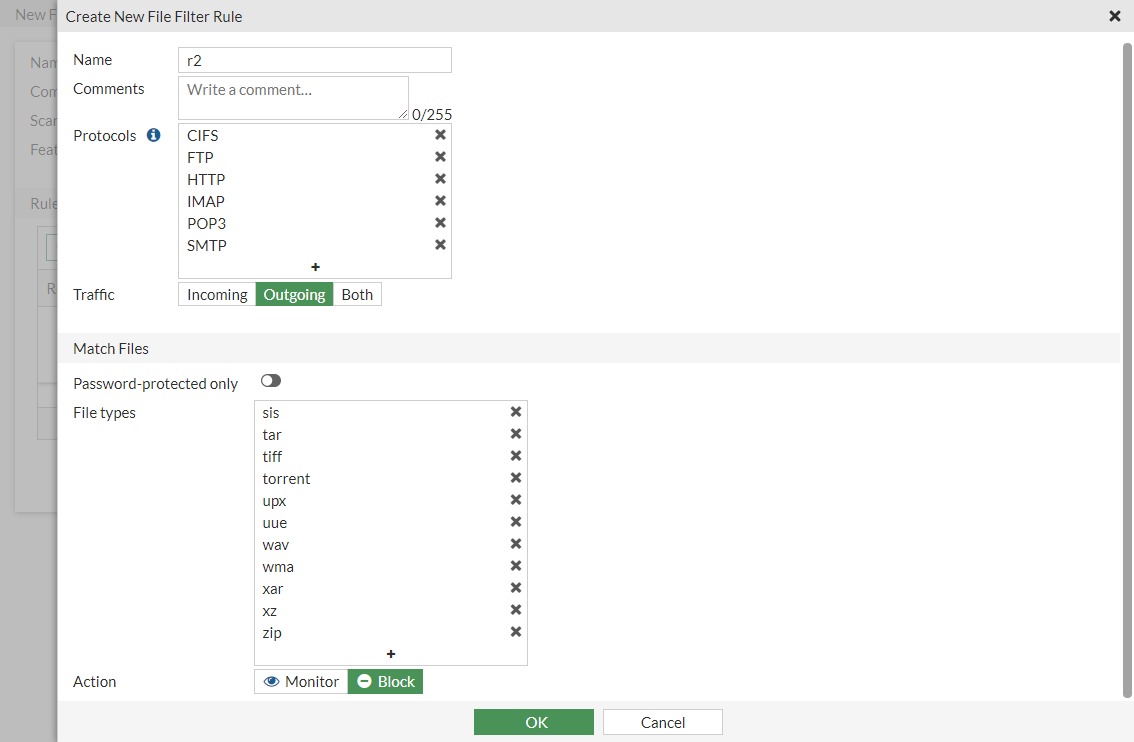
    7. In the Rules table, click Create New and configure rule 2 as follows:

      Name

      r2

      Protocols

      HTTP, FTP, SMTP, IMAP, POP3, CIFS

      Traffic

      Outgoing

      Password-protected only

      Deselect

      File types

      sis, tar, tiff, torrent, upx, uue, wav, wma, xar, xz, zip

      Action

      Block
    8. Click OK to save the rule.

    9. Click OK to save the filter profile.

  2. Apply the filter to a policy:
    1. Go to Policy & Objects > Firewall Policy and edit an existing policy or create a new one.
    2. In the Security Profiles section, enable File Filter.
    3. Select the filter from the dropdown box (test).
    4. Configure the other settings as needed.
    5. Click OK.
To configure a file filter in the CLI:
  1. Configure the file filter profile:
    config file-filter profile
        edit "test"
            set comment ''
            set feature-set flow
            set replacemsg-group ''
            set log enable
            set scan-archive-contents enable
            config rules
                edit "r1"
                    set comment ''
                    set protocol http ftp smtp imap pop3 cifs
                    set action log-only
                    set direction any
                    set password-protected any
                    set file-type ".net" "7z" "activemime" "arj" "aspack" "avi" "base64" "bat" "binhex" "bmp" "bzip" "bzip2"
                next
                edit "r2"
                    set comment ''
                    set protocol http ftp smtp imap pop3 cifs
                    set action block
                    set direction outgoing
                    set password-protected any
                    set file-type "sis" "tar" "tiff" "torrent" "upx" "uue" "wav" "wma" "xar" "xz" "zip"
                next
            end
        next
    end
  2. Apply the filter to a policy:
    config firewall policy
        edit 1
            set name "filefilter-policy"
            set srcintf "port10"
            set dstintf "port9"
            set srcaddr "all"
            set dstaddr "all"
            set srcaddr6 "all"
            set dstaddr6 "all"
            set action accept
            set schedule "always"
            set service "ALL"
            set utm-status enable
            set profile-protocol-options "protocol"
            set ssl-ssh-profile "protocols"
            set file-filter-profile "test"
            set auto-asic-offload disable
            set np-acceleration disable
            set nat enable
        next
    end
To view file filter logs in the GUI:
  1. Go to Log & Report > Security Events.
  2. Select the File Filter card.
To view file filter logs in the CLI:
# execute log filter category utm-file-filter			
# execute log display

Log samples

date=2020-04-21 time=17:04:02 logid="1900064000" type="utm" subtype="file-filter" eventtype="file-filter" level="warning" vd="root" eventtime=1587513843211612684 tz="-0700" policyid=1 sessionid=1751 srcip=10.1.100.22 srcport=57382 srcintf="port21" srcintfrole="undefined" dstip=172.16.200.44 dstport=445 dstintf="port23" dstintfrole="undefined" proto=6 service="CIFS" profile="filefilter" direction="incoming" action="blocked" rulename="1" filename="sample\\putty.exe" filesize=454656 filetype="exe" msg="File was blocked by file filter."
date=2020-04-21 time=17:03:54 logid="1900064000" type="utm" subtype="file-filter" eventtype="file-filter" level="warning" vd="root" eventtime=1587513834376811325 tz="-0700" policyid=1 sessionid=1742 srcip=10.1.100.22 srcport=36754 srcintf="port21" srcintfrole="undefined" dstip=172.16.200.44 dstport=22 dstintf="port23" dstintfrole="undefined" proto=6 service="SSH" subservice="SCP" profile="filefilter" direction="incoming" action="blocked" rulename="1" filename="test.pdf" filesize=571051 filetype="pdf" msg="File was blocked by file filter."
date=2020-04-21 time=17:00:30 logid="1900064000" type="utm" subtype="file-filter" eventtype="file-filter" level="warning" vd="root" eventtime=1587513630482716465 tz="-0700" policyid=1 sessionid=1684 srcip=10.1.100.22 srcport=58524 srcintf="port21" srcintfrole="undefined" dstip=172.16.200.44 dstport=143 dstintf="port23" dstintfrole="undefined" proto=6 service="IMAP" profile="filefilter" direction="incoming" action="blocked" from="pc4user1@qa.fortinet.com" to="pc4user2@qa.fortinet.com" recipient="pc4user2" subject="QA Test" rulename="1" filename="test.JPG" filesize=48079 filetype="jpeg" msg="File was blocked by file filter."
date=2020-04-21 time=16:59:58 logid="1900064000" type="utm" subtype="file-filter" eventtype="file-filter" level="warning" vd="root" eventtime=1587513598866551739 tz="-0700" policyid=1 sessionid=1674 srcip=10.1.100.22 srcport=39854 srcintf="port21" srcintfrole="undefined" dstip=172.16.200.44 dstport=110 dstintf="port23" dstintfrole="undefined" proto=6 service="POP3" profile="filefilter" direction="incoming" action="blocked" from="pc4user1@qa.fortinet.com" to="pc4user2@qa.fortinet.com" recipient="pc4user2" subject="QA Test" rulename="1" filename="test.JPG" filesize=48079 filetype="jpeg" msg="File was blocked by file filter."
date=2020-04-21 time=16:58:31 logid="1900064000" type="utm" subtype="file-filter" eventtype="file-filter" level="warning" vd="root" eventtime=1587513511516745955 tz="-0700" policyid=1 sessionid=1619 srcip=10.1.100.22 srcport=53144 srcintf="port21" srcintfrole="undefined" dstip=172.16.200.44 dstport=25 dstintf="port23" dstintfrole="undefined" proto=6 service="SMTP" profile="filefilter" direction="outgoing" action="blocked" from="pc4user1@qa.fortinet.com" to="pc4user2@qa.fortinet.com" sender="pc4user1@qa.fortinet.com" recipient="pc4user2@qa.fortinet.com" subject="QA Test" rulename="1" filename="test.PNG" filesize=65173 filetype="png" msg="File was blocked by file filter."
date=2020-04-21 time=16:58:14 logid="1900064000" type="utm" subtype="file-filter" eventtype="file-filter" level="warning" vd="root" eventtime=1587513494608988795 tz="-0700" policyid=1 sessionid=1605 srcip=10.1.100.22 srcport=43186 srcintf="port21" srcintfrole="undefined" dstip=172.16.200.44 dstport=21 dstintf="port23" dstintfrole="undefined" proto=6 service="FTP" profile="filefilter" direction="incoming" action="blocked" rulename="1" filename="index.html" filesize=21 filetype="html" msg="File was blocked by file filter."

Configuring a file filter profile

Configuring a file filter profile

In this example, a flow-based file filter profile is created that has two rules.

  • Rule 1: applied to HTTP, FTP, SMTP, IMAP, POP3, and CIFS to monitor any matched .NET, 7-Zip, ActiveMime, ARJ, ASPack, AVI, Base64, Windows batch, BinHex, BMP, Bzip, and Bzip2 files transmitted in the session's originating and reply directions.
  • Rule 2: applied to HTTP, FTP, SMTP, IMAP, POP3, and CIFS to block any matched SIS, TAR. TIFF, torrent, UPX, UUE, WAV, WMA. ZAR archive, XZ, and ZIP files transmitted in the session's originating direction.
To configure a file filter in the GUI:
  1. Configure the filter profile:

    1. Go to Security Profiles > File Filter and click Create New.

    2. Enter a name.

    3. Set the Feature set to Flow-based.

    4. In the Rules table, click Create New.

    5. Configure rule 1 as follows:

      Name

      r1

      Protocols

      HTTP, FTP, SMTP, IMAP, POP3, CIFS

      Traffic

      Both

      Password-protected only

      Deselect

      File types

      .net, 7z, activemime, arj, aspack, avi, base64, bat, binhex, bmp, bzip, bzip2

      Action

      Monitor

    6. Click OK to save the rule.

    7. In the Rules table, click Create New and configure rule 2 as follows:

      Name

      r2

      Protocols

      HTTP, FTP, SMTP, IMAP, POP3, CIFS

      Traffic

      Outgoing

      Password-protected only

      Deselect

      File types

      sis, tar, tiff, torrent, upx, uue, wav, wma, xar, xz, zip

      Action

      Block

    8. Click OK to save the rule.

    9. Click OK to save the filter profile.

  2. Apply the filter to a policy:
    1. Go to Policy & Objects > Firewall Policy and edit an existing policy or create a new one.
    2. In the Security Profiles section, enable File Filter.
    3. Select the filter from the dropdown box (test).
    4. Configure the other settings as needed.
    5. Click OK.
To configure a file filter in the CLI:
  1. Configure the file filter profile:
    config file-filter profile
        edit "test"
            set comment ''
            set feature-set flow
            set replacemsg-group ''
            set log enable
            set scan-archive-contents enable
            config rules
                edit "r1"
                    set comment ''
                    set protocol http ftp smtp imap pop3 cifs
                    set action log-only
                    set direction any
                    set password-protected any
                    set file-type ".net" "7z" "activemime" "arj" "aspack" "avi" "base64" "bat" "binhex" "bmp" "bzip" "bzip2"
                next
                edit "r2"
                    set comment ''
                    set protocol http ftp smtp imap pop3 cifs
                    set action block
                    set direction outgoing
                    set password-protected any
                    set file-type "sis" "tar" "tiff" "torrent" "upx" "uue" "wav" "wma" "xar" "xz" "zip"
                next
            end
        next
    end
  2. Apply the filter to a policy:
    config firewall policy
        edit 1
            set name "filefilter-policy"
            set srcintf "port10"
            set dstintf "port9"
            set srcaddr "all"
            set dstaddr "all"
            set srcaddr6 "all"
            set dstaddr6 "all"
            set action accept
            set schedule "always"
            set service "ALL"
            set utm-status enable
            set profile-protocol-options "protocol"
            set ssl-ssh-profile "protocols"
            set file-filter-profile "test"
            set auto-asic-offload disable
            set np-acceleration disable
            set nat enable
        next
    end
To view file filter logs in the GUI:
  1. Go to Log & Report > Security Events.
  2. Select the File Filter card.
To view file filter logs in the CLI:
# execute log filter category utm-file-filter			
# execute log display

Log samples

date=2020-04-21 time=17:04:02 logid="1900064000" type="utm" subtype="file-filter" eventtype="file-filter" level="warning" vd="root" eventtime=1587513843211612684 tz="-0700" policyid=1 sessionid=1751 srcip=10.1.100.22 srcport=57382 srcintf="port21" srcintfrole="undefined" dstip=172.16.200.44 dstport=445 dstintf="port23" dstintfrole="undefined" proto=6 service="CIFS" profile="filefilter" direction="incoming" action="blocked" rulename="1" filename="sample\\putty.exe" filesize=454656 filetype="exe" msg="File was blocked by file filter."
date=2020-04-21 time=17:03:54 logid="1900064000" type="utm" subtype="file-filter" eventtype="file-filter" level="warning" vd="root" eventtime=1587513834376811325 tz="-0700" policyid=1 sessionid=1742 srcip=10.1.100.22 srcport=36754 srcintf="port21" srcintfrole="undefined" dstip=172.16.200.44 dstport=22 dstintf="port23" dstintfrole="undefined" proto=6 service="SSH" subservice="SCP" profile="filefilter" direction="incoming" action="blocked" rulename="1" filename="test.pdf" filesize=571051 filetype="pdf" msg="File was blocked by file filter."
date=2020-04-21 time=17:00:30 logid="1900064000" type="utm" subtype="file-filter" eventtype="file-filter" level="warning" vd="root" eventtime=1587513630482716465 tz="-0700" policyid=1 sessionid=1684 srcip=10.1.100.22 srcport=58524 srcintf="port21" srcintfrole="undefined" dstip=172.16.200.44 dstport=143 dstintf="port23" dstintfrole="undefined" proto=6 service="IMAP" profile="filefilter" direction="incoming" action="blocked" from="pc4user1@qa.fortinet.com" to="pc4user2@qa.fortinet.com" recipient="pc4user2" subject="QA Test" rulename="1" filename="test.JPG" filesize=48079 filetype="jpeg" msg="File was blocked by file filter."
date=2020-04-21 time=16:59:58 logid="1900064000" type="utm" subtype="file-filter" eventtype="file-filter" level="warning" vd="root" eventtime=1587513598866551739 tz="-0700" policyid=1 sessionid=1674 srcip=10.1.100.22 srcport=39854 srcintf="port21" srcintfrole="undefined" dstip=172.16.200.44 dstport=110 dstintf="port23" dstintfrole="undefined" proto=6 service="POP3" profile="filefilter" direction="incoming" action="blocked" from="pc4user1@qa.fortinet.com" to="pc4user2@qa.fortinet.com" recipient="pc4user2" subject="QA Test" rulename="1" filename="test.JPG" filesize=48079 filetype="jpeg" msg="File was blocked by file filter."
date=2020-04-21 time=16:58:31 logid="1900064000" type="utm" subtype="file-filter" eventtype="file-filter" level="warning" vd="root" eventtime=1587513511516745955 tz="-0700" policyid=1 sessionid=1619 srcip=10.1.100.22 srcport=53144 srcintf="port21" srcintfrole="undefined" dstip=172.16.200.44 dstport=25 dstintf="port23" dstintfrole="undefined" proto=6 service="SMTP" profile="filefilter" direction="outgoing" action="blocked" from="pc4user1@qa.fortinet.com" to="pc4user2@qa.fortinet.com" sender="pc4user1@qa.fortinet.com" recipient="pc4user2@qa.fortinet.com" subject="QA Test" rulename="1" filename="test.PNG" filesize=65173 filetype="png" msg="File was blocked by file filter."
date=2020-04-21 time=16:58:14 logid="1900064000" type="utm" subtype="file-filter" eventtype="file-filter" level="warning" vd="root" eventtime=1587513494608988795 tz="-0700" policyid=1 sessionid=1605 srcip=10.1.100.22 srcport=43186 srcintf="port21" srcintfrole="undefined" dstip=172.16.200.44 dstport=21 dstintf="port23" dstintfrole="undefined" proto=6 service="FTP" profile="filefilter" direction="incoming" action="blocked" rulename="1" filename="index.html" filesize=21 filetype="html" msg="File was blocked by file filter."