Configuring a file filter profile with the warning action NEW
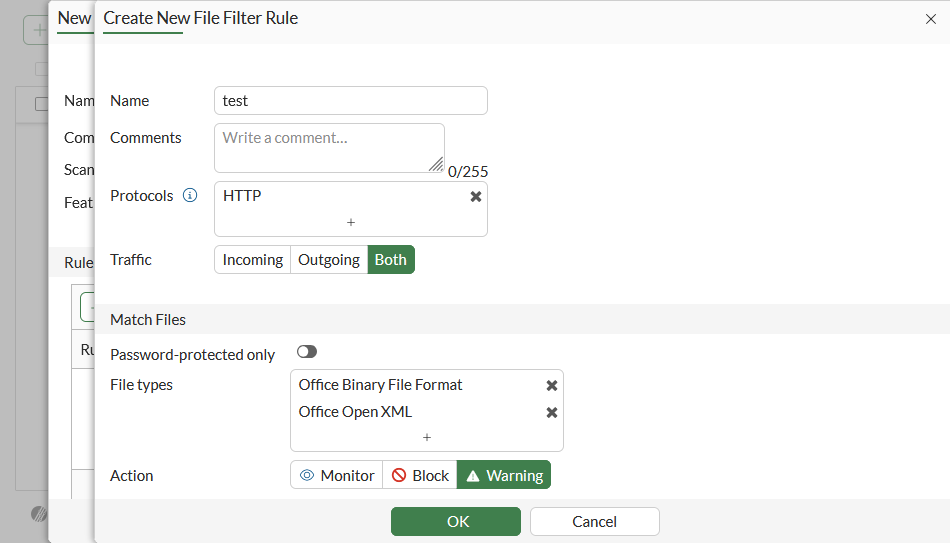
In this example, a proxy-based file filter profile is created that has one rule. The rule is applied to HTTP traffic to warn about any matched Office Binary File Format or Office Open XML files.
After the user acknowledges the warning, the content is allowed and access is logged. This behavior applies only to incoming HTTP traffic (eg. HTTP GET); outgoing HTTP traffic (eg. HTTP POST) and non-HTTP protocols are log-only, with no warning or blocking when applied to the same profile.
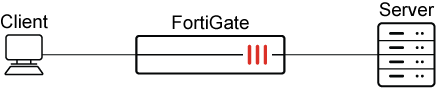
To configure and use a file filter profile with the warning action in the GUI:
-
Go to Security Profiles > File Filter and click Create New.
-
Set Feature set to Proxy-based.
-
In the Rules table, click Create New.
-
Set Action to Warning.
-
Configure the remaining settings as needed, then click OK.
-
Configure the remaining filter profile settings as needed, then click OK.
-
Go to Policy & Objects > Firewall Policy and create a new policy or edit an existing one.
-
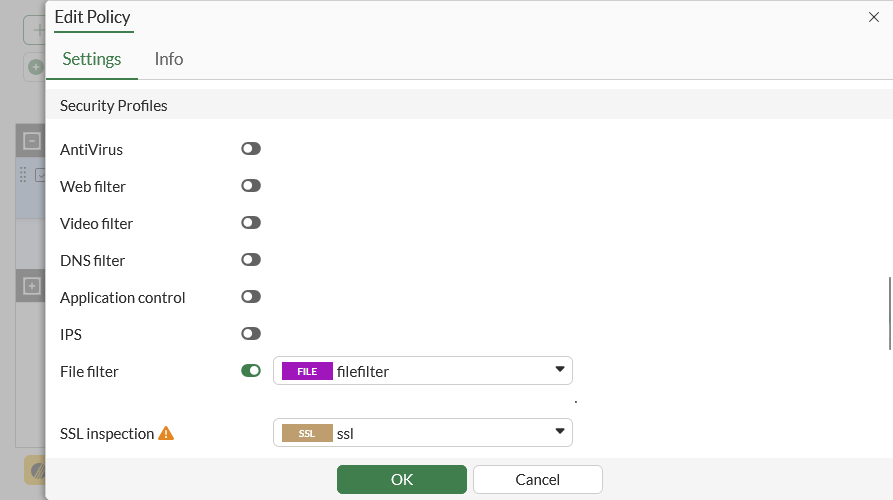
In the Security Profiles section, enable File filter and select the file filter profile.
-
Configure the remaining settings as required, then click OK.
To configure and use a file filter profile with the warning action in the CLI:
-
Configure a file filter profile with the warning action:
config file-filter profile edit "filefilter" set feature-set proxy config rules edit "test" set protocol http set action warning set file-type "msoffice" "msofficex" next end next end -
Apply the file filter profile to a firewall policy:
config firewall policy
    edit 1
        set name "filefilter"
        set srcintf "port1"
        set dstintf "port3"
        set action accept
        set srcaddr "all"
        set dstaddr "all"
        set srcaddr6 "all"
        set dstaddr6 "all"
        set schedule "always"
        set service "ALL"
        set utm-status enable
        set inspection-mode proxy
        set profile-protocol-options "protocol"
        set ssl-ssh-profile "ssl"
        set file-filter-profile "filefilter"
        set logtraffic all
        set nat enable
    next
end
To test the file filter:
-
On a Windows client, access an absolute URL (http://<iP address>/sample/test.doc) to download file test.doc.
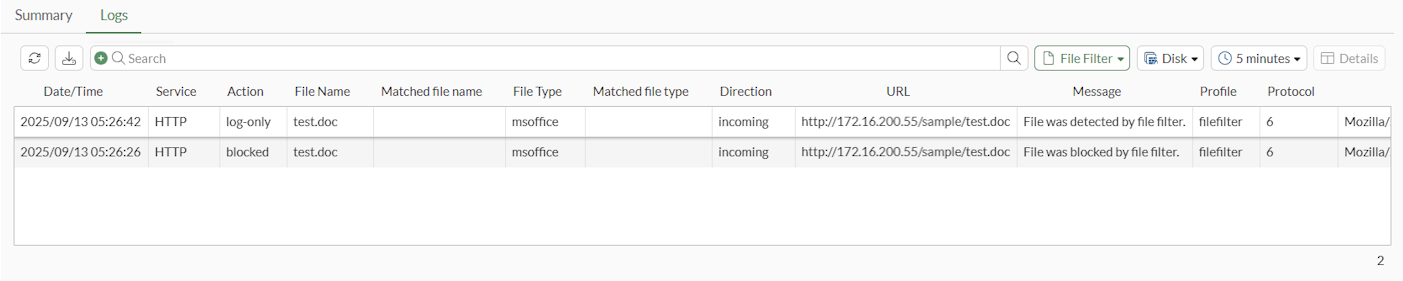
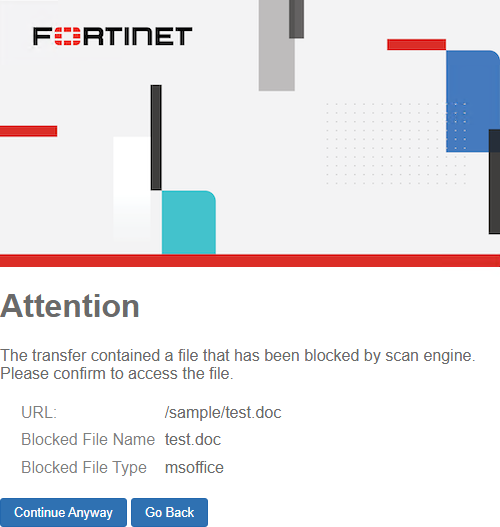
A replacement message is shown that asks the user to authorize or cancel the file download, and a blocking UTM file filter log is generated.
2: date=2025-09-13 time=05:26:26 eventtime=1757697986602674439 tz="+1200" logid="1900064000" type="utm" subtype="file-filter" eventtype="file-filter" level="warning" vd="vdom1" policyid=1 poluuid="61c636d2-5b59-51f0-b555-76579a0b21fa" policytype="policy" sessionid=1583 srcip=10.1.100.195 srcport=51426 srccountry="Reserved" srcintf="port1" srcintfrole="undefined" srcuuid="1027adc4-5b59-51f0-7577-e6bcd1ba3541" dstip=172.16.200.55 dstport=80 dstcountry="Reserved" dstintf="port3" dstintfrole="undefined" dstuuid="1027adc4-5b59-51f0-7577-e6bcd1ba3541" proto=6 service="HTTP" profile="filefilter" direction="incoming" action="blocked" url="http://172.16.200.55/sample/test.doc" hostname="172.16.200.55" agent="Mozilla/5.0 (Windows NT 10.0; Win64; x64) AppleWebKit/537.36 (KHTML, like Gecko) Chrome/140.0.0.0 Safari/537.36" httpmethod="GET" rulename="test" filename="test.doc" filesize=19456 filetype="msoffice" msg="File was blocked by file filter."
-
Click Continue Anyway to download the file. A log-only file filter log is generated:
1: date=2025-09-13 time=05:26:42 eventtime=1757698001607832698 tz="+1200" logid="1900064001" type="utm" subtype="file-filter" eventtype="file-filter" level="notice" vd="vdom1" policyid=1 poluuid="61c636d2-5b59-51f0-b555-76579a0b21fa" policytype="policy" sessionid=1602 srcip=10.1.100.195 srcport=51432 srccountry="Reserved" srcintf="port1" srcintfrole="undefined" srcuuid="1027adc4-5b59-51f0-7577-e6bcd1ba3541" dstip=172.16.200.55 dstport=80 dstcountry="Reserved" dstintf="port3" dstintfrole="undefined" dstuuid="1027adc4-5b59-51f0-7577-e6bcd1ba3541" proto=6 service="HTTP" profile="filefilter" direction="incoming" action="log-only" url="http://172.16.200.55/sample/test.doc" hostname="172.16.200.55" agent="Mozilla/5.0 (Windows NT 10.0; Win64; x64) AppleWebKit/537.36 (KHTML, like Gecko) Chrome/140.0.0.0 Safari/537.36" httpmethod="GET" referralurl="http://172.16.200.55/sample/test.doc" rulename="test" filename="test.doc" filesize=19456 filetype="msoffice" msg="File was detected by file filter."
-
Go to Log & Report > Security Events and view the File Filter logs.