
Fortinet white logo
Fortinet white logo

Administration Guide

Zero Trust Network Access introduction

Zero Trust Network Access introduction

Zero Trust Network Access (ZTNA) is an access control method that uses client device identification, authentication, and security posture tags (formerly ZTNA tags) to provide role-based application access. It gives administrators the flexibility to manage network access for On-net local users and Off-net remote users. Access to applications is granted only after device verification, authenticating the user’s identity, authorizing the user, and then performing context based posture checks using security posture tags.

Traditionally, a user and a device have different sets of rules for on-net access and off-net VPN access to company resources. With a distributed workforce and access that spans company networks, data centers, and cloud, managing the rules can become complex. User experience is also affected when multiple VPNs are needed to get to various resources. ZTNA can improve this experience.

ZTNA application gateway and IP/MAC based access control

  • ZTNA application gateway allows users to securely access resources through an SSL encrypted access proxy. This simplifies remote access by eliminating the use of VPNs.

  • IP/MAC based access control combines IP/MAC with security posture tags for identification and security posture check to implement role-based zero trust access inline with regular firewall policies.

ZTNA telemetry, tags, and policy enforcement
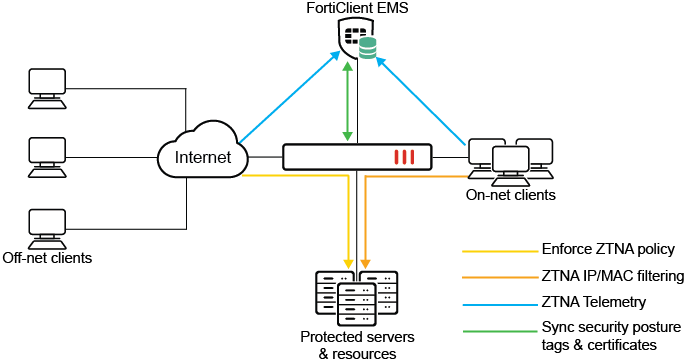
When On-net and Off-net FortiClient endpoints register to FortiClient EMS, device information, log on user information, and security posture are all shared over ZTNA telemetry with the EMS server. Clients also make a certificate signing request to obtain a client certificate from the EMS that is acting as the ZTNA Certificate Authority (CA).

Based on the client information, EMS applies matching Zero Trust tagging rules to tag the clients. These tags, and the client certificate information, are synchronized with the FortiGate in real-time. This allows the FortiGate to verify the client's identity using the client certificate, and grant access based on the security posture tags applied in the ZTNA policy.

For more information, see Establish device identity and trust context with FortiClient EMS.

Application gateway
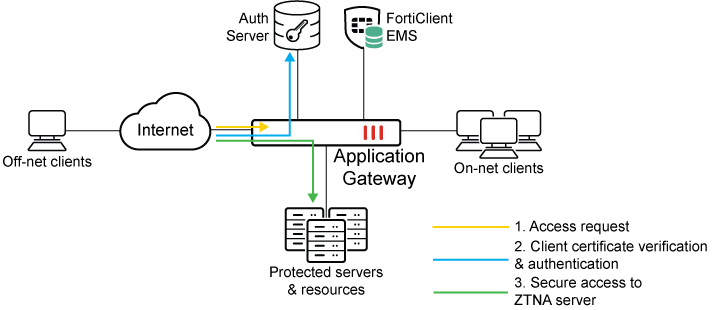
The FortiGate application gateway can proxy HTTP, SSH, RDP, SMB, FTP, and other TCP traffic as well as UDP traffic over secure connections with the client. This enables seamless access from the client to the protected servers, without needing to form IPsec tunnels.

ZTNA web proxy

The FortiGate ZTNA web proxy works as a reverse proxy for the HTTP server. When a client connects to a webpage hosted by the protected server, the address resolves to the FortiGate’s access proxy VIP. The FortiGate proxies the connection and takes steps to authenticate the user. It prompts the user for their certificate on the browser, and verifies this against the ZTNA endpoint record that is synchronized from the EMS. If an authentication scheme, such as SAML authentication, is configured, the client is redirected to a captive portal for sign-on. If this passes, traffic is allowed based on ZTNA policies, and the FortiGate returns the webpage to the client.

For example configurations, see ZTNA web proxy example, ZTNA web proxy with basic authentication example, and ZTNA application gateway with SAML authentication example.

ZTNA traffic forwarding proxy

The ZTNA traffic forwarding proxy (formerly TCP forwarding access proxy or TFAP) works as a special type of HTTPS reverse proxy. Instead of proxying traffic to a web server, TCP and UDP traffic is tunneled between the client and the access proxy over HTTPS, and forwarded to the protected resource. The FortiClient on the remote endpoint intercepts traffic destined for the protected resources and routes them to the FortiGate proxy gateway. An HTTPS connection is made to the FortiGate’s access proxy VIP, where the client certificate is verified and access is granted based on the ZTNA policies. Traffic is forwarded from the FortiGate to the protected resource, and an end to end connection is established. To reduce overhead, you can disable access proxy encryption on the client, as some TCP protocols, like RDP, are already secure. The traffic forwarding proxy supports UTM scanning and deep inspection for HTTP, HTTPS, SMTP, SMTPS, IMAP, IMAPS, POP3, POP3S, SMB, and CIFS.

For an example configuration, see ZTNA traffic forwarding proxy example.

SSH access proxy

The SSH access proxy provides some benefits to proxying SSH connections over traffic forwarding proxy, including allowing SSH deep inspection, performing optional SSH host-key validation, and allowing one-time user authentication to authenticate the ZTNA SSH access proxy connection and SSH server connection.

For an example configuration, see ZTNA SSH traffic forwarding proxy example.

Basic ZTNA configuration components

The basic components required to configure ZTNA application gateway on the FortiGate are:

  1. FortiClient EMS fabric connector and security posture tags.

  2. FortiClient EMS running version 7.0.0 or later or FortiClient EMS Cloud.

  3. FortiClient running 7.0.0 or later.

  4. ZTNA port

  5. ZTNA server (web server or traffic forwarding server)

  6. ZTNA policy

  7. (Optional) User authentication

  8. (Optional) HA configurations

For configuration details, see Basic ZTNA configuration.

This feature is not supported on FortiGate models with 2 GB RAM or less. See Proxy-related features not supported on FortiGate 2 GB RAM models for more information.

ZTNA service connector

In certain environments, we may want to prevent users from accessing the FortiGate ZTNA application gateway directly or expose ports and services on the FortiGate to the public. In these scenarios, another layer of ZTNA proxy may be required to serve as the ZTNA Edge.

The FortiGate can act as a ZTNA service connector to reverse proxy service connections upstream to the ZTNA Edge. The ZTNA Edge may be a FortiPAM, FortiProxy, or even a FortiGate that acts as the ZTNA application gateway to the end users. The FortiGate, as the ZTNA service connector, forms a persistent control connection with ZTNA Edge. The ZTNA Edge forwards connection requests through the control tunnel to the FortiGate ZTNA service connector, which proxies the request to the protected server.

Zero Trust Network Access introduction

Zero Trust Network Access introduction

Zero Trust Network Access (ZTNA) is an access control method that uses client device identification, authentication, and security posture tags (formerly ZTNA tags) to provide role-based application access. It gives administrators the flexibility to manage network access for On-net local users and Off-net remote users. Access to applications is granted only after device verification, authenticating the user’s identity, authorizing the user, and then performing context based posture checks using security posture tags.

Traditionally, a user and a device have different sets of rules for on-net access and off-net VPN access to company resources. With a distributed workforce and access that spans company networks, data centers, and cloud, managing the rules can become complex. User experience is also affected when multiple VPNs are needed to get to various resources. ZTNA can improve this experience.

ZTNA application gateway and IP/MAC based access control

  • ZTNA application gateway allows users to securely access resources through an SSL encrypted access proxy. This simplifies remote access by eliminating the use of VPNs.

  • IP/MAC based access control combines IP/MAC with security posture tags for identification and security posture check to implement role-based zero trust access inline with regular firewall policies.

ZTNA telemetry, tags, and policy enforcement

When On-net and Off-net FortiClient endpoints register to FortiClient EMS, device information, log on user information, and security posture are all shared over ZTNA telemetry with the EMS server. Clients also make a certificate signing request to obtain a client certificate from the EMS that is acting as the ZTNA Certificate Authority (CA).

Based on the client information, EMS applies matching Zero Trust tagging rules to tag the clients. These tags, and the client certificate information, are synchronized with the FortiGate in real-time. This allows the FortiGate to verify the client's identity using the client certificate, and grant access based on the security posture tags applied in the ZTNA policy.

For more information, see Establish device identity and trust context with FortiClient EMS.

Application gateway

The FortiGate application gateway can proxy HTTP, SSH, RDP, SMB, FTP, and other TCP traffic as well as UDP traffic over secure connections with the client. This enables seamless access from the client to the protected servers, without needing to form IPsec tunnels.

ZTNA web proxy

The FortiGate ZTNA web proxy works as a reverse proxy for the HTTP server. When a client connects to a webpage hosted by the protected server, the address resolves to the FortiGate’s access proxy VIP. The FortiGate proxies the connection and takes steps to authenticate the user. It prompts the user for their certificate on the browser, and verifies this against the ZTNA endpoint record that is synchronized from the EMS. If an authentication scheme, such as SAML authentication, is configured, the client is redirected to a captive portal for sign-on. If this passes, traffic is allowed based on ZTNA policies, and the FortiGate returns the webpage to the client.

For example configurations, see ZTNA web proxy example, ZTNA web proxy with basic authentication example, and ZTNA application gateway with SAML authentication example.

ZTNA traffic forwarding proxy

The ZTNA traffic forwarding proxy (formerly TCP forwarding access proxy or TFAP) works as a special type of HTTPS reverse proxy. Instead of proxying traffic to a web server, TCP and UDP traffic is tunneled between the client and the access proxy over HTTPS, and forwarded to the protected resource. The FortiClient on the remote endpoint intercepts traffic destined for the protected resources and routes them to the FortiGate proxy gateway. An HTTPS connection is made to the FortiGate’s access proxy VIP, where the client certificate is verified and access is granted based on the ZTNA policies. Traffic is forwarded from the FortiGate to the protected resource, and an end to end connection is established. To reduce overhead, you can disable access proxy encryption on the client, as some TCP protocols, like RDP, are already secure. The traffic forwarding proxy supports UTM scanning and deep inspection for HTTP, HTTPS, SMTP, SMTPS, IMAP, IMAPS, POP3, POP3S, SMB, and CIFS.

For an example configuration, see ZTNA traffic forwarding proxy example.

SSH access proxy

The SSH access proxy provides some benefits to proxying SSH connections over traffic forwarding proxy, including allowing SSH deep inspection, performing optional SSH host-key validation, and allowing one-time user authentication to authenticate the ZTNA SSH access proxy connection and SSH server connection.

For an example configuration, see ZTNA SSH traffic forwarding proxy example.

Basic ZTNA configuration components

The basic components required to configure ZTNA application gateway on the FortiGate are:

  1. FortiClient EMS fabric connector and security posture tags.

  2. FortiClient EMS running version 7.0.0 or later or FortiClient EMS Cloud.

  3. FortiClient running 7.0.0 or later.

  4. ZTNA port

  5. ZTNA server (web server or traffic forwarding server)

  6. ZTNA policy

  7. (Optional) User authentication

  8. (Optional) HA configurations

For configuration details, see Basic ZTNA configuration.

This feature is not supported on FortiGate models with 2 GB RAM or less. See Proxy-related features not supported on FortiGate 2 GB RAM models for more information.

ZTNA service connector

In certain environments, we may want to prevent users from accessing the FortiGate ZTNA application gateway directly or expose ports and services on the FortiGate to the public. In these scenarios, another layer of ZTNA proxy may be required to serve as the ZTNA Edge.

The FortiGate can act as a ZTNA service connector to reverse proxy service connections upstream to the ZTNA Edge. The ZTNA Edge may be a FortiPAM, FortiProxy, or even a FortiGate that acts as the ZTNA application gateway to the end users. The FortiGate, as the ZTNA service connector, forms a persistent control connection with ZTNA Edge. The ZTNA Edge forwards connection requests through the control tunnel to the FortiGate ZTNA service connector, which proxies the request to the protected server.