
Fortinet white logo
Fortinet white logo

Administration Guide

HA with 802.3ad aggregate interfaces

HA with 802.3ad aggregate interfaces

You can use 802.3ad Link Aggregation and Link Aggregation Control Protocol (LACP) to combine multiple physical links into a single logical interface. This increases throughput and provides network resiliency.

In an HA cluster, HA monitoring treats the aggregate link as a single interface. A failure is only registered if all physical members in the aggregate link fail. The aggregate interface uses a virtual MAC address derived from the first physical port in the bundle.

For optimal LACP and HA failover performance in Active-Passive or Active-Active modes, the connected switches should support multiple Link Aggregation Groups (LAGs). This allows the subordinate unit to participate in LACP negotiation during normal operation, reducing failover delay.

If the switch does not support multiple LAGs for the same MAC address (the virtual MAC shared by the cluster), you must prevent the subordinate unit from participating in LACP negotiation using the set lacp-ha-slave disable command to avoid cluster disruption. If the link‑level redundancy is the primary requirement and load-balancing is not needed see HA with redundant interfaces.

Disabling LACP on the subordinate unit prevents the use of Active-Active mode and may increase failover time. Additionally, using Static LACP may further reduce delay but risks failing to detect non-physical link issues due to the lack of LAC Protocol Data Unit (LACPDU) heartbeats.

In this example, two FortiGate units are configured in a HA cluster to ensure continuous network uptime. The units utilize Port 5 and Port 6 as dedicated heartbeat links to synchronize sessions and monitor device health. To prevent bottlenecks and provide redundancy, physical ports are combined into 802.3ad Link Aggregates, connecting the internal network and the internet router through redundant switches. If the primary FortiGate fails, the secondary unit instantly takes over the traffic, maintaining seamless connectivity for all users.
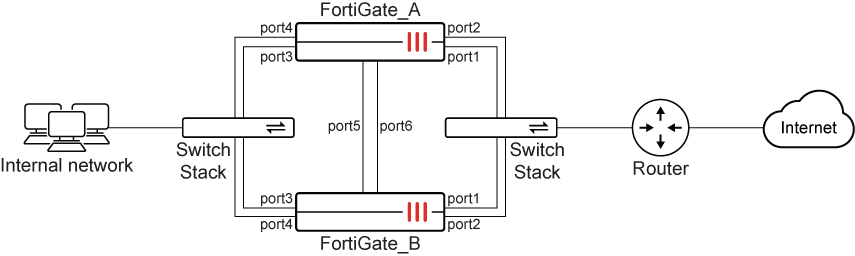
To configure the FortiGates for HA operation in the GUI:
  1. On both FortiGates, go to System > HA and configure the following:

    Option

    Value

    Mode

    Active-Passive

    Group Name

    Pochiya

    Password

    ***********

    Heartbeat interfaces

    port5

    port6

    Heartbeat Interface Priority

    port5: 50

    port6: 50

  2. Click OK.

To configure the aggregate interfaces in the GUI:
  1. Go to Network > Static Routes and temporarily delete any routes using member ports (port1 to port4).

  2. Go to Network > Interfaces and click Create new > Interface.

  3. Configure the WAN aggregate interface:

    Option

    Value

    Name

    WAN_Aggregate

    Type

    802.3ad Aggregate

    Interface Members

    port1

    port2

    IP/Netmask

    172.20.120.141/24

  4. Click OK.

  5. Click Create new > Interface again to create the internal aggregate interface:

    Option

    Value

    Name

    Internal_Aggregate

    Type

    802.3ad Aggregate

    Interface Members

    port3

    port4

    IP/Netmask

    10.11.101.100/24

  6. Click OK.

To disable LACP on the subordinate unit (CLI only):

You must use the CLI to prevent the subordinate unit from sending LACP packets.

config system interface
    edit "WAN_Aggregate"
        set lacp-ha-slave disable
    next
    edit "Internal_Aggregate"
        set lacp-ha-slave disable
    next
end
To configure static routing in the GUI:
  1. Go to Network > Static Routes and click Create new.

  2. Configure the following:

    Option

    Value

    Destination

    0.0.0.0/0.0.0.0

    Gateway Address

    172.20.120.2

    Interface

    WAN_Aggregate

  3. Click OK.

To configure HA port monitoring in the GUI:
  1. Go to System > HA.

  2. Edit the primary unit in the Cluster Members list.

  3. Set Monitor Interfaces to WAN_Aggregate and Internal_Aggregate .

  4. Click OK.

To configure HA with aggregate interfaces in the CLI:
  1. Configure HA on both units:

    config system ha
        set mode a-p
        set group-name Pochiya
        set password *********
        set hbdev port5 50 port6 50
    end
    
  2. Create aggregate interfaces with LACP slave participation disabled:

    config system interface
        edit "WAN_Aggregate"
            set type aggregate
            set member port1 port2
            set lacp-ha-slave disable
            set ip 172.20.120.141 255.255.255.0
        next
        edit "Internal_Aggregate"
            set type aggregate
            set member port3 port4
            set lacp-ha-slave disable
            set ip 10.11.101.100 255.255.255.0
        next
    end
    
  3. Configure static routing:

    config router static
        edit 1
            set gateway 172.20.120.2
            set device "WAN_Aggregate"
        next
    end
    
  4. Configure HA monitoring:

    config system ha
        set monitor "WAN_Aggregate" "Internal_Aggregate"
    end
    

HA with 802.3ad aggregate interfaces

HA with 802.3ad aggregate interfaces

You can use 802.3ad Link Aggregation and Link Aggregation Control Protocol (LACP) to combine multiple physical links into a single logical interface. This increases throughput and provides network resiliency.

In an HA cluster, HA monitoring treats the aggregate link as a single interface. A failure is only registered if all physical members in the aggregate link fail. The aggregate interface uses a virtual MAC address derived from the first physical port in the bundle.

For optimal LACP and HA failover performance in Active-Passive or Active-Active modes, the connected switches should support multiple Link Aggregation Groups (LAGs). This allows the subordinate unit to participate in LACP negotiation during normal operation, reducing failover delay.

If the switch does not support multiple LAGs for the same MAC address (the virtual MAC shared by the cluster), you must prevent the subordinate unit from participating in LACP negotiation using the set lacp-ha-slave disable command to avoid cluster disruption. If the link‑level redundancy is the primary requirement and load-balancing is not needed see HA with redundant interfaces.

Disabling LACP on the subordinate unit prevents the use of Active-Active mode and may increase failover time. Additionally, using Static LACP may further reduce delay but risks failing to detect non-physical link issues due to the lack of LAC Protocol Data Unit (LACPDU) heartbeats.

In this example, two FortiGate units are configured in a HA cluster to ensure continuous network uptime. The units utilize Port 5 and Port 6 as dedicated heartbeat links to synchronize sessions and monitor device health. To prevent bottlenecks and provide redundancy, physical ports are combined into 802.3ad Link Aggregates, connecting the internal network and the internet router through redundant switches. If the primary FortiGate fails, the secondary unit instantly takes over the traffic, maintaining seamless connectivity for all users.

To configure the FortiGates for HA operation in the GUI:
  1. On both FortiGates, go to System > HA and configure the following:

    Option

    Value

    Mode

    Active-Passive

    Group Name

    Pochiya

    Password

    ***********

    Heartbeat interfaces

    port5

    port6

    Heartbeat Interface Priority

    port5: 50

    port6: 50

  2. Click OK.

To configure the aggregate interfaces in the GUI:
  1. Go to Network > Static Routes and temporarily delete any routes using member ports (port1 to port4).

  2. Go to Network > Interfaces and click Create new > Interface.

  3. Configure the WAN aggregate interface:

    Option

    Value

    Name

    WAN_Aggregate

    Type

    802.3ad Aggregate

    Interface Members

    port1

    port2

    IP/Netmask

    172.20.120.141/24

  4. Click OK.

  5. Click Create new > Interface again to create the internal aggregate interface:

    Option

    Value

    Name

    Internal_Aggregate

    Type

    802.3ad Aggregate

    Interface Members

    port3

    port4

    IP/Netmask

    10.11.101.100/24

  6. Click OK.

To disable LACP on the subordinate unit (CLI only):

You must use the CLI to prevent the subordinate unit from sending LACP packets.

config system interface
    edit "WAN_Aggregate"
        set lacp-ha-slave disable
    next
    edit "Internal_Aggregate"
        set lacp-ha-slave disable
    next
end
To configure static routing in the GUI:
  1. Go to Network > Static Routes and click Create new.

  2. Configure the following:

    Option

    Value

    Destination

    0.0.0.0/0.0.0.0

    Gateway Address

    172.20.120.2

    Interface

    WAN_Aggregate

  3. Click OK.

To configure HA port monitoring in the GUI:
  1. Go to System > HA.

  2. Edit the primary unit in the Cluster Members list.

  3. Set Monitor Interfaces to WAN_Aggregate and Internal_Aggregate .

  4. Click OK.

To configure HA with aggregate interfaces in the CLI:
  1. Configure HA on both units:

    config system ha
        set mode a-p
        set group-name Pochiya
        set password *********
        set hbdev port5 50 port6 50
    end
    
  2. Create aggregate interfaces with LACP slave participation disabled:

    config system interface
        edit "WAN_Aggregate"
            set type aggregate
            set member port1 port2
            set lacp-ha-slave disable
            set ip 172.20.120.141 255.255.255.0
        next
        edit "Internal_Aggregate"
            set type aggregate
            set member port3 port4
            set lacp-ha-slave disable
            set ip 10.11.101.100 255.255.255.0
        next
    end
    
  3. Configure static routing:

    config router static
        edit 1
            set gateway 172.20.120.2
            set device "WAN_Aggregate"
        next
    end
    
  4. Configure HA monitoring:

    config system ha
        set monitor "WAN_Aggregate" "Internal_Aggregate"
    end