

VPN with FortiClient Standalone and FortiIdentity Cloud New
The FortiClient Standalone client can be licensed without FortiClient EMS, and operates as an unmanaged VPN client. This FortiClient is licensed through FortiCloud with the FortiClient Standalone license. Once registered, the end-users can be provisioned through FortiIdentity Cloud (FIC), which offers Single-Sign-On (SSO) via SAML.
The VPN Wizard on the FortiGate integrates FortiIdentity Cloud configurations into the wizard for simple Remote Access VPN setup for FortiClient Standalone. SAML configurations configured through the VPN wizard are automatically synchronized with FortiIdentity Cloud.
For more information about FortiIdentity Cloud SSO integration with the FortiGate, see SSO integration with FortiIdentity Cloud.
Topology

Prerequisites
-
FortiClient Standalone license registered on the FortiCloud account
-
FIC is licensed
-
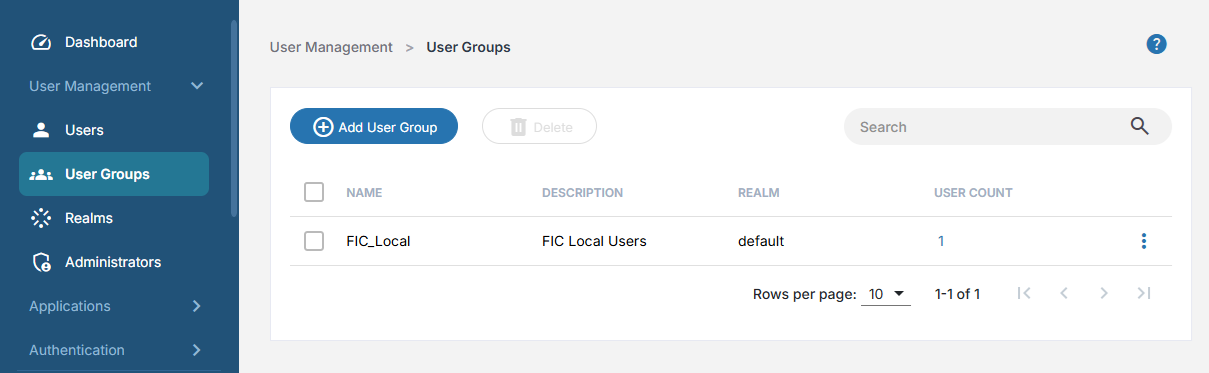
A realm and user group is already configured on FIC (the default realm can be used)
-
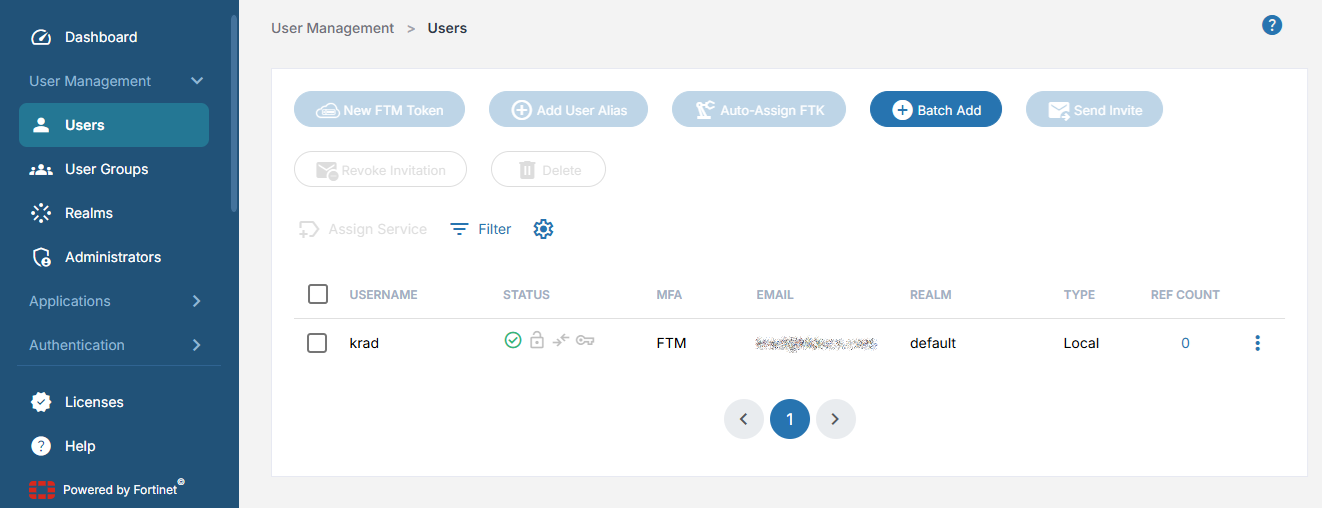
A user has been activated and FortiClient invitation has been sent
-
The FortiGate is registered to the same FortiCloud account as FIC
-
The FortiClient Standalone client is installed on the user’s endpoint
FortiClient EMS is not required
Example
In this example, a Local User group with users hosted on FIC is provisioned. Users are activated and FortiClient VPN invitations are sent to each user. The FortiGate VPN Gateway is configured to allow remote access from standalone clients instead of EMS managed clients. Remote users can access the servers behind the FortiGate.
To configure the VPN with the VPN Wizard:
-
Go to VPN > VPN Wizard.
-
Name the VPN tunnel StandaloneUser, select Remote Access template, and click Begin
-
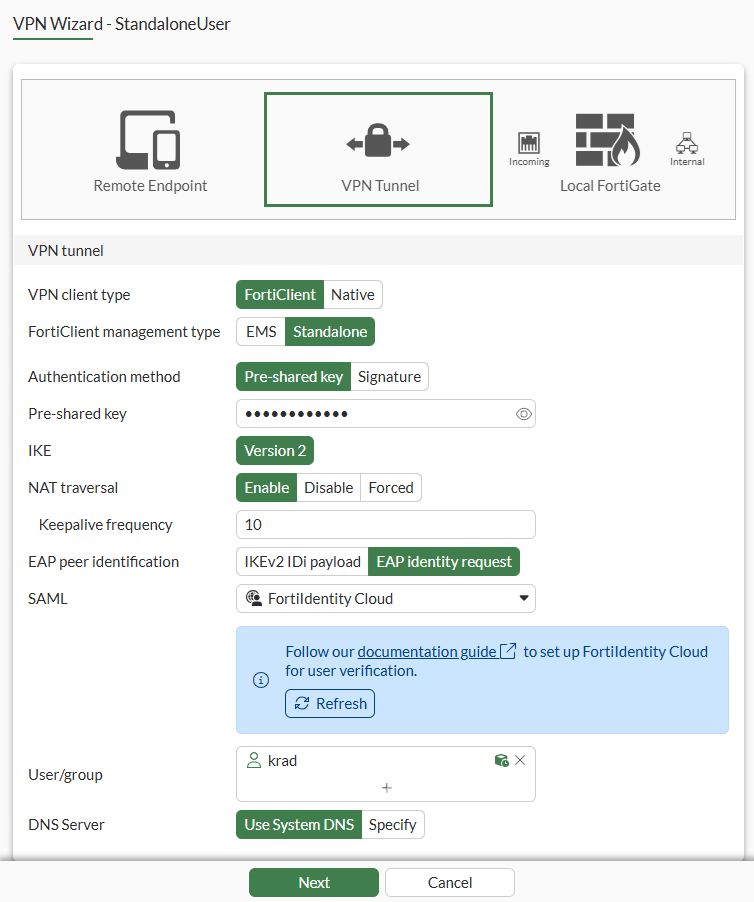
Set VPN client type to FortiClient.
-
Set FortiClient management type to Standalone.
-
In the pop-up, click Setup SSO:
-
Edit the SSO Service Provider Configuration as needed.
-
Under Identity Provider Configuration select the following values, which are retrieved from the FIC account:
Field
Value
Realm
default
User source
LocalIDP_default
Certificate
FIC_Default_Cert
-
Under Additional SAML Attributes, set Attribute used to identify groups to group.
-
Click OK.
-
-
Enter Pre-Shared key or switch to Signature for certificate authentication.
-
Verify EAP peer identification is set to EAP identity request.
-
Ensure SAML is configured to the SAML server created for FIC.
-
For User/group, select the individual users.
-
Click Next.
-
For Addressing mode, either use IPAM and select your Network size, or switch to Manual and assign address range for your endpoints.
-
Click Next.
-
Select Incoming interface, Local interface, and Local Address.
-
Disable Create and add interface to zone.
-
Click Next.
-
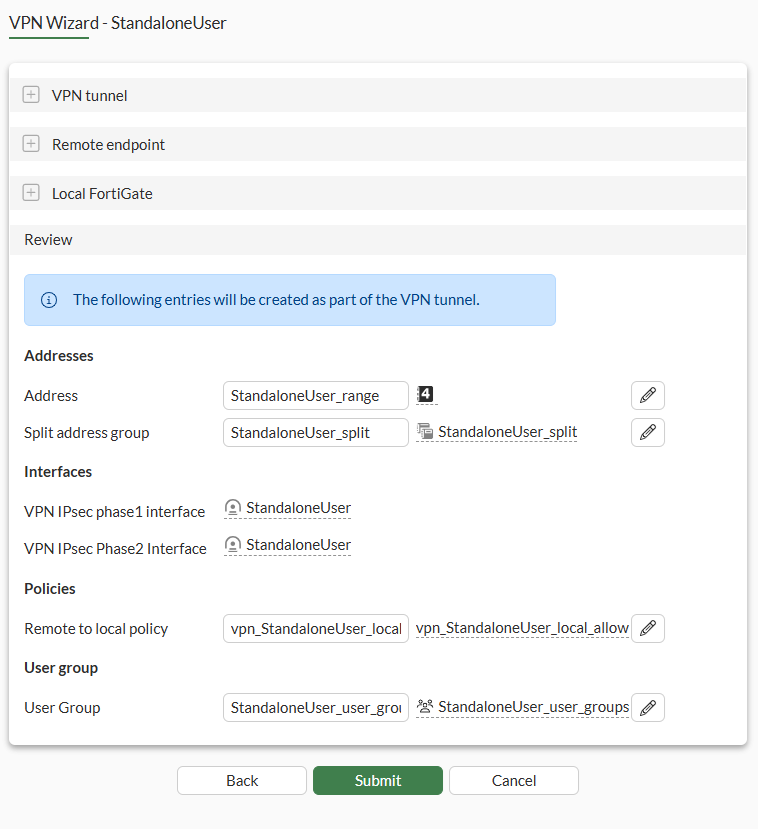
Review your settings.
-
Split tunneling will be enabled to route only traffic to the local subnet to the tunnel.
-
A policy will be created to allow traffic to the local subnet.
-
A user group will be created containing the user(s) you selected.
-
-
Click Submit.
To verify SAML settings on FortiIdentity Cloud:
-
Login to FIC.
-
Go to Applications > SSO.
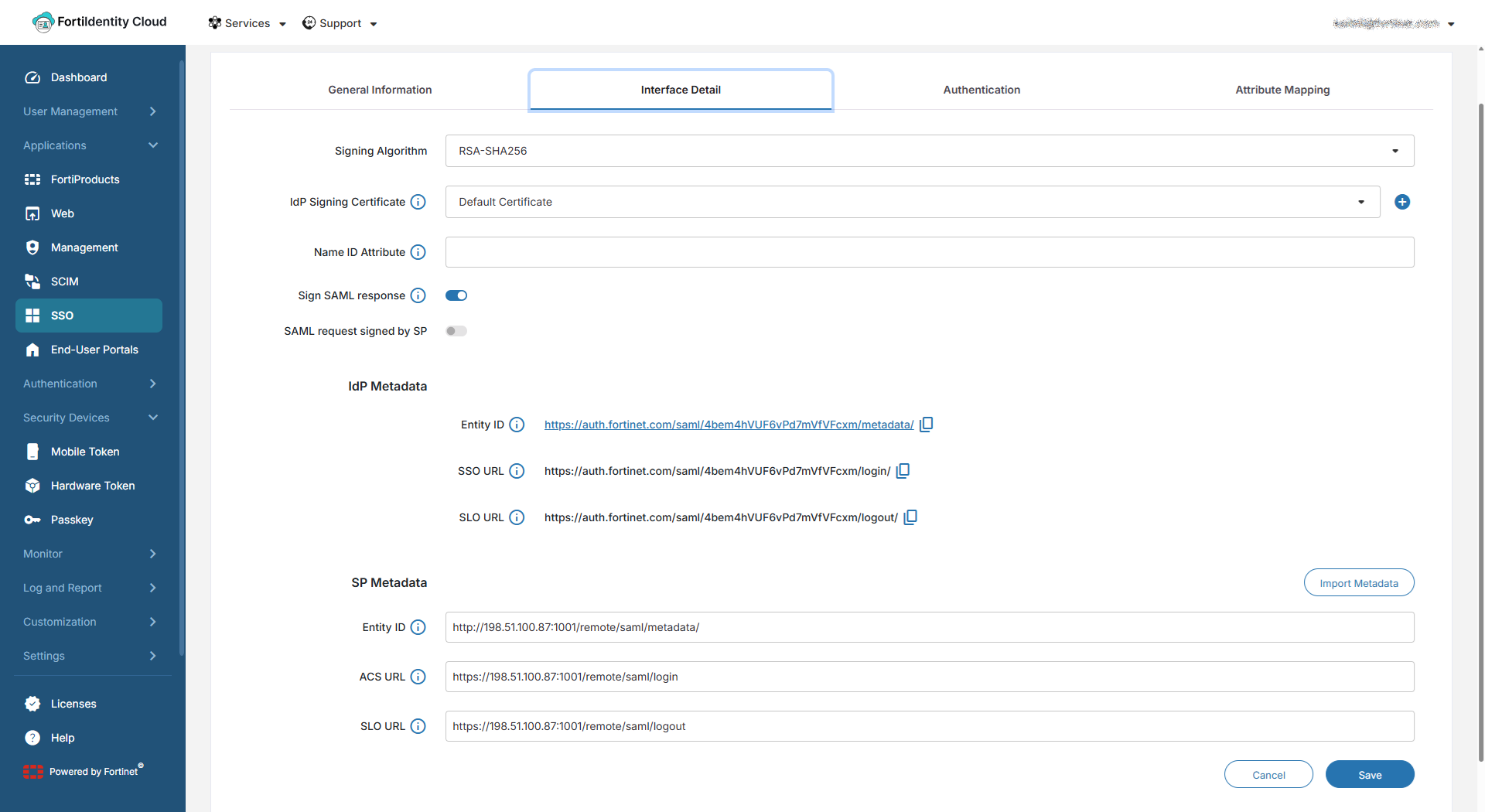
A new SSO Application called “FortiIdentity Cloud” is automatically created when the FortiGate SSO configurations were set up.
-
Click Edit to see the details.
-
On the Interface Detail tab, the IdP and SP information are displayed:
-
Click Cancel to exit the page.
To configure the VPN on FortiClient Standalone:
-
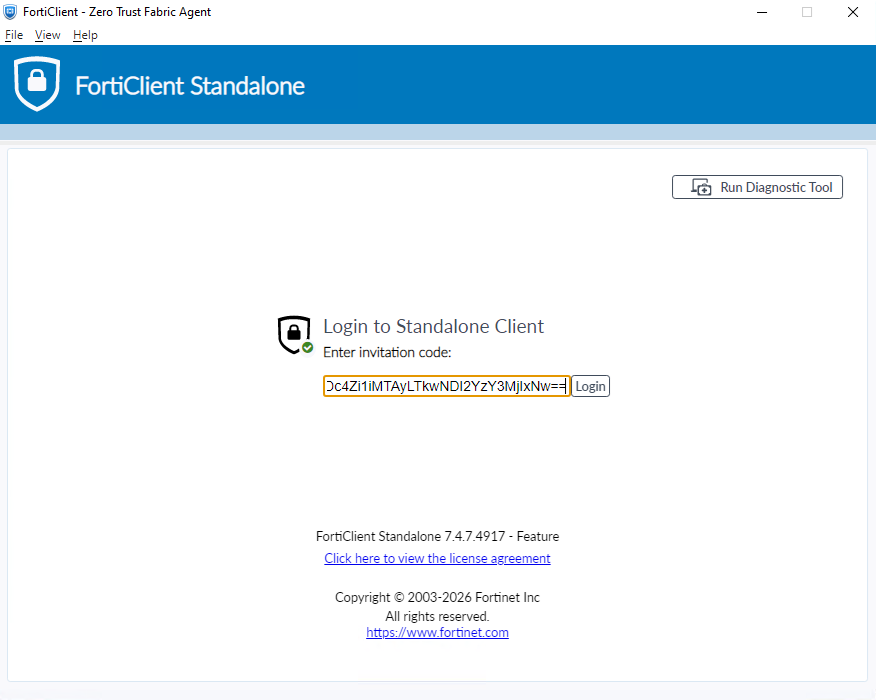
On the remote endpoint, open FortiClient Standalone.
-
Use the invitation code sent to the user email when the FIC account was created to login and activate FortiClient Standalone.
-
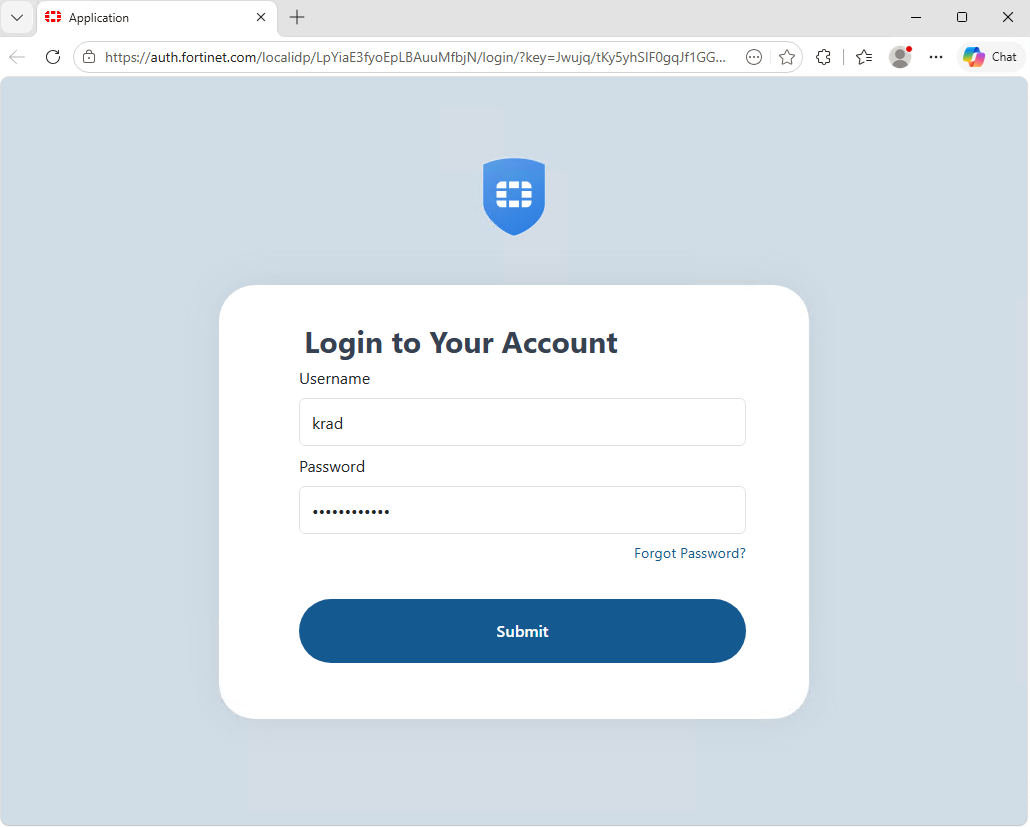
A SAML authentication window will open on a browser requiring the end user to authenticate to FortiIdentity Cloud. Enter the user credentials and password.
-
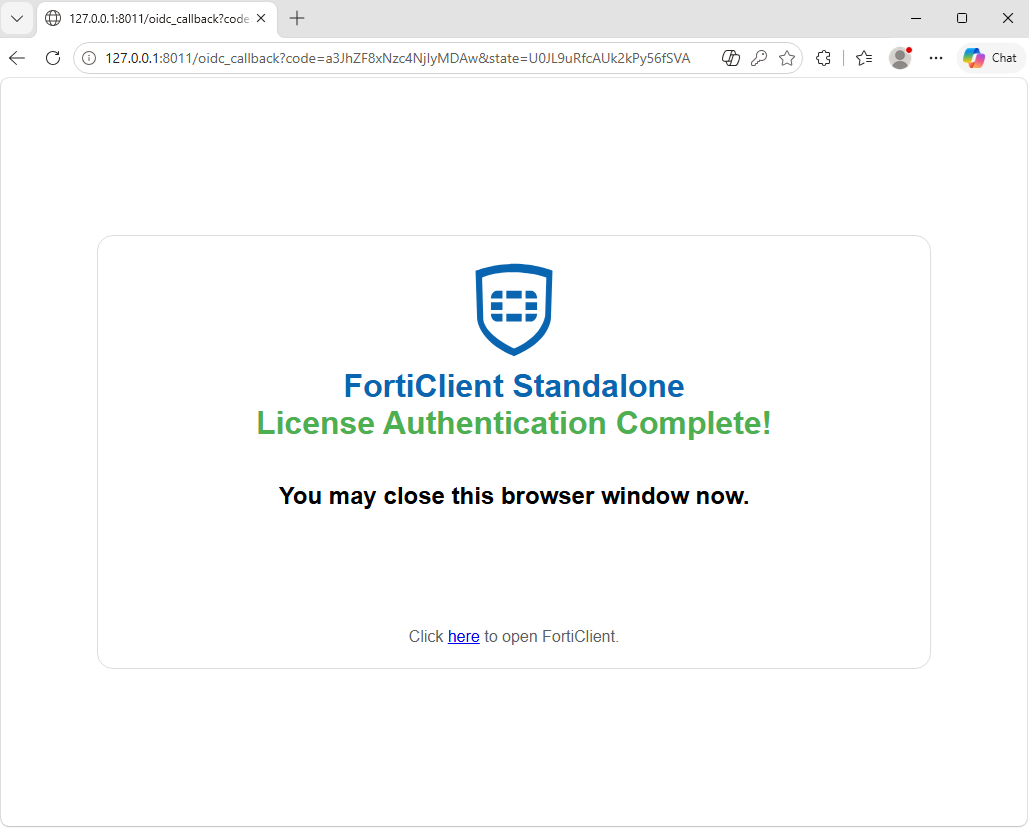
Once successful, a page will appear indicating the license is activated.
-
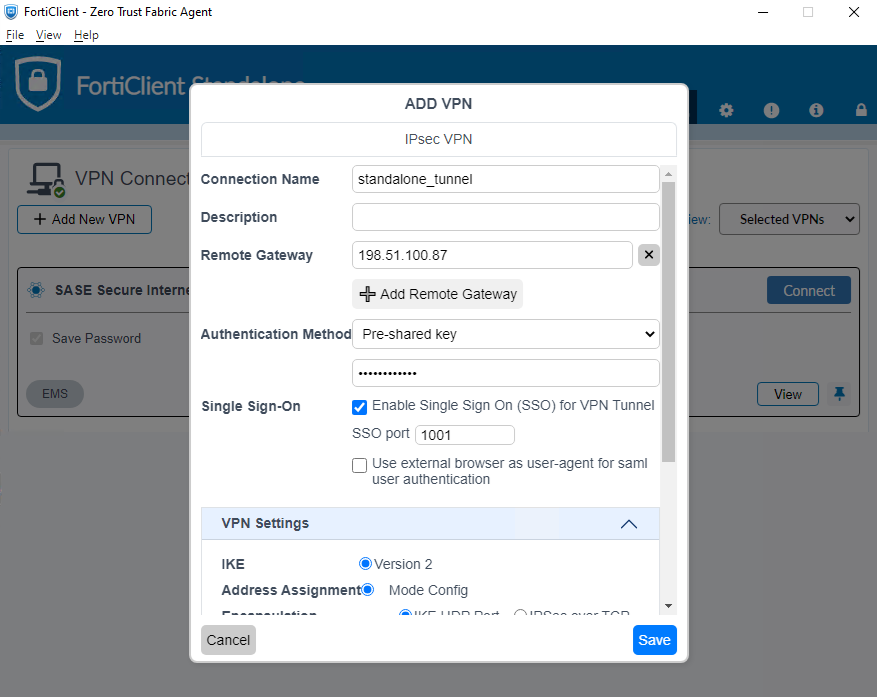
Go to the FortiClient Standalone Client, and click Add New VPN.
-
Configure the following:
Field
Value
Connection Name
standalone_tunnel
Remote Gateway
198.51.100.87
Authentication Method
Pre-shared key
Key
<enter key>
Single Sign-On
Click Enable Single Sign On (SSO) for VPN Tunnel
SSO port
1001
Use external browser as user-agent for saml user authentication
Enable if you want to use your browser to authenticate
Leave the remaining settings as their default values.
Testing and verification
To test the connection from the FortiClient:
-
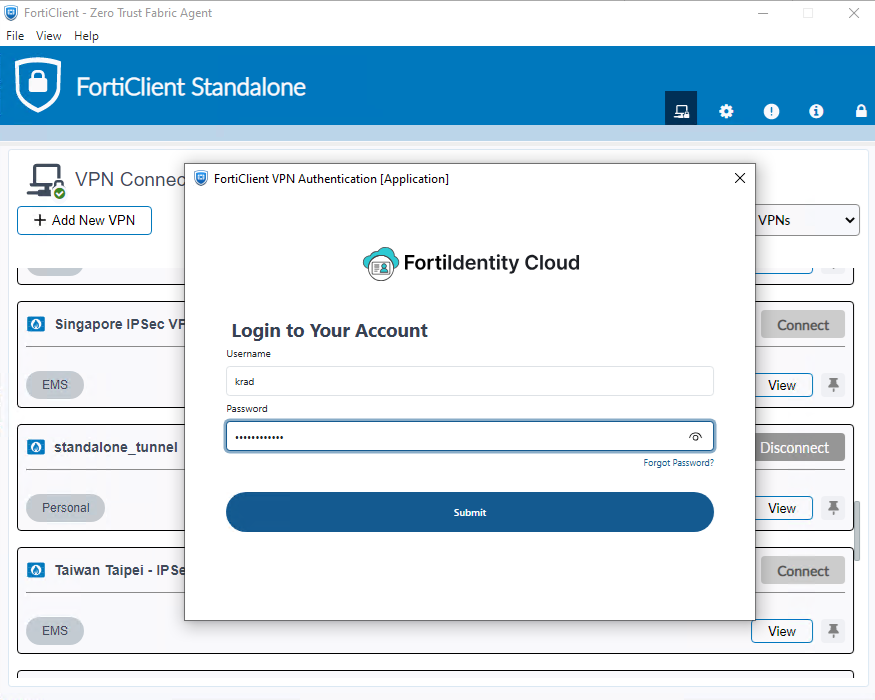
Find the new tunnel and click Connect.
-
When prompted, enter the FIC credentials.
-
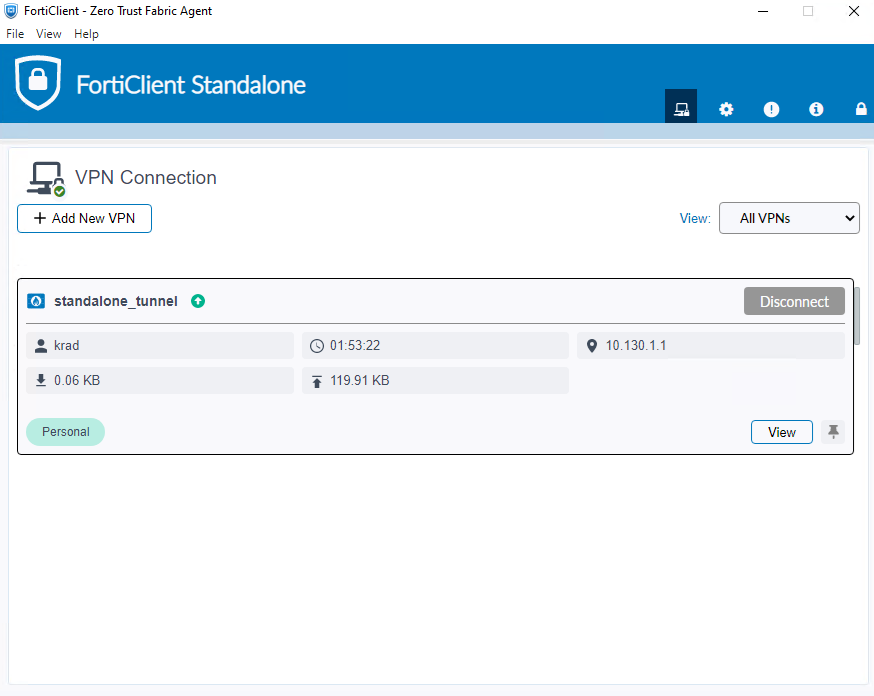
After passing 2-factor authentication, the user will be authenticated and the tunnel will come up.
-
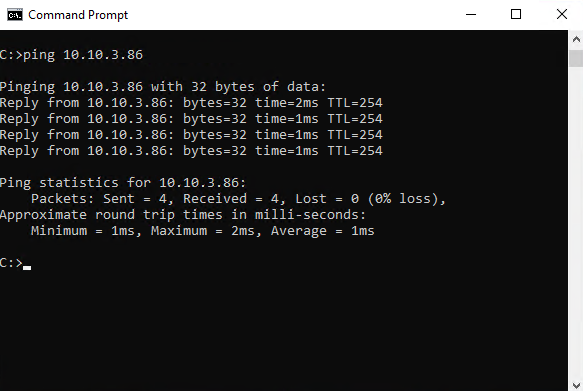
In the CLI, try to ping a server behind the FortiGate:
-
Login to FortiIdentity Cloud.
-
Go to the Monitor > IdP Sessions page. The user that logged into VPN is displayed.
-
Click on Details to see more information about the User and session.
-
On the FortiGate, go to Dashboard > Network Monitor > VPN to view the user that is connected.
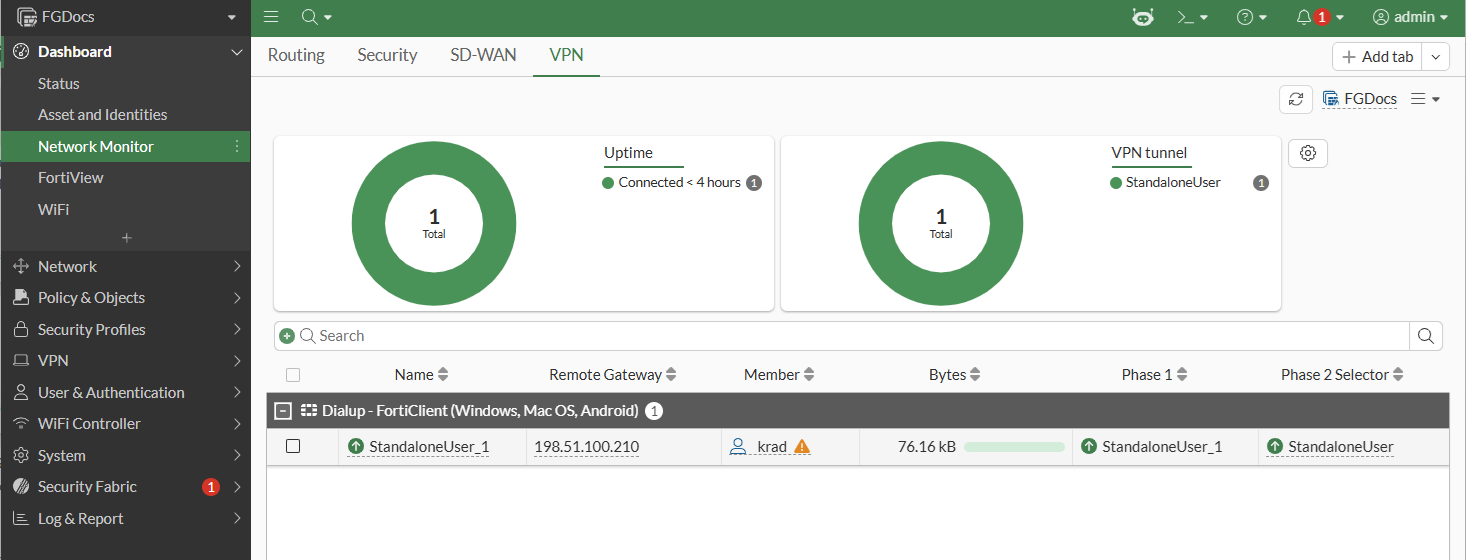
-
From the Command palette (CTRL+P) > CLI Diagnostics, search for ike gateway to list all VPN gateway tunnels.
vd: root/0
name: StandaloneUser_1
version: 2
interface: port2 6
addr: 198.51.100.87:4500 -> 198.51.100.210:58718
tun_id: 10.130.1.1/::10.0.0.1
remote_location: 0.0.0.0
network-id: 0
transport: UDP
created: 7326s ago
eap-user: krad
2FA: no
peer-id: 198.51.100.210
peer-id-auth: no
FortiClient UID: 7B95C78E064144C2B69BF772A8BDF999
assigned IPv4 address: 10.130.1.1/255.255.255.255
nat: me peer
pending-queue: 0
PPK: no
IKE SA: created 1/1  established 1/1  time 1030/1030/1030 ms
IPsec SA: created 1/1  established 1/1  time 40/40/40 ms

  id/spi: 7 110117e334c433de/38a77cd3d2bfccab
  direction: responder
  status: established 7326-7325s ago = 1030ms
  proposal: aes128-sha256
  child: no
  SK_ei: eec35c4e030308d3-fa7dcd8befebf685
  SK_er: 263313c9ddfdecaa-6b6c4af04f25755d
  SK_ai: 8bf501d144851c9e-4e53f231ee00e426-2f8325e2cba85127-21b5e615baea764a
  SK_ar: 40c40ae07a71187a-78fb7e7c42e29101-f5a517d281467544-0c20b16413f715a6
  PPK: no
  message-id sent/recv: 0/372
  QKD: no
  PQC-KEM (IKE): no
  PQC-KEM (all IPsec): no
  lifetime/rekey: 86400/78804
  DPD sent/recv: 00000000/00000000
  peer-id: 198.51.100.210
-
For troubleshooting real-time IKE debugs, use the following commands and observe the output when a tunnel is negotiated and authenticated:
# diagnose debug enable

# diagnose debug application ike -1
Debug messages will be on for 30 minutes.

# diagnose debug application fnbamd -1
Debug messages will be on for 29 minutes.

# diagnose debug application samld -1
Debug messages will be on for 29 minutes.

...
<saml:NameID xmlns:saml="urn:oasis:names:tc:SAML:2.0:assertion" Format="urn:oasis:names:tc:SAML:2.0:attrname-format:unspecified" SPNameQualifier=
"http://198.51.100.87:1001/remote/saml/metadata/">krad</saml:NameID>
</NidAndSessionIndex>
</Session>
samld_send_common_reply [134]:     Attr: 17, 31, magic=050c0d8097995b5e
samld_send_common_reply [134]:     Attr: 18, 29, 2026-05-12T18:30:49Z
samld_send_common_reply [131]:     Attr: 10, 22, 'username' 'krad'
samld_send_common_reply [131]:     Attr: 10, 25, 'first_name' 'Kenny'
samld_send_common_reply [131]:     Attr: 10, 22, 'last_name' 'Rad'
samld_send_common_reply [131]:     Attr: 10, 30, 'email' 'krad@xxxxx.com'
samld_send_common_reply [131]:     Attr: 10, 25, 'fic_tags' 'fct-vpn'
...
ike V=root:0: udp comes 198.51.100.210:58718->198.51.100.87:4500,ifindex=6,vrf=0,len=610....
ike V=root:0: IKEv2 exchange=SA_INIT id=110117e334c433de/0000000000000000 len=606
ike 0: in 110117E334C433DE000000000000000021202208000000000000025E220001140200004401010007030000080300000C0300000C0100000C800E0080030000080400001
403000008020000050300000802000006030000080200000700000008020000020200004402010007030000080300000C0300000C0100000C800E0080030000080400001503000008
020000050300000802000006030000080200000700000008020000020200004403010007030000080300000C0300000C0100000C800E0100030000080400001403000008020000050
300000802000006030000080200000700000008020000020000004404010007030000080300000C0300000C0100000C800E0100030000080400001503000008020000050300000802
000006030000080200000700000008020000022800006800140000D7979154F89601E66A62A2E1BA98D026E97F75E5759F1D5A80EC8A83BE94993C967AEAAFD3D2FDB6FA7B04E5C41
2DD1183F1C825A76A7036B83550355C975F49978101C8BED3474AA1BFEABDC01F2EF0C85C8A785BC7E9DE6A491DFF372609572B0000249215BB5D55C4A4538D90B1D5DC48A5E6B32C
F780E22B72FA2474E8C4388F299F2B00001C4C53427B6D465D1B337BB755A37A7FEF006C0054F77F00002B00001CB4F01CA951E9DA8D0BAFBBD34AD3044E206C0054F77F000029000
01CC1DC4350476B98A429B91781914CA43E7097189DB7020000290000080000402E2900001C0000400489E6FC10A8344FE335C4980062904516C2A810C62900001C00004005AE8829
933D63E8A43390B613553733D4D705FAD50000000E0000402F000200030004
ike V=root:0:110117e334c433de/0000000000000000:7: responder received SA_INIT msg
ike V=root:0:110117e334c433de/0000000000000000:7: VID forticlient connect license 4C53427B6D465D1B337BB755A37A7FEF006C0054F77F0000
ike V=root:0:110117e334c433de/0000000000000000:7: VID Fortinet Endpoint Control B4F01CA951E9DA8D0BAFBBD34AD3044E206C0054F77F0000
ike V=root:0:110117e334c433de/0000000000000000:7: VID Forticlient EAP Extension C1DC4350476B98A429B91781914CA43E7097189DB7020000
ike V=root:0:110117e334c433de/0000000000000000:7: received notify type FRAGMENTATION_SUPPORTED
ike V=root:0:110117e334c433de/0000000000000000:7: received notify type NAT_DETECTION_SOURCE_IP
ike V=root:0:110117e334c433de/0000000000000000:7: received notify type NAT_DETECTION_DESTINATION_IP
ike V=root:0:110117e334c433de/0000000000000000:7: received notify type SIGNATURE_HASH_ALGORITHMS
ike V=root:0:110117e334c433de/0000000000000000:7: incoming proposal:
ike V=root:0:110117e334c433de/0000000000000000:7: proposal id = 1:
ike V=root:0:110117e334c433de/0000000000000000:7:   protocol = IKEv2:
ike V=root:0:110117e334c433de/0000000000000000:7:      encapsulation = IKEv2/none
ike V=root:0:110117e334c433de/0000000000000000:7:         type=ENCR, val=AES_CBC (key_len = 128)
ike V=root:0:110117e334c433de/0000000000000000:7:         type=INTEGR, val=AUTH_HMAC_SHA2_256_128
ike V=root:0:110117e334c433de/0000000000000000:7:         type=PRF, val=PRF_HMAC_SHA2_256
ike V=root:0:110117e334c433de/0000000000000000:7:         type=PRF, val=PRF_HMAC_SHA2_384
ike V=root:0:110117e334c433de/0000000000000000:7:         type=PRF, val=PRF_HMAC_SHA2_512
ike V=root:0:110117e334c433de/0000000000000000:7:         type=PRF, val=PRF_HMAC_SHA
ike V=root:0:110117e334c433de/0000000000000000:7:         type=DH_GROUP, val=ECP384.
ike V=root:0:110117e334c433de/0000000000000000:7: proposal id = 2:
ike V=root:0:110117e334c433de/0000000000000000:7:   protocol = IKEv2:
ike V=root:0:110117e334c433de/0000000000000000:7:      encapsulation = IKEv2/none
ike V=root:0:110117e334c433de/0000000000000000:7:         type=ENCR, val=AES_CBC (key_len = 128)
ike V=root:0:110117e334c433de/0000000000000000:7:         type=INTEGR, val=AUTH_HMAC_SHA2_256_128
ike V=root:0:110117e334c433de/0000000000000000:7:         type=PRF, val=PRF_HMAC_SHA2_256
ike V=root:0:110117e334c433de/0000000000000000:7:         type=PRF, val=PRF_HMAC_SHA2_384
ike V=root:0:110117e334c433de/0000000000000000:7:         type=PRF, val=PRF_HMAC_SHA2_512
ike V=root:0:110117e334c433de/0000000000000000:7:         type=PRF, val=PRF_HMAC_SHA
ike V=root:0:110117e334c433de/0000000000000000:7:         type=DH_GROUP, val=ECP521.
ike V=root:0:110117e334c433de/0000000000000000:7: proposal id = 3:
ike V=root:0:110117e334c433de/0000000000000000:7:   protocol = IKEv2:
ike V=root:0:110117e334c433de/0000000000000000:7:      encapsulation = IKEv2/none
ike V=root:0:110117e334c433de/0000000000000000:7:         type=ENCR, val=AES_CBC (key_len = 256)
ike V=root:0:110117e334c433de/0000000000000000:7:         type=INTEGR, val=AUTH_HMAC_SHA2_256_128
ike V=root:0:110117e334c433de/0000000000000000:7:         type=PRF, val=PRF_HMAC_SHA2_256
ike V=root:0:110117e334c433de/0000000000000000:7:         type=PRF, val=PRF_HMAC_SHA2_384
ike V=root:0:110117e334c433de/0000000000000000:7:         type=PRF, val=PRF_HMAC_SHA2_512
ike V=root:0:110117e334c433de/0000000000000000:7:         type=PRF, val=PRF_HMAC_SHA
ike V=root:0:110117e334c433de/0000000000000000:7:         type=DH_GROUP, val=ECP384.
ike V=root:0:110117e334c433de/0000000000000000:7: proposal id = 4:
ike V=root:0:110117e334c433de/0000000000000000:7:   protocol = IKEv2:
ike V=root:0:110117e334c433de/0000000000000000:7:      encapsulation = IKEv2/none
ike V=root:0:110117e334c433de/0000000000000000:7:         type=ENCR, val=AES_CBC (key_len = 256)
ike V=root:0:110117e334c433de/0000000000000000:7:         type=INTEGR, val=AUTH_HMAC_SHA2_256_128
ike V=root:0:110117e334c433de/0000000000000000:7:         type=PRF, val=PRF_HMAC_SHA2_256
ike V=root:0:110117e334c433de/0000000000000000:7:         type=PRF, val=PRF_HMAC_SHA2_384
ike V=root:0:110117e334c433de/0000000000000000:7:         type=PRF, val=PRF_HMAC_SHA2_512
ike V=root:0:110117e334c433de/0000000000000000:7:         type=PRF, val=PRF_HMAC_SHA
ike V=root:0:110117e334c433de/0000000000000000:7:         type=DH_GROUP, val=ECP521.
ike V=root:0: cache rebuild start
ike V=root:0:StandaloneUser: cached as dynamic
ike V=root:0:auto-nego: local:10.152.95.87, remote:10.11.23.45
ike V=root:0:auto-nego: cached as static-ddns.
ike V=root:0: cache rebuild done
ike V=root:0:110117e334c433de/0000000000000000:7: matched proposal id 1
ike V=root:0:110117e334c433de/0000000000000000:7: proposal id = 1:
ike V=root:0:110117e334c433de/0000000000000000:7:   protocol = IKEv2:
ike V=root:0:110117e334c433de/0000000000000000:7:      encapsulation = IKEv2/none
ike V=root:0:110117e334c433de/0000000000000000:7:         type=ENCR, val=AES_CBC (key_len = 128)
ike V=root:0:110117e334c433de/0000000000000000:7:         type=INTEGR, val=AUTH_HMAC_SHA2_256_128
ike V=root:0:110117e334c433de/0000000000000000:7:         type=PRF, val=PRF_HMAC_SHA2_256
ike V=root:0:110117e334c433de/0000000000000000:7:         type=DH_GROUP, val=ECP384.
ike V=root:0:110117e334c433de/0000000000000000:7: lifetime=86400
ike V=root:0:110117e334c433de/0000000000000000:7: SA proposal chosen, matched gateway StandaloneUser
ike V=root:0:StandaloneUser:StandaloneUser: created connection: 0x556befa429a0 6 198.51.100.87->198.51.100.210:58718.
...
ike V=root:0:StandaloneUser:7: responder received EAP msg
ike V=root:0:StandaloneUser:7: send EAP message to FNBAM
ike V=root:0:StandaloneUser:7: initiating EAP authentication
ike V=root:0:StandaloneUser: EAP user "7B95C78E064144C2B69BF772A8BDF999"
ike V=root:0:StandaloneUser: auth group StandaloneUser_user_groups
ike V=root:0:StandaloneUser: EAP 12708923928577 pending
...
[781] fnbam_user_auth_group_match-req id: 12708923928577, server: FortiIdentity Cloud, local auth: 0, dn match: 0
[658] __group_match-Updating saml username from 7B95C78E064144C2B69BF772A8BDF999 to krad

[672] __group_match-Use 'krad' for user group matching.
[704] __group_match-Group 'StandaloneUser_user_groups' passed group matching
[707] __group_match-Add matched group 'StandaloneUser_user_groups'(3)
[269] find_matched_usr_grps-Passed group matching
[1012] update_auth_token_session-config does not require 2fa
[357] fnbamd_comm_send_result-Sending result 0 (nid 0) for req 12708923928577, len=2784
[2048] handle_child_rsp-Auth rsp 12708923928577, session created, line 15
ike V=root:0:StandaloneUser:7 EAP 12708923928577 result FNBAM_SUCCESS
ike V=root:0:StandaloneUser: EAP succeeded for user "7B95C78E064144C2B69BF772A8BDF999" group "StandaloneUser_user_groups" 2FA=no
ike V=root:0:StandaloneUser:7: responder preparing EAP pass through message
...
ike V=root:0:StandaloneUser:7:StandaloneUser:0: comparing selectors
ike V=root:0:StandaloneUser:7:StandaloneUser:0: matched by rfc-rule-2
ike V=root:0:StandaloneUser:7:StandaloneUser:0: phase2 matched by subset
ike V=root:0:StandaloneUser:7:StandaloneUser:0: using mode-cfg override 0:10.130.1.1-10.130.1.1:0
ike V=root:0:StandaloneUser:7:StandaloneUser:0: accepted proposal:
ike V=root:0:StandaloneUser:7:StandaloneUser:0: TSi_0 0:10.130.1.1-10.130.1.1:0
ike V=root:0:StandaloneUser:7:StandaloneUser:0: TSr_0 0:0.0.0.0-255.255.255.255:0
...
ike V=root:0:StandaloneUser_1:7: processed INITIAL-CONTACT
ike V=root:0:StandaloneUser_1:7: mode-cfg assigned (1) IPv4 address 10.130.1.1
ike V=root:0:StandaloneUser_1:7: mode-cfg assigned (2) IPv4 netmask 255.255.255.255
ike V=root:0:StandaloneUser_1:7: mode-cfg send (13) 0:10.10.3.0/255.255.255.0:0
ike V=root:0:StandaloneUser_1:7: mode-cfg send (3) IPv4 DNS(1) 96.45.45.45
ike V=root:0:StandaloneUser_1:7: mode-cfg send (3) IPv4 DNS(2) 96.45.46.46
ike V=root:0:StandaloneUser_1:7: mode-cfg send INTERNAL_IP6_SUBNET
ike V=root:0:StandaloneUser_1:7: mode-cfg IPv6 DNS ignored, no IPv6 DNS servers found
ike V=root:0:StandaloneUser_1:7: mode-cfg send (28673) UNITY_SAVE_PASSWD
ike V=root:0:StandaloneUser_1:7: client auto-negotiate is disabled
ike V=root:0:StandaloneUser_1:7: client-keep-alive is disabled
ike V=root:0:StandaloneUser_1:7:StandaloneUser:0: replay protection enabled
ike V=root:0:StandaloneUser_1:7:StandaloneUser:0: set sa life soft seconds=43186.
ike V=root:0:StandaloneUser_1:7:StandaloneUser:0: set sa life hard seconds=43200.
ike V=root:0:StandaloneUser_1:7:StandaloneUser:0: IPsec SA selectors #src=1 #dst=1
ike V=root:0:StandaloneUser_1:7:StandaloneUser:0: src 0 7 0:0.0.0.0-255.255.255.255:0
ike V=root:0:StandaloneUser_1:7:StandaloneUser:0: dst 0 7 0:10.130.1.1-10.130.1.1:0
ike V=root:0:StandaloneUser_1:7:StandaloneUser:0: add dynamic IPsec SA selectors 682
ike V=root:0:StandaloneUser_1:7:StandaloneUser:0: added dynamic IPsec SA proxyids new 1 682
ike V=root:0:StandaloneUser:0: add route 10.130.1.1/255.255.255.255 gw 10.130.1.1 oif StandaloneUser(45) metric 15 priority 1
ike V=root:0:StandaloneUser_1:7:StandaloneUser:0: tunnel 1 of VDOM limit 0/0
ike V=root:0:StandaloneUser_1:7:StandaloneUser:0: add IPsec SA: SPIs=5aaaa081/07ee57c0
ike 0:StandaloneUser_1:7:StandaloneUser:0: IPsec SA dec spi 5aaaa081 key 16:60E1E90B6E808912FBD1CF183EADF8D3 auth 32:38632B9AFC5B5E4BB70D7166F83D
3366D9B976B0F97206B90DE9D003A3A5163B
ike 0:StandaloneUser_1:7:StandaloneUser:0: IPsec SA enc spi 07ee57c0 key 16:560B856E06BB458E90901285A6DA0163 auth 32:F7D180A7EA6FF227196964C28EA1
319B6ADA092126382F78D1422231728FE746
ike V=root:0:StandaloneUser_1:7:StandaloneUser:0: added IPsec SA: SPIs=5aaaa081/07ee57c0
ike V=root:0:StandaloneUser_1: scope=(3):(0), sync=1. Ignored
ike V=root:0:StandaloneUser_1:7:StandaloneUser:0: sending SNMP tunnel UP trap
ike V=root:0:StandaloneUser_1: tunnel up event assigned address 10.130.1.1