

Assign confidence levels in FortiGuard managed DLP dictionaries
Users can select a FortiGuard dictionary with varying confidence levels based on their specific requirements.
-
The high level provides maximum precision to minimize false positives.
-
The medium level balances match quantity and precision.
-
The low level captures the most matches, but may result in more false positives.
A valid DLP license is required to obtain the latest package.
When applying a FortiGuard built-in dictionary to a custom sensor, the dictionary with the highest confidence level is selected by default.
Use case examples
In these use case examples, various Canadian Social Insurance Number (SIN) formats are tested at different confidence levels using different protocols.
|
|
Low Confidence |
Medium Confidence |
High Confidence |
|---|---|---|---|
|
SIN format |
Matching criteria: regular expression, data validation |
Matching criteria: regular expression, data validation SIN format validation |
Matching criteria: regular expression, data validation, SIN format validation, Match-around data |
|
815489034 |
match |
does not match |
does not match |
|
193849270 |
match |
match |
does not match |
|
sin# 193849270 |
match |
match |
match |
To verify that a FortiGuard dictionary with the low confidence level will block matching message through an HTTPS post:
-
Configure a DLP profile with a DLP sensor that uses the Canadian SIN card dictionary (
fg-can-natl_id-sin-dict) DLP dictionary with the Confidence level set to Low and then use the profile in a policy.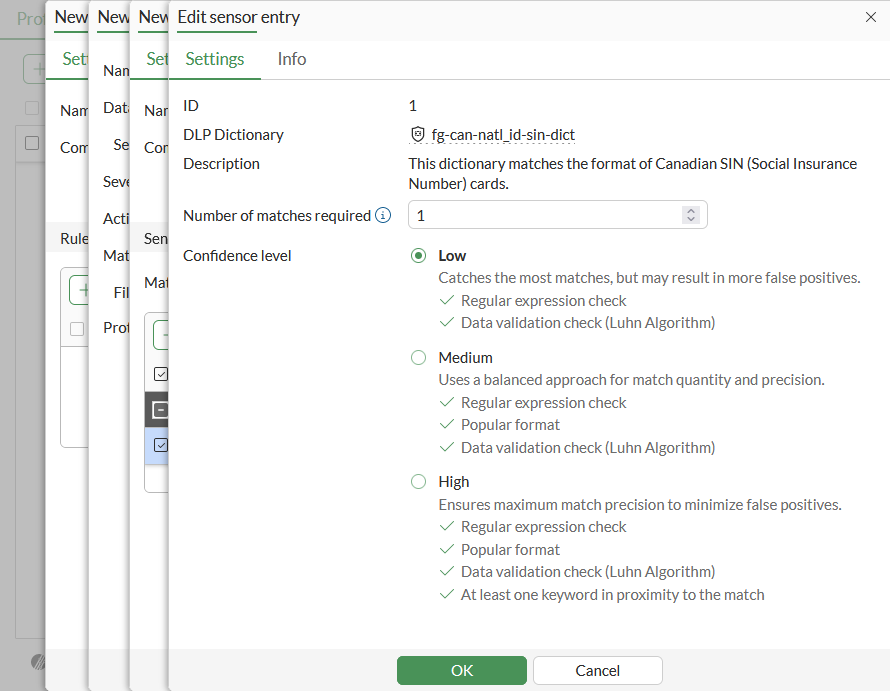
-
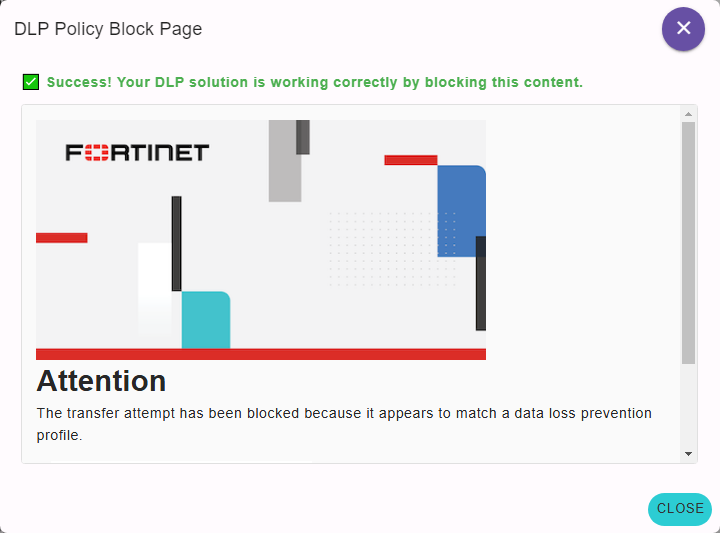
Test that an HTTPS message containing a SIN is blocked. DLP Test > HTTPS Post can be used to send a test message.
The message is blocked:
-
Go to Log & Report > Security Events and view the Data Loss Prevention logs matching the can-natl_id-sin-dict-low dictionary.
-
Check the raw logs:
1: date=2024-05-29 time=16:55:27 eventtime=1717026926501493215 tz="-0700" logid="0954024576" type="utm" subtype="dlp" eventtype="dlp" level="warning" vd="vdom1" ruleid=1 rulename="sensor_can_sin_low" dlpextra="Sensor 'sensor_can_sin_low' matching any: ('g-fg-can-natl_id-sin-dict-low'=1) >= 1; match." filtertype="sensor" filtercat="message" severity="medium" policyid=1 poluuid="a084e3dc-1d48-51ef-5286-940d89557186" policytype="policy" sessionid=64304 epoch=2100732550 eventid=1 srcip=10.1.100.241 srcport=34184 srccountry="Reserved" srcintf="port2" srcintfrole="undefined" srcuuid="5a9d01f6-1d48-51ef-1c5f-c5a49f106988" dstip=35.209.95.242 dstport=443 dstcountry="United States" dstintf="port1" dstintfrole="undefined" dstuuid="5a9d01f6-1d48-51ef-1c5f-c5a49f106988" proto=6 service="HTTPS" filetype="N/A" direction="outgoing" action="block" hostname="dlptest.ai" url="https://dlptest.ai/https-post/" agent="Mozilla/5.0 (X11; Linux x86_64) AppleWebKit/537.36 (KHTML, like Gecko) Chrome/122.0.0.0 Safari/537.36" httpmethod="POST" referralurl="https://dlptest.ai/https-post/" profile="customer_can_sin"
To verify that a FortiGuard dictionary with medium confidence level will block matching message through a FTPS post:
-
Configure a DLP profile with a DLP sensor that uses the Canadian SIN card dictionary (
fg-can-natl_id-sin-dict) DLP dictionary with the Confidence level set to Medium and then use the profile in a policy. -
Test that posting a file that contains
193849270is blocked.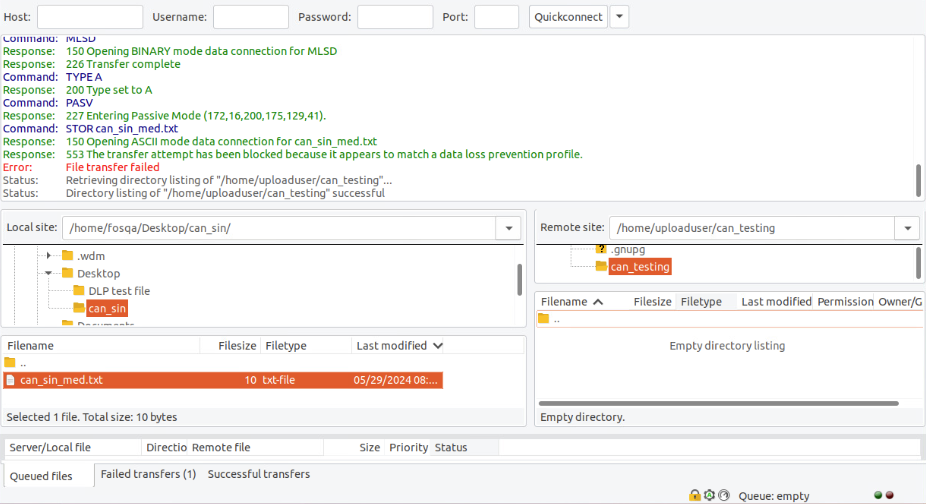
-
Go to Log & Report > Security Events and view the Data Loss Prevention logs matching the can-natl_id-sin-dict-med dictionary.
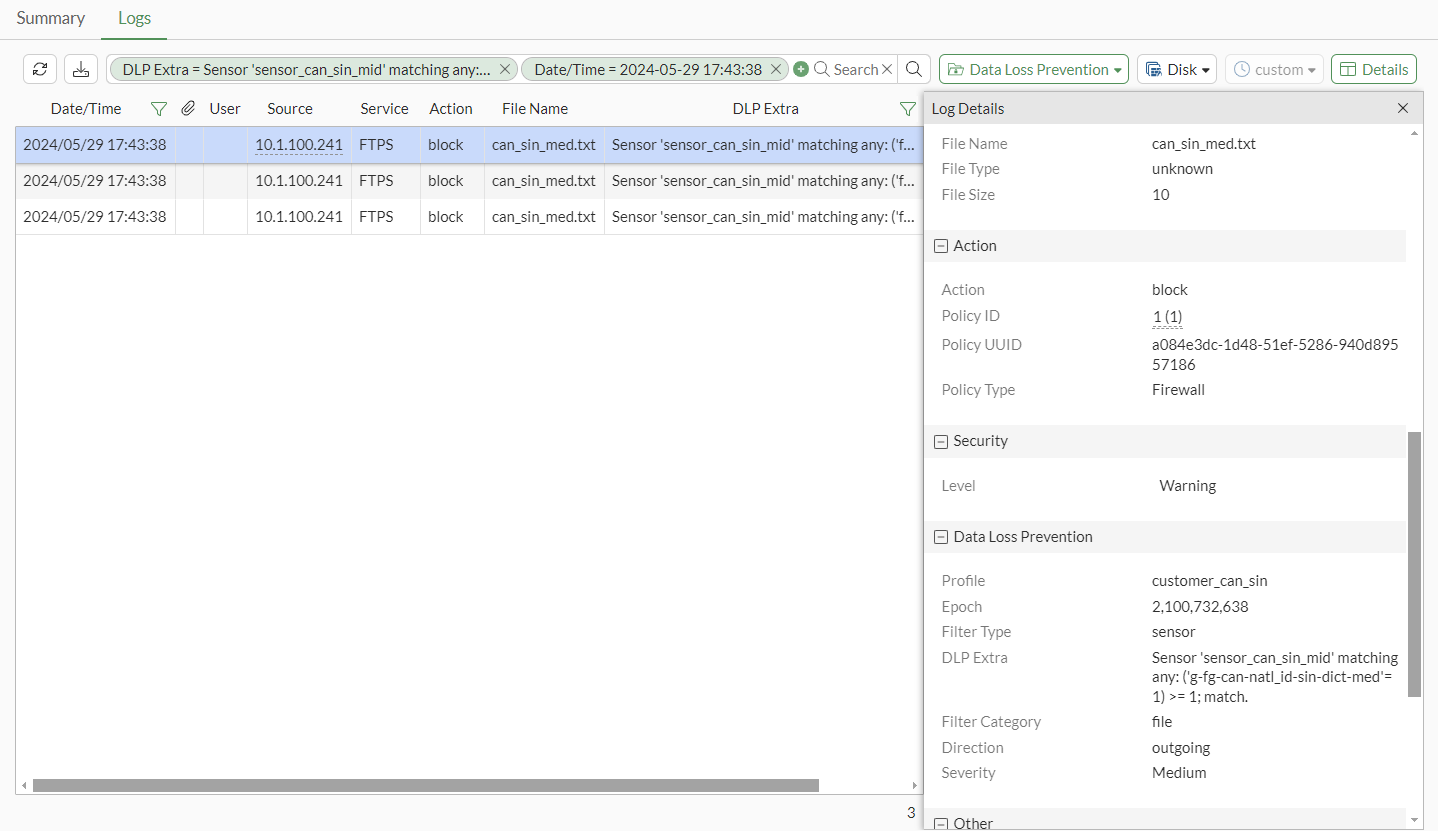
-
Check the raw logs:
1: date=2024-05-29 time=17:43:38 eventtime=1717029818309788622 tz="-0700" logid="0954024576" type="utm" subtype="dlp" eventtype="dlp" level="warning" vd="vdom1" ruleid=2 rulename="sensor_can_sin_med" dlpextra="Sensor 'sensor_can_sin_mid' matching any: ('g-fg-can-natl_id-sin-dict-med'=1) >= 1; match." filtertype="sensor" filtercat="file" severity="medium" policyid=1 poluuid="a084e3dc-1d48-51ef-5286-940d89557186" policytype="policy" sessionid=65893 epoch=2100732638 eventid=0 srcip=10.1.100.241 srcport=37561 srccountry="Reserved" srcintf="port2" srcintfrole="undefined" srcuuid="5a9d01f6-1d48-51ef-1c5f-c5a49f106988" dstip=172.16.200.175 dstport=33065 dstcountry="Reserved" dstintf="port1" dstintfrole="undefined" dstuuid="5a9d01f6-1d48-51ef-1c5f-c5a49f106988" proto=6 service="FTPS" filetype="unknown" direction="outgoing" action="block" filename="can_sin_med.txt" filesize=10 profile="customer_can_sin"
To verify that the FortiGuard dictionary with a high confidence level will block matching message through an SMTP post:
-
Configure a DLP profile with a DLP sensor that uses the Canadian SIN card dictionary (
fg-can-natl_id-sin-dict) DLP dictionary with the Confidence level set to High and then use the profile in a policy. -
Test that sending email with an attached file that contains
sin# 193849270is blocked. -
Go to Log & Report > Security Events and view the Data Loss Prevention logs matching the can-natl_id-sin-dict-high dictionary.
-
Check the raw logs:
1: date=2024-05-30 time=11:37:18 eventtime=1717094238851929893 tz="-0700" logid="0954024576" type="utm" subtype="dlp" eventtype="dlp" level="warning" vd="vdom1" ruleid=3 rulename="sensor_can_sin_high" dlpextra="Sensor 'sensor_can_sin_high' matching any: ('g-fg-can-natl_id-sin-dict-high'=1) >= 1; match." filtertype="sensor" filtercat="file" severity="medium" policyid=1 poluuid="a084e3dc-1d48-51ef-5286-940d89557186" policytype="policy" sessionid=96838 epoch=1455065196 eventid=2 srcip=10.1.100.171 srcport=51141 srccountry="Reserved" srcintf="port2" srcintfrole="undefined" srcuuid="5a9d01f6-1d48-51ef-1c5f-c5a49f106988" dstip=172.16.200.175 dstport=25 dstcountry="Reserved" dstintf="port1" dstintfrole="undefined" dstuuid="5a9d01f6-1d48-51ef-1c5f-c5a49f106988" proto=6 service="SMTP" filetype="unknown" direction="outgoing" action="block" from="johndoe@example.com" to="smithwhite@example.com" sender="emailuser1@qa.fortinet.com" recipient="emailuser2@qa.fortinet.com" subject="Canadian SIN" attachment="yes" filename="sin.txt" filesize=70 profile="customer_can_sin"