Fortinet white logo
Fortinet white logo

Administration Guide

ToS matching and negate options on adaptive FEC profiles NEW

ToS matching and negate options on adaptive FEC profiles NEW

Adaptive FEC can take the ToS/DSCP value into consideration when mapping the FEC profile. In the first round of matching, traffic will be matched against packet-loss, latency, and bandwidth. In the second round of matching, the TOS value and mask will be used.

Negate options allow users to match against the negative of a threshold. For example, negate packet-loss of 5% means any packet-loss less than 5% will be matched.

For more information about how to configure ToS value and netmask and how it maps to DSCP values, please see Configuring SD-WAN rules.

To configure ToS matching:
config vpn ipsec fec
    edit <name>
        config mappings
            edit <id>
                config tos
                    edit <id>
                        set tos <value>
                        set tos-mask <value>
                        set base <value>
                        set redundant <value>
                    next
                end
            next
        end
    next
end

Command

Description

tos <value>

Type of service bit pattern (0x00 - 0xFF).

tos-mask <value>

Type of service evaluated bits (0x01 - 0xFF).

base <value>

Number of base FEC packets (1 - 40).

redundant <value>

Number of redundant FEC packets (0 - 20).

To configure negate options:
config vpn ipsec fec
    edit <name>
        config mappings
            edit <id>
                set packet-loss-threshold-negate {enable | disable}
                set latency-threshold-negate {enable | disable}
                set bandwidth-up-threshold-negate {enable | disable}
                set bandwidth-down-threshold-negate {enable | disable}
                set bandwidth-bi-threshold-negate {enable | disable}
            next
        end
    next
end

Command

Description

packet-loss-threshold-negate {enable | disable}

Negate packet loss threshold (default = disable).

latency-threshold-negate {enable | disable}

Negate latency threshold (default = disable).

bandwidth-up-threshold-negate {enable | disable}

Negate up bandwidth threshold (default = disable).

bandwidth-down-threshold-negate {enable | disable}

Negate down bandwidth threshold (default = disable).

bandwidth-bi-threshold-negate {enable | disable}

Negate bi-bandwidth threshold (default = disable).

Example

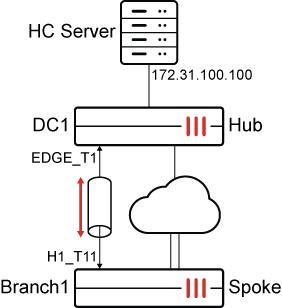
In this single-hub SD-WAN deployment, the spoke has defined a performance health-check targeting the HC Server behind the Hub. Adaptive FEC is configured based on the health-checks using the following criteria:

Health Check

Matching tos 0x01 mask 0xff

Matching tos 0x02 mask 0xff

Not matching either traffic class

Rule 1

Packet-loss is above the threshold of 5%

Apply base 5 redundant 1

Apply base 5 redundant 2

Apply default base 11 redundant 1

Rule 2

Latency is less than the threshold of 20ms

Apply base 6 redundant 1

Apply base 6 redundant 2

Apply default base 12 redundant 2

Rule 3

Available upstream bandwidth is more than 50Mbps

Apply base 7 redundant 1

Apply base 7 redundant 2

Apply default base 13 redundant 3

Rule 4

Packet-loss is below the threshold of 5%

Do not send any redundant packets

The rules are examined in the order that they are configured.

To configure the spoke:
  1. Configure SD-WAN:

    config system sdwan
        set status enable
        config zone
            edit "virtual-wan-link"
            next
            edit "overlay"
            next
            edit "underlay"
            next
        end
        config members
            ...
            edit 3
                set interface "H1_T11"
                set zone "overlay"
                set source 172.31.0.65
            next
            ...
        end
        config health-check                
            edit "HUB"
                set server "172.31.100.100"
                set update-static-route disable
                set members 3
                config sla
                    edit 1
                    next
                end
            next
        end
        config service
            edit 1
                set dst "CORP_LAN"
                set priority-members 3
            next
        end
    end
  2. Configure VPN:

    config vpn ipsec fec
        edit "fec_mapping"
            config mappings
                edit 1
                    set base 11
                    set redundant 1
                    set packet-loss-threshold 5
                    config tos
                        edit 1
                            set tos 0x01
                            set tos-mask 0xff
                            set base 5
                            set redundant 1
                        next
                        edit 2
                            set tos 0x02
                            set tos-mask 0xff
                            set base 5
                            set redundant 2
                        next
                    end
                next
                edit 2
                    set base 12
                    set redundant 2
                    set latency-threshold 20
                    config tos
                        edit 1
                            set tos 0x01
                            set tos-mask 0xff
                            set base 6
                            set redundant 1
                        next
                        edit 2
                            set tos 0x02
                            set tos-mask 0xff
                            set base 6
                            set redundant 2
                        next
                    end
                next
                edit 3
                    set base 13
                    set redundant 3
                    set bandwidth-up-threshold 50000
                    config tos
                        edit 1
                            set tos 0x01
                            set tos-mask 0xff
                            set base 7
                            set redundant 1
                        next
                        edit 2
                            set tos 0x02
                            set tos-mask 0xff
                            set base 7
                            set redundant 2
                        next
                    end
                next
                edit 4
                    set base 40
                    set redundant 0
                    set packet-loss-threshold 5
                    set packet-loss-threshold-negate enable
                next
            end
        next
    end
    config vpn ipsec phase1-interface
        edit "H1_T11"
            ...
            set fec-egress enable
            set fec-codec rs
            set fec-health-check "HUB"           
            set fec-mapping-profile "fec_mapping"
            ...
        next
    end
  3. Configure a firewall policy:

    config firewall policy
        edit 1
           ...
            set fec enable
        next
    end
To configure the hub:
config vpn ipsec phase1-interface
    edit "EDGE_T1"
        ...
        set fec-ingress enable
        ...
    next
end
To test the configuration:
  1. Check SD-WAN metrics on H1_T11 and the applied FEC settings:

    In this first scenario, the first 3 rules were not matched. Therefore, the 4th rule implies that no redundant packets are sent.

    Branch1_A_FGT (root) (Interim)# diagnose sys sdwan health-check
    Health Check(HUB):
    Seq(3 H1_T11): state(alive), packet-loss(0.000%), latency(30.247), jitter(0.016), mos(4.389), custom_profile(0.000), bandwidth-up(49758), bandwidth-dw(89990), bandwidth-bi(139748), sla_map=0x0
    
    Branch1_A_FGT# diagnose vpn  tunnel  fec  H1_T11
    egress:  enabled=1
            base=40 redundant=0 codec=0 timeout=10(ms)
            encode=0 encode_timeout=0 encode_fail=0
            tx_data=0 tx_parity=0
            total_tx_data=0 total_tx_parity=0
    ingress: enabled=0
            timeout=0(ms) fasm_cnt=0 fasm_full=0
            ipsec_fec_chk_fail=0 complete=0
            recover=0 recover_timeout=0 recover_fail=0
            rx_data=0 rx_parity=0
            rx=0 rx_fail=0
  2. Make the available upstream bandwidth more than 50M by decreasing traffic on H1_T11, then check the applied FEC settings. The third rule is matched:

    # diagnose sys sdwan health-check
    Health Check(HUB):
    Seq(3 H1_T11): state(alive), packet-loss(0.000%), latency(30.234), jitter(0.022), mos(4.389), custom_profile(0.000), bandwidth-up(63244), bandwidth-dw(89993), bandwidth-bi(153237), sla_map=0x0
    
    Branch1_A_FGT (root) (Interim)# diagnose vpn  tunnel  fec  H1_T11
    egress:  enabled=1
            base=13 redundant=3 codec=0 timeout=10(ms)
            encode=0 encode_timeout=0 encode_fail=0
            tx_data=0 tx_parity=0
            tos/mask=0x01/0xFF:
                    base=7 redundant=1
                    encode=0 encode_timeout=0 encode_fail=0
                    tx_data=0 tx_parity=0
            tos/mask=0x02/0xFF:
                    base=7 redundant=2
                    encode=0 encode_timeout=0 encode_fail=0
                    tx_data=0 tx_parity=0
            total_tx_data=0 total_tx_parity=0
    ingress: enabled=0
            timeout=0(ms) fasm_cnt=0 fasm_full=0
            ipsec_fec_chk_fail=0 complete=0
            recover=0 recover_timeout=0 recover_fail=0
            rx_data=0 rx_parity=0
            rx=0 rx_fail=0
  3. Make latency on H1_T11 less than 20ms, then check the applied FEC settings again. Both the latency and upstream bandwidth are above the threshold, so because rule 2 comes first, rule 2 is applied:

    # diagnose sys sdwan  health-check
    Health Check(HUB):
    Seq(3 H1_T11): state(alive), packet-loss(0.000%), latency(0.247), jitter(0.027), mos(4.404), custom_profile(0.000), bandwidth-up(89999), bandwidth-dw(89997), bandwidth-bi(179996), sla_map=0x1
    
    Branch1_A_FGT (root) (Interim)# diagnose vpn  tunnel  fec  H1_T11
    egress:  enabled=1
            base=12 redundant=2 codec=0 timeout=10(ms)
            encode=0 encode_timeout=0 encode_fail=0
            tx_data=0 tx_parity=0
            tos/mask=0x01/0xFF:
                    base=6 redundant=1
                    encode=0 encode_timeout=0 encode_fail=0
                    tx_data=0 tx_parity=0
            tos/mask=0x02/0xFF:
                    base=6 redundant=2
                    encode=0 encode_timeout=0 encode_fail=0
                    tx_data=0 tx_parity=0
            total_tx_data=0 total_tx_parity=0
    ingress: enabled=0
            timeout=0(ms) fasm_cnt=0 fasm_full=0
            ipsec_fec_chk_fail=0 complete=0
            recover=0 recover_timeout=0 recover_fail=0
            rx_data=0 rx_parity=0
            rx=0 rx_fail=0
  4. Make packet-loss on H1_T11 more than 5%, then check the applied FEC settings again. All 3 rules match since health checks are above the threshold, so because rule 1 comes first, rule 1 is applied.

    # diagnose sys sdwan  health-check
    Health Check(HUB):
    Seq(3 H1_T11): state(alive), packet-loss(6.000%), latency(0.254), jitter(0.029), mos(4.401), custom_profile(0.000), bandwidth-up(89999), bandwidth-dw(89997), bandwidth-bi(179996), sla_map=0x0
    
    Branch1_A_FGT (root) (Interim)# diagnose vpn  tunnel  fec  H1_T11
    egress:  enabled=1
            base=11 redundant=1 codec=0 timeout=10(ms)
            encode=0 encode_timeout=0 encode_fail=0
            tx_data=0 tx_parity=0
            tos/mask=0x01/0xFF:
                    base=5 redundant=1
                    encode=0 encode_timeout=0 encode_fail=0
                    tx_data=0 tx_parity=0
            tos/mask=0x02/0xFF:
                    base=5 redundant=2
                    encode=0 encode_timeout=0 encode_fail=0
                    tx_data=0 tx_parity=0
            total_tx_data=0 total_tx_parity=0
    ingress: enabled=0
            timeout=0(ms) fasm_cnt=0 fasm_full=0
            ipsec_fec_chk_fail=0 complete=0
            recover=0 recover_timeout=0 recover_fail=0
            rx_data=0 rx_parity=0
            rx=0 rx_fail=0

ToS matching and negate options on adaptive FEC profiles NEW

ToS matching and negate options on adaptive FEC profiles NEW

Adaptive FEC can take the ToS/DSCP value into consideration when mapping the FEC profile. In the first round of matching, traffic will be matched against packet-loss, latency, and bandwidth. In the second round of matching, the TOS value and mask will be used.

Negate options allow users to match against the negative of a threshold. For example, negate packet-loss of 5% means any packet-loss less than 5% will be matched.

For more information about how to configure ToS value and netmask and how it maps to DSCP values, please see Configuring SD-WAN rules.

To configure ToS matching:
config vpn ipsec fec
    edit <name>
        config mappings
            edit <id>
                config tos
                    edit <id>
                        set tos <value>
                        set tos-mask <value>
                        set base <value>
                        set redundant <value>
                    next
                end
            next
        end
    next
end

Command

Description

tos <value>

Type of service bit pattern (0x00 - 0xFF).

tos-mask <value>

Type of service evaluated bits (0x01 - 0xFF).

base <value>

Number of base FEC packets (1 - 40).

redundant <value>

Number of redundant FEC packets (0 - 20).

To configure negate options:
config vpn ipsec fec
    edit <name>
        config mappings
            edit <id>
                set packet-loss-threshold-negate {enable | disable}
                set latency-threshold-negate {enable | disable}
                set bandwidth-up-threshold-negate {enable | disable}
                set bandwidth-down-threshold-negate {enable | disable}
                set bandwidth-bi-threshold-negate {enable | disable}
            next
        end
    next
end

Command

Description

packet-loss-threshold-negate {enable | disable}

Negate packet loss threshold (default = disable).

latency-threshold-negate {enable | disable}

Negate latency threshold (default = disable).

bandwidth-up-threshold-negate {enable | disable}

Negate up bandwidth threshold (default = disable).

bandwidth-down-threshold-negate {enable | disable}

Negate down bandwidth threshold (default = disable).

bandwidth-bi-threshold-negate {enable | disable}

Negate bi-bandwidth threshold (default = disable).

Example

In this single-hub SD-WAN deployment, the spoke has defined a performance health-check targeting the HC Server behind the Hub. Adaptive FEC is configured based on the health-checks using the following criteria:

Health Check

Matching tos 0x01 mask 0xff

Matching tos 0x02 mask 0xff

Not matching either traffic class

Rule 1

Packet-loss is above the threshold of 5%

Apply base 5 redundant 1

Apply base 5 redundant 2

Apply default base 11 redundant 1

Rule 2

Latency is less than the threshold of 20ms

Apply base 6 redundant 1

Apply base 6 redundant 2

Apply default base 12 redundant 2

Rule 3

Available upstream bandwidth is more than 50Mbps

Apply base 7 redundant 1

Apply base 7 redundant 2

Apply default base 13 redundant 3

Rule 4

Packet-loss is below the threshold of 5%

Do not send any redundant packets

The rules are examined in the order that they are configured.

To configure the spoke:
  1. Configure SD-WAN:

    config system sdwan
        set status enable
        config zone
            edit "virtual-wan-link"
            next
            edit "overlay"
            next
            edit "underlay"
            next
        end
        config members
            ...
            edit 3
                set interface "H1_T11"
                set zone "overlay"
                set source 172.31.0.65
            next
            ...
        end
        config health-check                
            edit "HUB"
                set server "172.31.100.100"
                set update-static-route disable
                set members 3
                config sla
                    edit 1
                    next
                end
            next
        end
        config service
            edit 1
                set dst "CORP_LAN"
                set priority-members 3
            next
        end
    end
  2. Configure VPN:

    config vpn ipsec fec
        edit "fec_mapping"
            config mappings
                edit 1
                    set base 11
                    set redundant 1
                    set packet-loss-threshold 5
                    config tos
                        edit 1
                            set tos 0x01
                            set tos-mask 0xff
                            set base 5
                            set redundant 1
                        next
                        edit 2
                            set tos 0x02
                            set tos-mask 0xff
                            set base 5
                            set redundant 2
                        next
                    end
                next
                edit 2
                    set base 12
                    set redundant 2
                    set latency-threshold 20
                    config tos
                        edit 1
                            set tos 0x01
                            set tos-mask 0xff
                            set base 6
                            set redundant 1
                        next
                        edit 2
                            set tos 0x02
                            set tos-mask 0xff
                            set base 6
                            set redundant 2
                        next
                    end
                next
                edit 3
                    set base 13
                    set redundant 3
                    set bandwidth-up-threshold 50000
                    config tos
                        edit 1
                            set tos 0x01
                            set tos-mask 0xff
                            set base 7
                            set redundant 1
                        next
                        edit 2
                            set tos 0x02
                            set tos-mask 0xff
                            set base 7
                            set redundant 2
                        next
                    end
                next
                edit 4
                    set base 40
                    set redundant 0
                    set packet-loss-threshold 5
                    set packet-loss-threshold-negate enable
                next
            end
        next
    end
    config vpn ipsec phase1-interface
        edit "H1_T11"
            ...
            set fec-egress enable
            set fec-codec rs
            set fec-health-check "HUB"           
            set fec-mapping-profile "fec_mapping"
            ...
        next
    end
  3. Configure a firewall policy:

    config firewall policy
        edit 1
           ...
            set fec enable
        next
    end
To configure the hub:
config vpn ipsec phase1-interface
    edit "EDGE_T1"
        ...
        set fec-ingress enable
        ...
    next
end
To test the configuration:
  1. Check SD-WAN metrics on H1_T11 and the applied FEC settings:

    In this first scenario, the first 3 rules were not matched. Therefore, the 4th rule implies that no redundant packets are sent.

    Branch1_A_FGT (root) (Interim)# diagnose sys sdwan health-check
    Health Check(HUB):
    Seq(3 H1_T11): state(alive), packet-loss(0.000%), latency(30.247), jitter(0.016), mos(4.389), custom_profile(0.000), bandwidth-up(49758), bandwidth-dw(89990), bandwidth-bi(139748), sla_map=0x0
    
    Branch1_A_FGT# diagnose vpn  tunnel  fec  H1_T11
    egress:  enabled=1
            base=40 redundant=0 codec=0 timeout=10(ms)
            encode=0 encode_timeout=0 encode_fail=0
            tx_data=0 tx_parity=0
            total_tx_data=0 total_tx_parity=0
    ingress: enabled=0
            timeout=0(ms) fasm_cnt=0 fasm_full=0
            ipsec_fec_chk_fail=0 complete=0
            recover=0 recover_timeout=0 recover_fail=0
            rx_data=0 rx_parity=0
            rx=0 rx_fail=0
  2. Make the available upstream bandwidth more than 50M by decreasing traffic on H1_T11, then check the applied FEC settings. The third rule is matched:

    # diagnose sys sdwan health-check
    Health Check(HUB):
    Seq(3 H1_T11): state(alive), packet-loss(0.000%), latency(30.234), jitter(0.022), mos(4.389), custom_profile(0.000), bandwidth-up(63244), bandwidth-dw(89993), bandwidth-bi(153237), sla_map=0x0
    
    Branch1_A_FGT (root) (Interim)# diagnose vpn  tunnel  fec  H1_T11
    egress:  enabled=1
            base=13 redundant=3 codec=0 timeout=10(ms)
            encode=0 encode_timeout=0 encode_fail=0
            tx_data=0 tx_parity=0
            tos/mask=0x01/0xFF:
                    base=7 redundant=1
                    encode=0 encode_timeout=0 encode_fail=0
                    tx_data=0 tx_parity=0
            tos/mask=0x02/0xFF:
                    base=7 redundant=2
                    encode=0 encode_timeout=0 encode_fail=0
                    tx_data=0 tx_parity=0
            total_tx_data=0 total_tx_parity=0
    ingress: enabled=0
            timeout=0(ms) fasm_cnt=0 fasm_full=0
            ipsec_fec_chk_fail=0 complete=0
            recover=0 recover_timeout=0 recover_fail=0
            rx_data=0 rx_parity=0
            rx=0 rx_fail=0
  3. Make latency on H1_T11 less than 20ms, then check the applied FEC settings again. Both the latency and upstream bandwidth are above the threshold, so because rule 2 comes first, rule 2 is applied:

    # diagnose sys sdwan  health-check
    Health Check(HUB):
    Seq(3 H1_T11): state(alive), packet-loss(0.000%), latency(0.247), jitter(0.027), mos(4.404), custom_profile(0.000), bandwidth-up(89999), bandwidth-dw(89997), bandwidth-bi(179996), sla_map=0x1
    
    Branch1_A_FGT (root) (Interim)# diagnose vpn  tunnel  fec  H1_T11
    egress:  enabled=1
            base=12 redundant=2 codec=0 timeout=10(ms)
            encode=0 encode_timeout=0 encode_fail=0
            tx_data=0 tx_parity=0
            tos/mask=0x01/0xFF:
                    base=6 redundant=1
                    encode=0 encode_timeout=0 encode_fail=0
                    tx_data=0 tx_parity=0
            tos/mask=0x02/0xFF:
                    base=6 redundant=2
                    encode=0 encode_timeout=0 encode_fail=0
                    tx_data=0 tx_parity=0
            total_tx_data=0 total_tx_parity=0
    ingress: enabled=0
            timeout=0(ms) fasm_cnt=0 fasm_full=0
            ipsec_fec_chk_fail=0 complete=0
            recover=0 recover_timeout=0 recover_fail=0
            rx_data=0 rx_parity=0
            rx=0 rx_fail=0
  4. Make packet-loss on H1_T11 more than 5%, then check the applied FEC settings again. All 3 rules match since health checks are above the threshold, so because rule 1 comes first, rule 1 is applied.

    # diagnose sys sdwan  health-check
    Health Check(HUB):
    Seq(3 H1_T11): state(alive), packet-loss(6.000%), latency(0.254), jitter(0.029), mos(4.401), custom_profile(0.000), bandwidth-up(89999), bandwidth-dw(89997), bandwidth-bi(179996), sla_map=0x0
    
    Branch1_A_FGT (root) (Interim)# diagnose vpn  tunnel  fec  H1_T11
    egress:  enabled=1
            base=11 redundant=1 codec=0 timeout=10(ms)
            encode=0 encode_timeout=0 encode_fail=0
            tx_data=0 tx_parity=0
            tos/mask=0x01/0xFF:
                    base=5 redundant=1
                    encode=0 encode_timeout=0 encode_fail=0
                    tx_data=0 tx_parity=0
            tos/mask=0x02/0xFF:
                    base=5 redundant=2
                    encode=0 encode_timeout=0 encode_fail=0
                    tx_data=0 tx_parity=0
            total_tx_data=0 total_tx_parity=0
    ingress: enabled=0
            timeout=0(ms) fasm_cnt=0 fasm_full=0
            ipsec_fec_chk_fail=0 complete=0
            recover=0 recover_timeout=0 recover_fail=0
            rx_data=0 rx_parity=0
            rx=0 rx_fail=0