

Best quality strategy
When using Best Quality mode, SD-WAN will choose the best link to forward traffic by comparing the link-cost-factor. A link-cost factor is a specific metric of participating link(s) (such as, latency, packet loss, and so on) evaluated against a target that you define (such as a health-check server), for example, the latency of WAN1 and WAN2 to your datacenter. Below is a list of link-cost factors available to you:
|
GUI |
CLI |
Description |
|---|---|---|
|
Latency |
latency |
Select a link based on latency. |
|
Jitter |
jitter |
Select a link based on jitter. |
|
Packet Loss |
packet-loss |
Select a link based on packet loss. |
|
Downstream |
inbandwidth |
Select a link based on available bandwidth of incoming traffic. |
|
Upstream |
outbandwidth |
Select a link based on available bandwidth of outgoing traffic. |
|
Bandwidth |
bibandwidth |
Select a link based on available bandwidth of bidirectional traffic. |
|
Customized profile |
custom-profile-1 |
Select link based on customized profile. If selected, set the following weights:
|
Although SD-WAN intelligence selects the best quality link according to the selected metric, by default a preference or advantage is given to the first configured SD-WAN member. This default is 10% and may be configured with the CLI command set link-cost-threshold 10.
Example of how link-cost-threshold works:
config system sdwan
    config members
        edit 1
            set interface "wan1"
        next
        edit 2
            set interface "wan2"
        next
    end
    config service
        edit 1
            set name "Best_Quality"
            set mode priority
            set priority-members 2 1
            set dst "DC_net"
            set health-check “DC_HealthCheck”
            set link-cost-factor latency
            set link-cost-threshold 10
        next
    end
end
In this example both WAN1 and WAN2 are assumed to have 200ms latency to the health-check server named DC_HealthCheck. Because WAN2 is specified before WAN1 in priority-members, SD-WAN parses the two interfaces metric as follows:
- WAN1: 200ms
- WAN2: 200ms / (1+10%) = ~182ms
As a result, WAN2 is selected because the latency is lower.
If the Downstream (inbandwidth), Upstream (outbandwidth), or Bandwidth (bibandwidth) quality criteria is used, the FortiGate uses the upstream and downstream bandwidth values configured on the member interfaces to calculate bandwidth.
The interface bandwidth configuration can be done manually, or the interface speedtest can be used to populate the bandwidth values based on the speedtest results. See GUI speed test for details.
To manually configure the upstream and downstream interface bandwidth values:
config system interface
    edit <interface>
        set estimated-upstream-bandwidth <speed in kbps>
        set estimated-downstream-bandwidth <speed in kbps>
    next
end
Example
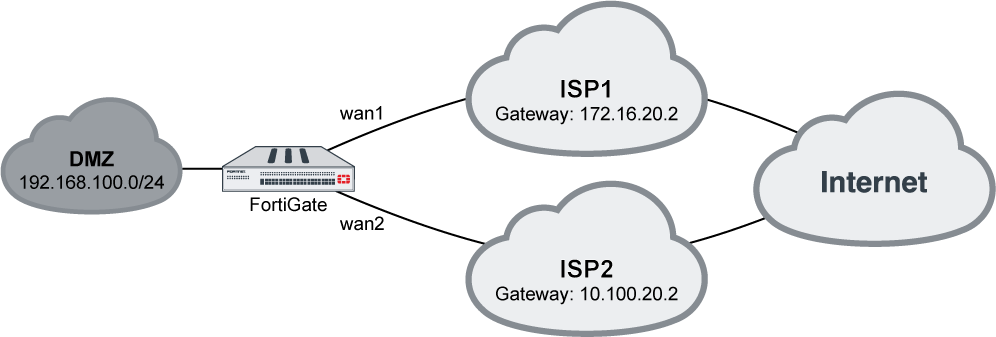
In this example, your wan1 and wan2 SD-WAN interfaces connect to two ISPs that both go to the public internet, and you want Gmail services to use the link with the least latency.
To configure an SD-WAN rule to use Best Quality:
-
On the FortiGate, add wan1 and wan2 as SD-WAN members, then add a policy and static route. See SD-WAN quick start for more details.
-
Go to Network > SD-WAN, select the Performance SLAs tab, and click Create New.
-
Enter a name for the performance SLA, such as google, and set the Server to google.com. See Health checks for more details.
-
Click OK.
-
Go to Network > SD-WAN, select the SD-WAN Rules tab, and click Create New.
-
Enter a name for the rule, such as gmail.
-
Configure the following settings:
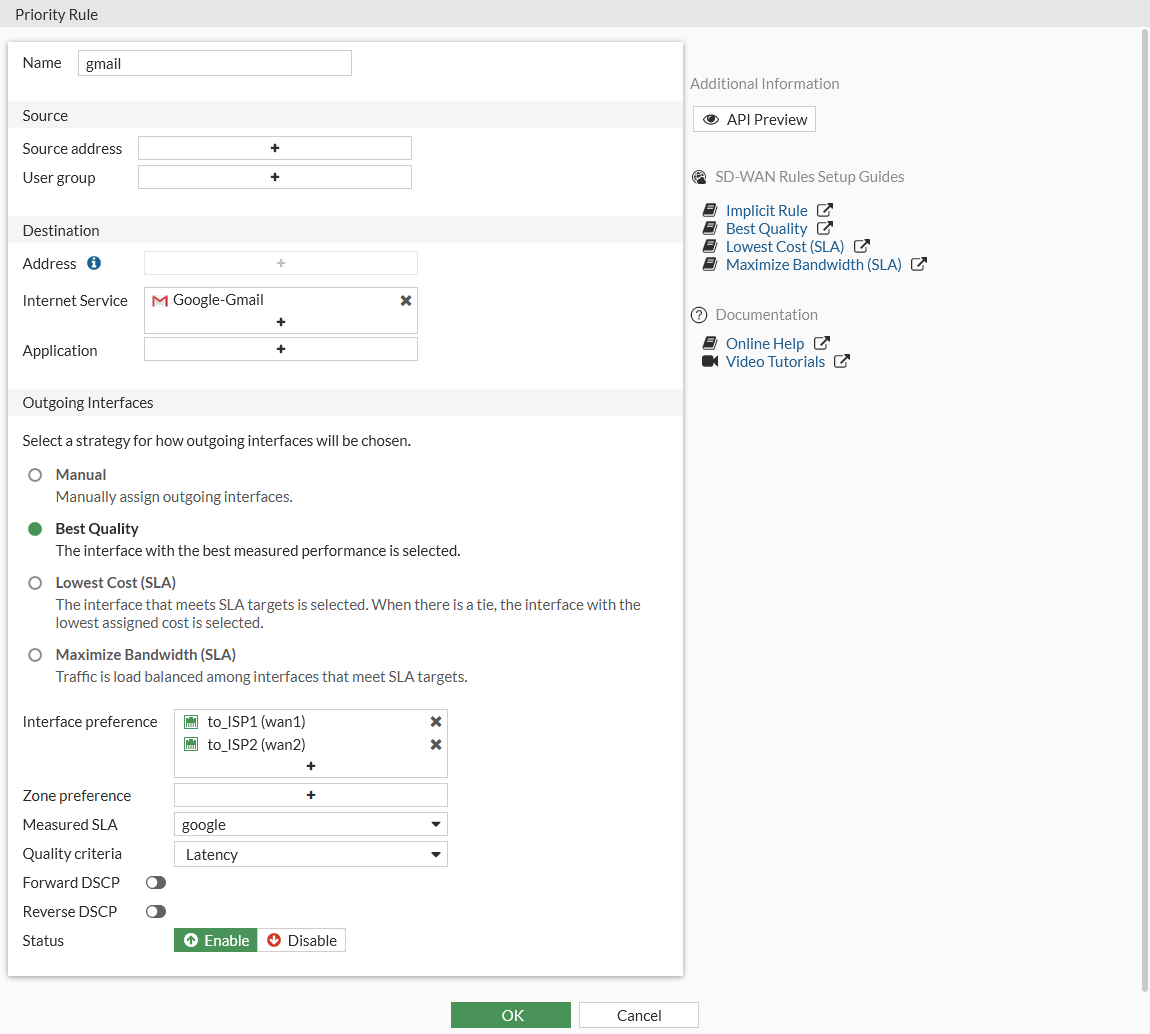
Internet Service
Google-Gmail
Strategy
Best Quality
Interface preference
wan1 and wan2
Measured SLA
google
Quality criteria
Latency
-
Click OK.
To configure an SD-WAN rule to use priority:
config system sdwan
    config health-check
        edit "google"
            set server "google.com"
            set members 1 2
        next
    end
    config service
        edit 1
            set name "gmail"
            set mode priority
            set internet-service enable
            set internet-service-id 65646
            set health-check "google"
            set link-cost-factor latency
            set priority-members 1 2
        next
    end
end
To diagnose the Performance SLA status:
FGT # diagnose sys sdwan health-check google
Health Check(google):
Seq(1): state(alive), packet-loss(0.000%) latency(14.563), jitter(4.334) sla_map=0x0
Seq(2): state(alive), packet-loss(0.000%) latency(12.633), jitter(6.265) sla_map=0x0

FGT # diagnose sys sdwan service 1
Service(1):

    TOS(0x0/0x0), protocol(0: 1->65535), Mode(priority), link-cost-facotr(latency), link-cost-threshold(10), health-check(google) Members:

        1: Seq_num(2), alive, latency: 12.633, selected
        2: Seq_num(1), alive, latency: 14.563, selected

    Internet Service: Google-Gmail(65646)
As wan2 has a smaller latency, SD-WAN will put Seq_num(2) on top of Seq_num(1) and wan2 will be used to forward Gmail traffic.