

ICAP response filtering
ICAP HTTP responses can be forwarded or bypassed based on the HTTP header value and status code.
When configuring the ICAP profile, if response is enabled, the respmod-default-action option can be configured:
- If
respmod-default-actionis set toforward, FortiGate will treat every HTTP response and send ICAP requests to the ICAP server. - If
respmod-default-actionis set tobypass, FortiGate will only send ICAP requests if the HTTP response matches the defined rules, and the rule's action is set to forward.
When configuring a response rule:
- The
http-resp-status-codeoption is configured to specific HTTP response codes. If the HTTP response has any one of the configured values, then the rule takes effect. - Multiple header value matching groups can be configured. If the header value matches one of the groups, then the rule takes effect.
- If both status codes and header values are specified in a rule, the response must match at least one of each.
The UTM ICAP log category is used for logging actions when FortiGate encounters errors with the ICAP server, such as no service, unreachable, error response code, or timeout. If an error occurs, a traffic log and an associated UTM ICAP log will be created.
Example
The FortiGate acts as a gateway for the client PC and connects to a reachable ICAP server. The ICAP server can be in NAT, transparent, or proxy mode.
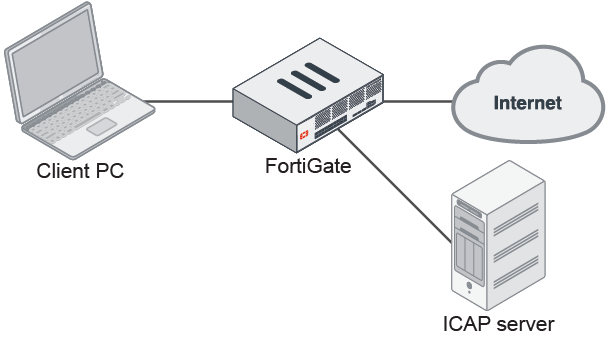
In this example, client request HTTP responses will be forwarded to the ICAP server from all hosts if they have an HTTP status code of 200, 301, or 302, and have content‑type: image/jpeg in the their header.
To configure an ICAP profile with HTTP response rules:
config icap profile
    edit "icap_profile2"
        set request disable
        set response enable
        set streaming-content-bypass disable
        set preview disable
        set response-server "icap_server1"
        set response-failure error
        set response-path ''
        set methods delete get head options post put trace other
        set response-req-hdr disable
        set respmod-default-action bypass
        config respmod-forward-rules
            edit "rule2"
                set host "all"
                set action forward
                set http-resp-status-code 200 301 302
                config header-group
                    edit 2
                        set header-name "content-type"
                        set header "image/jpeg"
                    next
                end
            next
        end
    next
end
To view the logs if an error occurs:
- View the traffic log:
# execute log filter category 0
# execute log display
1 logs found.
1 logs returned.

 1: date=2019-10-25 time=17:43:47 logid="0000000013" type="traffic" subtype="forward" level="notice" vd="vdom1" eventtime=1572050627037314464 tz="-0700" srcip=10.1.100.145 srcport=47968 srcintf="port1" srcintfrole="undefined" dstip=172.16.200.46 dstport=80 dstintf="port2" dstintfrole="undefined" poluuid="a4d5324e-f6c3-51e9-ce2d-f360994fb547" sessionid=43549 proto=6 action="close" policyid=1 policytype="policy" service="HTTP" dstcountry="Reserved" srccountry="Reserved" trandisp="snat" transip=172.16.200.1 transport=47968 duration=1 sentbyte=485 rcvdbyte=398 sentpkt=6 rcvdpkt=5 appcat="unscanned" wanin=478 wanout=165 lanin=165 lanout=165 utmaction="block" counticap=1 crscore=5 craction=262144 crlevel="low" utmref=65532-0
- View the UTM ICAP log:
# execute log filter category 20
# execute log display
1 logs found.
1 logs returned.

 1: date=2019-10-25 time=17:43:46 logid="2000060000" type="utm" subtype="icap" eventtype="icap" level="warning" vd="vdom1" eventtime=1572050626010097145 tz="-0700" msg="Request blocked due to ICAP server error" service="HTTP" srcip=10.1.100.145 dstip=172.16.200.46 srcport=47968 dstport=80 srcintf="port1" srcintfrole="undefined" dstintf="port2" dstintfrole="undefined" policyid=1 sessionid=43549 proto=6 action="blocked" profile="icap_profile1" url="/icap_test/"
The logs show that the ICAP services stopped before the access. When the client tried to access HTTP and ICAP took effect, the FortiGate sent the ICAP request to the ICAP server and received an error. The client sees a 502 Bad Gateway message, and FortiGate writes the two logs. In the GUI, the logged traffic is displayed as Result: Deny: UTM Blocked.