Fortinet white logo
Fortinet white logo
7.6.2

External IdPs

External IdPs

Use the System > User Management > External IdPs page to configure external IdPs for remote users. You can then add the remote users to the users list (see User Management).

The following external IdP types are supported:

  • LDAP
  • Kerberos
  • SAML 2.0
To add an IdP server:
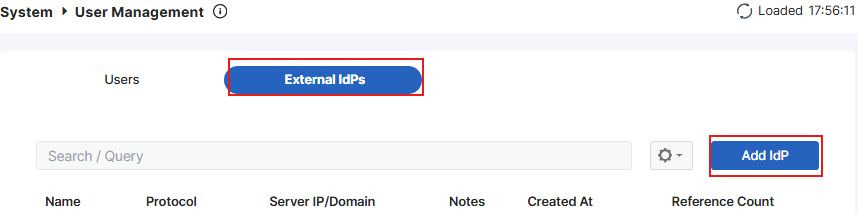
  1. On the System > User Management > External IdPs page, click Add IdP.
  2. Specify the name.
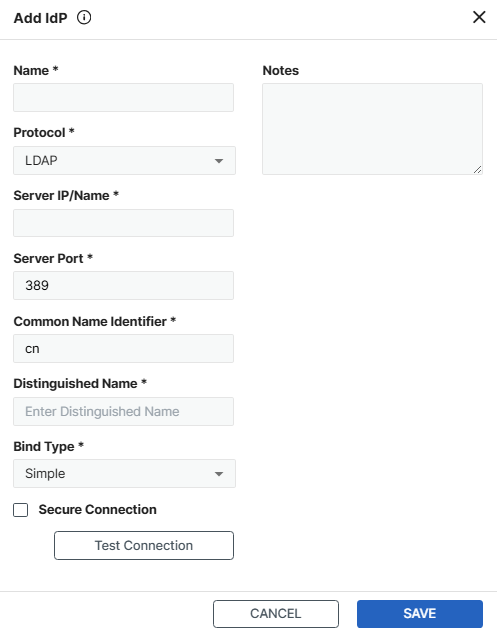
  3. Select the protocol and configure the following options:

    Protocol

    Configuration options

    LDAP
    Server IP/NameIP or FQDN of the LDAP server.
    Server Port

    Port of the LDAP server.

    Common Name Identifier Common name identifier of the LDAP server.
    Distinguished NameDistinguished name of the LDAP server.
    Bind Type

    Select from the following:

    • Simple
    • Anonymous
    • Regular
    Secure ConnectionSelect to enable HTTPS connection for better security. You can then further select the STARTTLS or LDAPS protocol and CA/client certificate.

    Test Connection

    Click to verify if the server connection is successful.

    Kerberos
    Delegated RealmSpecify the delegated realm.
    PortSpecify the port of the Kerberos server.
    KDC HostSpecify the KDC host. If left empty, FortiData uses delegated realm as KDC host instead.

    Test Connection

    Click to verify if the server connection is successful.

    SAML 2.0
    AddressURL of the service provider.
    Entity IDEntity ID of the service provider.
    Assertion consumer service URLAssertion consumer service URL of the service provider.
    Signal logout service URLSignal logout service URL of the service provider.
    IdP entity ID Entity ID of the IdP.
    IdP single sign-on URLSingle sign-on URL of the IdP.
    IdP single logout URLSingle logout URL of the IdP.

    Certificate

    Select a remote certificate from the list or add a new one. See Certificates.

    Attribute used to identity users

    Specify the attribute used to identity users.

    Attribute used to identity groups

    Specify the attribute used to identity groups.

  4. Click SAVE.

External IdPs

External IdPs

Use the System > User Management > External IdPs page to configure external IdPs for remote users. You can then add the remote users to the users list (see User Management).

The following external IdP types are supported:

  • LDAP
  • Kerberos
  • SAML 2.0
To add an IdP server:
  1. On the System > User Management > External IdPs page, click Add IdP.

  2. Specify the name.
  3. Select the protocol and configure the following options:

    Protocol

    Configuration options

    LDAP
    Server IP/NameIP or FQDN of the LDAP server.
    Server Port

    Port of the LDAP server.

    Common Name Identifier Common name identifier of the LDAP server.
    Distinguished NameDistinguished name of the LDAP server.
    Bind Type

    Select from the following:

    • Simple
    • Anonymous
    • Regular
    Secure ConnectionSelect to enable HTTPS connection for better security. You can then further select the STARTTLS or LDAPS protocol and CA/client certificate.

    Test Connection

    Click to verify if the server connection is successful.

    Kerberos
    Delegated RealmSpecify the delegated realm.
    PortSpecify the port of the Kerberos server.
    KDC HostSpecify the KDC host. If left empty, FortiData uses delegated realm as KDC host instead.

    Test Connection

    Click to verify if the server connection is successful.

    SAML 2.0
    AddressURL of the service provider.
    Entity IDEntity ID of the service provider.
    Assertion consumer service URLAssertion consumer service URL of the service provider.
    Signal logout service URLSignal logout service URL of the service provider.
    IdP entity ID Entity ID of the IdP.
    IdP single sign-on URLSingle sign-on URL of the IdP.
    IdP single logout URLSingle logout URL of the IdP.

    Certificate

    Select a remote certificate from the list or add a new one. See Certificates.

    Attribute used to identity users

    Specify the attribute used to identity users.

    Attribute used to identity groups

    Specify the attribute used to identity groups.

  4. Click SAVE.