
Fortinet white logo
Fortinet white logo
7.6.2

Data Types

Data Types

In a DLP system, data types are categories of sensitive information that the system can detect and protect. Common data types include PII (Personally Identifiable Information), PHI (Protected Health Information), and PCI (Payment Card Information). The Content Insight > Data Types page displays a list of data types (of different categories) that you defined, which can then be referenced when you create Data Classifiers.. You can search the custom data type groups by various dimensions.

To define a data type:
  1. In the Content Insight > Data Types page, click Add Data Type.

  2. Configure the data type with the following options:
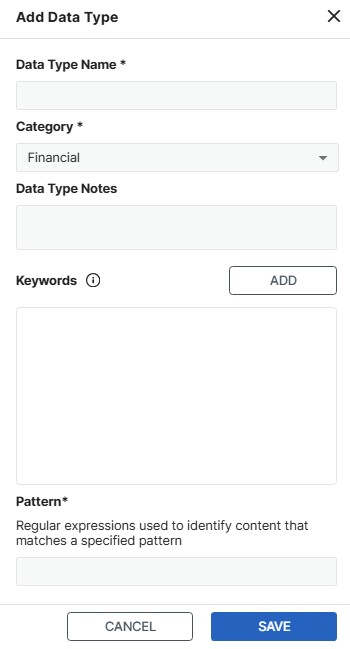
    1. Specify the data type name.

    2. Select the category, which can be one of the following:

      • Financial
      • Health
      • Credential
      • Personal
      • Business
    3. Add notes as needed.

    4. Click ADD to define any keywords to look for during file scans. Keyword matching is case-insensitive.

      For example, you can configure the keywords Driver License and DLN to look for files that include Driver License or DLN. If a file includes any of the keywords, FortiData proceeds to evaluate the file against any regular expressions as defined in the next step.

    5. Specify the regular expressions with the content pattern to look for in files that match any of the keywords defined in the previous step.

      For example, for files that match the keyword Driver License or DLN, you can specify the regular expression [A-Z]\d{7} that looks for the content pattern of a leading capital letter followed by seven digits. With this definition of the data type, a file that includes a driver license number T16700185 will be considered a match.

    6. Add more keywords to the data type by repeating steps d and e.

  3. Click SAVE.

Data Types

Data Types

In a DLP system, data types are categories of sensitive information that the system can detect and protect. Common data types include PII (Personally Identifiable Information), PHI (Protected Health Information), and PCI (Payment Card Information). The Content Insight > Data Types page displays a list of data types (of different categories) that you defined, which can then be referenced when you create Data Classifiers.. You can search the custom data type groups by various dimensions.

To define a data type:
  1. In the Content Insight > Data Types page, click Add Data Type.

  2. Configure the data type with the following options:

    1. Specify the data type name.

    2. Select the category, which can be one of the following:

      • Financial
      • Health
      • Credential
      • Personal
      • Business
    3. Add notes as needed.

    4. Click ADD to define any keywords to look for during file scans. Keyword matching is case-insensitive.

      For example, you can configure the keywords Driver License and DLN to look for files that include Driver License or DLN. If a file includes any of the keywords, FortiData proceeds to evaluate the file against any regular expressions as defined in the next step.

    5. Specify the regular expressions with the content pattern to look for in files that match any of the keywords defined in the previous step.

      For example, for files that match the keyword Driver License or DLN, you can specify the regular expression [A-Z]\d{7} that looks for the content pattern of a leading capital letter followed by seven digits. With this definition of the data type, a file that includes a driver license number T16700185 will be considered a match.

    6. Add more keywords to the data type by repeating steps d and e.

  3. Click SAVE.