

Product integration and support
The following table lists version 7.4.5 product integration and support information:
|
Desktop operating systems |
|
||
|
Server operating systems |
FortiClient (Windows) 7.4.5 does not support Guiless (Core) OS. Microsoft Windows Server does not support Application Firewall. |
||
|
|||
|
FortiClient EMS |
|
||
|
FortiOS |
|
||
|
AV engine |
7.0.38 |
||
|
VCM engine |
2.0043 |
||
|
IPS engine |
7.6.1040 |
||
|
FortiAnalyzer |
|
||
|
FortiEDR for Windows |
|
||
|
FortiAuthenticator |
|
||
|
FortiManager |
|
||
|
FortiSandbox |
|
Language support
The following table lists FortiClient language support information:
|
Language |
GUI |
XML configuration |
Documentation |
|---|---|---|---|
|
English |
Yes |
Yes |
Yes |
|
Chinese (simplified) |
No |
No |
|
|
Chinese (traditional) |
|||
|
French (France) |
|||
|
German |
|||
|
Japanese |
|||
|
Korean |
|||
|
Portuguese (Brazil) |
|||
|
Russian |
|||
|
Spanish (Spain) |
The FortiClient language setting defaults to the regional language setting configured on the client workstation, unless configured in the XML configuration file.

|
If the client workstation is configured to a regional language setting that FortiClient does not support, it defaults to English. |
No support for multi-user sessions
FortiClient (Windows) does not support multi-user sessions using terminal servers, multi-session OSes, or via user switch.
Conflict with third-party endpoint protection software
As a Fortinet Fabric Agent that provides protection, compliance, and secure access, FortiClient may conflict with antimalware products on the market that provide similar AV, web filtering, application firewall, and ransomware protection features as FortiClient. If you encounter a conflict, there are a few steps you can take to address it:
-
Do not use other AV products when FortiClient AV is enabled.
-
If FortiClient AV is disabled, configure the third party AV product to exclude the FortiClient installation folder from being scanned.
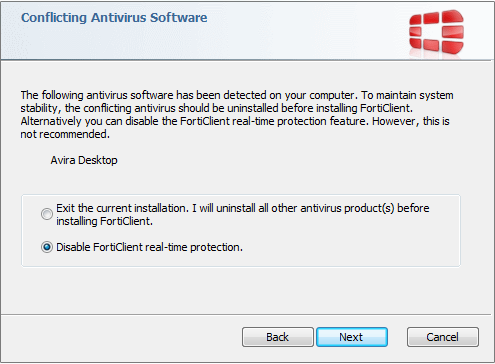
During a new FortiClient installation, the installer searches for other registered third party software and, if it finds any, warns users to uninstall them before proceeding with the installation. There is also an option to disable FortiClient real time protection.
Intune product codes
Deploying FortiClient with Intune requires a product code. The product codes for FortiClient 7.4.5 are as follows:
|
Version |
Product code |
|---|---|
|
Enterprise |
6B74BAA3-9F20-4F6E-84D2-1230945E503B |
|
Private access management-only agent |
3A976D64-2CA7-4B4F-8C47-5D5D84F3F396 |
|
Single sign on-only agent |
BA732507-8F6F-4866-BADD-A635BFB439EF |